You find a page with exactly the data you need: competitor prices, new listings, a directory of suppliers. You copy it into a sheet by hand. Next week you do it again, and by the third week you're wondering why a robot isn't doing this.
n8n can be that robot. A five-node workflow fetches the pages on a schedule, pulls out the fields you care about and writes clean rows to Google Sheets or Supabase. We built and ran one while writing this guide: 3 pages, 60 rows, 4.3 seconds.
The catch is that n8n reports success even when it scraped nothing. We'll show you the page that did that to us, and how to stop it.
We ran the workflows below on a self-hosted n8n 2.45.7 on 30 October 2026, against two public scraping sandboxes. Prices and node details come from n8n, Firecrawl and Apify pages checked the same day. We didn't run the Firecrawl or Apify nodes, or the Sheets and Supabase writes, because those need account keys.
What you'll have at the end
A workflow that runs on its own, once a day or once an hour, and leaves you a table you can sort. Five nodes do the work:
- Schedule Trigger starts the run.
- Code (or a sheet of URLs) lists the pages to visit.
- HTTP Request downloads each page's HTML.
- HTML pulls fields out with CSS selectors.
- Google Sheets or Supabase saves the rows.
That route costs nothing per page, because n8n bills per run, not per page. It breaks on sites that build their content with JavaScript.
For those you swap steps 3 and 4 for a Firecrawl or Apify node, and the bill starts counting pages. Most of this guide is about knowing which side of that line a site sits on.
What you need before you start
An n8n instance. You have two options:
- n8n Cloud, where the trial gives you 1,000 executions with a 180-second limit per run and no card.
- The free, self-hosted Community Edition. We installed it with npm. Version 2.45.7 refused Node 20 and asked for Node 24 or newer, so check that first.
You'll also want a Google account (for Sheets) or a Supabase project, and one page you're allowed to scrape. Read the site's terms and robots.txt before you point anything at it. This guide isn't legal advice.
For practice, use Books to Scrape. It's a sandbox built for this, and its banner says the prices "were randomly assigned and have no real meaning".
Step 1: fetch the pages with the HTTP Request node
Start with a Code node that returns one item per URL. n8n runs the next node once for every item it receives, so three items means three requests without a loop.
return [1, 2, 3].map(n => ({
  json: { url: `https://books.toscrape.com/catalogue/page-${n}.html` }
}));
Then add an HTTP Request node and set the URL to the expression {{ $json.url }}. Two options matter for scraping, both under Add Option:
- Response: set Response Format to Text and name the output field (we used
html). The HTML node reads from that field next. - Batching: Items per Batch 1, Batch Interval 1000 ms. That's one request a second, polite to the site and the pace n8n's own rate-limit guide uses as its example.
Got a curl command from a site's API docs or your browser's network tab? The node's Import cURL button fills the method, headers and body for you.
Results split across pages behind an API? The node's Pagination option can follow a next-page URL or bump a page parameter on each request. Plain HTML pages like ours are easier to list up front.
Step 2: pull out the fields with the HTML node
Add an HTML node and pick the Extract HTML Content operation. Source Data is JSON, and JSON Property is the field you named in step 1.
Each extraction value is a key, a CSS selector and what to return. Here's what we used on Books to Scrape:
| Key | CSS selector | Return value |
|---|---|---|
| title | article.product_pod h3 a | Attribute: title |
| price | article.product_pod .price_color | Text |
| stock | article.product_pod .availability | Text |
Why the attribute for the title? The visible link text gets cut short on long titles ("A Light in the ..."), while the title attribute holds the full name. Right-click the element in your browser, choose Inspect, and you'll often find the clean value sitting in an attribute like that.
Turn on Return Array for every key, or you only get the first match on each page. Turn on Trim Values and Clean Up Text too, so stray line breaks don't end up in your sheet.
Step 3: turn the arrays into clean rows
The HTML node gives you one item per page, each holding three parallel lists. A sheet wants one row per book. A short Code node fixes that and turns "£51.77" into a number you can sort:
const out = [];
for (const item of $input.all()) {
  const { title, price, stock } = item.json;
  title.forEach((t, i) => out.push({ json: {
    title: t,
    price_gbp: parseFloat(price[i].replace(/[^0-9.]/g, '')),
    in_stock: /In stock/i.test(stock[i]),
    scraped_at: new Date().toISOString()
  }}));
}
return out;
That's the whole scraper. When we ran it, the run took 4.3 seconds and returned 60 rows, 20 from each page.
The first was "A Light in the Attic" at 51.77. The HTTP step took 3.5 of those seconds, and two of them were the one-second pauses we asked for.
Hold on to that number. It comes back when we talk about limits.
Why did n8n say "success" and give us nothing?
We pointed the same HTTP and HTML nodes at two versions of one page. The plain quotes.toscrape.com returned 10 quotes. Its JavaScript version, /js/, returned an empty list.
Both runs finished with a green "success".
The HTTP Request node downloads the HTML the server sends. It doesn't run JavaScript. Many modern stores and dashboards build the page in the browser. The HTML you get is a shell, and your selectors match nothing.
Nothing errors. You just get empty rows, every day, until someone notices.
Two fixes, and you want both:
- Test the page first: open it with JavaScript turned off, or run the HTTP node once and search the raw output for a value you can see on screen. If it isn't there, the plain route won't work.
- Guard the workflow: add an If node after extraction that stops the run with an error when the row count is zero. A loud failure beats a quiet empty sheet.
When the test fails, you need something that renders the page like a browser. That's where Firecrawl and Apify come in, and where per-page billing starts.
Step 4 (for JavaScript sites): swap in the Firecrawl node
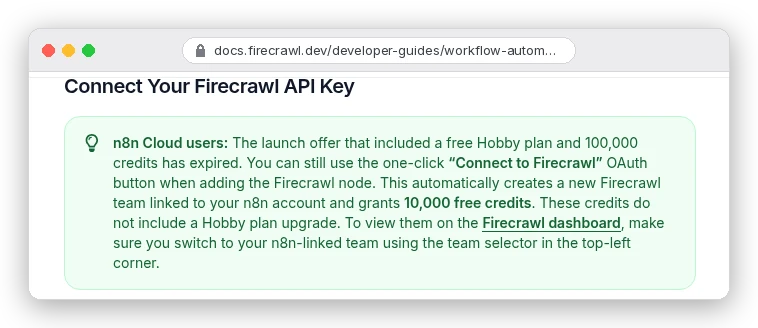
Firecrawl runs a real browser on its side and hands back clean Markdown, HTML or JSON. Its n8n node is a verified community node, @mendable/n8n-nodes-firecrawl, so on n8n Cloud you search "Firecrawl" in the nodes panel and click Install. On self-hosted n8n only the instance owner or an admin can install it, once, for everyone.
Pick the operation by how many pages you need:
- Scrape URL for one page. It replaces both your HTTP and HTML nodes.
- Batch Scrape URLs for a list. It returns a job ID, and a second Firecrawl node with Get Batch Scrape Status reads the results.
- Crawl Website to follow links across a site, read back with Get Crawl Status.
- Map Website to list a site's URLs without scraping them, which is handy for planning.
One detail that bites people upgrading old workflows: the credential has a Base URL field. New credentials point at https://api.firecrawl.dev/v2. Older ones may still say /v1, and then the newer operations (Agent, Browser, Interact) fail with a 404, according to Firecrawl's n8n guide.
If you want typed fields instead of Markdown, Firecrawl's JSON format extracts them with a prompt or schema. We walk through that in our Firecrawl structured JSON tutorial. Just know it costs more per page, which brings us to the bill.
What does it cost? Runs on one side, pages on the other
n8n counts executions. Its pricing page puts it plainly: "An execution is a single run of your entire workflow. It doesn't matter how many steps are in the workflow or how much data it processes."
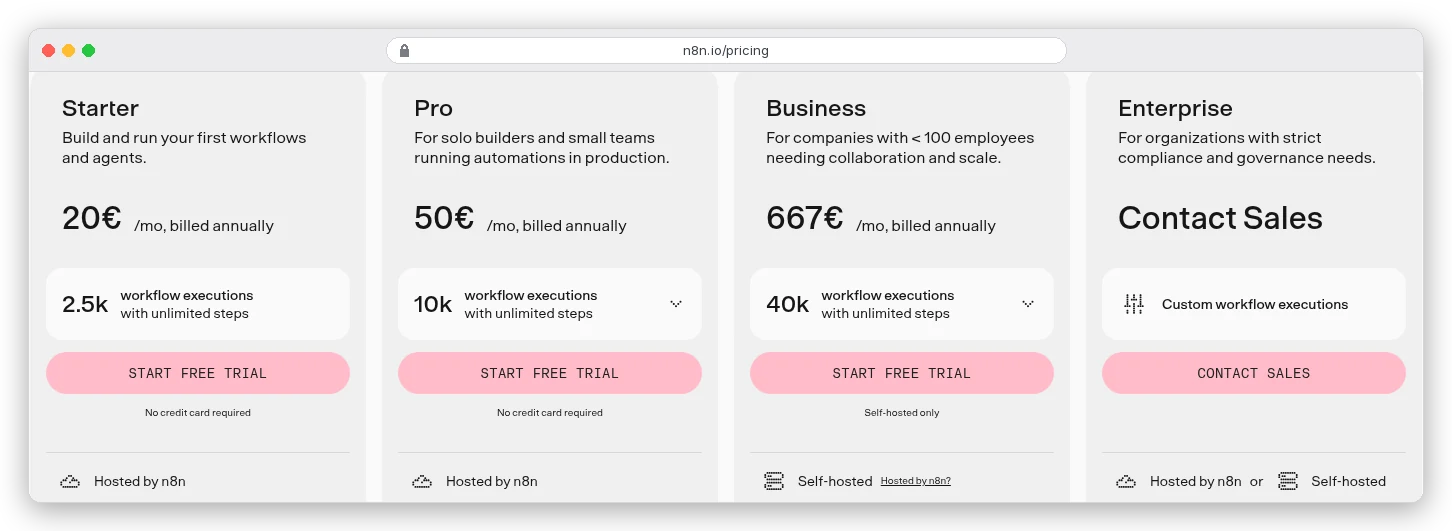
So our 60-row run was one execution. So would a 500-page run be. A daily schedule is 30 or 31 executions a month, and hourly is 720 to 744, both inside Starter's 2,500.
Firecrawl counts pages. One credit per page on a basic scrape, and the JSON format adds 4 more.
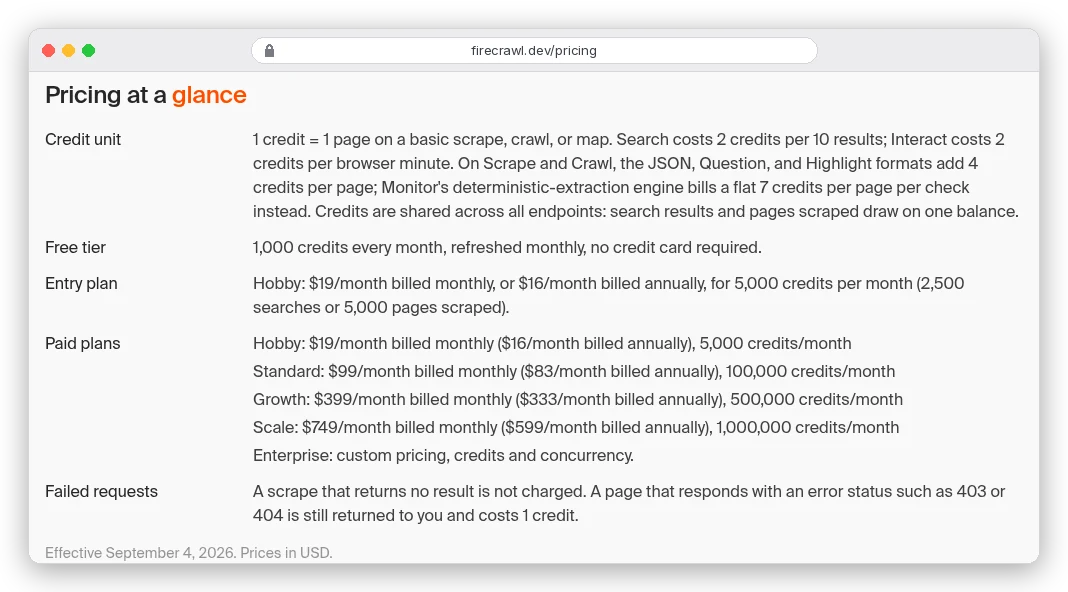
Say you track 500 product pages once a day. That's 15,000 credits a month as Markdown, or 75,000 with JSON extraction.
The free 1,000 credits cover about 33 pages a day. Hobby's 5,000 doesn't reach. Standard's 100,000 does, at $83 a month billed yearly, roughly 1,200 pages for a dollar.
Run the same 500 pages through plain HTTP Request nodes and the scraping costs nothing beyond your n8n plan. That's why it pays to test whether a site needs a browser at all. Mix them if you have to: plain nodes for the static sites, Firecrawl only for the ones that fail the test.
One more thing on Firecrawl's page: a URL that answers with a 403 or 404 still costs a credit. Clean your URL list before a big batch.
The limits that break a scraper quietly
Remember those one-second pauses?
On n8n Cloud, Starter caps a single execution at 5 minutes, Pro at 40, and the trial at 180 seconds. About 300 pages at one a second is five minutes of waiting alone. The run stops partway, and you get half a sheet.
Three ways around it:
- Split the URL list and run several smaller workflows, or call a sub-workflow per batch.
- Hand the heavy lifting to Firecrawl's Batch Scrape, so n8n only starts the job and collects results.
- Self-host, where you set the limits.
The second quiet one is time zones.
The Schedule Trigger uses the workflow's time zone, then the instance's, and n8n's docs say a self-hosted instance defaults to America/New_York. Set "every day at 9" in India without changing it and your run fires in the evening. Set the zone in the workflow settings.
The third: a schedule does nothing until you publish the workflow. Testing it with "Execute workflow" doesn't count.
Step 5: save the rows to Google Sheets or Supabase
For Google Sheets, add the node and choose Append or Update Row rather than Append Row. Append Row adds every result again on every run, so a daily price check on 500 products grows by 500 rows a day. Append or Update updates the row that already exists, so match on something unique, like the product URL.
Want history instead? Keep Append Row and keep the scraped_at column from step 3. Then you can chart a price over time.
For Supabase, the node's Create a new row operation writes each item into a table. Create the table first with columns that match your keys. A unique constraint on the URL makes the database refuse duplicates.
Add an Error Trigger workflow that emails or messages you when a run fails. Combined with the zero-rows check from earlier, you'll hear about a broken scraper the same day.
When should you use Apify instead?
Some sites are hard: logins, heavy bot protection, infinite scroll. Others are so common that someone already wrote the scraper. Apify covers both with Actors, ready-made scrapers for sites like Google Maps, Instagram and Amazon.
The Apify node is a community package, @apify/n8n-nodes-apify. Self-hosted, you add it under Settings, then Community Nodes. On Cloud you search for it in the nodes panel.
Apify's n8n docs describe two uses. As an action, it runs an Actor with your input. As a trigger, it starts your workflow when an Actor run finishes.
The trigger matters for long jobs. Let Apify run a long scrape on its side, and n8n only wakes up to save the results. That sidesteps the execution limit completely.
Billing is different again: Apify's free plan gives you $5 to spend, and paid plans start at $19 a month plus pay-as-you-go usage. Its pricing page says costs vary by Actor run, so check the Actor's own page before you schedule it daily.
We compared the two services in detail in Apify vs Firecrawl, and we used an Actor for scraping Google Maps leads.
Which route should you pick?
Run the JavaScript test on your target page first. It decides most of this.
If the data is in the raw HTML, use HTTP Request plus HTML. It's free per page, and the workflow we ran took 4.3 seconds for 60 rows.
Page needs a browser, or you want Markdown for an AI step? Use the Firecrawl node and budget one credit per page, five with JSON. For a whole site, our guide to web scraping for AI covers crawling and cleaning in more depth.
Someone already built a scraper for that site, or the job outruns your plan? Use an Apify Actor and let its trigger hand the results to n8n. And if you'd rather write the browser automation yourself in code, Firecrawl vs Playwright lays out that trade-off.