You've typed the same instructions into Claude for the fifth time this week. The review checklist, the report format, the steps for resizing images. Anthropic's answer is a skill: a folder with a SKILL.md file that Claude loads when your request matches it.
Writing one takes about ten minutes. Getting Claude to actually use it is the hard part, and it comes down to one line of the file.
There's a second trap too. Anthropic publishes two sets of rules for that file. A skill that works fine on your laptop can be rejected the moment you upload it anywhere else. Both get fixed below, with three skills you can copy.
Written from Anthropic's Claude Code, Claude Platform and Help Center docs and the public anthropics/skills repository, all checked on 28 October 2026. We didn't run these skills inside Claude; we did check their frontmatter with Anthropic's own validator script.
What is a Claude skill, and what will you have by the end?
A skill is a folder. Inside it sits SKILL.md: a short YAML header (the frontmatter) that says what the skill is for, then plain Markdown instructions. Optional extras sit next to it: reference files, templates and scripts.
The clever part is when each piece loads. Anthropic's Agent Skills overview splits it into three levels:
- The name and description load at startup, at about 100 tokens per skill.
- The body of
SKILL.mdloads only when the skill is triggered, and should stay under 5,000 tokens. - Bundled files cost nothing until Claude reads them. Scripts run, and "only their output enters context".
So twenty installed skills cost about 2,000 tokens until you use one, while a pasted prompt costs its full length every time. That's the whole case for skills over saved prompts.
By the end you'll have three working shapes to copy. One is instructions only and runs anywhere. One is a Claude Code command that pulls live data from git. The third ships its own Python script. First, though, where does the folder go?
Where do Claude skills live? Claude Code vs claude.ai vs the API
It depends on which Claude you use, and the three don't share. The overview page is blunt: "Custom Skills do not sync across surfaces." A skill uploaded to claude.ai must be uploaded to the API separately. Claude Code reads skills from your disk.
| Where you use Claude | Where the skill goes | Who gets it |
|---|---|---|
| Claude Code, personal | ~/.claude/skills/<name>/SKILL.md | You, in every project on that machine |
| Claude Code, project | .claude/skills/<name>/SKILL.md in the repo | Everyone who clones the repo |
| Claude Code plugin | <plugin>/skills/<name>/SKILL.md | Anyone who installs the plugin, as /plugin-name:skill-name |
| claude.ai and the desktop app | ZIP upload in Customize > Skills | You, unless you share it (Team and Enterprise) |
| Claude API | Upload through the Skills API (/v1/skills) | Everyone in the workspace |
Haven't installed Claude Code yet? Our Claude Code for beginners guide covers the install, the plan and where skills sit next to CLAUDE.md. This post picks up where that one stops: writing the file itself.
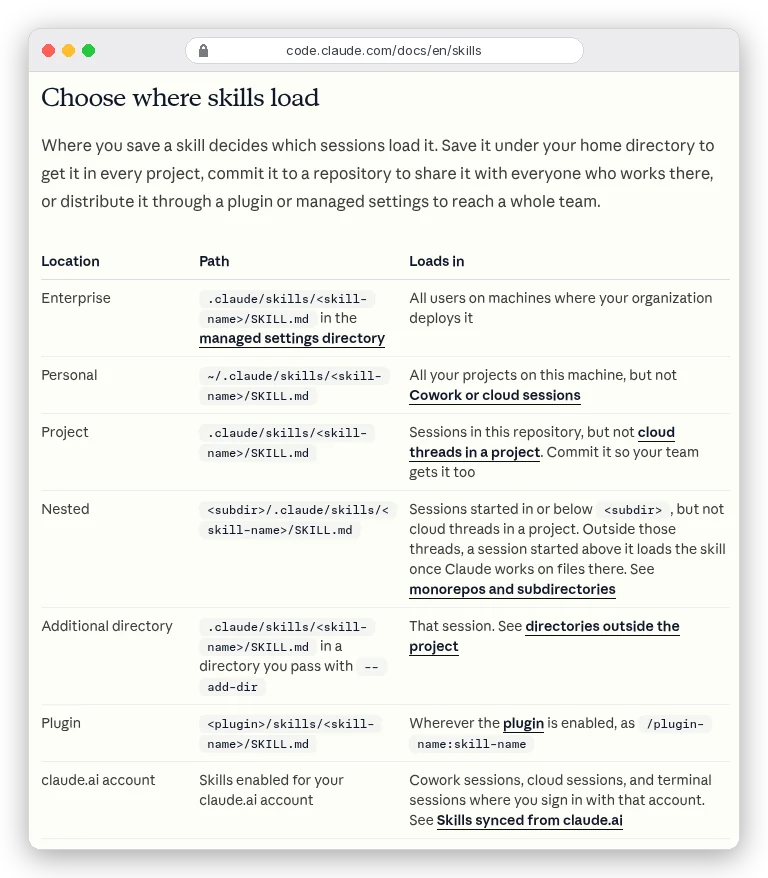
Two details from that page save real confusion. If the same skill name exists in both places, "personal over project" wins. And you don't need to restart: Claude Code watches those folders and "picks up the change within the current session".
There's a newer link between the surfaces as well. If you sign in to Claude Code with your claude.ai account, skills you enabled on claude.ai sync down into ~/.claude/skills/synced/ (Claude Code v2.1.273 or later). The sync is one-way, so edit those skills on claude.ai, not on disk.
The frontmatter: two rule books, so write to the stricter one
Here's the trap from the intro. Claude Code's own reference says "All fields are optional", and only description is recommended.
It accepts about 20 fields, and it "ignores a field it doesn't recognize without reporting an error". A typo just quietly does nothing.
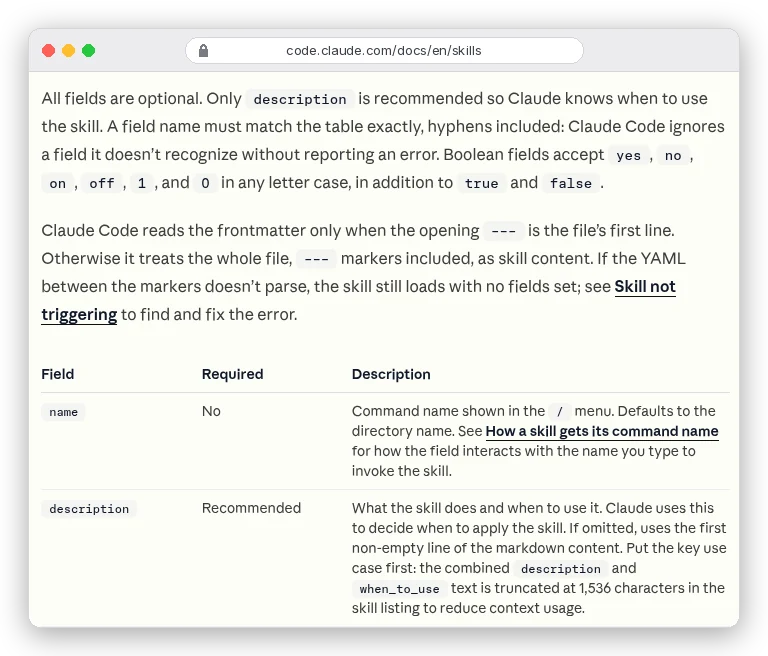
Everywhere else is strict. A claude.ai upload, the Skills API and Anthropic's package_skill.py accept six fields: name, description, license, compatibility, metadata and allowed-tools. Add any other field and, in the docs' words, upload "fails with a hard error instead of ignoring the field".
The strict side also requires both name and description, with these limits:
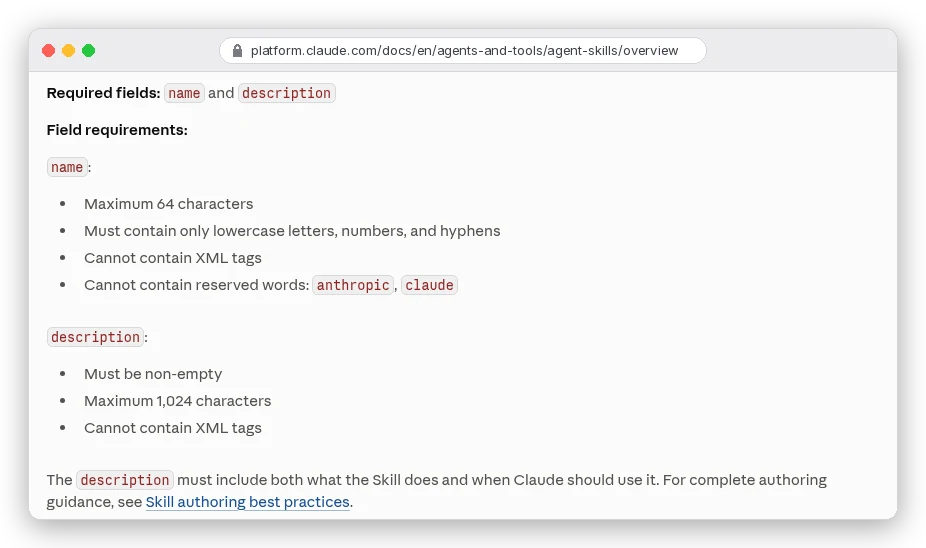
Look at the last name rule. A skill called claude-helper or anthropic-style is invalid outside Claude Code, because both words are reserved. The open Agent Skills specification adds three more. No hyphen at the start or end, no double hyphens, and the name "must match the parent directory name".
So the safe habit is simple. Give every skill a name that matches its folder, a description, and nothing else unless you need it. A file written that way loads in Claude Code unchanged, and it uploads anywhere.
One warning if you're reading Anthropic's Help Center. Its "creating custom skills" article still calls name "human-friendly", with "Brand Guidelines" as the example. It also caps the description at "200 characters maximum".
The newer docs at claude.com/docs and the platform docs both say lowercase-hyphen and 1,024. Follow those. Still, a description under 200 characters is never a bad idea.
Which brings us to the field that decides everything.
How do you write a skill description that actually triggers?
Claude never reads your instructions before deciding. The claude.com guide says it directly: "The description is the only part Claude reads before deciding to load the skill." A vague one means a skill that never fires, however good the body is.
Anthropic's authoring best practices boil down to four rules:
- Say what it does and when to use it, in that order. The "when" part is where trigger words go.
- Write in the third person. "Processes Excel files" works; "I can help you" and "You can use this" can "cause discovery problems", because the text is injected into the system prompt.
- Use the words people actually type: "PDF", "forms", ".xlsx", "changelog". Claude matches requests against them.
- Put the key use case first. Claude Code cuts the combined description at 1,536 characters in its listing, and drops descriptions entirely when you have too many skills.
Here's the difference in practice:
# Never fires reliably
description: Helps with documents

# Fires when it should
description: Extracts text and tables from PDF files, fills forms and merges documents. Use when working with PDF files or when the user mentions PDFs, forms or document extraction.
The second one is Anthropic's own example. It names the file type twice and lists three tasks.
Now the opposite problem: a skill you don't want Claude to start on its own. Add disable-model-invocation: true in Claude Code and only /skill-name runs it. The description also leaves the context entirely.
The docs suggest it for deploys and anything with side effects: "You don't want Claude deciding to deploy because your code looks ready."
Fair question: how do you know it's working?
In Claude Code, ask "What skills are available?" and check yours is listed. Then send a request worded the way you'd naturally say it. If Claude ignores the skill, the fix goes in the description, not the body.
How to create a Claude skill, step by step
This is the whole process for Claude Code. The claude.ai route only changes the last two steps.
- Write the job in one sentence, plus what a good result looks like. The claude.com guide says "That sentence becomes the skill's description".
- Make the folder, named the way you want to type the command:
mkdir -p ~/.claude/skills/reviewing-blog-drafts. - Create
SKILL.mdinside it. The opening---must be the very first line, or Claude Code treats the whole file as plain instructions. - Add
name(matching the folder) and the description, close the frontmatter with---, then write the steps. - Test it two ways: a natural request that should trigger it, and
/reviewing-blog-draftstyped directly. - For claude.ai, zip the folder itself (not its contents) and upload it under Customize > Skills. Code execution has to be turned on in Settings first.
Keep the body short. Anthropic's best-practices page starts from "Claude is already very smart", so explain only what Claude can't guess: your format, your thresholds, your order of steps. Under 500 lines is the stated ceiling, and most good skills are a fraction of that.
Ready for real ones? Each example below was written for this post and checked with quick_validate.py from Anthropic's skill-creator folder.
Example 1: an instructions-only skill that works everywhere
Most useful skills are just a checklist Claude would otherwise forget. This one reviews a blog draft against a house style. It uses only name and description, so the same folder works in Claude Code, on claude.ai and through the API.
Save it as reviewing-blog-drafts/SKILL.md:
---
name: reviewing-blog-drafts
description: Reviews a blog draft against our house style and returns a numbered list of fixes. Use when the user shares a draft, asks for an edit pass, or asks whether a post is ready to publish.
---

# Reviewing blog drafts

Read the whole draft before commenting. Then report, in this order:

1. The first 100 words: do they say what the reader gets? Quote the sentence that should move up if not.
2. Every claim with a number: flag any number that has no source link.
3. Headings: flag any heading that is a bare label ("Pricing", "Features").
4. Sentences over 25 words: list them with a shorter rewrite.
5. Filler phrases: "it goes without saying", "needless to say", "at this point in time". Quote each one you find.

Return a numbered list of fixes, most important first. Don't rewrite the whole draft unless asked.
If the draft is under 300 words, say so and review it anyway.
Anthropic's validator printed "Skill is valid!" for it. The description is 183 characters, which clears even the stale 200-character limit.
Two choices matter here. The name uses the gerund form ("reviewing") that the best-practices page suggests. And every check is concrete, a number or a quoted phrase, because "make it better" gives Claude nothing to measure.
Swap in your own style rules and keep the shape.
Example 2: a Claude Code command that pulls live git data
Claude Code adds features the open standard doesn't have. The useful one is dynamic context injection: a line like !`git status --short` runs before Claude sees the skill, and its output replaces the line.
This standup skill uses it. Save it as ~/.claude/skills/standup/SKILL.md and run /standup each morning, optionally followed by your blockers:
---
name: standup
description: Drafts a daily standup update from recent git activity in this repository. Use when the user asks for a standup, a daily update or a summary of what they worked on.
disable-model-invocation: true
argument-hint: "[blockers or extra notes]"
allowed-tools: Bash(git log *) Bash(git status *)
---

## Commits from the last two days

!`git log --since="2 days ago" --oneline`

## Uncommitted work

!`git status --short`

## Instructions

Write a standup update with three headings: Yesterday, Today, Blockers.

- Yesterday: summarise the commits above in plain words, at most four bullets.
- Today: infer it from the uncommitted files. If there are none, write "Picking up the next task".
- Blockers: use this text if the user gave any, otherwise write "None": $ARGUMENTS

Keep the whole update under 120 words. No commit hashes.
Here's what each field does:
disable-model-invocation: truekeeps Claude from running it uninvited. A standup is something you ask for.argument-hintshows "[blockers or extra notes]" in autocomplete, and whatever you type lands in$ARGUMENTS.allowed-toolspre-approves the two git commands for the turn that runs the skill.
That last field isn't decoration. Injected commands never prompt you for permission. Outside auto mode, a command that isn't allowed makes Claude Code abort the whole skill with Shell command permission check failed.
Same story for a command that exits with an error. One failed line and Claude never sees the skill at all. The docs suggest appending || true to commands you expect to fail sometimes.
This is also the skill that proves the two-rule-book point. Anthropic's validator rejected it: "Unexpected key(s) in SKILL.md frontmatter: argument-hint, disable-model-invocation."
That's correct. It's a Claude Code skill, and the injected lines wouldn't run on claude.ai or the API anyway.
Example 3: bundle a script and a reference file
Instructions are flexible; scripts are reliable. When a step must come out the same every time, give Claude code to run instead of asking it to write the code fresh. Only the script's output enters the context, so a 200-line script costs about as much as its one-line result.
This skill converts images to WebP for a blog. The folder looks like this:
optimizing-blog-images/
├── SKILL.md
├── references/
│   └── sizes.md
└── scripts/
    └── to_webp.py
The SKILL.md:
---
name: optimizing-blog-images
description: Converts PNG and JPG images to WebP at blog-ready sizes and reports the before and after file sizes. Use when the user wants to compress, resize or convert images for a website or blog post.
compatibility: Requires Python 3 with Pillow installed
allowed-tools: Bash(python3 ${CLAUDE_SKILL_DIR}/scripts/to_webp.py *)
---

# Optimizing blog images

1. Check the target width in [references/sizes.md](references/sizes.md). Use "inline" unless the user says the image is a cover.
2. Run the converter once per file:

   python3 ${CLAUDE_SKILL_DIR}/scripts/to_webp.py <input-file> <max-width>

   (Outside Claude Code, the script is at scripts/to_webp.py next to this file.)
3. Report each file as: name, old size, new size, new width x height.

Never overwrite the original. The script writes a new .webp file next to it.
If the script prints "Pillow missing", tell the user to run `pip install pillow` and stop.references/sizes.md, which Claude reads only at step 1:
# Target sizes

| Use    | Max width | WebP quality |
|--------|-----------|--------------|
| cover  | 1600 px   | 84           |
| inline | 1200 px   | 82           |
And scripts/to_webp.py:
import sys
from pathlib import Path

try:
    from PIL import Image
except ImportError:
    sys.exit("Pillow missing")

src, max_w = Path(sys.argv[1]), int(sys.argv[2])
img = Image.open(src)
if img.width > max_w:
    img = img.resize((max_w, round(img.height * max_w / img.width)))
out = src.with_suffix(".webp")
img.save(out, "WEBP", quality=84 if max_w >= 1600 else 82)
print(f"{src.name}: {src.stat().st_size // 1024} KB -> {out.stat().st_size // 1024} KB, {img.width}x{img.height}")
A few things here come straight from Anthropic's guidance. ${CLAUDE_SKILL_DIR} is a placeholder Claude Code swaps for the skill's folder, so the path works from any project. Using it inside allowed-tools too means the script runs without a permission prompt.
On claude.ai the whole folder is copied into the sandbox, which is why the note keeps a relative path as well.
The reference file is linked straight from SKILL.md. Anthropic says to keep references "one level deep", because Claude may only partly read a file that's linked from another linked file. Forward slashes only, even on Windows.
We ran the validator (it passed) and the script itself on a test image: a 2400×1200 PNG came out as a 1200×600 WebP. We didn't run the skill inside Claude.
Where would this skill fail? On the API.
Skills there run in a container with "no network access and no runtime package installation". So the script works only if Pillow is among the preinstalled packages. Check the code execution tool's package list before you depend on one.
Skill, MCP server or CLAUDE.md: which one do you need?
People mix these up constantly. Anthropic's Help Center draws the line in one sentence: "MCP connections give Claude access to tools, while skills teach Claude how to use those tools effectively."
A skill can't reach Notion or your database on its own. If the job needs live data from another service, you need an MCP server, which our MCP explainer covers. Often you want both: the connector for access, a skill for your team's way of using it.
One tip for mixing them. Anthropic's best practices say to name MCP tools fully inside a skill, as ServerName:tool_name, or Claude may not find them.
CLAUDE.md (or project instructions on claude.ai) is for facts Claude needs in every conversation. A procedure you run sometimes belongs in a skill, because its body only loads when used.
Want a creative example? Our guide to editing Instagram Reels with Claude walks through a video-editing skill. The Claude video editing prompts show the kind of request worth turning into one.
How do you share a skill with a team?
It depends on where your team uses Claude:
- Claude Code: commit
.claude/skills/to the repo, or put the skill in a plugin'sskills/folder. Admins can also push skills to every machine through managed settings. - claude.ai: on Team and Enterprise, use Share in Customize > Skills for specific people, or Publish to org for everyone. Shared skills are view-only for the people you share them with. Individual plans can't share.
- The API: a custom skill is visible to the whole workspace. Uploads must be under 30 MB uncompressed, and a request can carry up to 20 skills.
Sharing cuts both ways, though. Anthropic's own advice is to "Use Skills only from trusted sources" and to treat a skill "like installing software".
The Claude Code docs add a sharper warning: a project skill's allowed-tools applies even in a folder you've never trusted. Read the frontmatter of any skill in a repo you clone before you start Claude Code there. And never put API keys in a skill, since everyone you share it with gets its files.
Want a head start? Anthropic's skills repo has 19 example skill folders, including brand-guidelines (instructions only), pdf (scripts and references) and skill-creator, which helps you write and test your own. The repo itself calls them "for demonstration and educational purposes only", so copy the structure and write your own instructions.
Mistakes that stop a skill from loading
- Anything above the opening
---, even a blank line. Claude Code then reads the frontmatter as plain text. - Broken YAML. The skill still loads with no fields, so
/nameworks but Claude can't match your description. Runclaude --debugto see the error, orclaude plugin validate .claude/skills. - A
namecontaining "claude" or "anthropic", or one that doesn't match the folder. Fine in Claude Code, rejected on upload. - Zipping the files instead of the folder. claude.ai looks for
<skill-name>/SKILL.mdinside the archive. Rununzip -land check every line starts with the folder name. - The most important rule buried at the bottom. After Claude Code compacts a long conversation, it re-attaches only the first 5,000 tokens of each skill.
- Too many skills. Claude Code's skill listing gets about 1% of the context window, and least-used descriptions are dropped first.
/skill-doctorshows which ones never get used.
Which skill should you write first?
If you live in Claude Code, start with a project skill for the procedure you explain most often. Commit it, and the rest of the team gets it on their next pull. Add disable-model-invocation if it changes anything outside your editor.
If you mostly use claude.ai, write Example 1's shape: name, description, a short numbered checklist, nothing else. It uploads cleanly and you can move it into Claude Code later without touching a line.
Either way, spend most of your time on the description. Write it, test it with the words you'd really use, and rewrite it until the skill turns up without being named.