You point a chatbot at your help centre. Someone asks how to cancel, and it answers from a pricing page you replaced in March, with total confidence.
That bot wasn't broken, it was fed badly. A RAG chatbot from website content is only as good as the pages it pulls in, how they're cut up, and what it may say when the answer isn't there.
The good news is the bill: embedding a 500-page site costs under a dollar.
The part that costs you is quieter. One page in our own check came back as 13 times more text than the site's own Markdown copy of it. We'll get to what that does to your index.
We checked Firecrawl, OpenAI, Pinecone and n8n pricing pages and docs on 24 October 2026. We ran a keyless Firecrawl scrape of five public pages and the chunking code below. We didn't run the crawl, embedding, Pinecone or chat steps (they need account keys) or a production test.
What you'll have at the end, and what a 500-page site costs
A Python script, or an n8n workflow, that crawls your site and stores it as searchable chunks. It answers questions with links to the pages it used. When the answer isn't on your site, it says so.
RAG stands for retrieval-augmented generation. Before the model answers, you fetch the few passages of your content that match the question and hand them over with it. Five steps do the work: crawl, chunk, embed, store, answer.
Here's the cost for a hypothetical 500-page site, using each vendor's own prices on 24 October 2026:
| Step | Tool | What 500 pages uses | Cost |
|---|---|---|---|
| Crawl | Firecrawl | 500 credits (1 per page) | $0 on the free plan's 1,000 credits |
| Embed | OpenAI text-embedding-3-small | 0.4M to 22M tokens | $0.008 to $0.44 |
| Store | Pinecone Starter | about 1,000 to 50,500 chunks | $0 (up to 2 GB) |
| Answer | OpenAI gpt-6-luna | about 2,650 tokens in, 300 out per question | about $0.42 per 1,000 questions |
That embedding range is 55 times wide, and it isn't a typo. Which end you land on depends on step two.
What you need before you start
Three accounts, all with a free tier, and Python with four packages:
- A Firecrawl API key. The free plan gives 1,000 credits a month with no card. You need the key for crawling: the keyless tier only covers scrape, search and interact.
- An OpenAI API key for embeddings and answers.
- A Pinecone account on Starter. It's free, but the indexes live on AWS in us-east-1 only.
pip install firecrawl pinecone openai tiktoken
export FIRECRAWL_API_KEY="fc-..."
export OPENAI_API_KEY="sk-..."
export PINECONE_API_KEY="..."
The package names follow each vendor's install docs today: firecrawl (we had 4.54.0), pinecone (10.2.0) and openai (3.37.0). If you followed our Firecrawl JSON extraction tutorial, note the rename from firecrawl-py.
Prefer not to write Python? Skip to the n8n section. The steps are the same, only the boxes change.
Step 1: Crawl your site into Markdown, with a page cap
Firecrawl's crawl starts at one URL, follows links and the sitemap, and returns each page as clean Markdown with its URL, title and HTTP status. That last field matters more than it looks. Main-content-only output is the API default, so menus and footers are dropped before you see them.
import hashlib, os, re
import tiktoken
from firecrawl import Firecrawl
from firecrawl.types import ScrapeOptions
from openai import OpenAI
from pinecone import Pinecone, ServerlessSpec

SITE = "https://docs.example.com"   # your site
INDEX = "site-chat"
NAMESPACE = "docs-example-com"

fc = Firecrawl(api_key=os.environ["FIRECRAWL_API_KEY"])
oai = OpenAI()                       # reads OPENAI_API_KEY
pc = Pinecone(api_key=os.environ["PINECONE_API_KEY"])
enc = tiktoken.get_encoding("cl100k_base")

job = fc.crawl(
    SITE,
    limit=200,
    exclude_paths=["tag/.*", "author/.*"],
    scrape_options=ScrapeOptions(formats=["markdown"]),
)
pages = [d for d in job.data
         if d.markdown and d.metadata and d.metadata.status_code == 200]
print(f"{len(job.data)} documents, {len(pages)} usable")
Three settings in there save you money or embarrassment.
Set limit every time. The default is 10,000 pages, and Firecrawl's crawl docs bill 1 credit per page crawled. A blog with tag and author archives can turn 200 real pages into thousands of near-duplicates, which is what exclude_paths (pathname regex) is for.
The status filter is the other one. Firecrawl charges for pages that come back as 403 or 404, because the target site did respond. Those pages land in job.data too, and without the filter your bot will happily quote a "Page not found" template.
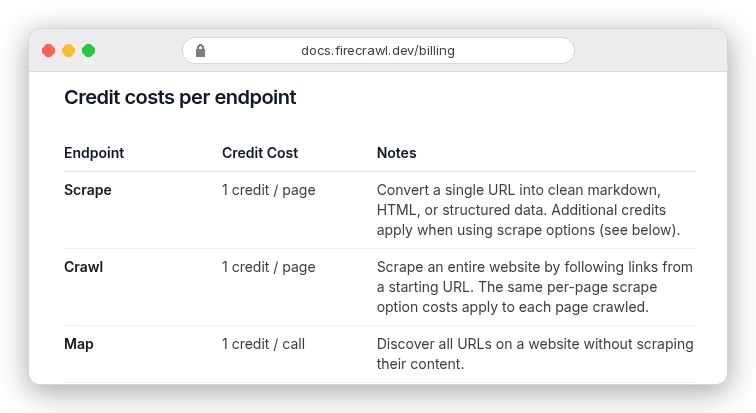
So 500 pages is 500 credits, inside the free plan's 1,000 a month. Know one thing before you rely on it. The free plan has no pay-as-you-go, so requests return HTTP 402 once the month's credits are gone, mid-crawl or not.
Why not requests and BeautifulSoup? For one static site you control, they're fine and free.
Firecrawl earns its credit when pages render with JavaScript or when you'd rather not write a boilerplate stripper. Our Firecrawl vs Playwright comparison goes through where that line sits.
Step 2: Chunk the Markdown, after checking how big it really is
Here's the loop from the intro. We scraped five public pages keyless and counted the Markdown tokens with OpenAI's tiktoken tokenizer:
| Page | Markdown tokens | 500-token chunks |
|---|---|---|
| firecrawl.dev/pricing | 4,683 | 24 |
| firecrawl.dev (home) | 14,079 | 36 |
| docs.firecrawl.dev/features/map | 40,191 | 101 |
| firecrawl.dev/blog | 55,813 | 125 |
| docs.firecrawl.dev/features/crawl | 91,846 | 226 |
The last row is the surprise. That docs site publishes its own Markdown copy of the same page, and that copy is 7,182 tokens. The visible text in a browser came to 5,320.
Same page, 13 times the tokens.
We didn't save the scraped Markdown before the keyless limit stopped us, so we can't tell you which part ballooned. The lesson holds anyway: count tokens per page before you embed a whole site.
OpenAI's own example assumes about 800 tokens a page. Our median was 40,191.
Two cheap fixes. If the site serves an llms.txt or .md versions of its pages, as Firecrawl's and OpenAI's docs both do, crawl those instead.
Then strip link URLs, keeping the anchor words. On the crawl docs page, that alone cut 7,182 tokens to 6,697. Our guide to web scraping for AI measured link URLs eating up to 45% of a page.
def clean(md):
    md = re.sub(r"!\[[^\]]*\]\([^)]*\)", "", md)          # drop images
    return re.sub(r"\[([^\]]*)\]\([^)]*\)", r"\1", md)     # keep link text, drop URL

def chunk(md, size=500, overlap=50):
    out = []
    for section in re.split(r"(?m)^(?=#{1,3} )", clean(md)):
        toks = enc.encode(section)
        for start in range(0, len(toks), size - overlap):
            out.append(enc.decode(toks[start:start + size]))
            if start + size >= len(toks):
                break
    return [c for c in out if c.strip()]

records = []
for page in pages:
    url = page.metadata.source_url or page.metadata.url
    for i, text in enumerate(chunk(page.markdown)):
        rid = hashlib.sha1(url.encode()).hexdigest()[:16] + f"-{i}"
        records.append({"id": rid, "text": text, "url": url,
                        "title": page.metadata.title or url})
The splitter cuts at headings first, so a chunk rarely mixes two topics, then into windows of 500 tokens with a 50-token overlap. n8n's docs suggest 200 to 500 tokens for fine-grained retrieval, which is where this sits. The overlap added 10.4% to our token count, a fair price for not slicing a sentence in half.
Step 3: Embed the chunks for fractions of a cent
An embedding turns each chunk into a list of numbers that sits close to other text with similar meaning. OpenAI's text-embedding-3-small returns 1,536 numbers per chunk.
def embed(texts):
    resp = oai.embeddings.create(model="text-embedding-3-small", input=texts)
    return [d.embedding for d in resp.data]

for b in range(0, len(records), 100):
    batch = records[b:b + 100]
    for rec, vec in zip(batch, embed([r["text"] for r in batch])):
        rec["values"] = vec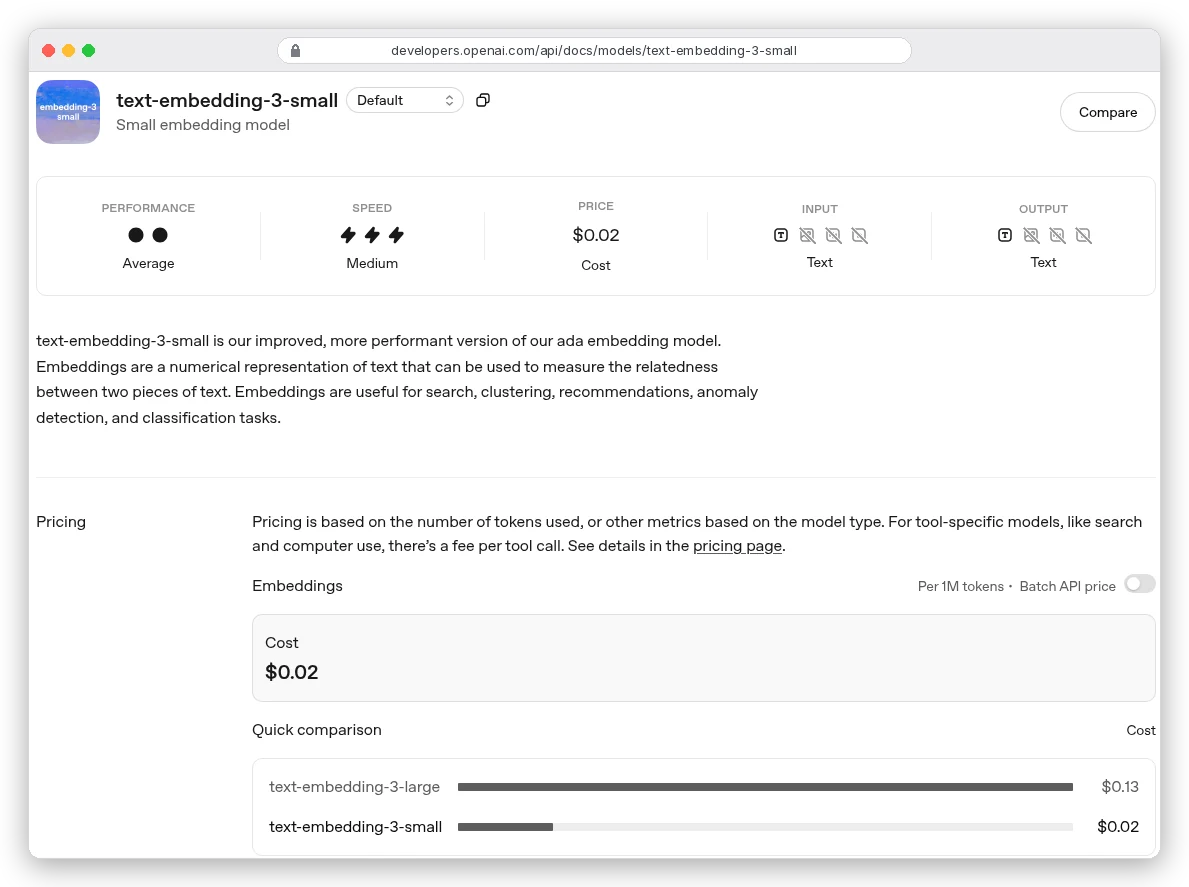
At $0.02 per million tokens, the 500-page site costs $0.008 if pages really are 800 tokens. At our measured median (44,362 tokens a page with overlap), it's $0.44. Either way, embedding is the cheapest line in the build.
Batches of 100 stay well inside the limits. A request takes up to 2,048 inputs and 300,000 tokens, and 8,192 tokens per input, per OpenAI's embeddings reference. Our 500-token chunks never come close.
Should you pay for text-embedding-3-large at $0.13? Try small first. Retrieval problems in a site bot usually come from messy chunks, and a bigger model won't fix those.
Step 4: Store the vectors in Pinecone's free tier
Pinecone holds the vectors plus whatever metadata you attach, and finds the ones closest to a question. The snippet follows Pinecone's create-an-index and upsert docs.
if not pc.has_index(INDEX):
    pc.create_index(
        name=INDEX,
        vector_type="dense",
        dimension=1536,
        metric="cosine",
        spec=ServerlessSpec(cloud="aws", region="us-east-1"),
    )
index = pc.Index(host=pc.describe_index(name=INDEX).host)

for b in range(0, len(records), 100):
    index.upsert(
        vectors=[{"id": r["id"], "values": r["values"],
                  "metadata": {"text": r["text"], "url": r["url"], "title": r["title"]}}
                 for r in records[b:b + 100]],
        namespace=NAMESPACE,
    )
We store the chunk text as metadata so the answer step can read it back without a second database. That makes each record about 8.4 KB. The vector is 6,144 bytes (1,536 numbers at 4 bytes each), the text roughly 2 KB, plus a little for the URL and title.
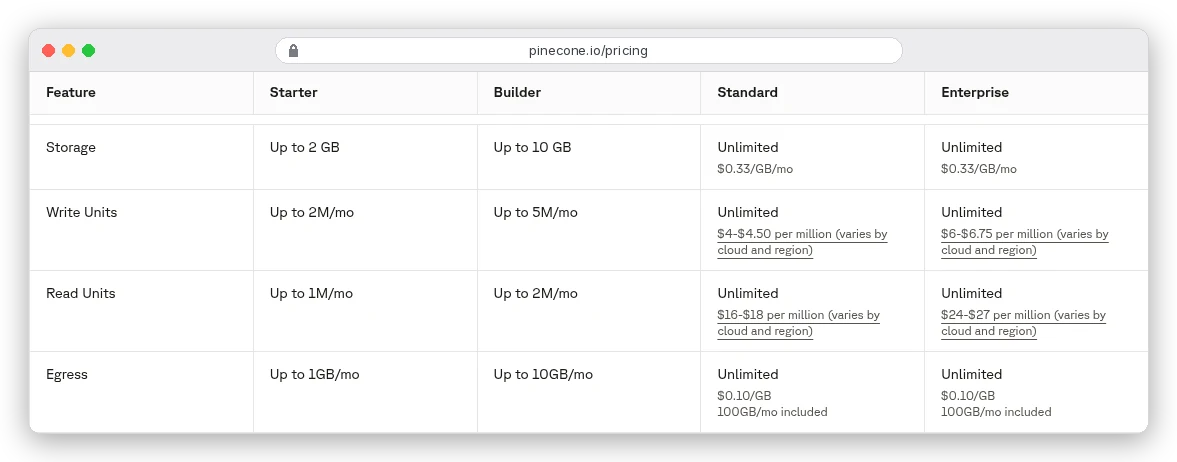
Now the arithmetic. 2 GB holds about 239,000 of those records. Our 500-page example at the measured median of 101 chunks a page is 50,500 chunks, or 0.42 GB, a fifth of the free storage.
Writes are where people get caught. Pinecone's cost docs charge 1 write unit per KB upserted, so the first load is about 422,000 of Starter's 2M.
But overwriting an existing record also bills the KB of the old one. Re-upsert the same site and it costs about 845,000, so you get roughly two full refreshes a month, not four.
Reads are not the limit. A query bills 1 read unit per GB of namespace, with a minimum of 0.25.
Under 0.25 GB, the 1M read units cover about 4 million questions a month. Even at a full unit per query, that's a million.
You may be asking why not Postgres with pgvector, if you already run it. Fair question, and it's a good choice when your data already lives there. We used Pinecone because the free tier needs no server and n8n has a ready node for it.
Step 5: Answer from the chunks, and cite the pages
At question time, embed the question with the same model, pull the five nearest chunks and give them to a chat model with strict instructions.
def ask(question):
    hits = index.query(namespace=NAMESPACE, vector=embed([question])[0],
                       top_k=5, include_metadata=True)
    context = "\n\n".join(
        f"[{n}] {m.metadata['url']}\n{m.metadata['text']}"
        for n, m in enumerate(hits.matches, 1))
    response = oai.responses.create(
        model="gpt-6-luna",
        instructions=("Answer using only the numbered sources. Cite them like [1]. "
                      "If the answer is not in the sources, say you don't know."),
        input=f"Sources:\n{context}\n\nQuestion: {question}",
    )
    return response.output_text

print(ask("How do I reset my password?"))
The "say you don't know" line is the cheapest quality fix in the whole build. Without it, a model that finds nothing relevant fills the gap from memory. That's how the March pricing page ends up quoted as fact.
Cost per answer: five 500-token chunks plus instructions is about 2,650 input tokens, and a short reply about 300 output tokens. On gpt-6-luna at $0.10 in and $0.50 out per million (OpenAI's pricing page), that's $0.000415, or about 42 cents per 1,000 questions.
The no-code version: the same pipeline in n8n
If you'd rather drag boxes than run Python, n8n does all five steps with built-in AI nodes. Firecrawl ships a verified node for it (@mendable/n8n-nodes-firecrawl). n8n even lists a ready template: "Scrape and ingest web pages into a Pinecone RAG stack with Firecrawl and OpenAI".
You build two workflows. The first loads your site:
- Firecrawl node, Resource Crawling, Operation Crawl Website, with a page limit. It returns a job ID.
- A second Firecrawl node with Get Crawl Status to read the pages back.
- Pinecone Vector Store in Insert Documents mode, with an Embeddings OpenAI sub-node (text-embedding-3-small) and a Default Data Loader for chunking.
The second answers questions. Connect a Chat Trigger to an AI Agent, and give the agent the same Pinecone Vector Store in Retrieve Documents (As Tool for AI Agent) mode.
Use the same embedding model on both sides. n8n's RAG docs spell this out, because vectors from two different models don't line up.
One default to change. The Default Data Loader's "Simple" splitting uses chunks of 1,000 characters with 200 overlap. That's roughly 250 tokens, so you get about twice as many chunks as our Python setup, and twice the write units in Pinecone.
Costs differ from the code route in two places.
On n8n Cloud, the "Connect to Firecrawl" button creates a linked Firecrawl team with 10,000 free credits, according to Firecrawl's n8n guide. The standard free plan gives 1,000 a month.
And n8n Cloud Starter costs $20 a month, billed annually, for 2,500 workflow executions. Each chat message runs the answer workflow once, so that's about 2,500 questions a month, minus your loading runs. The self-hosted Community Edition is free.
On the Chat Trigger, turn on Make Chat Publicly Available. Hosted Chat gives you a ready page; Embedded Chat puts n8n's widget on your own site.
Keeping the bot current without paying twice
A site bot goes stale the day you edit a page. The fix is a scheduled recrawl, and the costs move in a way you might not expect.
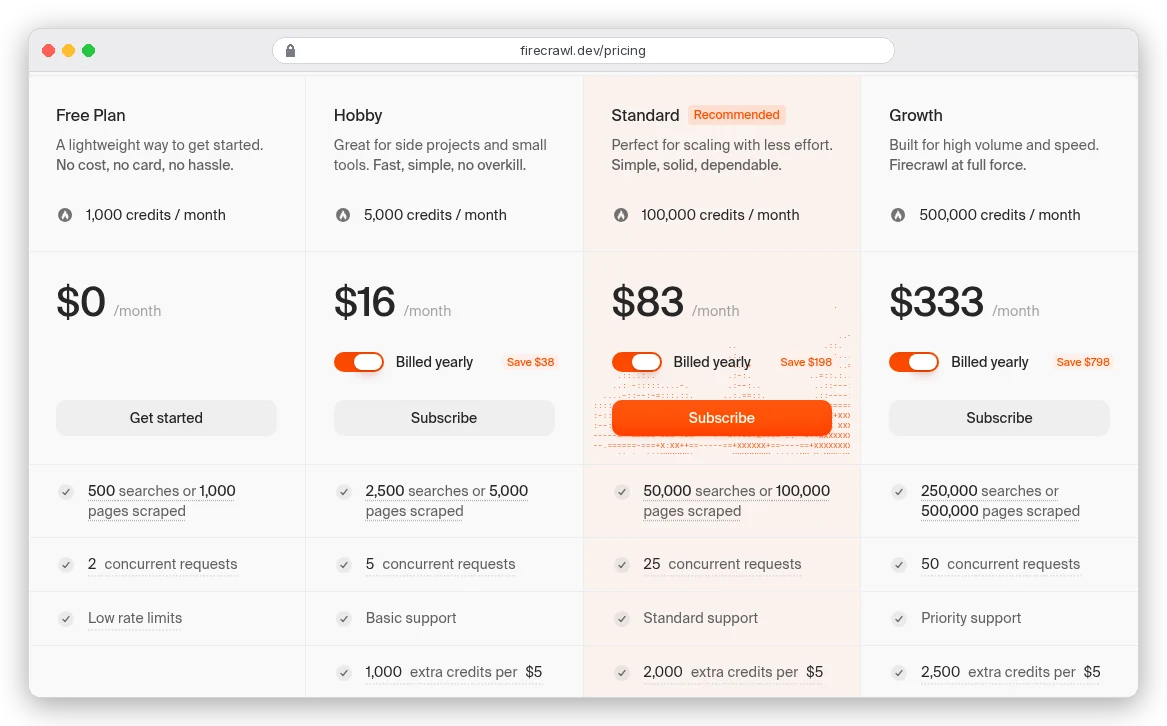
Weekly recrawls of 500 pages use about 2,167 Firecrawl credits a month. That's past the free 1,000 but well inside Hobby's 5,000, which costs $16 a month billed yearly or $19 monthly.
On the Pinecone side, don't overwrite. Delete the namespace (5 write units) and load the fresh crawl into it, and you pay the 422,000 first-load price instead of 845,000. It also clears out pages you've removed, which an overwrite would leave behind.
Can't have the bot go blank during a reload? Load into a second namespace, then switch the name in your code.
In n8n, the Pinecone node's Clear Namespace option does the same delete before inserting.
Mistakes that make a site bot give wrong answers
- No page limit. The 10,000-page default meets an archive-heavy blog, and the free plan stops at a 402.
- Error pages in the index. 404s are billed and returned as documents. Filter on
status_code. - Raw link URLs in the chunks. They inflate tokens and pull retrieval towards menu text.
- Different embedding models for loading and asking. Every search then returns nonsense with high confidence.
- No refusal instruction. The model fills gaps from memory instead of saying it doesn't know.
- Trusting every page. Page text can contain instructions aimed at AI systems. If you index sites you don't control, Firecrawl's opt-in prompt-injection check costs 4 extra credits a page.
Firecrawl's own rough edges belong here too: it bills error pages, its default crawl size is generous to a fault, and the free tier hard-stops.
None of that is hidden, it's all in the billing docs, but none of it is on the pricing cards either. Our Firecrawl review covers the rest.
Which route should you take?
If you're comfortable in Python and want control over chunking and prompts, use the script. It's under 100 lines and the whole 500-page build costs less than a coffee in API fees.
If someone non-technical will maintain it, build it in n8n. Same if you want a hosted chat page this afternoon. Change the chunk size before your first load.
And if your whole site is a dozen short pages, you may not need a vector store at all. Send the pages with each question and skip steps 3 and 4.
Either way, run the token count from step 2 first. It's the number that decides everything after it.