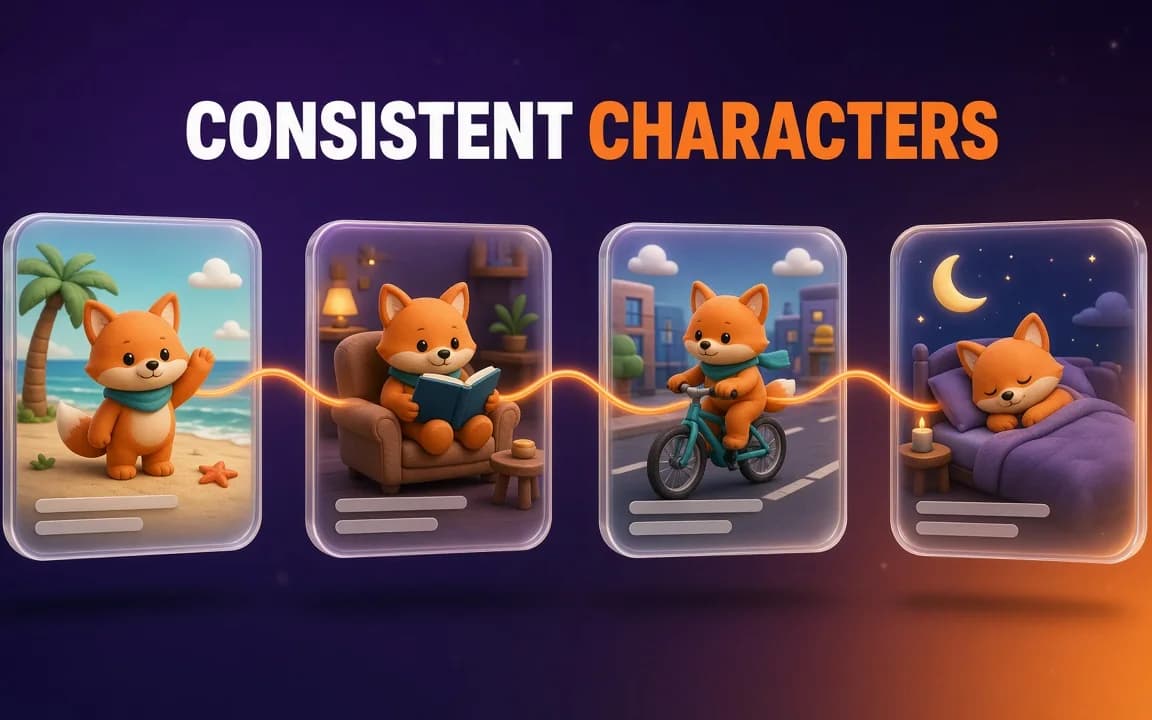
You finally get the perfect mascot: an orange fox with a teal scarf and one floppy ear. Then you ask for the same fox on a bike. The scarf turns green, the ear stands up and the snout grows.
By image six you have six cousins, not one character.
Making consistent AI characters is mostly about picking the right method for the job. Reference images, a character sheet, a saved character and a trained model each hold identity differently, and they ask for very different amounts of work.
The setting most people lock first, the seed, does the least for identity. We'll get to why.
Written from OpenArt, ImagineArt, Google and Black Forest Labs documentation and pricing pages, checked on 24 October 2026. We didn't generate characters for this guide; the arithmetic is ours.
What you'll end up with
Three things you can reuse for months. A short written character bible. One clean character sheet showing the character from several angles. And a saved or trained version of the character inside the tool you use.
With those in place, a new scene is one prompt instead of an afternoon of rerolls. There are four ways to get there, and they stack:
| Method | What holds the identity | Setup | Best for |
|---|---|---|---|
| Reference images | The images you attach to each prompt | None | A one-off series of 5 to 20 images |
| Character sheet | One multi-angle image you reuse as the reference | One session | Comics, storyboards, anything with turns and profiles |
| Saved character | The tool's stored version, called by name | One upload of 4 to 10 images | Mascots and recurring hosts |
| Trained model (LoRA) | A small file of learned weights | Hours, plus a dataset | A character you'll render hundreds of times |
Which method fits your job?
Start from how long the character has to live, not from the tool.
Say you're making a ten-slide carousel where one character walks through a story. That's a one-off. Attach two or three good images of the character to every prompt and you're done.
A brand mascot is different. It shows up in ads, on the website and in next spring's campaign, possibly made by someone else on your team. That calls for a saved character, so nobody has to remember which reference files to attach.
Comics and storyboards sit in between. You need profiles, back views and close-ups, and two characters often share a panel. Build a character sheet first, then use prompts that name each character.
And if one character will carry hundreds of images, or you run models locally, train a LoRA. It's the most work up front, and the only method where the identity lives inside the model.
Why a seed won't keep your character's face
A seed is the number that sets the starting noise. Hugging Face's Diffusers docs on reproducibility put it plainly. Diffusion "is a random process that generates a different output every time", and pipelines draw "the initial noisy tensors" from a random seed.
So the same seed with the same prompt and settings gives you the same image again. That's what it's for.
But your next prompt isn't the same. "Fox on a bicycle" pulls that noise toward a different picture than "fox in an armchair." Nothing in the seed knows what the fox looked like last time.
The seed remembers the dice roll, not the character.
Keep using seeds to get back an exact image you already have. For identity across scenes, the model has to see the character, which is what every method below does. None of them asks for a seed.
Step 1: Write the character bible before the first image
Most drift starts in the prompt. On Monday you write "a fox with a scarf." On Wednesday it's "a cute orange fox wearing a teal scarf", and the model treats them as two requests.
Fix this with a short block of text you paste, unchanged, into every prompt. Keep only the traits that make the character recognisable:
- Species or body type, age range and build
- Face: eye shape and colour, nose, one distinctive mark
- Hair, fur or skin colour, with exact names (burnt orange, not "warm")
- The signature outfit or prop, with colours
- Art style and rendering, in the same words every time
Then stop. A bible with twenty traits gives the model twenty chances to drop one. Our guide to writing AI image prompts covers the rest of the prompt around this block: scene, camera, light and what not to write.
Step 2: Make a character sheet
A character sheet, or turnaround, shows the same character from several angles on one canvas. It becomes the reference for everything else, so get it right before you make a single scene.
Here's a template. Swap the bracketed parts and paste your bible where it says so:
Character turnaround sheet of [CHARACTER BIBLE].
Five full-body views in a row on a plain light-grey background:
front, three-quarter left, left profile, back, three-quarter right.
Same outfit, same proportions and same colours in every view.
Neutral standing pose, arms relaxed, even studio lighting.
Below the row, three head close-ups: neutral, smiling, surprised.
[ART STYLE], clean edges, no props, no scenery.
Two vendors document their own route to the same result. OpenArt's character page says to make one clear picture and run it through Multi-View, which "makes 9 different angles of the character."
Google's Nano Banana docs build a 360-degree view angle by angle instead. The tip: include "previously generated images in subsequent prompts to maintain consistency."
Check the sheet before moving on. If the scarf changes colour between the front and back views, regenerate now, because every scene will inherit the error.
Step 3: Feed reference images the way each model expects
Attaching references is the fastest method, and the one where limits matter most. Google's documentation separates images of characters from images of objects and style, with a much lower ceiling for characters:
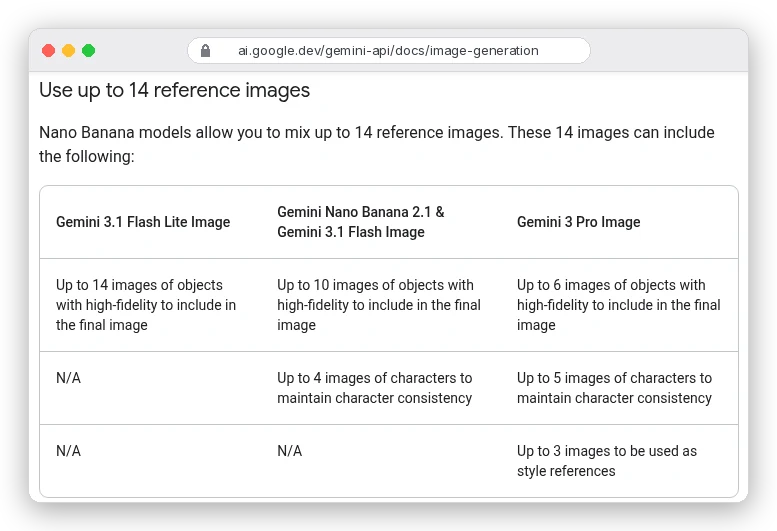
So "up to 14 reference images" doesn't mean fourteen photos of your character. On Nano Banana 2.1 it's four for character consistency. On Gemini 3 Pro Image (Nano Banana Pro) it's five.
Flash Lite has no character slot at all; Google calls it "not optimized for multiple reference inputs." Check the model before you blame your prompt.
Black Forest Labs takes a different approach with FLUX. Its multi-reference guide accepts 1 to 10 images, each at least 256 × 256 pixels, and asks you to say what each one supplies:
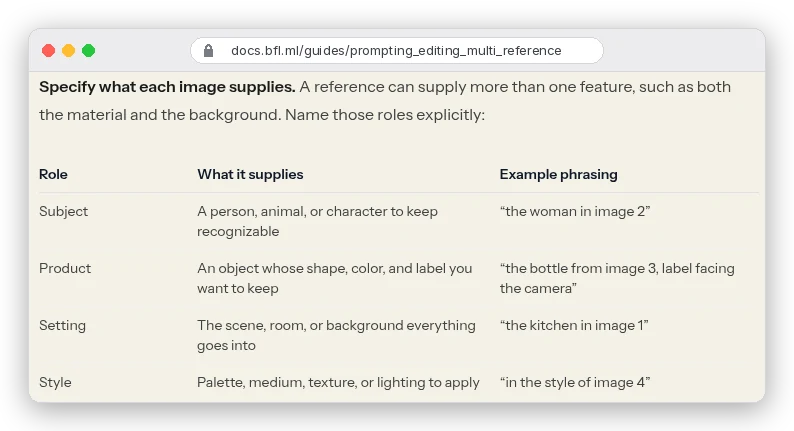
That habit works beyond FLUX. Write "the fox in image 1 rides the bicycle from image 2 through the street in image 3", not "use these images."
For scenes with two people, ImagineArt's Nano Banana Pro page suggests labels like "Subject A" and "Subject B." It calls them "clear anchors for identity preservation."
Still on FLUX.1 Kontext? BFL now calls it a previous-generation model and recommends FLUX.2 for new projects, partly for that 10-image multi-reference support.
Step 4: Save the character once, for anything recurring
Reference images have one weakness: you have to attach the right ones every time. Saved characters fix that. You upload references once, name the character and call it into any prompt.
OpenArt's version is OpenArt Characters (Character Builder in the app). You can start from a reference image, a text prompt or presets. Once saved, it can be tagged with any model OpenArt runs, from Nano Banana Pro for stills to Veo 3.1 for video. Several characters can share a scene.
What does one cost? OpenArt's pricing page doesn't give a per-character price, but it does list how many "consistent characters" each plan covers:
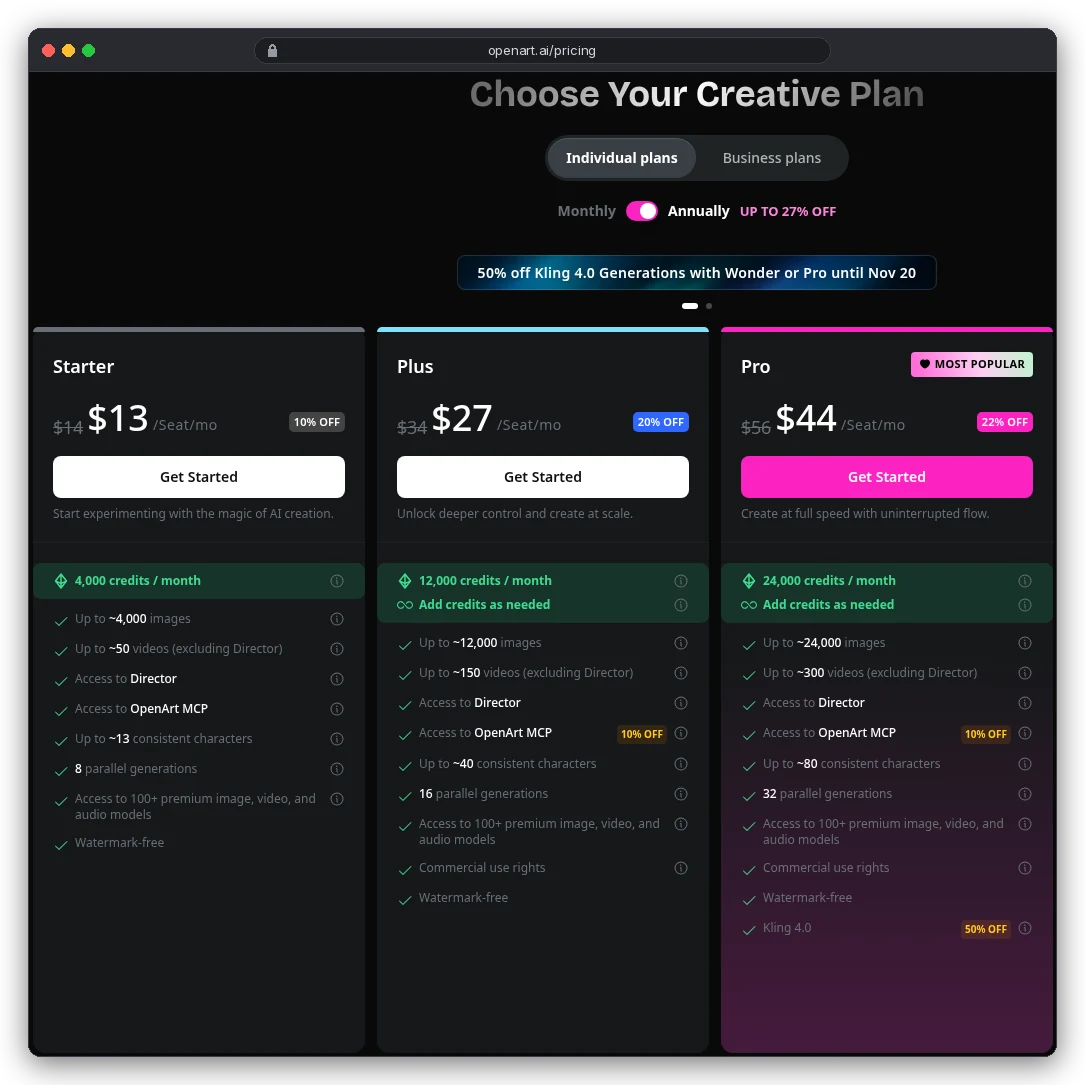
Divide the credits by the character counts and every plan lands on about 300 credits per character (12,000 ÷ 40, 24,000 ÷ 80). On Starter billed annually, that's roughly a dollar each.
That's our arithmetic, not a price OpenArt states. Still, it says a saved character costs less than a handful of wasted rerolls.
Two catches before you pick a plan. The Starter card doesn't list commercial use rights; Plus and above do, which matters for a brand mascot. And OpenArt's help centre says there's "no public API", so this lives in the web app or OpenArt's MCP connector, not your own scripts.
ImagineArt's equivalent is also called Characters, under Add References in the image panel. You upload up to 10 reference images, name the character and call it with @CharacterName. The docs are specific about what helps:
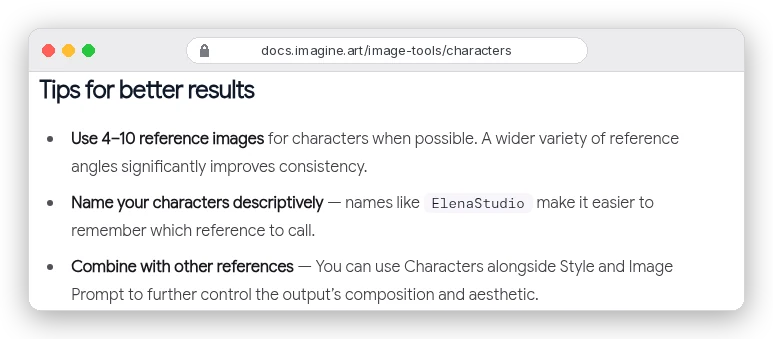
"A wider variety of reference angles" is the phrase to notice, and it's why Step 2 comes first. Give a saved character five near-identical front shots and it has never seen the back of your fox. Upload the turnaround views instead.
You can stack a Style reference on top, since ImagineArt says each reference type "operates on a different layer of the image." Weighing the two platforms on price, seats and rights? Our ImagineArt vs OpenArt comparison covers it, or open ImagineArt and try Characters yourself.
Step 5: Train a model when references stop being enough
A trained model is the heavy option. You teach the model your character instead of showing it each time. The result is a small set of weights you load when you generate.
On a hosted platform it's mostly an upload form. OpenArt trains custom models from 4 to 100 sample images, as Style, Face, Character or Object types.
Its help centre also separates Character Training, which "focuses specifically on one character" and adds expression and pose tools, from Model Training, which "captures general artistic styles."
Running it yourself is a real project. Black Forest Labs' FLUX.2 [klein] training guide lists character consistency as a LoRA use case. LoRA files are "typically 10-200MB" and training takes 1 to 3 hours on consumer GPUs.
The 4B base model needs an NVIDIA card with 12 GB of VRAM and 32 GB of system memory. It's Apache 2.0. The 9B base uses the FLUX Non-Commercial License, so a mascot trained on it can't go into a paid campaign without separate licensing.
You're probably wondering whether training beats a saved character. For most people, no.
A saved character is one upload and works across many models. A LoRA trained on FLUX.2 [klein] loads into that model, not into Nano Banana or GPT Image. Train when you've outgrown references, not as a first step.
Step 6: Carry the character into video
The best still of your character is also the best first frame. Our image-to-video guide covers animating it without the face melting. For longer pieces, how to make AI videos locks the look in stills before any motion.
Both platforms carry characters across. OpenArt's saved characters work in its video tools and in Director mode, which builds multi-scene videos up to 5 minutes long.
ImagineArt uses Elements for video: up to 4 reference images per element, and "a frontal image is required." Fill the other three slots with side, three-quarter or back views.
Mistakes that make characters drift
- Rewording the character in every prompt. Paste the bible unchanged and edit the scene around it.
- Relying on a seed to hold the face. It holds the starting noise, nothing more.
- Uploading five photos from the same angle. ImagineArt and Google both point to varied angles and earlier outputs.
- Overfilling the character slot. Ten character photos on a model documented for four buys you nothing the docs promise.
- Changing the outfit and the scene at once. Change one thing and say what stays, as in Google's example: "Keep everything the same, but change the character's expression to be more serious."
- Letting a flawed image become the reference. A wrong scarf colour in image three gets copied into image thirty.
Can you own a consistent character, or use a real face?
Owning it is less certain than it sounds. OpenArt's help centre says that "under current U.S. guidance, AI-generated images default to public domain status."
So if your mascot is purely AI-generated, you may not be able to stop someone copying it. How much human design work a protectable character needs is a question for a lawyer, not a prompt.
Real faces need more care. Use only photos you have the rights to, of people who agreed, ideally in writing for anything commercial.
The tools make it easy: ImagineArt's Imagine You turns one photo of a person into new images for 90 credits each, and that's exactly why consent matters. On Google's side, Search grounding on Nano Banana 2.1 doesn't support real-world images of people from web search. None of this is legal advice.
Which method should you start with?
Making one short series this week? Write the bible, attach two or three references on a model with a character slot, and stop there.
Building a mascot or a recurring host? Make the character sheet first, then save it in OpenArt or ImagineArt, on a plan that includes commercial rights.
Drawing a comic? Character sheet, then prompts that name every character by image number.
Train a model only once you've rendered the same character often enough to know references can't keep up. And if you're still choosing the model underneath, our roundup of the best AI image generation tools compares them.