You type "cozy coffee shop, cinematic, 8k, masterpiece" and get the same glossy stock photo everyone else gets. So you add more adjectives. It gets worse.
Good AI image prompts aren't longer. They're more specific about five things: the subject, the style, the light, the camera and any text.
And the vendors don't agree on the rest. Midjourney's docs say short phrases work best. Black Forest Labs says 30 to 80 words is usually ideal for FLUX.2. OpenAI says the format barely matters.
There's also one small word that backfires in most image models. It's probably in your prompt right now. We'll get to it.
Written from each vendor's official prompting docs, checked 21 October 2026. We didn't run a side-by-side test, and the example prompts below are illustrations, not promises of a specific output.
What goes into a good AI image prompt?
Every official guide we read lists roughly the same ingredients.
Midjourney's prompt basics name subject, medium, environment, lighting, color, mood and composition. Black Forest Labs boils it down to Subject + Action + Style + Context. Google's Gemini docs say to "describe a scene in rich detail".
Merge them and you get five parts, plus one most people skip:
- Subject and action. Who or what, doing what. "Three cats" beats "cats", as Midjourney's own docs put it.
- Style or medium. Photo, watercolor, 3D render, risograph print, cel-shaded sticker.
- Light. Golden hour, overcast, a single window on the left, harsh direct flash.
- Lens and composition. Close-up or wide, eye level or low angle, subject centred with empty space on the right.
- Text in the image. The exact words, in quotes, with where they sit and how they look.
- Purpose. What the image is for: a product listing, a blog header, a poster.
That last one is the part people skip, and two vendors call it out. OpenAI's guide starts with "Name the subject and intended use". Google's best practices put it this way: "Create a logo for a high-end, minimalist skincare brand" beats "Create a logo." Purpose quietly sets the polish level, the framing and how much empty space the model leaves.
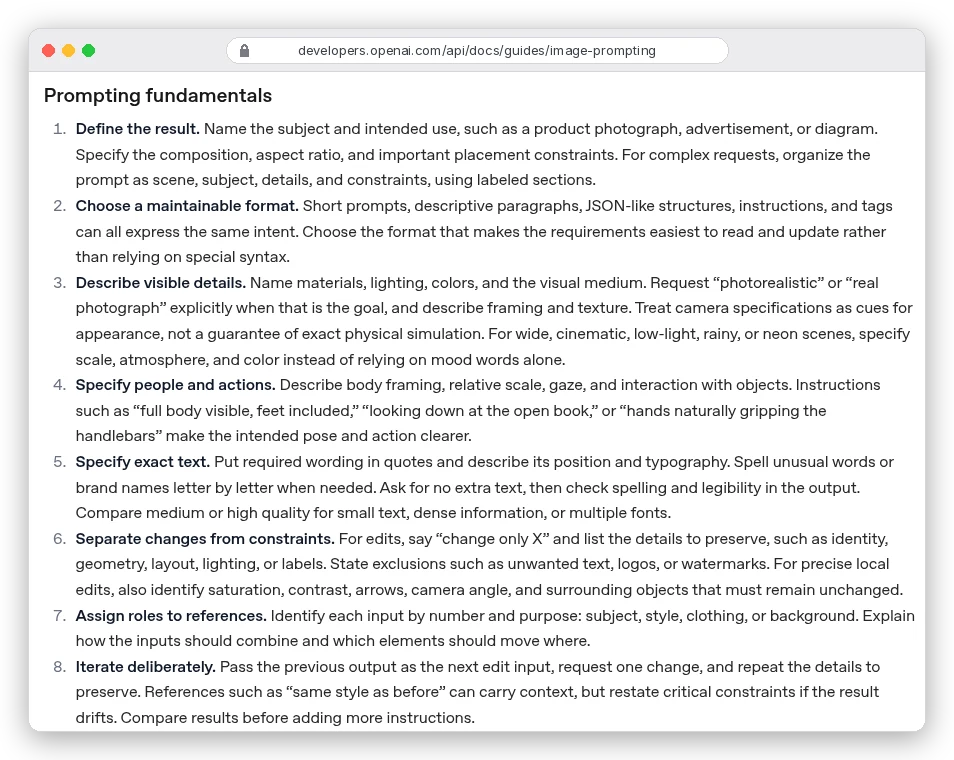
Note rule 3 in that list. Camera specs are "cues for appearance, not a guarantee of exact physical simulation." So "50mm lens" nudges the look toward a natural portrait. It doesn't turn the model into a camera.
A prompt template you can copy
Here's the structure we'd start from on any natural-language model. It follows the order in OpenAI's cookbook: scene, subject, details, constraints. It also puts the most important thing first, which BFL says FLUX.2 weighs most.
[Purpose]: A [style/medium] of [subject] [doing what], in [setting].
Light: [light source, direction, time of day].
Camera: [shot type], [angle], [lens feel], [where the subject sits in frame].
Text: "[exact words]" in [font style], [position]. No other text.
Keep: [anything that must not change or must not appear, said positively].
And here it is filled in. A blog header for a post about home coffee:
Blog header image: a photorealistic close-up of a ceramic pour-over dripper on a glass carafe, steam rising, on a pale oak counter. Light: soft morning window light from the left, warm and low. Camera: eye level, shallow depth of field, carafe on the right third with empty counter on the left for a headline. No text in the image.
Compare that with the version most people start with:
coffee, aesthetic, cinematic lighting, 8k, ultra detailed, masterpiece
The first one names the object, the surface, the light, the empty space and the job. The second tells the model almost nothing. So you get its default idea of "aesthetic coffee."
OpenAI's cookbook makes the same point about quality tags: for photorealism, "include the word 'photorealistic' directly in the prompt" rather than leaning on generic labels.
But that long, chatty template is exactly what Midjourney tells you not to write.
Why the same prompt works on one model and fails on another
Image models fall into two rough camps, and the official docs make the split obvious.
Natural-language models read your prompt like a brief. OpenAI's GPT Image 2.5, Google's Nano Banana family (Gemini's native image models) and FLUX.2 all read full sentences well. OpenAI says short prompts, paragraphs, JSON and tags "can all express the same intent".
Google gives fill-in-the-blank sentence templates. BFL even accepts structured JSON with fields like scene, lighting and camera.
Midjourney sits in the other camp. Its prompt basics say "Short and simple prompts typically generate the best images." Long lists or detailed instructions "can confuse the process."
Its own example swaps a 25-word request for "Colored pencil illustration of bright orange California poppies." Control comes from parameters added at the end, like --ar for shape and --no for exclusions.
Stable Diffusion 3.5 is in between. Stability's API docs ask for "a strong, descriptive prompt that clearly defines elements, colors, and subjects," plus a separate negative_prompt field.
Here's how the five families differ on the things that trip people up:
| Model family | Prompt style | Exclusions | Aspect ratio |
|---|---|---|---|
| GPT Image 2.5 (OpenAI) | Any format; labeled sections for complex briefs | State them in the prompt ("no watermarks") | size parameter, edges multiples of 16 |
| Nano Banana (Gemini) | Detailed scene description | Describe the scene positively | aspect_ratio setting; examples also say it in the prompt |
| FLUX.2 (Black Forest Labs) | Subject first; 30-80 words usually ideal | No negative prompts at all | Set in the request; dimensions multiples of 16 |
| Midjourney | Short phrases | --no parameter | --ar, square by default |
| Stable Diffusion 3.5 | Descriptive prompt | Separate negative_prompt field | aspect_ratio, nine fixed options |
One note if you're reading older guides: Google's Imagen models are gone from the Gemini API. Its docs page now says "Imagen models are shut down. Use Nano Banana for image generation."
For a ranking of the models themselves, our best AI image generation tools roundup covers which ones handle photorealism, text and editing well.
Why "no" in a prompt often adds the thing you banned
This is the word from the top. Type "a birthday party, no cake" and there's a fair chance you get a cake.
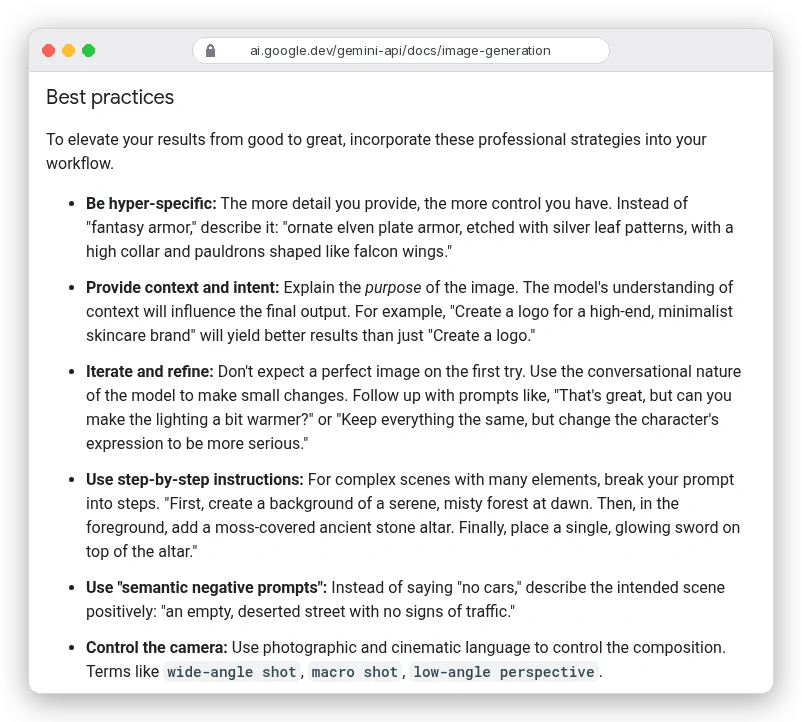
Midjourney's docs admit it: "a cake might still appear." Google's Gemini docs give the fix a name, "semantic negative prompts": describe what the empty space looks like instead of what's missing.
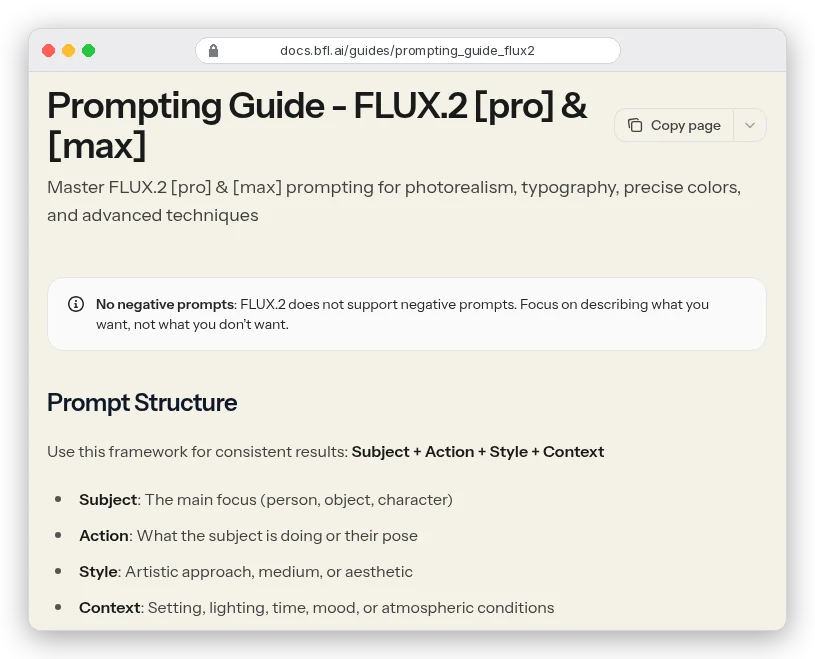
FLUX.2 goes further. BFL's guide opens with a warning box: FLUX.2 "does not support negative prompts." Its swaps are worth stealing for any model: instead of "no blur," write "sharp focus throughout"; instead of "no people," describe "an empty scene."
You're probably thinking OpenAI's guide tells you to write "no watermark". It does. Its rules say to "state exclusions such as unwanted text, logos, or watermarks."
Its own example prompts end with lines like "No extra text, no watermarks, no unrelated logos." That works for short, generic junk the model might add on its own. It's a different thing from banning an object that fits the scene, like cake at a party.
So here's the rule that works across all five families:
- For objects, describe the scene without them: "an empty, deserted street with no signs of traffic" (Google's example), not "street, no cars".
- For generic add-ons (watermarks, stray text, logos), a short exclusion line is fine where the vendor supports it.
- On Midjourney, put exclusions in
--no, comma-separated:still life gouache painting --no fruit, apple, pear. - On Stable Diffusion, use the
negative_promptfield for a few keywords. Stability labels it "an advanced feature."
One Midjourney trap that catches people out: its moderation reads each word after --no separately. Midjourney's own example is --no modern clothing, read as "no modern" and "no clothing," which can trigger a warning. Name the clothing you want instead.
Aspect ratio: set it as a parameter, not just a word
Writing "wide shot" doesn't make the canvas wide. The canvas shape is usually a setting.
- GPT Image 2.5: OpenAI says "Set API parameters separately from the prompt." Common sizes include 1536x1024 for landscape and 1024x1536 for portrait; custom sizes need both edges in multiples of 16 and a ratio no wider than 3:1.
- Nano Banana: an
aspect_ratiosetting such as "16:9". Google's sample prompts also end with "Aspect ratio 16:9," so saying it in the text doesn't hurt. - Midjourney: images are square unless you add
--ar. No decimals: use--ar 139:100, not 1.39:1. You can type pixel sizes like--ar 1920:1080and it simplifies them to 16:9. - Stable Diffusion 3.5: nine fixed options from 21:9 to 9:21, for text-to-image only.
- FLUX.2: any size from 64x64 to 4 megapixels, in multiples of 16; BFL recommends up to 2 megapixels for most uses.
Pick the shape before you write the composition. "Subject on the right third with empty space on the left" means something different on a square than on a 16:9 header.
How do you get readable text in an AI image?
Google says Gemini "excels at rendering text" and BFL says FLUX.2 "generates clean typography." Claims aside, the docs agree on how to ask for it:
- Put the exact words in quotes.
- Say where the text goes and what it looks like: "bold sans-serif, centred at the top."
- Say how many times it appears. OpenAI's example: "Render the tagline exactly once."
- Ask for no other text.
- Keep it short. BFL: "long strings are harder to render accurately."
OpenAI adds one more for tricky names: "Spell unusual words or brand names letter by letter when needed."
Google's tip runs the other way round. Gemini "works best if you first generate the text and then ask for an image with the text." Not sure what the poster should say? Ask the model to write the line first, then use it.
Poster for a neighbourhood bakery's opening day. A flat, warm
illustration of a bread loaf and wheat stalks on a cream background.
Text: "FRESH FROM 7AM" in bold rounded sans-serif, dark brown,
centred at the top, rendered exactly once. No other text, no logos.
Then read every letter of the result. OpenAI's guide says to "check spelling and legibility in the output." One wrong letter on a poster is worse than no text at all.
Editing prompts: change one thing, list what stays
Editing an existing image is where people lose an afternoon. You ask for warmer light and the model also changes the face.
OpenAI's rule is "say 'change only X' and list the details to preserve." Google's inpainting template says the same thing in fill-in form:
Using the provided image, change only the [specific element] to
[new element/description]. Keep everything else in the image exactly
the same, preserving the original style, lighting, and composition.
Three habits from the docs make edits stick:
- One change per turn. OpenAI: "request one change, and repeat the details to preserve." Google's example follow-up is "Keep everything the same, but change the character's expression to be more serious."
- Give each reference image a job. OpenAI says to identify each input "by number and purpose: subject, style, clothing, or background." So: "Put the dog from image 2 next to the woman in image 1."
- Know the limits. Google says
gemini-2.5-flash-imageworks best with up to 3 input images, while Nano Banana Pro supports up to 14 in total. FLUX.2 [pro] takes up to 8 references per request, and Midjourney's--edittakes up to four.
And when a region must not move at all? OpenAI is honest about it: repeated edits "can still change details you intended to preserve." For pixel-identical areas, it recommends compositing the edit into the original instead.
Three before-and-after rewrites
These are illustrations of the rules above, not outputs we generated.
A product photo
Before: white sneaker, product photo, high quality
After: Product photo for an online store listing: a white leather sneaker, three-quarter view, on a plain light grey backdrop. Soft, even studio light from above with a gentle contact shadow. Shot at eye level with the whole shoe in frame and space around it for cropping. No text, no logos.
The rewrite adds purpose (store listing), angle, background, light and framing, which is everything the "high quality" tag was hoping to imply.
The same idea for Midjourney
Before: Please make me a picture of a lighthouse at night in a storm. I want it to look like an oil painting with big waves and no people anywhere
After:
oil painting of a lighthouse in a night storm, towering waves, beam cutting through rain --ar 3:2 --no people, boats
Short phrase, the medium first, and the shape and exclusions moved to parameters at the end, which is where Midjourney's parameter rules put them.
A retro portrait
Before: 90s photo of a woman
After: A candid disposable-camera snapshot from a 1990s house party: a young woman laughing on a sofa, holding a paper cup. Harsh direct on-camera flash, slight red-eye, dark background falling off to black. Grainy film look, warm colour cast, date-stamp-free. Vertical 2:3.
Era photos live or die on the camera and the light, not the word "90s". Our 18 retro 80s and 90s ChatGPT image prompts apply this to mall glamour shots, yearbook portraits and VHS stills. Each one names the film stock, lighting and aspect ratio.
Can you use artist names, and do you own the result?
Style prompts are where people get nervous, with reason. The official docs handle it in two ways.
Google's own style-transfer example uses a painting long out of copyright: "into the artistic style of Vincent van Gogh's 'Starry Night'." OpenAI's character examples add the constraint "Original character (no copyrighted characters)."
Describing the visual qualities you want ("swirling impasto brushstrokes, deep blues and bright yellows") tells the model what you mean. It also keeps living artists' names out of your prompts.
Ownership is a separate question. In January 2025 the U.S. Copyright Office concluded that AI outputs are protected "only where a human author has determined sufficient expressive elements." That excludes "the mere provision of prompts." Its announcement lists editing and arranging the output as things that can count.
Commercial rights also depend on the tool and the plan you pay for, which we compare in ImagineArt vs OpenArt. This is a general summary, not legal advice; for client or commercial work, read the tool's terms and ask a lawyer.
Which way should you write your next prompt?
It depends on where you'll paste it:
- ChatGPT or the GPT Image API: write a brief. Purpose first, then labeled lines for scene, light, camera, text and constraints.
- Gemini (Nano Banana): a full scene description, phrased positively, with the purpose stated. For text-heavy images, draft the words first.
- FLUX.2: subject and action in the first few words, 30 to 80 words total, no "no".
- Midjourney: one short descriptive phrase, then
--arand--no. - Stable Diffusion 3.5: a descriptive prompt plus a handful of keywords in the negative field.
If you switch between models a lot, keep the template from this guide as your master copy and adapt the last mile for each one. A hub like OpenArt lists GPT Image 2.5, Nano Banana 2 and Seedream among its image models. That lets you try one prompt on several without separate accounts.
Once you have a still you like, the same five parts carry over to motion. Our guide on how to make AI videos starts from a locked still image. The Kling B-roll prompts show what a motion prompt adds on top.