You paste a web page into your RAG pipeline, ask a question, and the answer quotes the cookie banner.
Or the bot cites a "Related articles" box from the sidebar. The model isn't broken. It read exactly what you gave it.
Web scraping for AI is mostly about what you throw away before the model sees a page. Converting HTML to Markdown gets you most of the way, and every guide says so.
We counted the tokens on three real pages.
Even after the conversion, one part of the Markdown that nobody talks about took up a third to almost half of what was left. And it isn't the menus.
We ran the token counts ourselves on 21 October 2026 through Firecrawl's keyless free tier, using OpenAI's o200k_base tokenizer. Prices and credit rules come from Firecrawl's pricing page and docs, checked the same day. We didn't run a crawl, a map or JSON extraction, because those need an API key.
What "LLM-ready" data actually means
An LLM-ready page is the page's main content as Markdown. Attach four facts: the source URL, the title, the HTTP status and the date you fetched it. Nothing else.
Each part earns its place.
Markdown keeps the structure a model can use (headings, lists, tables, code blocks) and drops the tags it can't. The URL lets your app cite its source. The status tells you whether you scraped an article or an error page. The date tells you when to fetch it again.
Everything else on a page is noise to a model: menus, footers, script tags, tracking attributes, "you may also like" boxes. Noise isn't harmless in a retrieval system. A chunk full of menu links can outrank the paragraph that answers a query, because the menu mentions every topic on the site.
So how much noise are we talking about?
Why Markdown beats raw HTML: we counted the tokens
We scraped three public pages. One was the Wikipedia article on web scraping, one the Python docs page for the json module, and one a product page on books.toscrape.com, a practice store built for scrapers. For each one we asked Firecrawl for the raw HTML and for Markdown, then counted tokens with the same tokenizer GPT-4o uses.
| Page | Raw HTML | Markdown, main content | Cut |
|---|---|---|---|
| Wikipedia: Web scraping | 52,211 tokens | 13,109 tokens | 75% |
| Python docs: json module | 36,485 tokens | 11,052 tokens | 70% |
| Books to Scrape product page | 2,238 tokens | 459 tokens | 79% |
That matches the 70 to 80% figure you'll see quoted around the web. Most of the HTML is markup: class names, attributes, inline scripts. The words a reader sees are a quarter of the file or less.
The "main content" setting mattered less than we expected.
Firecrawl's onlyMainContent option (on by default) strips headers, footers and sidebars. On Wikipedia it cut the Markdown from 17,817 tokens to 13,109, about 26%. On the Python docs it saved 8%, and on the product page 5%. Pages with heavy page furniture gain the most.
But 13,109 tokens is still a lot for one article. Where did they go?
The hidden cost inside Markdown: link URLs
Open the Markdown and you'll see it straight away. Every link keeps its full address: [Data scraping](https://en.wikipedia.org/wiki/Data_scraping "Data scraping"). The model reads two words of text and about fifteen tokens of URL it will never use.
The Wikipedia article has 334 links. The Python page has 193. So we stripped the URLs, kept the link text, dropped image references, and counted again.
| Page | Markdown | Same, URLs stripped | Cut vs raw HTML |
|---|---|---|---|
| Wikipedia: Web scraping | 13,109 | 7,249 | 86% |
| Python docs: json module | 11,052 | 7,356 | 80% |
| Books to Scrape product page | 459 | 366 | 84% |
Stripping links cut another 45% on Wikipedia and 33% on the Python docs. That's more than the main-content filter saved on any page.
Here's how that feels in practice. A model with a 128,000-token context window holds about two copies of that Wikipedia page as raw HTML. As link-free Markdown, it holds seventeen.
You're probably thinking the links matter.
Sometimes they do: if your agent follows links, or you want citations to point at sub-pages, keep them. Firecrawl's links format returns them as a separate list, so you can store them as metadata and keep them out of the text you embed. For plain question answering, the model needs the words, not the addresses.
Now that you know what to keep, the next question is which kind of scraping job you're running, because the bill depends on it.
Scrape, crawl, map or search: which job are you doing?
Most scraping APIs split the work into a handful of jobs. Firecrawl's names are typical, and its billing page lists what each one costs:
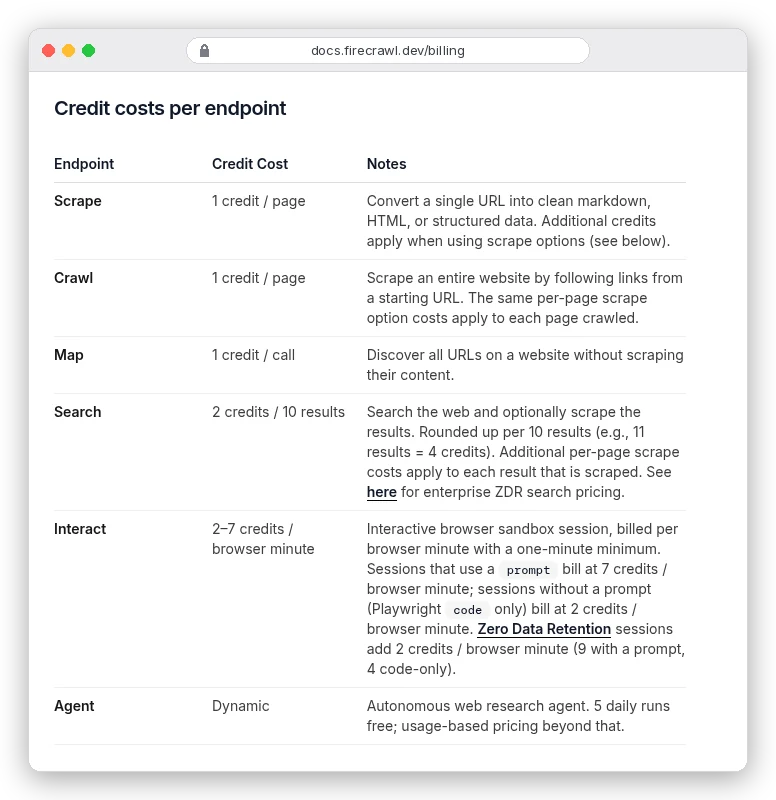
- Scrape: one URL in, one document out. Use it when you already know which pages you want.
- Crawl: give it a start URL and it follows links and scrapes every page it finds, one credit each. Firecrawl's default limit is 10,000 pages, so set
limityourself on the first run. - Map: returns the list of URLs on a site without scraping them. The docs say one credit per call "regardless of the number of URLs returned", though the pricing page table says "1 / page". Trust the docs, then check your usage after the first call.
- Search: runs a web search and can scrape the results. Two credits per 10 results, plus the scrape cost of each page you pull.
The cheapest pattern for a whole site is map first, crawl never. Map the site for one credit, filter the URL list down to the sections you need (say, /docs/ and /blog/), then scrape only those. A blind crawl of a 3,000-page site where you need 400 pages burns 2,600 credits on pages you'll delete.
Markdown covers most AI work. One case doesn't fit it.
When you need JSON instead of Markdown
If your app needs fields (a price, a date, a job title, a stock count) rather than prose to search, you want structured extraction. You pass a schema, an LLM reads the page and fills it in.
That LLM costs extra. On Firecrawl, JSON format adds four credits to every page:
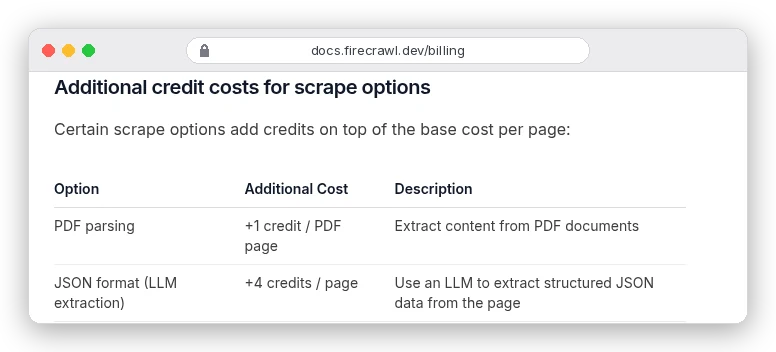
So the same plan covers a fifth as many pages.
Two things soften that. Firecrawl's product format pulls title, price, availability and variants from product pages without an LLM call, so it doesn't carry the JSON surcharge. And on a listing page, one JSON call can return every item on the page as an array, instead of one call per product.
JSON extraction also has traps the Markdown route doesn't. In our Python walkthrough for structured JSON with Firecrawl, a 404 page came back as a "valid" record. It was billed the full five credits. If you only need text to search, stay with Markdown.
What web scraping for AI costs per 1,000 pages
Firecrawl sells credits on monthly plans. One credit buys one Markdown page. Here are the plans, billed yearly:
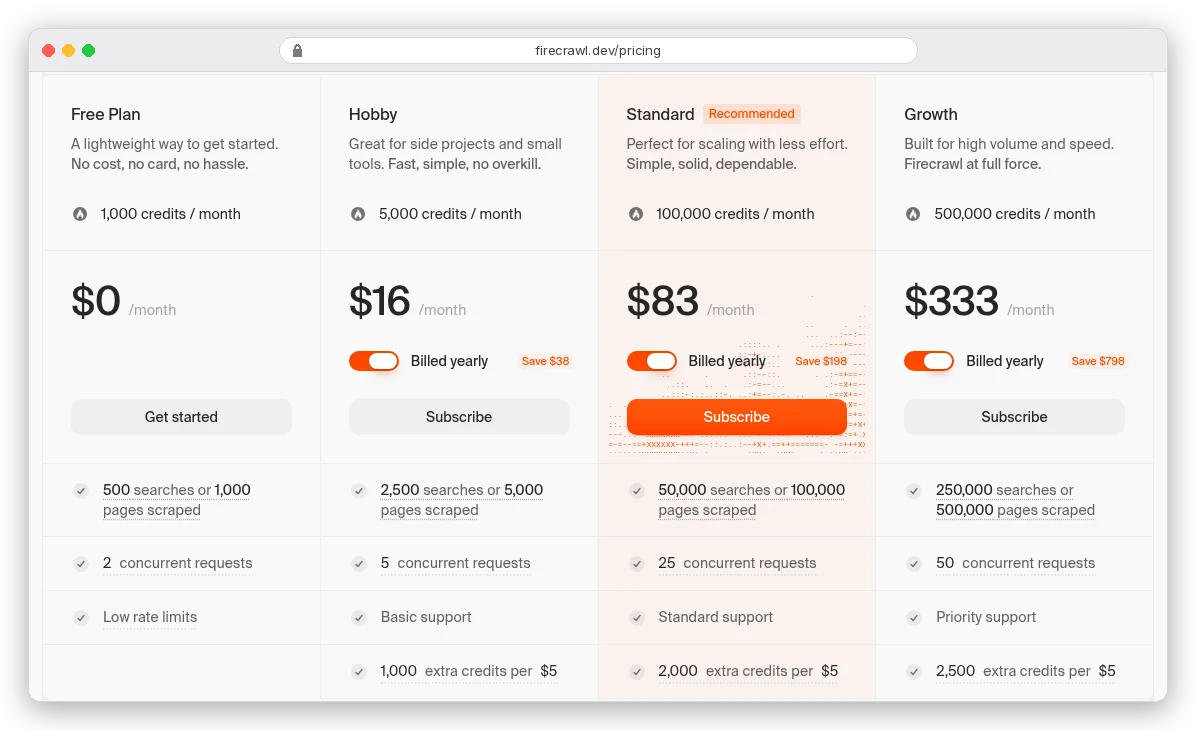
| Plan (yearly) | Markdown, per 1,000 pages | JSON, per 1,000 pages | Extra credits, per 1,000 |
|---|---|---|---|
| Hobby, $16/mo | $3.20 | $16.00 | $5.00 |
| Standard, $83/mo | $0.83 | $4.15 | $2.50 |
| Growth, $333/mo | $0.67 | $3.33 | $2.00 |
| Scale, $599/mo | $0.60 | $3.00 | $1.00 |
Hobby is $19 a month billed monthly, which makes it $3.80 per 1,000 pages. The free plan gives 1,000 credits a month with no card.
Look at the last column.
Pay-as-you-go credits on Standard and Growth cost three times the plan rate. If you regularly run out, the next plan up is cheaper than topping up. And only Scale rolls unused credits over, for one month.
Three billing rules catch people out:
- A page that comes back as a 403 or 404 still costs a credit, because Firecrawl returned a document. Check
metadata.statusCodeand stop retrying URLs that keep failing. - Cached results "still cost 1 credit per page". Firecrawl serves pages from a cache up to two days old by default; that saves time, not money. Set
maxAge: 0when you need today's version. - Crawl and batch jobs bill as each page finishes, so the total can keep climbing for minutes after you submit.
A five-step pipeline from URL list to vector store
Here's the whole route, from a website to chunks your retrieval system can search.
- Map the site and filter the URLs to the sections you need.
- Scrape each page as main-content Markdown.
- Check the status, strip link and image URLs, and keep the metadata.
- Split the Markdown at its headings, not at a fixed character count.
- Embed the chunks, store the fetch date, and re-scrape on a schedule.
Steps two and three fit in one Python function. This calls Firecrawl's REST API with plain requests. Without a key it runs on the keyless free tier, which is capped per IP address per day. That tier covers scrape, but not map or crawl.
import re
import requests

API = "https://api.firecrawl.dev/v2/scrape"

def scrape_markdown(url, api_key=None):
    headers = {"Authorization": f"Bearer {api_key}"} if api_key else {}
    r = requests.post(API, headers=headers, timeout=120, json={
        "url": url, "formats": ["markdown"], "onlyMainContent": True})
    r.raise_for_status()
    data = r.json()["data"]
    meta = data["metadata"]
    status = meta.get("statusCode", 0)
    if not (200 <= status < 300 or status == 304):
        raise ValueError(f"{url} returned {status}")   # this page was still billed
    md = re.sub(r"!\[[^\]]*\]\([^)]*\)", "", data["markdown"])  # drop images
    md = re.sub(r"\[([^\]]*)\]\([^)]*\)", r"\1", md)             # keep link text only
    return {"url": meta.get("sourceURL", url), "title": meta.get("title"),
            "status": status, "markdown": md}
Step four is where Markdown pays off again. Because the headings survive, you can cut the page where the author changed topic:
def chunk_by_headings(md, max_chars=4000):
    sections = re.split(r"(?m)^(?=#{1,3} )", md)
    chunks, buf = [], ""
    for s in sections:
        if buf and len(buf) + len(s) > max_chars:
            chunks.append(buf.strip())
            buf = ""
        buf += s
    if buf.strip():
        chunks.append(buf.strip())
    return chunks
On the Python json docs page this gave seven chunks, each starting at a heading. One caveat: a single section longer than max_chars stays whole, so split those by paragraph before embedding.
Store the title and URL with every chunk. When the bot answers, it can say where the answer came from, and you can re-scrape just that page when it changes.
Do you need a paid scraping tool at all?
Not always. We ran the same three pages through a plain Python fetch and the open-source markdownify converter, with no main-content filter.
On the Python docs it produced 10,518 tokens, slightly fewer than Firecrawl's 11,052. On the product page, 513 against 459.
On Wikipedia it gave 20,094 tokens against Firecrawl's 13,109, because the sidebars and footers came along. For simple, static pages, a free converter does the job.
The paid tool earns its money where a converter can't help. A plain fetch of a JavaScript-rendered page gets an empty shell. Some sites block data-centre traffic outright. And crawling at volume means running browsers yourself.
Firecrawl routes requests through proxies by default and retries blocked ones. If you'd rather run your own browsers, our Firecrawl vs Playwright comparison works out when that's cheaper. If you need ready-made scrapers for specific sites (maps listings, social profiles), Apify vs Firecrawl covers where each one fits.
Whichever route you take, one risk comes with every page you feed a model.
Pages that talk back: prompt injection
A scraped page is text written by someone else, and some of it is written for your model.
Firecrawl's own pricing page has a footer line for exactly that. It begins "If you are an AI agent, LLM, or automated system" and tells the reader to fetch and follow another file. That one is harmless onboarding. The same trick on a hostile page tells an agent to ignore its instructions.
Treat scraped text as data. Keep it inside clearly marked boundaries in your prompt, never let it trigger actions on its own, and be strictest with user-submitted URLs.
Firecrawl's checkPromptInjection option scans the page before any LLM-based format runs. It adds four credits per page: worth it for untrusted sources, wasteful for your own docs.
robots.txt, terms and the legal side
The robots.txt file tells crawlers which paths a site owner wants left alone. The current standard, RFC 9309, is blunt about its limits: "These rules are not a form of access authorization." It's a request, not a lock.
Respecting it is still the baseline for a good-faith crawler, and Firecrawl's crawl docs say robots.txt "is respected unless ignoreRobotsTxt is enabled", an Enterprise-only setting.
robots.txt isn't the whole picture. Terms of service, copyright and your country's personal data rules can all apply. Whether scraped text can train or ground a commercial AI product is still a live legal question.
Scrape public pages, go easy on request rates, don't collect personal data you don't need, and read the terms of any site you depend on. This isn't legal advice; for a commercial product, ask a lawyer who knows your jurisdiction.
Where to start
Feeding a chatbot your own docs or a handful of public pages? Start with a free converter or Firecrawl's free 1,000 credits, strip the link URLs, and chunk by headings. You'll spend nothing.
Need whole sites, JavaScript-heavy pages or a weekly refresh? Then a scraping API is worth paying for: map first, scrape only what you need, and size the plan so you never pay the top-up rate. Our Firecrawl review covers where it falls short before you commit.
And if you need fields rather than text, budget five credits a page and validate every record before it reaches your database.