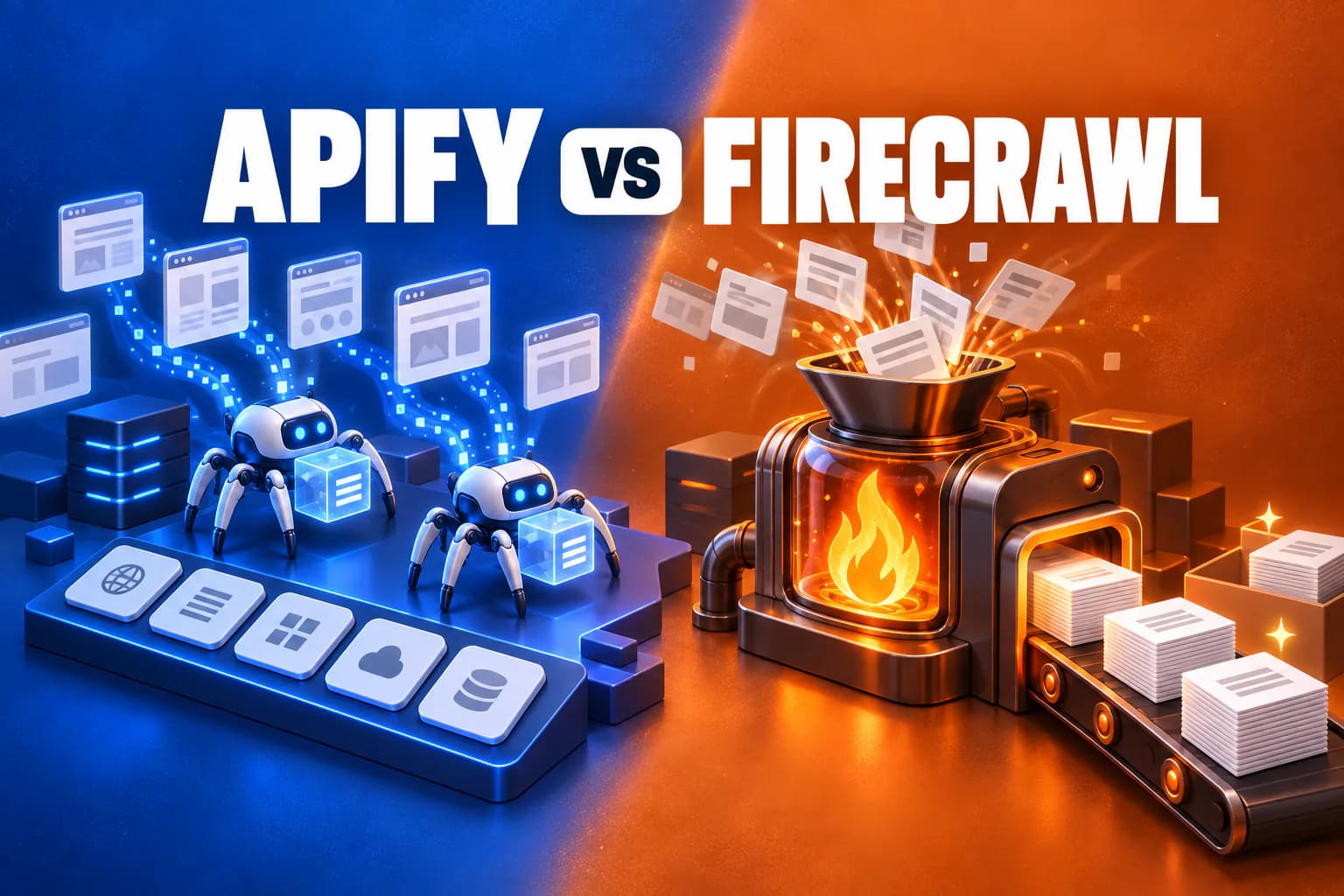
Apify and Firecrawl both get you data off the web, and both are increasingly pitched at AI builders. That is roughly where the similarity ends. Firecrawl is an API that turns any URL, site or search query into clean Markdown or structured JSON. Apify is a platform for running scrapers, with a marketplace of more than 71,000 ready-made ones built for specific websites.
Pick the wrong one and you will either rebuild something that already exists in Apify's Store, or run a heavyweight platform to do what one Firecrawl API call would have done. This comparison works through what each is actually for, what each really costs per page, and which to reach for.
The short answer
Choose Firecrawl if you are feeding web content into an LLM, a RAG pipeline or an AI agent, and you want any page turned into clean Markdown or JSON through one simple API with predictable per-page pricing. It is the faster route from "I have URLs" to "my model has the content".
Choose Apify if you need structured data from specific, well-known platforms — Google Maps, Instagram, LinkedIn, Amazon and the like — where someone has already built and maintained a scraper, or if you need to run your own custom scraping code at scale. On simple sites it can also be the cheaper of the two by a wide margin.
Many teams end up using both: Firecrawl for turning arbitrary pages into model-ready text, Apify for pulling structured records from specific platforms.
At a glance
| Firecrawl | Apify | |
|---|---|---|
| What it is | Web data API for AI | Scraping platform and Actor marketplace |
| Core output | Markdown, HTML, JSON, screenshots | Whatever each Actor returns, usually structured JSON |
| Free plan | 1,000 credits/mo | $5 of usage/mo |
| Entry paid plan | Hobby, $19/mo ($16 annual) | Starter, $19/mo |
| Billing unit | Credits: 1 per page | Prepaid dollars: compute, proxies, storage, Actor fees |
| Cost predictability | High — flat per page | Lower — varies by site and settings |
| Prebuilt site scrapers | No | 71,000+ Actors |
| Open source | Core engine, self-hostable | Crawlee library |
| Unused credits | Roll over on Scale only | Expire monthly |
They solve different problems
This is the part most comparisons skip, and it matters more than any price.
Firecrawl is content-first. You give it a URL, a site or a search query and it returns the content, cleaned and formatted for a model. Its core endpoints are Scrape (one page), Crawl (a whole site), Map (every URL on a site), Search (search the web and return full page content), and Interact (click, fill forms and navigate a live page). You do not write scraping logic for each site; Firecrawl handles rendering, proxies and anti-bot measures, and hands you text.
Apify is task-first. The unit of work is an Actor — a packaged scraper for a job, such as "extract every listing from Google Maps for this query with name, rating and phone number". Its Store has more than 71,000 of them. You pick one, give it JSON input, and get structured records back. When no Actor fits, you write your own and run it on Apify's infrastructure.
The practical test: if what you want is the text of pages, Firecrawl is the natural fit. If what you want is specific fields from a specific platform, Apify's Store is usually faster, because someone has already solved that platform's structure and quirks.
The overlap is general website crawling for AI, where Apify's own Website Content Crawler Actor competes directly with Firecrawl's Crawl endpoint. That is where a like-for-like price comparison is possible.
Pricing plans
Firecrawl
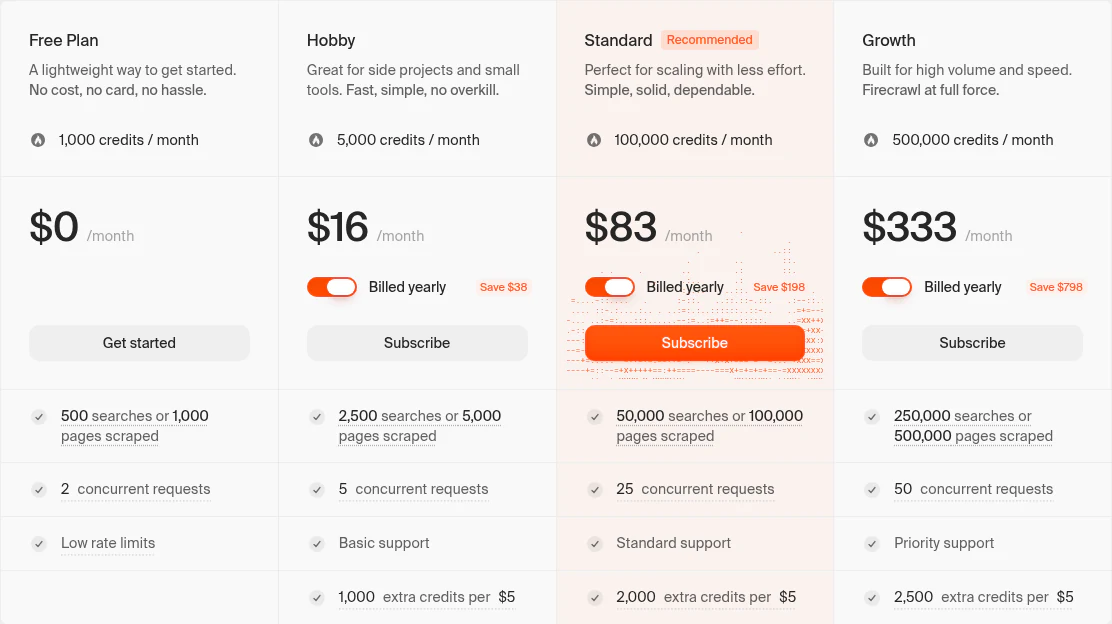
| Plan | Annual (per month) | Credits / month | Concurrent requests |
|---|---|---|---|
| Free | $0 | 1,000 | 2 |
| Hobby | $16 ($19 monthly) | 5,000 | 5 |
| Standard | $83 | 100,000 | 25 |
| Growth | $333 | 500,000 | 50 |
| Scale | $599 | 1,000,000 | 100 |
Annual billing saves 16.7% on Hobby, Standard and Growth and 20% on Scale. A basic scrape, crawl or map costs 1 credit per page; search costs 2 credits per 10 results.
Apify
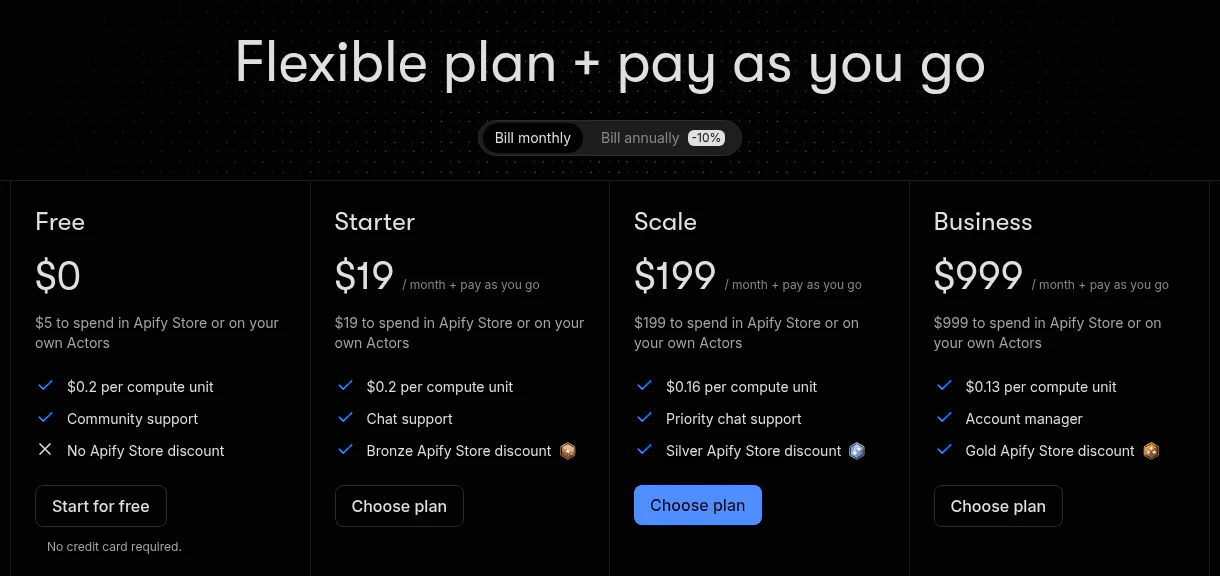
| Plan | Monthly | Prepaid usage | Compute unit | Concurrent runs |
|---|---|---|---|---|
| Free | $0 | $5 | $0.20 | 5 |
| Starter | $19 | $19 | $0.20 | 32 |
| Scale | $199 | $199 | $0.16 | 128 |
| Business | $999 | $999 | $0.13 | 256 |
Apify's plan fee is a prepaid usage budget rather than a subscription: compute, proxies, storage and Store Actor fees all draw it down, and paid plans continue on pay-as-you-go once it runs out. Annual billing takes about 10% off. We break Apify's model down in detail in our Apify pricing guide.
What 1,000 pages actually cost
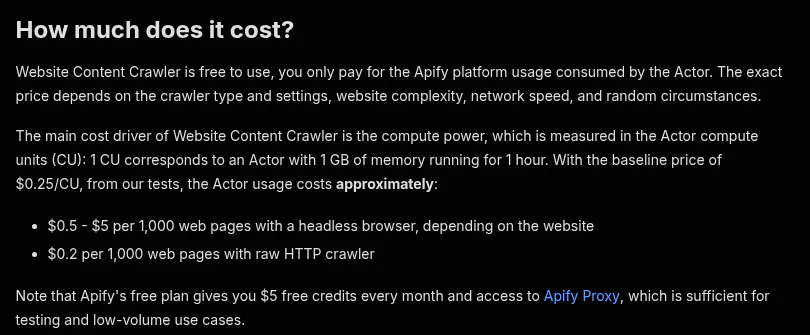
The closest like-for-like comparison is crawling general websites into clean text, where Firecrawl's Crawl endpoint meets Apify's Website Content Crawler.
| Option | Cost per 1,000 pages |
|---|---|
| Apify, raw HTTP crawler | $0.20 |
| Apify, headless browser | $0.50 – $5.00, depending on the site |
| Firecrawl Scale (annual) | $0.60 |
| Firecrawl Growth (annual) | $0.67 |
| Firecrawl Standard (annual) | $0.83 |
| Firecrawl Hobby (annual) | $3.20 |
Two findings fall out of that table.
On simple sites, Apify is dramatically cheaper. Where a page does not need a browser to render, Apify's plain HTTP crawler costs about $0.20 per 1,000 pages — three to sixteen times less than any Firecrawl plan.
On JavaScript-heavy sites, Firecrawl is more predictable. Apify's browser crawling ranges from $0.50 to $5 per 1,000 pages depending on how heavy the site is, and you only find out by running it. Firecrawl charges one credit per page whether or not the site needs JavaScript rendering, so its cost is known before you start. On a heavy site, Firecrawl Standard can easily be the cheaper of the two.
The honest summary is that Apify has the lower floor and Firecrawl has the lower ceiling. If your targets are mostly static, Apify wins on price. If they are modern, script-heavy sites, or you need to budget precisely, Firecrawl's flat rate is worth a lot.
The hidden multiplier in each
Firecrawl: structured extraction costs five times as much
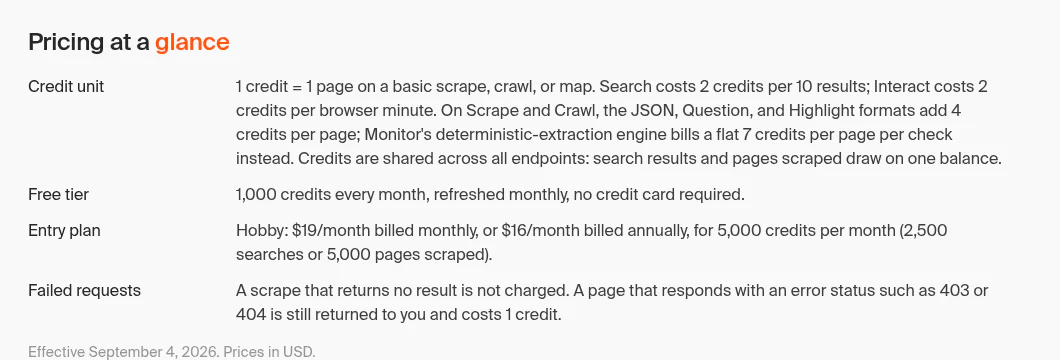
A basic scrape costs 1 credit. But requesting the JSON, Question or Highlight formats — structured extraction, the feature that turns a page into specific fields — adds 4 credits per page. A structured-extraction page therefore costs 5 credits, five times a Markdown scrape.
| Plan | Markdown, per 1,000 pages | JSON extraction, per 1,000 pages |
|---|---|---|
| Hobby | $3.20 | $16.00 |
| Standard | $0.83 | $4.15 |
| Growth | $0.67 | $3.33 |
| Scale | $0.60 | $3.00 |
If you plan to extract fields on every page, size your plan on five credits per page, not one. It is often cheaper to take Markdown and run the extraction with your own model, especially at volume.
Apify: the four meters
Apify's multiplier is less a single number than a spread. Compute is billed on memory allocated rather than used, residential proxy costs $8 per GB on Starter and often exceeds compute on protected sites, and storage and data transfer are metered separately. None of it is expensive in isolation; together it makes a bill hard to predict before you run the job.
Real workloads, priced
10,000 pages a month of general content
Firecrawl: Hobby's 5,000 credits cover half, and the rest comes from pay-as-you-go at $5 per 1,000 credits on Hobby — about $44 a month. Alternatively Standard, at $83 a month on annual billing, covers ten times the volume.
Apify: on static sites, about $2 of usage — well inside Starter's $19 of prepaid usage. On browser-heavy sites, $5 to $50 depending on the site, so anywhere from inside the plan to a meaningful overage.
100,000 pages a month for a RAG pipeline
Firecrawl: Standard's 100,000 credits cover it exactly at $83 a month on annual billing, for Markdown output. If you need JSON extraction on every page, that becomes 500,000 credits — Growth, at $333 a month.
Apify: about $20 of usage on static sites, or $50 to $500 on browser-heavy ones. Starter plus overage covers the lower end; Scale, at $199, becomes worth it as usage approaches that level for its cheaper compute and proxy rates.
Structured data from Google Maps or Instagram
Apify is the natural choice here. A maintained Store Actor for the platform returns clean fields — name, rating, address, follower count — without you writing extraction logic or handling that site's defences. Firecrawl can scrape those pages, but you would be rebuilding what an Actor already does.
Features compared
Where Firecrawl is stronger
- LLM-ready output by default. Clean Markdown is the core format, not an option you configure. It also returns HTML, structured JSON, screenshots and links.
- Search that returns content. One call searches the web and returns the full page content of the results, which is exactly what research agents need.
- Interact. Scrape a page, then keep working with it — click buttons, fill forms, navigate — by describing what you want in plain English.
- Agent tooling. A hosted MCP server that connects to Claude Code, Cursor, Codex and other clients with a browser sign-in, plus a CLI that installs skills into coding agents.
- Simplicity. A single API with Python and Node SDKs, and you can scrape a page without an API key to try it.
- Parse. Turn local PDFs, Word documents and spreadsheets into Markdown or JSON through the same API.
Where Apify is stronger
- The Store. More than 71,000 prebuilt Actors for specific platforms and tasks, which nothing else matches.
- Custom code at scale. Write your own Actors with the open-source Crawlee library and run them on managed infrastructure, with scheduling, storage and monitoring built in.
- Cheap static crawling. Its HTTP crawler undercuts every Firecrawl plan on sites that do not need a browser.
- Automation beyond scraping. Actors can run any browser automation, not only data extraction.
- Integrations. Mature webhooks and integrations with tools such as n8n and Make.
Credits, rollover and running out
- Firecrawl: plan credits do not roll over on Hobby, Standard or Growth. Scale carries unused credits for one month. Pay-as-you-go credits, bought in $5 increments, stay on your account until used — though they expire if you cancel.
- Apify: unused prepaid usage expires at the end of each billing cycle, with no rollover on any plan. Paid plans continue on overage billed to your next invoice.
Firecrawl's pay-as-you-go rate improves sharply by plan — $5 buys 1,000 extra credits on Hobby but 5,000 on Scale — so if you regularly buy top-ups on Hobby, Standard is almost certainly the cheaper plan.
On failed requests, Firecrawl does not charge for a scrape that returns no result, but a page that responds with an error status such as a 403 or 404 still costs 1 credit.
Open source and self-hosting
Firecrawl's core engine is open source and self-hostable. Scrape, crawl, map and search are included in the default stack. But the Agent, Browser and Interact features, the dashboard, enhanced proxy paths and enterprise controls are Cloud-only, and you connect your own model provider for LLM-backed extraction. Firecrawl's own recommendation is to start on Cloud unless infrastructure control is worth the operational work.
Apify's crawling library, Crawlee, is open source and runs anywhere, which meaningfully reduces lock-in if you build custom scrapers on Apify.
Security and compliance
Firecrawl lists SOC 2 Type II, penetration testing and PII redaction on every plan including free, with zero data retention, SSO and SCIM on Enterprise. Apify displays SOC 2 and GDPR compliance, with SSO on Enterprise. For regulated work, both route you through their enterprise tiers.
Which should you choose?
Choose Firecrawl if
- You are building an AI agent, RAG pipeline or LLM application that needs page content.
- You want one simple API instead of a platform to learn.
- Your targets are modern, JavaScript-heavy sites, where its flat rate beats variable browser costs.
- You need to budget precisely, since a page costs one credit regardless of the site.
- You want search results with full page content in a single call.
Choose Apify if
- You need structured fields from a specific platform that an existing Actor already handles.
- Your targets are mostly static sites, where its HTTP crawler is far cheaper.
- You want to run your own custom scraping code on managed infrastructure.
- You need browser automation beyond data extraction.
How to decide in fifteen minutes
- Pick three pages that represent your real targets — include your hardest one.
- Scrape them with Firecrawl's free credits and note the output quality and credit cost.
- Search the Apify Store for your target platform. If a maintained Actor exists, run it on the free plan and read the usage cost.
- If no Actor fits, try Apify's Website Content Crawler on the same pages and compare the usage cost with Firecrawl's credits.
- Multiply both by your monthly volume, and multiply Firecrawl's figure by five if you need structured extraction on every page.
For the full picture on either tool, see our Firecrawl review and our Apify review.
A note on these figures
Both vendors change prices and limits regularly. Everything above reflects Firecrawl's pricing page (effective 4 September 2026) and Apify's pricing page and Website Content Crawler listing as checked on 19 September 2026. Firecrawl's monthly prices above Hobby are derived from its stated annual discounts. Apify's per-page figures are Apify's own published ranges and vary by site. The workload examples are arithmetic on list prices, not measured invoices.