You see "Starter, $19 a month" and think you know what Apify costs.
You don't, yet.
That $19 isn't a subscription. It's $19 of credit, and compute, proxies, storage and Actor fees all eat into it. When it runs out, the meter keeps running.
That one fact explains almost every surprised first invoice. By the end of this guide you'll be able to estimate your own bill before you run anything, and you'll know the one setting that stops it running away.
Prices checked against Apify's pricing page and API documentation on 21 September 2026.
Apify pricing plans at a glance
| Plan | Price / month | Usage included | Compute unit rate | Concurrent runs |
|---|---|---|---|---|
| Free | $0 | $5 | $0.20 | 5 |
| Starter | $19 | $19 | $0.20 | 32 |
| Scale | $199 | $199 | $0.16 | 128 |
| Business | $999 | $999 | $0.13 | 256 |
| Enterprise | Custom | Custom | Custom | Custom |
Annual billing takes 10% off, which makes the paid plans $17, $179 and $899 a month. And if you're building your own Actors or AI agents, Apify's Creator offer gives you $500 of free usage for six months.
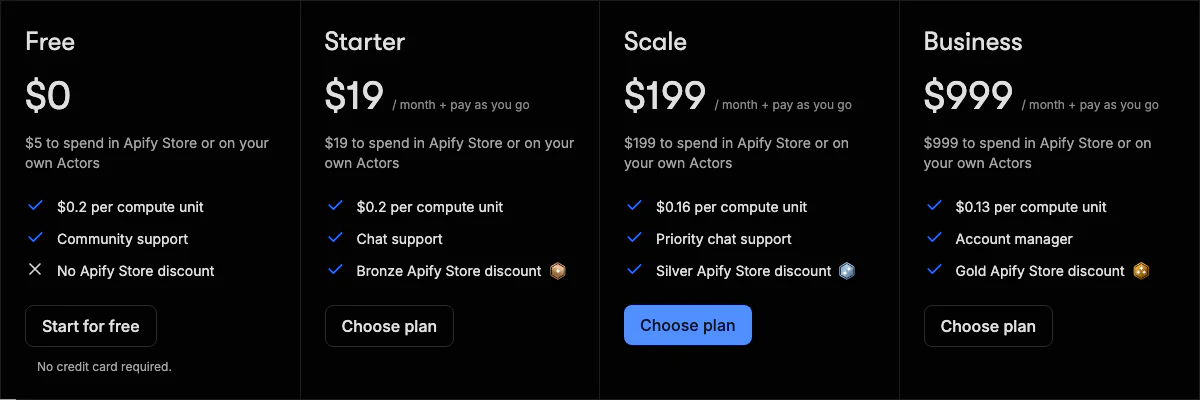
Look at the price and the usage columns. They're the same number on every plan.
So what are you actually buying when you move up? Not more product. You're pre-buying usage at a lower rate, with higher limits, better support and a bigger discount on paid Store Actors.
That leads to the rule most people learn too late: upgrading only saves money if you'd have spent it anyway. Unused usage disappears at the end of each billing cycle. Upgrade early and you're paying for credit you'll throw away.
What a compute unit actually is
Compute is the first meter, and the simplest.
One compute unit (CU) is 1 GB of memory running for one hour. That's it. Multiply the memory you give a run by how long it runs:
compute units = memory (GB) × runtime (hours)A job with 4 GB that runs for 30 minutes uses 2 CU. On Starter, that's 40 cents. Run the same job for a full hour and it's 80 cents.
Now the detail that catches people. You pay for the memory you allocate, not the memory the job uses.
You set memory per run, in steps from 128 MB up to 32 GB, and every 4 GB also gives the run one full CPU core.
Give a job 8 GB "to be safe" when it needs 1 GB, and you pay eight times over. The run won't fail. It'll just cost more.
The costs that aren't in the plan price
Compute is one meter of four. On most scraping jobs, it isn't even the biggest.
Proxies
| Proxy | Free and Starter | Scale | Business |
|---|---|---|---|
| Residential | $8 / GB | $7.50 / GB | $7 / GB |
| SERP | $2.50 / 1,000 | $2 / 1,000 | $1.70 / 1,000 |
| Datacenter | 5 IPs on Free; 30 on Starter, then $1 / IP | 200 included, then $0.80 / IP | 500 included, then $0.60 / IP |
Put residential proxy in compute terms. One GB costs the same as 40 hours of a 1 GB job on Starter.
That's why proxy choice should shape how you build. If a site doesn't need residential IPs, using them anyway can multiply your bill for nothing. Test datacenter proxies on your target first.
Storage and data transfer
These are small per job and easy to ignore, until you run millions of pages.
| Item | Free and Starter | Scale | Business |
|---|---|---|---|
| Dataset storage, per 1,000 GB-hours | $1.00 | $0.90 | $0.80 |
| Request queue storage, per 1,000 GB-hours | $4.00 | $3.60 | $3.20 |
| Dataset writes, per 1,000 | $0.005 | $0.0045 | $0.004 |
| External data transfer, per GB | $0.20 | $0.19 | $0.18 |
| Internal data transfer, per GB | $0.05 | $0.045 | $0.04 |
Writing 10,000 results to a dataset costs about 5 cents. Cheap. But request queues cost four times as much to store as datasets, so a big crawl with a bloated queue quietly adds up.
One more from Apify's own FAQ: reading or writing a run's dataset after the run has finished also counts as usage. So does every retry when a request fails.
Actor fees
This is the meter that catches people hardest, because it depends on someone else's pricing.
The Store lists more than 72,000 Actors, and each one's page tells you which of two pricing models it uses.
The first is pay per event. You pay a fixed price for something the developer defines, like starting a run or returning one result, and most include platform usage in that price. Some don't, so read the Actor's pricing section.
The second is pay per usage. The developer adds nothing. You pay only for the compute, transfer, storage and proxies the run uses, which is exactly what the maths above describes.
Both draw from the same prepaid credit. Paid plans also come with Store discounts (Bronze on Starter, Silver on Scale, Gold on Business) that cut the price of participating Actors. If you mostly run other people's Actors, that discount can matter more than the compute rate.
What Apify actually costs: three worked examples
Enough rates. What does a real job cost?
1. A small recurring scrape
One Actor with 2 GB of memory, running 20 minutes, twice a day. That's about two-thirds of a CU per run, or roughly 40 CU a month.
At $0.20 a CU, you spend about $8 on compute. Add a little storage and transfer and you're still well inside Starter's $19, with room left for a paid Store Actor.
Pick Starter. You won't use all of it.
2. A mid-size daily crawl
Four Actors at 4 GB each, running an hour a day. That's 16 CU a day, about 480 a month: $96 on Starter, or $77 on Scale.
Now add 20 GB of residential proxy. On Starter that's another $160, which is more than you spent on compute, and your month now comes to about $256.
You might be thinking you'll just stay on Starter and pay the overage. Run the numbers on Scale instead: $77 of compute plus $150 of proxy is $227, all but $28 of it covered by the $199 you prepaid. Scale is about $29 cheaper, and you get four times the concurrency.
And notice what a compute-only forecast would have told you: $96. It would have missed more than half the bill.
3. Buying results instead of compute
Say you need 10,000 Google Maps listings a month for a sales list. Apify's Google Maps Scraper charges per place scraped, from $1.50 per 1,000 places, and doesn't bill compute separately.
At that starting rate, the whole job is about $15. It fits inside Starter's $19, and you never think about memory or proxies. Extras like reviews, images and contact details cost more, and your plan's Store discount changes the rate, so check the price the Actor shows you before a big run.
For well-defined jobs, this is usually the cheapest and most predictable way to use Apify.
Can a runaway job drain your card?
It's the question every finance person asks. The answer is no, if you set one thing.
On a paid plan, running past your prepaid usage doesn't stop anything. You keep going and pay overage on your next invoice. But Apify charges overage only up to the usage limit you set in your billing settings.
Set that limit on day one. On the free plan you don't need it: once the $5 is gone, runs are blocked until the next billing cycle.
API costs and rate limits
Calling the API costs nothing on its own. You pay for what the runs behind it use. What the API does have is rate limits, and they apply per resource, not per account.
| Operation | Limit |
|---|---|
| Default, per resource | 60 requests / second |
| Key-value store records | 200 requests / second |
| Request queue operations | 400 requests / second |
| Dataset push | 400 requests / second |
| Global, per account | 250,000 requests / minute |
"Per resource" means each Actor, run, dataset or key-value store on its own. Go over and you get HTTP 429 Too Many Requests.
Apify's docs recommend waiting a random 500 to 1,000 milliseconds, then doubling the wait on each repeat. The official SDKs do this for you. Call the REST API directly and you'll need to build it yourself.
Scraper limits by plan
| Limit | Free | Starter | Scale | Business |
|---|---|---|---|---|
| Total memory, all runs | 16 GB | 64 GB | 256 GB | 512 GB |
| Concurrent runs | 5 | 32 | 128 | 256 |
Total memory is usually the wall you hit first. Starter's 64 GB fits 32 runs at 2 GB each. Give your Actor 4 GB and it fits 16, not the 32 on the plan.
Close to the limit? You don't always need the next tier.
Extra concurrent runs cost $5 each and extra memory $1 per GB, both as monthly add-ons. Compare that with the next plan: sometimes the add-on is far cheaper, and sometimes the upgrade's lower rates pay for themselves.
Seven ways to cut your Apify bill
- Right-size memory. Check what one run really needs, then allocate that plus some headroom. An Actor set to 4 GB that needs 1 GB costs four times what it should.
- Skip residential proxies unless the site demands them. They're the most expensive meter per GB. Try datacenter first.
- Block images, fonts and media in browser scrapers. They cost you twice, once in transfer and again in runtime.
- Use plain HTTP scraping where the site allows it. A headless browser needs more memory and runs longer, and you pay for both.
- Keep request queues lean. They cost four times as much to store as datasets.
- Compare per-result Actors with per-usage ones. For a well-built Actor, paying per result is often cheaper and always more predictable.
- Don't upgrade for the rate alone. Unused usage expires. Move up only when your spend already sits near the next plan's price.
How Apify pricing compares
Comparing scraping tools on price is awkward, because they don't share a unit. Apify sells compute time, Bright Data sells records, and ScrapingBee sells API credits. Here's where each starts:
- Apify: a free plan with $5 of usage, paid plans from $19 a month, and $999 before Enterprise.
- Bright Data: 5,000 free records a month, then $1.50 per 1,000 records pay-as-you-go, or $499 a month for its Scale plan.
- Octoparse: a free plan, then paid plans from $69 a month.
- ScrapingBee: 1,000 free API credits, then plans from $19 a month.
Interesting, isn't it? Bright Data's pay-as-you-go rate is the same $1.50 per 1,000 as Apify's Google Maps Scraper's starting price.
Apify wins on the free plan, which is real enough to test with, and on cheap per-result Store Actors. It loses on predictability for compute-billed work, where a per-record price is simply easier to budget.
Which plan should you choose?
Start from what you'll really spend, not from the features list.
- Free is for testing and small jobs. $5 of usage, 5 concurrent runs and 16 GB of memory, with no time limit and no card.
- Starter ($19) fits solo developers with one or two recurring scrapes or light Store Actor use. It's the right default if you'd spend under $19 a month.
- Scale ($199) suits small teams running production pipelines. Take it once your Starter bill would pass $199 anyway, not before.
- Business ($999) is for sustained high-volume work, where the $0.13 compute rate, $7 residential proxy and Gold Store discount all compound on real spend.
Not sure which one you are? Don't guess from a table. Run your real job on the free plan for a week, open the usage breakdown, and let those numbers choose.
For whether Apify is right for you at all, beyond price, read our Apify review.