
You have a name, a company and a reason to write. So you guess jane.doe@company.com, send, and get a bounce notice ten seconds later. Do that forty times and your own domain starts paying for it.
The good news: finding a business email address is cheap now. At list prices, a found and checked address costs about 2 cents in Hunter or Apollo, and a careful manual guess costs nothing.
The bad news is a kind of company domain where no checker can tell you whether your guess is right. You can't tell from the outside which companies run one. We'll get to how to spot it, and what to do about it.
Checked on 25 October 2026 against Hunter's and Apollo's pricing pages and docs, ZeroBounce's pricing, Google's sender guidelines and the UK ICO. We didn't look up or verify any real person's address for this post, and we didn't send a campaign.
Three ways to find a work email, and what each costs
Every method comes down to the same two steps: get a likely address, then check it before you send. What changes is who does the guessing.
| Route | Cost per address | Best when |
|---|---|---|
| Work out the pattern yourself, then verify | Free for a handful (Hunter's verifier gives 5 free checks a day without signup) | You need under ten addresses |
| An email finder (Hunter, Apollo) | About 2 cents on entry paid plans; nothing if no address comes back | You're building a list of 50 or more |
| A separate verifier on an old list (ZeroBounce, Hunter) | About 1 to 2 cents a check | The addresses are months old or came from a CSV |
Start with the free route, even if you plan to pay later. Knowing how the guess works is how you'll read a finder's results.
Method 1: work out the company's email pattern yourself
Almost every company builds addresses from one template, like jane.doe@ or jdoe@. Find one real address at the company and you know the template for everyone there.
Step 1: find one real address on their own pages
Look where companies publish named addresses on purpose. Try the press page, the team page and blog bylines first. Then the security disclosure page, speaker bios and PDF reports.
A generic address like hello@ or sales@ tells you the domain, not the pattern. You need one with a person's name in it.
Also check the domain itself. A company's website and its email can live on different domains after a rebrand or an acquisition. If the press contact is jane.doe@acme-group.com while the site is acme.io, use acme-group.com.
Step 2: if you find nothing, guess by company size
Company size predicts the pattern surprisingly well. Interseller, a sales software company, published its count from over 5 million companies, and the split is stark:
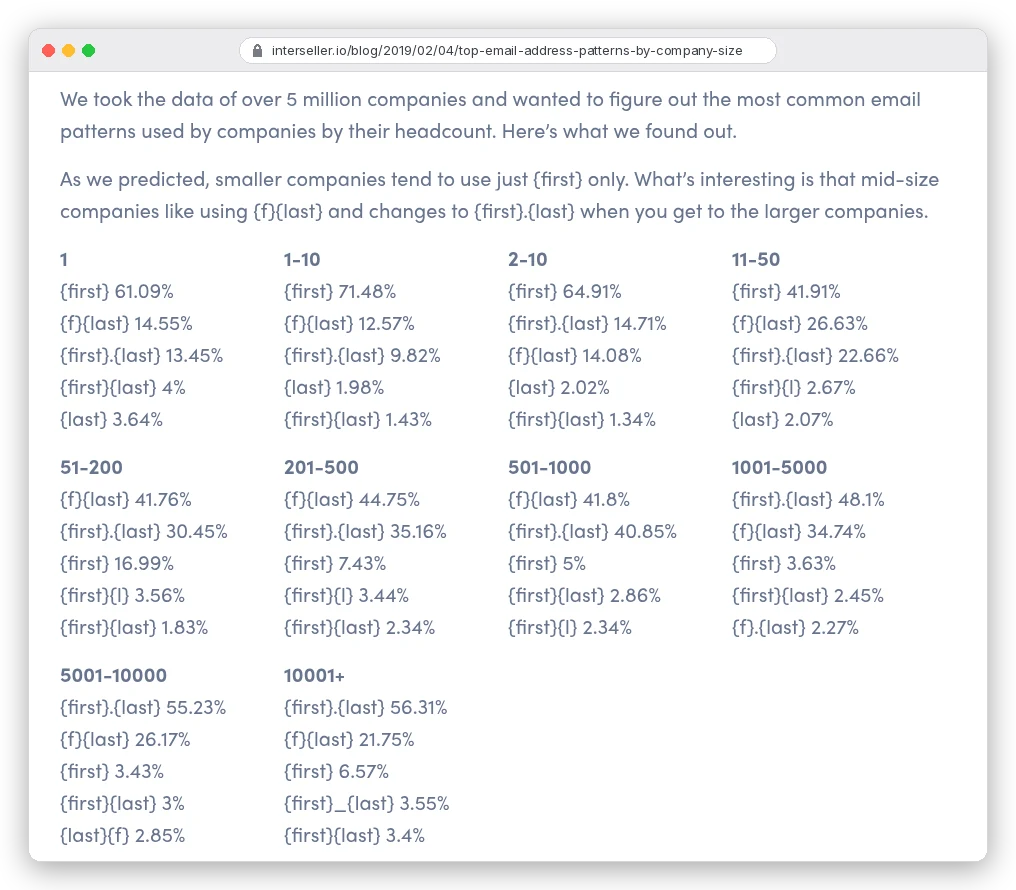
So the order to try depends on headcount:
- Under 50 people: jane@ first. At 1 to 10 people, 71.48% of companies used first name only.
- 51 to 1,000 people: jdoe@ first, then jane.doe@. The two are close at 501 to 1,000 (41.8% against 40.85%).
- Over 1,000 people: jane.doe@ first. It reaches 56.31% above 10,000 employees.
Those numbers are from 2019, which is old for a dataset. But companies rarely change an email template once hundreds of people use it, so the ranking still makes a sensible order of guesses.
Step 3: never send to the guess unchecked
A guess is a hypothesis. Paste it into a verifier first (the verification section below explains what the answer means). If jane@ comes back invalid, try jdoe@, then jane.doe@.
Three tries usually settles it. If none comes back valid, stop guessing and move to Method 2.
Method 2: let an email finder do the guessing
A finder does the same thing you just did, at scale, with a database behind it. You give it a name and a company domain. It returns one address and tells you how sure it is.
Hunter describes it plainly. Its Email Finder first searches addresses "found publicly on the web". If there's no likely match, it "considers the likely permutations of the person's name on that domain".
Then every result goes through "a free email verification before being returned".
That last part matters for your budget. You don't need a second tool to re-check an address a finder just returned. You'd pay twice for the same check.
Read the label, though. Hunter's API marks each address as "found" (seen on a public web page) or "inferred" (worked out from the name and the company's pattern). An inferred address on a domain that fails verification is still a guess, just a well-informed one.
What a found email costs in Hunter
Hunter charges credits. One credit per email found, half a credit per verification, and "if the email address can't be found, it's free". Repeat searches inside a billing period count once.
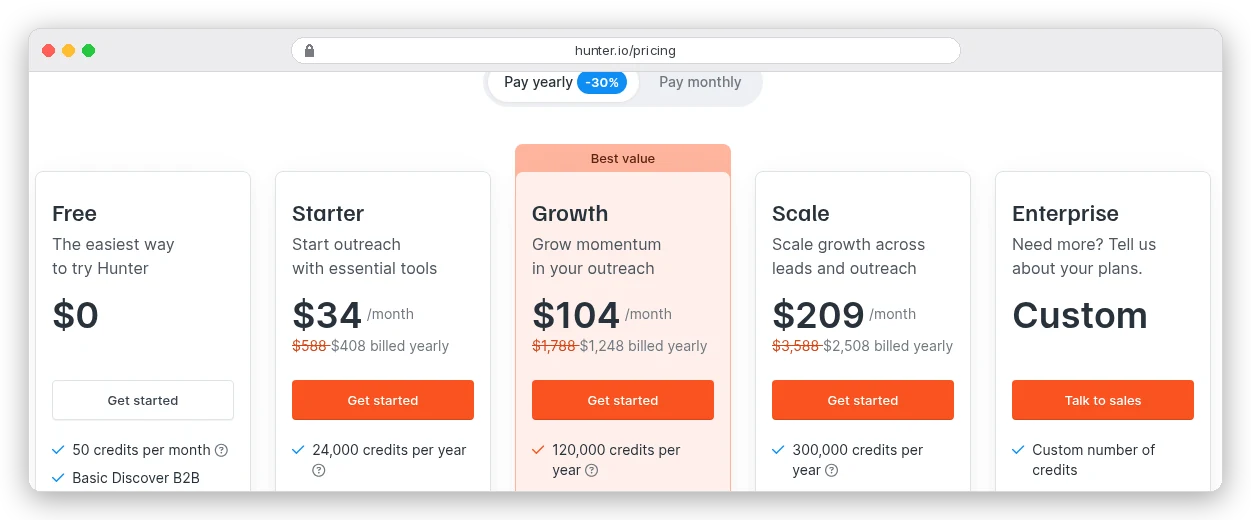
On Starter that's $408 for 24,000 credits, or 1.7 cents per found address. A dollar buys about 59 found emails. The free plan's 50 credits a month cover 50 lookups or 100 verifications.
One more detail from the pricing page: Hunter's plans come with unlimited team members sharing one credit pool. A small team doesn't pay per seat for lookups. If you want to look, Hunter's plans start free.
What a found email costs in Apollo
Apollo also charges one credit per email, and it's a bigger database with a sequencer and dialer attached. Basic is $49 per seat per month, billed annually, with 30,000 credits per seat per year.
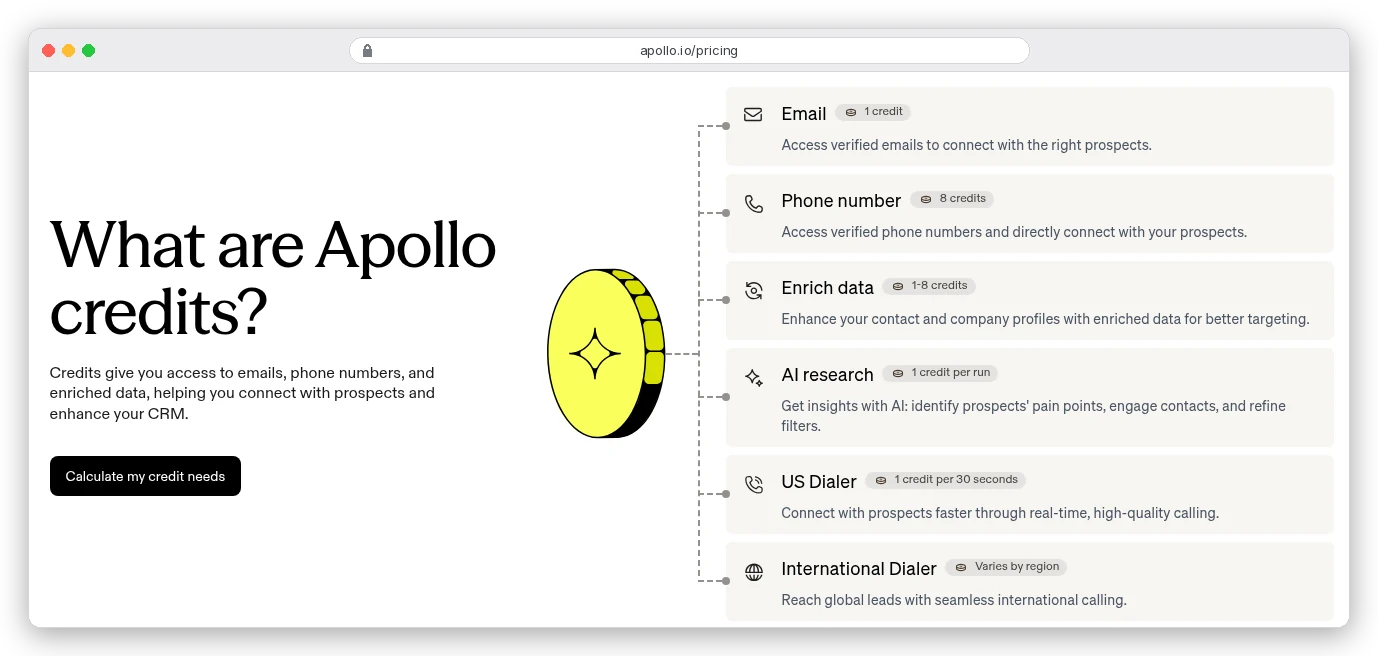
That works out to about 2 cents per email on Basic ($588 a year for 30,000 credits). Phone numbers cost 8 credits each, so a list with mobiles burns credits eight times faster.
The free plan gives 900 credits per seat per year, granted monthly. That's 75 email lookups a month, enough to test it on a real list.
The API docs add a useful detail: Apollo's enrichment charges "only if credit-consuming data is found". A lookup that returns no email costs nothing, same as Hunter.
Which one? If all you need is addresses, Hunter is simpler, and the whole team shares its credits. If you'll also filter by job title, sequence and call, Apollo saves you a second tool.
Our guide to finding leads in Apollo covers the filters. The Instantly vs Apollo comparison covers sending.
How to verify an email address before you send
A verifier runs a few checks in order. Hunter's starts with the format and flags gibberish, disposable and webmail addresses. Then it looks up the domain's MX records (the DNS entries naming its mail server) and "runs a live check against its SMTP server".
That last step asks the company's mail server whether the mailbox exists, without sending a message. The server's answer decides the status you get back.
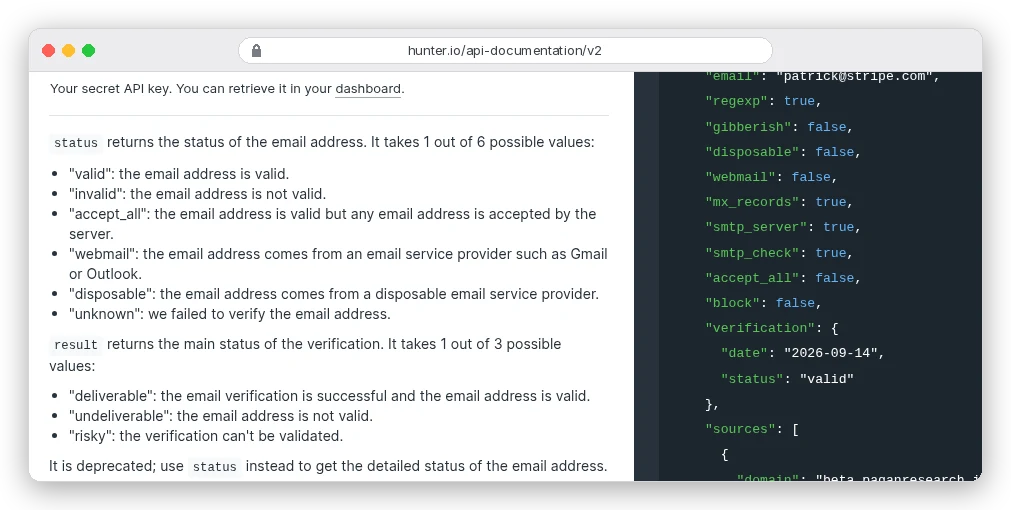
Here's what each status means for you:
| Status | What the server said | What to do |
|---|---|---|
| valid | This mailbox exists | Send |
| invalid | No such mailbox | Don't send; try the next pattern |
| accept_all | It accepts any address at this domain | Read the next section first |
| unknown | Hunter couldn't complete the check | Retry later, or treat it as accept_all |
| webmail | A Gmail or Outlook-type address | Not a business address; find their work one |
| disposable | A throwaway inbox service | Drop it |
Failed checks are usually free. Hunter charges nothing when a verification comes back unknown, and ZeroBounce says it will "never charge you for 'unknown' results".
Apollo shows its own labels in search results: verified, unverified, catch-all and a few others. Its help centre says sending to unverified addresses "can increase your bounce risk". In its API, an address Apollo holds but hasn't verified comes back as "extrapolated".
Checking an old list costs about 1 to 2 cents an address
A list you bought, scraped or exported last year needs a full pass before it goes near a sequence. People change jobs, and their old address starts bouncing.
On Hunter Starter, a verification costs half a credit, about 0.85 cents. ZeroBounce's pay-as-you-go starts at $39 for 2,000 checks, about 1.95 cents each.
ZeroBounce has a finder too, but it uses 20 credits per successful lookup: about 39 cents at that rate. Use it to clean lists, not to find people.
Watch the date on the result, too. Hunter's API docs say it "can return a verification made up to one month ago". For a list you're sending next quarter, check again closer to the send.
The catch: accept-all domains can't confirm anything
Back to the domain type from the top. Some company mail servers are set to accept mail for any address at the domain, real or not. Hunter calls them accept-all; Apollo calls them catch-all.
On those domains, the SMTP check is useless. jane.doe@ gets the same "yes" as qwerty123@. Hunter's API docs warn of "false positives on SMTP checks", and its verifier page says such addresses "cannot be verified".
You're probably thinking: then the email gets delivered, so what's the problem? It gets delivered somewhere.
Maybe a catch-all mailbox nobody reads, a filter that drops it later, or a delayed bounce that still counts against you. You won't know which.
So what do you do with an accept_all result?
- Prefer an address that was found on a public page over one that was inferred. Hunter lists the sources and the dates it saw them.
- Check the confidence score. Hunter gives one for addresses it couldn't validate; treat a low score as a guess.
- Try a second source. Apollo says its catch-all results can be verified by its own process and charges 1 credit for them. If two independent tools agree on the same address, that's better evidence than either alone.
- Send a small batch from one mailbox first, and watch bounces before you add the rest.
- Skip the contact when it's a cold first touch and nothing else supports the address. A LinkedIn message or a phone call may be the better route.
The rule for catch-all addresses: never let them make up most of a sequence. Keep them in a separate, smaller send so a bad batch can't drag your whole domain down.
Why one bad batch costs more than the credits you saved
The number to work to is 2%. Hunter's verifier page says to keep "campaign bounce rates below 2%". The benchmark reports in our cold email guide draw the danger line in the same place.
Two percent of a 500-person list is ten bounces. Ten unverified guesses can use that up on their own.
Mailbox providers react to bounces. Google tells senders to "automatically unsubscribe recipients who have multiple bounced messages". When bounces start, it says to "reduce the sending volume until the SMTP error rate decreases".
Compare the costs. Verifying 500 addresses on Hunter Starter costs about $4.25. Fixing a domain's reputation costs weeks of reduced sending, and there's no price list for that.
Is it legal to find and email someone's work address?
Finding a published address is one thing. What you do with it is where the rules apply, and they differ by country. This is a plain-English summary of official guidance, not legal advice; talk to a qualified lawyer about your situation.
In the UK, the ICO's guidance says you can email "any corporate body" without prior consent. But sole traders and some partnerships "are treated as individuals".
The ICO adds that you "may also need to consider data protection implications" when emailing named employees at addresses like firstname.lastname@. That's exactly the kind of address this post helps you find.
The ICO also notes the guidance is under review after the Data (Use and Access) Act, so check it again before relying on it.
Two habits help almost everywhere. Record where each address came from. Under Article 14 of the EU GDPR, you must tell people "from which source the personal data originate", at the latest in your first message. And don't buy lists: Google's sender guidelines say "don't purchase email addresses from other companies".
Our cold email guide covers CAN-SPAM, PECR and GDPR in more depth.
Mistakes that waste credits or burn your domain
- Running a permutation list of 30 guesses through a verifier. On an accept-all domain, every guess comes back the same.
- Paying a separate verifier to re-check addresses a finder verified this week.
- Sending to a role address like info@ in place of a person. It's real, but nobody owns the reply.
- Exporting phone numbers you won't call. In Apollo, each one costs 8 credits.
- Sending to a list you verified three months ago without checking again.
- Using the website domain when the company sends from a different one.
Which route should you take?
Need two or three addresses this week? Do it by hand. Find one named address on the company's site and apply its pattern. Then check each guess in Hunter's free verifier, which allows 5 checks a day without an account.
Building a list of 50 to a few hundred people? Use a finder and trust its own verification. Pick Hunter if you only need emails and want the team on one credit pool. Pick Apollo if you'll also filter by role, sequence and call from it.
Sitting on an old list? Verify all of it before it goes near a sequence. That's 1 to 2 cents an address, which is cheap insurance next to a damaged domain.
Apollo's free plan gives you 75 email lookups a month, enough to try this on your next real list.
Whichever route you pick, set aside the accept-all addresses. Send them separately, and only when something besides the SMTP check backs them up.