You buy a fresh domain on Monday, set up three mailboxes and load 300 prospects into a sequence. By Wednesday: zero replies and a full bounce report.
The copy was fine. The mail never reached anyone.
Cold email deliverability is the plumbing under every campaign: three DNS records, a sending pace, and two numbers you have to keep low. Get them right once and you mostly stop thinking about them.
The rules Gmail, Yahoo and Outlook publish look like they're only for senders of 5,000 emails a day. One line in Google's FAQ says otherwise for most cold emailers. We'll get to it.
Requirements checked against Google's, Yahoo's and Microsoft's sender pages, the SPF and DMARC standards and Apollo's help centre on 28 October 2026. This post is written from those docs and standards. We didn't send test campaigns for it.
What cold email deliverability comes down to
Deliverability means your email lands in the inbox, not the spam folder or a bounce log. For cold email, five things decide it:
- SPF and DKIM on the sending domain, plus a DMARC record, all passing.
- The domain in your From: address aligned with the domain SPF or DKIM checked.
- Spam complaints below 0.1%, and never at 0.3%.
- Bounces below 2%, which means verifying every address first.
- A slow, steady pace: around 30 to 50 cold emails per mailbox per day, ramped up over weeks.
Copy matters too, and our guide to writing cold emails that get replies covers it. But copy can't rescue an email that fails authentication. So start with the records.
SPF, DKIM and DMARC: what each record proves
All three are TXT records in your domain's DNS. Each answers a different question a receiving server asks about your message.
| Record | The question it answers | Where it lives |
|---|---|---|
| SPF | Is this server allowed to send for this domain? | The domain itself |
| DKIM | Did the domain owner sign this message, and is it unchanged? | selector._domainkey under the domain |
| DMARC | Did SPF or DKIM pass for the From: domain, and what should happen if not? | _dmarc under the domain |
SPF: one record, ten lookups
In the examples below, example.com is your main company domain and example.net stands in for your cold email domain.
SPF lists the servers allowed to send as your domain. If you send from Google Workspace only, Google's SPF setup page gives you the whole record:
; Example only: replace example.net with your sending domain
example.net.  TXT  "v=spf1 include:_spf.google.com ~all"
Two rules from the SPF standard, RFC 7208, catch people out. A domain gets one SPF record: publish two and the check returns "permerror".
And the include, a, mx, ptr, exists and redirect terms are capped at 10 DNS lookups. Go over, and it fails the same way.
That cap bites when every tool you've ever trialled asked you to add its include. Remove the ones you no longer send through.
DKIM: a signature with a selector
DKIM signs each message with a private key and publishes the public half in DNS. Gmail requires a key of at least 1024 bits for personal accounts and recommends 2048. Yahoo asks for at least 1024.
The record sits under a selector. In Google Workspace the default is google, so the record lives at google._domainkey.example.net.
Not sure which selector your tool uses? Google's DKIM help page has the trick: send yourself an email, view the message source, and read the s= value in the DKIM-Signature header.
DMARC: the policy and the reports
DMARC tells receivers what to do when a message fails, and where to send reports about it. A starting record looks like this:
; Example only
_dmarc.example.net.  TXT  "v=DMARC1; p=none; rua=mailto:dmarc@example.net"
p=none means "deliver as normal, but report". Gmail, Yahoo and Microsoft all accept it as the minimum.
The rua address gets aggregate reports showing every server that sends as your domain. Yahoo "strongly" recommends including it.
Having all three records isn't the same as passing DMARC, though. That depends on alignment.
Alignment: the check most setups quietly fail
DMARC passes only when SPF or DKIM passes for a domain that matches the one in your From: address. Google's wording: "The authenticating domain must be the same domain that appears in the message From: header."
Here's how it goes wrong. You send as sam@example.net through a tool that signs DKIM with its own domain and uses its own bounce address.
SPF passes, for the tool's domain. DKIM passes, for the tool's domain. DMARC fails, because neither matches example.net.
Gmail has an error code for exactly this, 4.7.32: the From: header "isn't aligned with either the authenticated SPF or DKIM organizational domain."
Relaxed alignment accepts the same organisational domain, so mail.example.net aligns with example.net; strict needs an exact match. Yahoo says relaxed "is acceptable", and Google needs only one of SPF or DKIM aligned, for now.
"For now" is Google's hint, not ours. Its FAQ says DMARC alignment with both SPF and DKIM "will eventually be a sender requirement". So align both today and you won't have to touch this again.
How to check your records in five minutes
You don't need a paid checker. From a Mac or Linux terminal:
# Example domain: swap in your own
dig +short TXT example.net                      # SPF: look for one line starting v=spf1
dig +short TXT google._domainkey.example.net    # DKIM: v=DKIM1; k=rsa; p=...
dig +short TXT _dmarc.example.net               # DMARC: v=DMARC1; p=...
On Windows, nslookup -type=TXT _dmarc.example.net does the same job.
Then check a real message. Send one to a Gmail address you own, open it, and view the original. The Authentication-Results header shows spf, dkim and dmarc, each with pass or fail, and the domain each one checked.
Read the domains, not just the word "pass". A DKIM pass for your sending tool's domain is the alignment failure from the last section, dressed up as a success.
Do the Gmail, Yahoo and Outlook bulk-sender rules apply to cold email?
On paper, the strict rules start at 5,000 messages a day. Here's what each provider asks for (the bulk column is where the five-figure senders live):
| Provider | Every sender | Bulk senders |
|---|---|---|
| Gmail (personal accounts) | SPF or DKIM, valid PTR records, TLS, spam rate below 0.3% | Close to 5,000 a day or more: SPF and DKIM, DMARC (p=none is fine), From: aligned, one-click unsubscribe on marketing mail, spam rate below 0.30% |
| Yahoo | SPF or DKIM, spam rate below 0.3%, valid forward and reverse DNS | No published threshold: SPF and DKIM, DMARC that passes, one-click unsubscribe, unsubscribes honoured within 2 days |
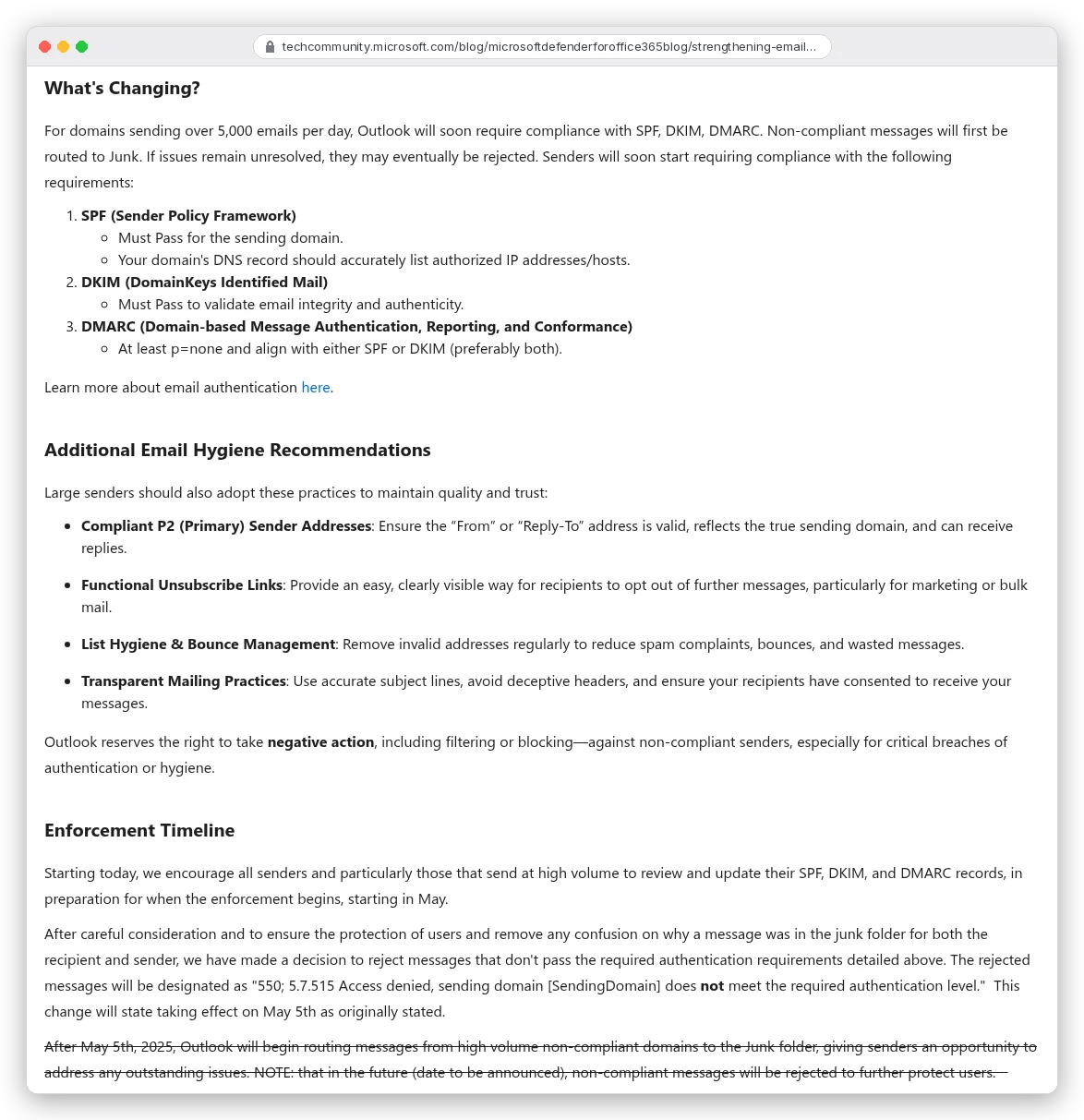
| Outlook.com (Microsoft consumer) | Recommendations only | Over 5,000 a day: SPF and DKIM must pass, DMARC at least p=none and aligned |
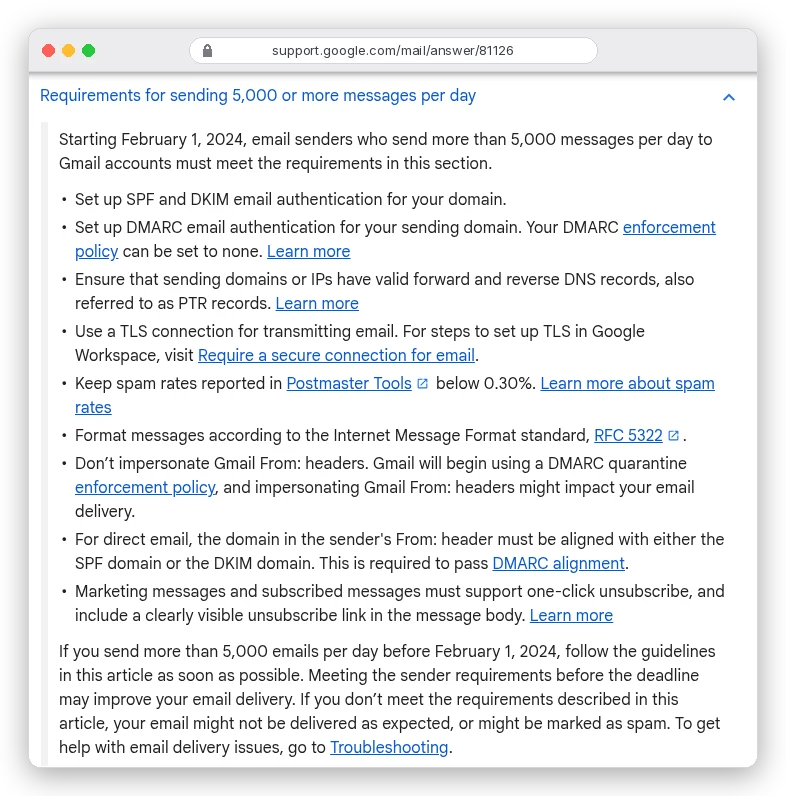
Now the line from the top. Google's sender guidelines FAQ counts "all messages sent from the same primary domain" toward the 5,000. And "senders who meet the above criteria at least once are permanently considered bulk senders."
So one day with about 5,000 emails to Gmail addresses, a newsletter say, makes your whole domain a bulk sender for good, cold mailboxes included. Yahoo doesn't publish a number at all: a bulk sender is anyone "sending a significant volume of mail".
Our advice: meet the bulk rules from day one, whatever your volume. It's three DNS records and a header.
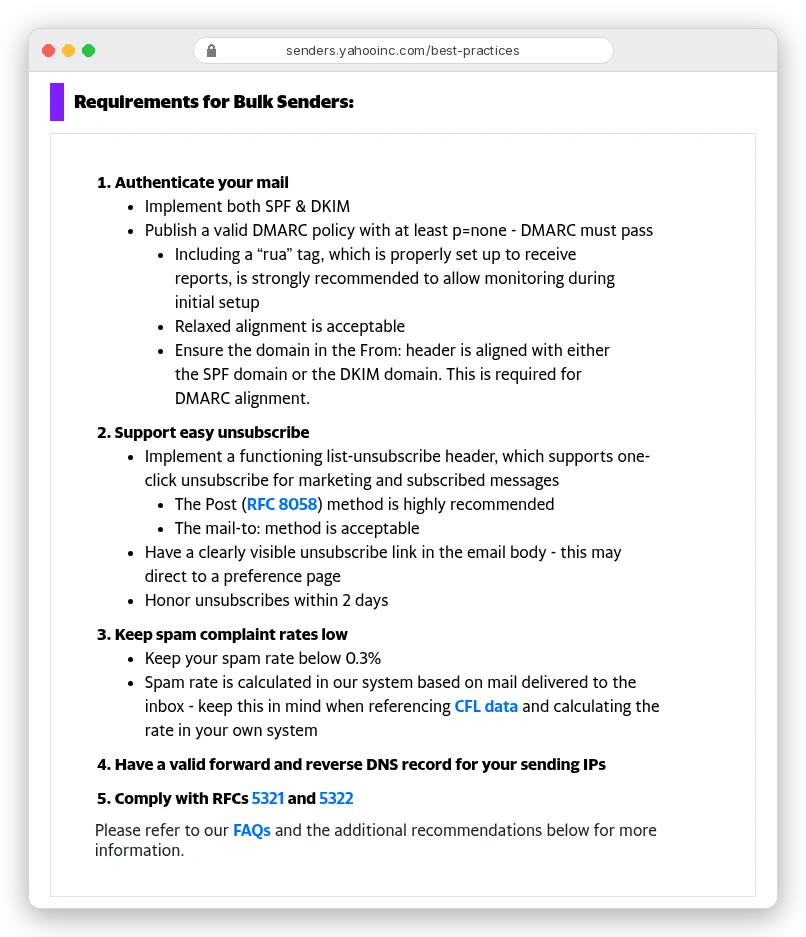
Is a cold email "marketing", so it needs one-click unsubscribe? Google answers that one for you: "Message recipients, not Google, determine the nature of the messages they receive." A stranger reads your pitch as promotional. Add the List-Unsubscribe headers and a plain opt-out line.
Enforcement is real now. Google says that from November 2025 non-compliant mail faces "temporary and permanent rejections".
Microsoft's April 2025 update goes further. Outlook.com rejects failing mail from high-volume domains with "550; 5.7.515 Access denied". A recipient's safe senders list won't save it.
One honest caveat. Google's rules cover personal Gmail accounts, and its FAQ says they "don't apply to messages sent to Google Workspace accounts", where most B2B prospects sit.
But nothing in Google's or Microsoft's docs says business inboxes are more forgiving. Set everything up anyway.
If you send through Apollo, two of these rules come built in. Its Sending protection checks SPF, DKIM and DMARC before emails go out and can pause a domain with a critical failure. Where Sending protection is active, it also adds one-click unsubscribe headers, and that policy "can't be turned off".
Should you send cold email from a separate domain?
Yes. Buy a second domain for outreach and keep your main domain for invoices, support and your team's day-to-day mail.
The reason is reputation. Gmail "tracks volume, feedback, and limits per domain and IP address", and Yahoo tells senders not to mix bulk mail with everyday or transactional mail.
If a cold campaign burns a domain, it should be one you can afford to lose.
Don't use a subdomain like outreach.example.com for this. Google's FAQ counts subdomains toward the primary domain's 5,000, and a subdomain still shares its organisational domain.
Set up the second domain like a real one:
- Its own SPF, DKIM and DMARC records, checked with the commands above.
- Mailboxes under real people's names that can receive replies, which Microsoft recommends for high-volume senders.
- A website, or a redirect to your main site, so a curious prospect lands somewhere real.
- A name a reader can connect to your company, not a random string.
Here's what a second domain doesn't do: make bad sending safe. Complaints and bounces follow the domain they came from. A team that blasts bought lists will burn the new domain too, just later.
How many cold emails can one mailbox send per day?
There are two different limits here, and people mix them up. The provider's hard cap is far higher than what's safe for cold email.
Google Workspace's sending limits allow 2,000 messages a day per user and 2,000 unique external recipients, over a rolling 24 hours. Exchange Online allows 10,000 recipients a day and 30 messages a minute, and Microsoft adds that legitimate bulk senders "should use third-party providers". Hit Google's cap and the user can't send for up to 24 hours.
Those caps are for normal business use. As Apollo's help centre puts it, "The average person doesn't send more than 50 emails a day."
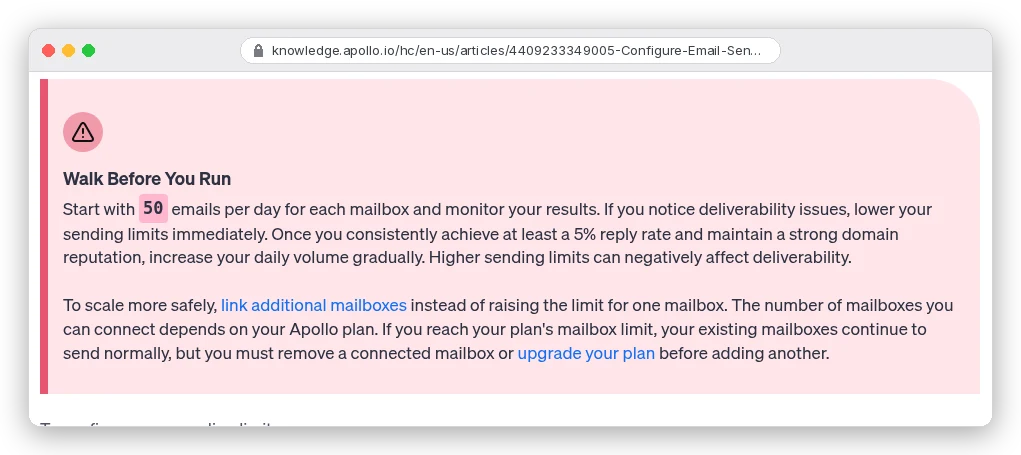
Even Apollo doesn't agree with itself on the number. The same help article lists recommended limits of 50 to 100 a day, 10 to 20 an hour, and 1 to 5 minutes between emails. Its deliverability product page says to start "around 20 emails per day" and not exceed 50.
Our call: 30 to 50 cold emails per mailbox per day, never more than 50, with a gap of a few minutes between sends. Need more volume? Add mailboxes, which is what Apollo's own article recommends.
Fifty a day sounds small. Over about 22 working days it's 1,100 emails, or roughly 275 new prospects a month on a four-email sequence. Three mailboxes cover about 800 people a month.
Apollo applies its limits per mailbox over a rolling 24 hours, and overflow waits instead of being dropped. One catch: mail you send from the inbox outside Apollo isn't counted. If the mailbox also handles everyday email, set the Apollo limit lower.
A ramp-up plan for a new domain
Google's guidance is blunt. "Start with a low sending volume", send "at a consistent rate", and avoid bursts: even doubling your volume suddenly can trigger rate limits.
Here's that turned into a calendar for one new mailbox. It's our plan, built from the providers' guidance, not a schedule any of them publishes.
| When | Do this | Cold emails a day |
|---|---|---|
| Day 0 | Buy the domain, create mailboxes, publish SPF and DKIM. Add DMARC (p=none, with rua) at least 48 hours later, as Google advises. | 0 |
| Weeks 1-2 | Warm-up only. No cold email yet. | 0 |
| Week 3 | Start with your best-fit, verified contacts. | 10-15 |
| Week 4 | Increase if bounces stay under 2% and nobody complains. | 20-30 |
| Week 5 on | Hold steady. Add mailboxes to grow, not volume per mailbox. | 30-50 |
If messages start bouncing or getting deferred, Google says to cut volume until the errors drop, then climb slowly again. A 4.7.28 error means you hit a quota: stop for at least 10 minutes before trying again.
Moving DMARC past p=none, and the pct tag that's gone
Once a week of reports shows only your own servers sending as the domain, you can tighten the policy. Google's rollout guide suggests a sample like p=quarantine; pct=5 to start.
But DMARC changed this year. In May 2026 it became a Standards Track RFC, RFC 9989, replacing RFC 7489, and the new version drops the pct tag.
The RFC's reason: pct "was usually not accurately applied, unless the value specified was either 0 or 100". A new t=y flag means "testing", and receivers apply one level below the stated policy.
Google's rollout page, updated 26 October 2026, still shows pct=5. Receivers on the old spec may honour it; ones on the new spec ignore it.
So don't build your plan on a percentage. Move to p=quarantine when reports are clean, and to p=reject once they've stayed clean for a few weeks.
; Example only: a sending domain at full enforcement
_dmarc.example.net.  TXT  "v=DMARC1; p=quarantine; rua=mailto:dmarc@example.net"
That leaves the step most people pay for first.
What warm-up tools do, and what they don't
A warm-up tool sends emails from your mailbox to a private network of other inboxes, which open them and reply. Apollo's warm-up guide describes exactly that, run through a third party, Warmbox.ai, and only on some Apollo plans.
Apollo recommends at least two weeks, a minimum of 10 and a maximum of 40 warm-up emails a day, and a 30% reply rate.
What it does: give a brand-new mailbox some history of normal, answered email before real prospects see it. That's worth having on day one.
What it doesn't do is just as important:
- It can't fix a bad list. Bounces come from your prospects' addresses, not the warm-up network.
- It can't undo complaints. Every "report spam" from a real prospect still counts against your domain.
- It can't rescue a burned domain. Apollo says so itself: if your reputation "is already damaged, email warmup may not be sufficient to recover."
- It can't hide from providers. Apollo's product page warns that providers "can detect compressed, bot-like warm-up".
So is warm-up a scam? No. It's a head start for new mailboxes, and a poor substitute for everything else here: use it for the first two weeks, not as insurance.
Bounces and complaints: the two numbers that end campaigns
Everything above gets your mail accepted. These two numbers decide whether it keeps being accepted.
Bounces first. The benchmark reports in our cold email guide put the danger line at 2%. Emailchaser saw unverified addresses bounce 4.6% of the time, verified ones 0.6%.
So every address gets checked before it enters a sequence. Our guide to finding and verifying business email addresses shows how.
Apollo's Bounce guard is on by default. It flags a sequence at a 4% bounce rate and pauses it at 6%, once 200 emails have gone out in seven days. That's looser than the 2% line, so lower both, to around 2% and 3%.
Complaints next. Google wants your spam rate below 0.10% and never at 0.30%; Yahoo's ceiling is 0.3%. That's one spam report per 1,000 delivered emails, and three at the hard limit.
Here's the part only a small sender hits: Postmaster Tools may show nothing. Google says dashboards "might not include all data" on low-volume days. At 150 cold emails a day, expect gaps.
Watch replies instead. Two "take me off your list" replies in a week means stop and fix the targeting.
If your lists come from Apollo, its sending protection can hold back unverified addresses and block high-risk catch-all contacts before they're enrolled.
When deliverability isn't the problem
Run the checks. SPF, DKIM and DMARC all pass and align, bounces sit under 2%, nobody's complaining, and replies are still close to zero. Then your mail is arriving, and people are choosing not to answer.
That's a targeting or copy problem, and more DNS work won't help. Don't diagnose it with open rates either: Google says it "doesn't track open rates", and low ones "aren't necessarily an accurate indicator of deliverability". Go back to the list (who you picked and why) and the first line of the email.
What to set up this week
Starting from scratch? Buy a separate sending domain today, publish SPF and DKIM, add DMARC two days later, and warm up two mailboxes for two weeks. Then follow the ramp table to 30 to 50 a day each.
Already sending, with problems? Run the three dig commands and read one message's Authentication-Results. Fix alignment first, then halve your daily volume until bounces and deferrals settle.
Scaling a team? Add mailboxes and domains, not volume per mailbox. Our Instantly vs Apollo comparison shows what each extra mailbox costs in both tools.
Building the lists in Apollo too? Our guide to finding and closing leads in Apollo covers the setup before the first send.
Whichever you are, check the records again after every new tool you connect. That's when the SPF record grows a second line, or an eleventh lookup.