You sell to local businesses. Dentists, plumbers, gyms, the café on every corner. They're all on Google Maps with a phone number and a website. Copying them into a spreadsheet by hand gets you about forty rows before lunch.
A scraper does the same job for every dentist in a city in one run. With Apify's Google Maps Scraper, 1,000 places plus the emails found on their websites cost $5.00 on the Starter plan at today's list prices. That's half a cent a business.
Two things can wreck the list before it reaches your CRM: one word in the search box, and a free-plan price that's 20 times the paid one. Both are below.
Checked on 27 October 2026 against Apify's actor page, input docs and pricing, Google's Maps Platform pricing and terms, HubSpot's import docs and the GDPR text. Written from the docs: we didn't run the actor or the Places API. We ran the cleaning script on a three-row sample shaped like Apify's documented output.
What you'll have at the end, and what it costs
The goal is a clean CSV of businesses, one row per place, that a CRM accepts without errors. Each row comes from fields the actor documents in its output:
- Name, category and Google's place ID (
title,categoryName,placeId) - Full address, split into street, city, postal code and country
- Phone, in a display form and an international form (
+17183565168in Apify's example) - Website, star rating (
totalScore) and review count - Whether the place is temporarily or permanently closed
- With the contacts add-on: emails and social profiles found on the business's own website
Apify bills this actor per result, not per minute of server time. The pricing tab says "Platform costs: Included" on every plan, so you pay for places and add-ons, and nothing for the machine doing the work.
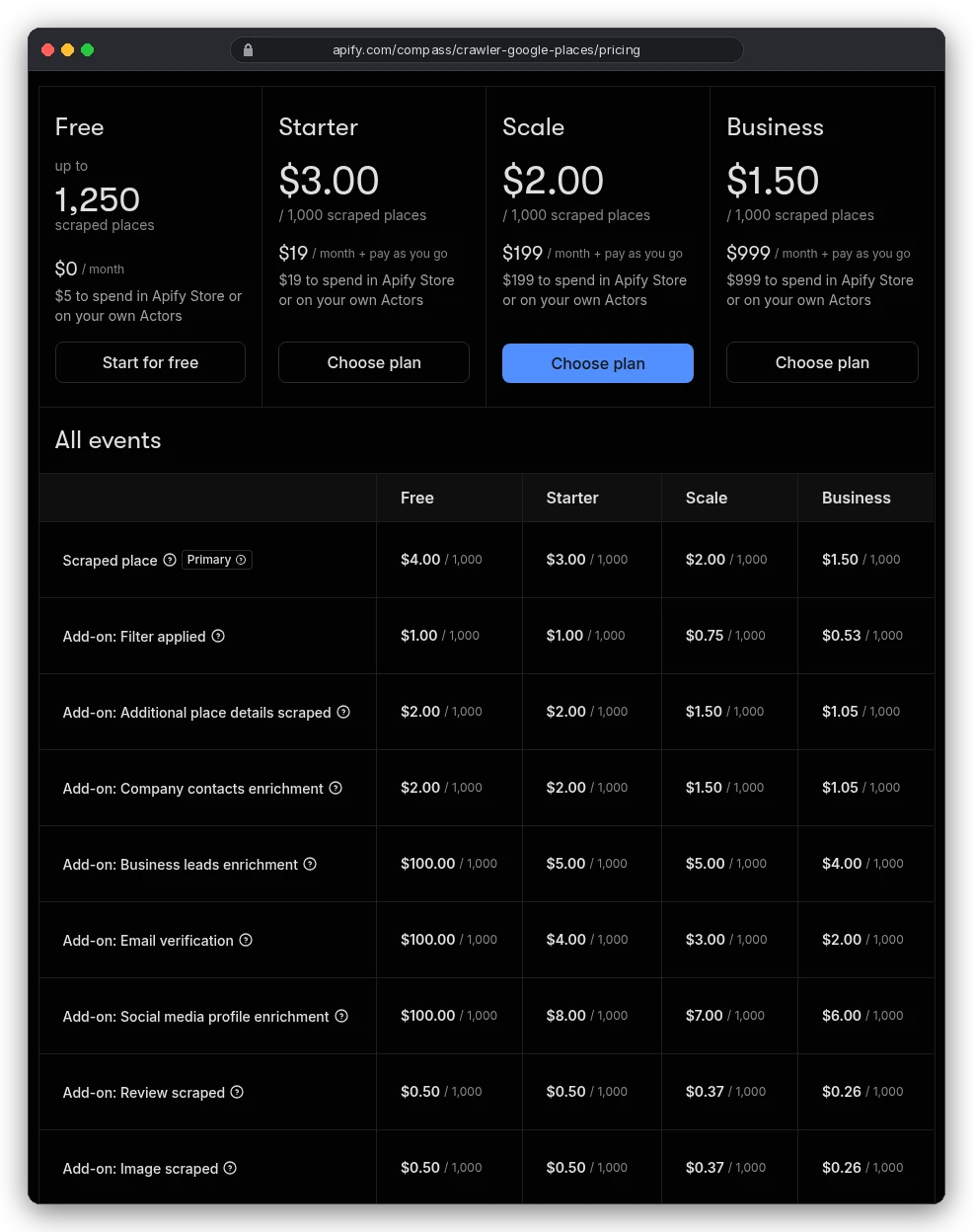
Here's what the common setup costs per 1,000 places, adding the place price and the company contacts add-on from that table:
| Plan | Places only | Places + website contacts | Plus one filter |
|---|---|---|---|
| Free ($5 credit) | $4.00 | $6.00 | $7.00 |
| Starter ($19/mo) | $3.00 | $5.00 | $6.00 |
| Scale ($199/mo) | $2.00 | $3.50 | $4.25 |
| Business ($999/mo) | $1.50 | $2.55 | $3.08 |
Each plan's monthly fee comes back as credit to spend in the Apify Store. So Starter's $19 covers 3,800 places with contacts before pay-as-you-go starts. The free $5 covers 1,250 bare places, or about 830 with contacts.
What you need before you start
Less than you'd think. An Apify account (the free plan needs no credit card) and a clear idea of who you're selling to. Plus somewhere to put the result: a CRM, Google Sheets, or a CSV for now.
No code is needed. The actor runs from a form in the Apify Console, and the export is a download button. You only need the API if you want runs on a schedule; our Apify review covers how the platform and its Store fit together.
How to scrape Google Maps with Apify, step by step
Step 1: pick search terms that don't overlap
Type what you'd type into Google Maps: dentist, plumber, yoga studio. Several terms are fine if they mean different things.
Synonyms just slow you down. Apify's README gives a good list: restaurant, bar, pub, cafe. Then a bad one: restaurant, restaurants, chinese restaurant, cafe, coffee, coffee shop. The bad list finds the same places over and over, and the run takes longer for no new rows.
Step 2: put the city in the Location field, never in the search term
This is the word that wrecks lists. The input docs warn that putting the location in the search, as in "restaurant Pittsburgh", "can limit you to a maximum of 120 results per search term".
That's Google Maps' own scroll limit. Type dentist Austin and you get at most 120 dentists, however many the city has. Put dentist in Search terms and Austin, USA in Location, and the actor splits the area into smaller map views and keeps going.
Use one location per run, and keep it simple: the docs suggest "City + Country rather than City + Country + State". A whole state or country works too, because the actor divides it up itself. For an odd-shaped area, the Custom search area field takes a GeoJSON polygon, with longitude before latitude.
Step 3: switch on only the add-ons you'll use
Every input marked with ($) in the form can add a billable event. The ones that matter for leads:
- Company contacts enrichment (
scrapeContacts): visits each business website and returns emails and social profiles. $2.00 per 1,000 on Starter. This is the one most lead lists need. - Business leads enrichment (
maximumLeadsEnrichmentRecords): named employees with job titles and work emails, up to the number per place you set. $5.00 per 1,000 leads on Starter. - Email verification: checks those lead emails. You're charged only for decisive results (valid, invalid, disposable), not catch-all or unknown.
- Reviews: leave
maxReviewsat 0 for a lead list. Reviews add cost and, by default, reviewers' names and photos.
Filters such as "with website only" or "skip closed places" are also marked ($). The pricing tab lists "Filter applied" at $1.00 per 1,000 on Starter.
We couldn't tell from the docs whether two filters bill twice. So take the cheap route: skip the closed-places filter and drop closed rows yourself in step 5. It's one line of code.
Step 4: run a small test, then the full area
Set maxCrawledPlacesPerSearch to 50 and run once. Open the table, check the categories are the ones you meant, and check how many rows have a website. Then clear the limit (empty means "all places") and run the whole area.
Here's that input as JSON, if you'd rather paste it into the JSON tab:
{
  "searchStringsArray": ["dentist"],
  "locationQuery": "Austin, USA",
  "maxCrawledPlacesPerSearch": 50,
  "language": "en",
  "website": "withWebsite",
  "scrapeContacts": true,
  "maxReviews": 0,
  "scrapeReviewsPersonalData": false
}
One warning in the docs surprises people. Some details only show to logged-in Google users, so popular times, "People also search" and most of additionalInfo are often empty. Don't plan a campaign around those fields.
Step 5: export and clean the dataset
When the run finishes, export from the Output or Storage tab as CSV, Excel or JSON. You can pick which fields to include before downloading. The raw file still needs three fixes before a CRM will like it:
- Remove duplicates by
placeId. Two search terms often find the same business. - Drop rows where
permanentlyClosedortemporarilyClosedis true. - Turn the website URL into a bare domain. HubSpot's company domain field "only accepts values up to the top-level domain", so
http://kimsislandsi.com/must becomekimsislandsi.com.
This short Python script does all three on a JSON export (standard library only). It turned Apify's documented example, plus a duplicate and a closed café we added, into one clean row:
import json, csv
from urllib.parse import urlparse

places = json.load(open("dataset.json"))
seen, rows = set(), []
for p in places:
    if p.get("permanentlyClosed") or p.get("temporarilyClosed"):
        continue                      # drop closed businesses
    if p["placeId"] in seen:
        continue                      # same place found by two search terms
    seen.add(p["placeId"])
    host = urlparse(p.get("website") or "").netloc.lower()
    domain = host[4:] if host.startswith("www.") else host
    rows.append({
        "Company name": p["title"],
        "Company domain name": domain,
        "Phone number": p.get("phoneUnformatted") or "",
        "Street address": p.get("address") or "",
        "City": p.get("city") or "",
        "Postal code": p.get("postalCode") or "",
        "Google category": p.get("categoryName") or "",
        "Google rating": p.get("totalScore") or "",
        "Google reviews": p.get("reviewsCount") or 0,
        "Google place ID": p["placeId"],
    })

with open("companies.csv", "w", newline="", encoding="utf-8") as f:
    w = csv.DictWriter(f, fieldnames=rows[0].keys())
    w.writeheader()
    w.writerows(rows)
print(len(places), "in,", len(rows), "out")
Keep the place ID. It's the only field that stays the same if a business renames itself, so it's how you'll match next quarter's run against this one.
The free-plan trap: same add-on, 20 times the price
The free plan looks like the obvious place to test. For bare places it is: $4.00 per 1,000, and the $5 credit covers 1,250 of them.
Now look at the business leads row in that pricing table. On Free it's $100.00 per 1,000 leads. On Starter it's $5.00.
Email verification ($100.00 against $4.00) and social profile enrichment ($100.00 against $8.00) jump the same way.
Say you test leads enrichment on the free plan with 50 leads. That's $5.00, your whole monthly credit, gone on one small run. On Starter the same 50 leads cost 25 cents.
So test the place search and website contacts on Free, where the gap is small. If you need named people, move to Starter first, or use a separate tool for that step (more on that below).
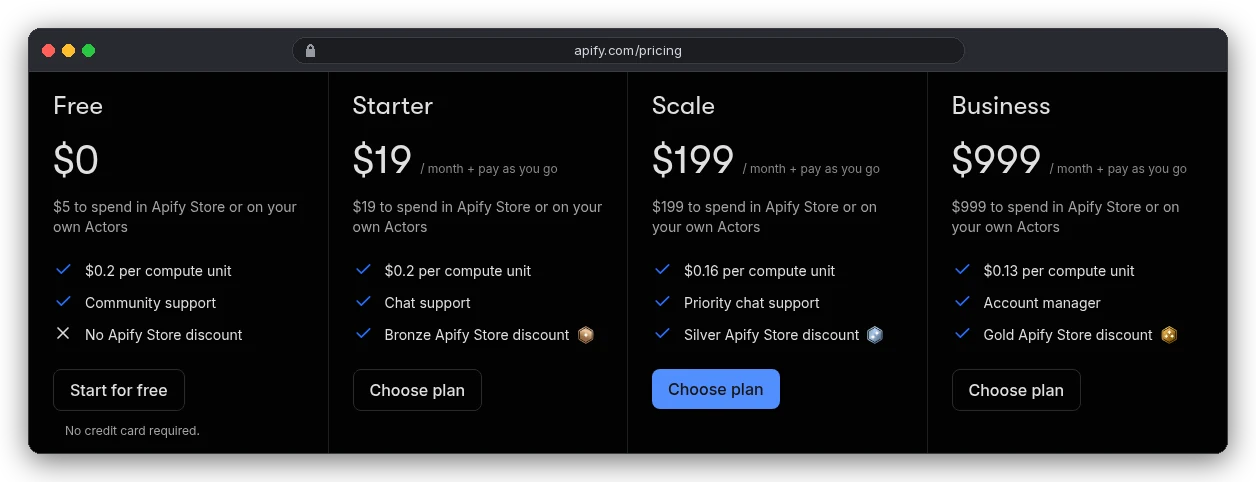
Is Scale worth $199 for this? Only if you'd spend that much anyway.
Places with contacts drop from $5.00 to $3.50 per 1,000, and a Starter bill reaches $199 at about 40,000 places a month. Past that, Scale is cheaper. For the full plan breakdown, see our Apify pricing guide.
Why not use Google's official Places API instead?
Fair question, and in raw dollars the API isn't expensive. Phone numbers and websites sit in the Text Search Enterprise tier, which costs $35.00 per 1,000 requests after 1,000 free requests a month. Each request returns up to 20 places.
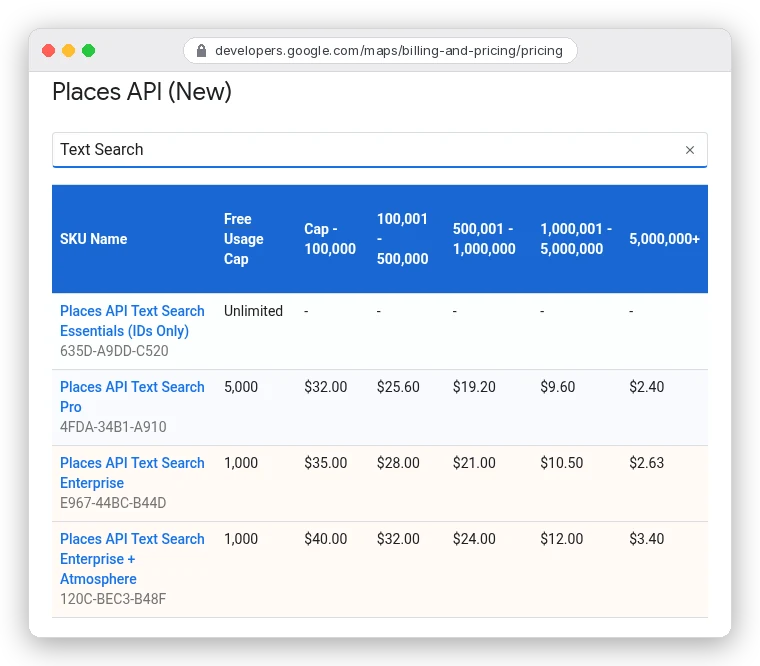
So 1,000 places means at least 50 requests, about $1.75 at that rate.
But Text Search "returns a maximum of 60 results across all pages", Google's docs say. Reaching 1,000 places takes at least 17 different queries. That's a lot of grid-splitting code.
The real blocker is the contract, though, not the code. Google Maps Platform's terms say a customer will not "copy and save business names, addresses, or user reviews".
The caching rules carve out only a little: you may keep place IDs, and coordinates for up to 30 days.
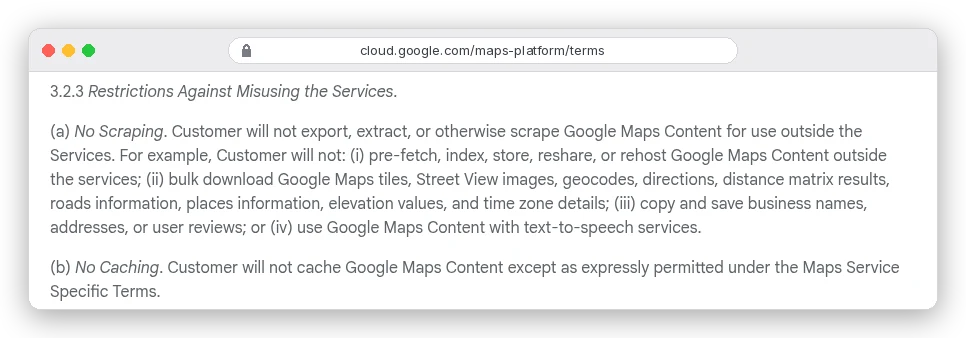
A CRM full of saved business names and addresses is exactly what that clause rules out. The API is built for showing places inside your app, not for building a list you keep.
One correction while we're here. Apify's own README still says the Maps API gives "$200 worth of credit usage every month". Google's current pricing page shows free usage caps per product instead, such as 1,000 free Text Search Enterprise requests a month.
Getting the list into your CRM without duplicates
HubSpot takes .csv, .xlsx or .xls files with a header row, fewer than 1,000 columns, and UTF-8 encoding if names have accents. On free tools, a file can be up to 20 MB and you can import up to 500,000 rows a day. Paid plans allow 512 MB and 1,048,576 rows per file.
Import as Companies, and map the domain column to Company domain name. That's the key HubSpot uses to match a company that already exists, so a second import updates rows instead of doubling them. Phone numbers import cleanly in the +[country code][number] form, which is what the actor's phoneUnformatted field already gives you.
The Google rating, review count and place ID columns have no default HubSpot property. Create custom company properties for them before importing, or set those columns to "Don't import column".
There's one more screen to expect.
When you import contacts, HubSpot asks you to agree "that contacts expect to hear from you and that your import file does not include a purchased list". A scraped list isn't purchased, but those people don't expect you either. Take that checkbox as a reminder of the legal part below.
From a business to the person who decides
A Google Maps row gives you the business: the front-desk phone and, with the contacts add-on, often an address like info@. For a five-person dental practice that's fine. At a 40-person firm, info@ often lands in a shared inbox, far from whoever approves the spend.
You have two ways to get a named owner or manager. Apify's business leads add-on does it inside the same run for $5.00 per 1,000 leads on Starter. Or import the domains into a sales database and search by company, the workflow in our guide to finding leads with Apollo.
Got a name and a domain but no address? Our guide on how to find a business email address covers pattern guessing and the catch with accept-all domains.
Then write to them like a person. Our cold email guide covers the first line, the follow-ups and the sending limits that protect your domain.
Is it legal to scrape Google Maps for leads?
It depends on two separate questions, and people mix them up. This is general information, not legal advice; ask a lawyer about your own case.
The first is Google's contract. Its terms for Maps users say you may not "mass download or create bulk feeds of the content". They also bar using Maps to build "a business listings database, mailing list, or telemarketing list" for a service that substitutes for Google Maps.
Apify's FAQ takes the view that scraping publicly available data is legal, and adds that you "should also factor in Google's Terms of Use". Both can be true at once: one is about the law, the other about Google's rules.
The second is privacy law. A company's name and switchboard number aren't usually personal data. A sole trader's name, an owner's email, a reviewer's profile and the people from leads enrichment are.
The actor's input docs repeat one warning beside each of those options: "You're responsible for having a legal basis to collect and use it under privacy laws."
If any of those people are in the EU or UK, GDPR applies. If you rely on "legitimate interests" (Article 6(1)(f)), that only holds where their interests and rights don't override yours.
And because you didn't get the data from them, Article 14 says you must tell them where it came from, including "whether it came from publicly accessible sources". When you contact them, that's due by your first message.
In practice: collect only the fields you'll use, with reviewer data off. Say in your first email how you found them. And remove anyone who asks, everywhere they appear.
Mistakes that waste a run or a list
- Putting the city in the search term, and stopping at 120 places without noticing.
- Testing leads enrichment or email verification on the free plan, at $100.00 per 1,000.
- Listing synonyms as search terms (dentist, dentists, dental office), which slows the run without adding rows.
- Using the category filter without every synonym. The docs warn that Divorce lawyer, Divorce service and Divorce attorney are three different Google categories, and Maps has over 4,000 of them.
- Scraping reviews for a lead list. They cost extra and bring reviewers' personal data you don't need.
- Importing websites as full URLs, so HubSpot can't match the company domain and creates duplicates.
Which setup should you use?
Selling to small local businesses where the front desk is the right contact? Run places plus company contacts on the free plan for your first city, then Starter. That's $5.00 per 1,000 places, and $19 covers 3,800 a month.
If you need named owners or managers at bigger firms, do it on Starter, not Free. Use the business leads add-on, or a sales database, and verify emails before anything is sent.
Feeding the data to an AI tool instead of a CRM? The same export works. Our guide to web scraping for AI covers turning scraped pages into model-ready data.
And if you were planning to build the list from Google's Places API to stay "official", don't. It's cheaper per request, but Google's terms forbid saving the names and addresses you'd be collecting.