You've seen the ads. Someone in a kitchen holds up a jar and says "I tried every serum until this one." Thirty seconds later you're on a product page.
Plenty of those people were never filmed. An avatar tool made them from a script.
Making AI UGC ads is the easy part. HeyGen, Hedra, Arcads and MakeUGC all turn a script into a talking presenter, for a few dollars an ad.
The hard part is the script. A classic UGC opening line can make the whole ad illegal in the US. An AI label doesn't fix it. We'll get to why.
What we checked, on 27 October 2026: Hedra, HeyGen, Arcads and MakeUGC pricing and help pages, TikTok and Meta ad policies, and the FTC rules on eCFR. We didn't make or run any ads; the cost arithmetic is ours.
What you'll end up with
A 30-second vertical ad you can run on TikTok and Instagram or Facebook Reels, built from five parts:
| Part | What it does | The rule that bites |
|---|---|---|
| Hook | The first line and shot, the part people decide on | No fake customer experience, no before-and-after |
| Avatar | A presenter reading the script to camera | Stock, your own twin, or someone who gave written consent |
| B-roll | The product in hand, in use, close up | The real product, at its real size |
| Captions and text | Burned-in words for sound-off viewers | Inside the 9:16 safe zone on both apps |
| The AI label | Tells viewers the presenter is generated | Required on TikTok; added automatically on Meta in many cases |
Before the steps, the question that decides whether this is worth doing at all: what does one of these ads cost to make?
What does one AI UGC ad cost to make?
Every tool here bills in credits, and each counts them differently. So we priced one job on each: a 30-second ad, rendered twice, because one take will have a fluffed word or an odd hand. That's 60 seconds of generated presenter per finished ad.
HeyGen charges by the minute of avatar video, and the rate depends on which avatar model you pick:
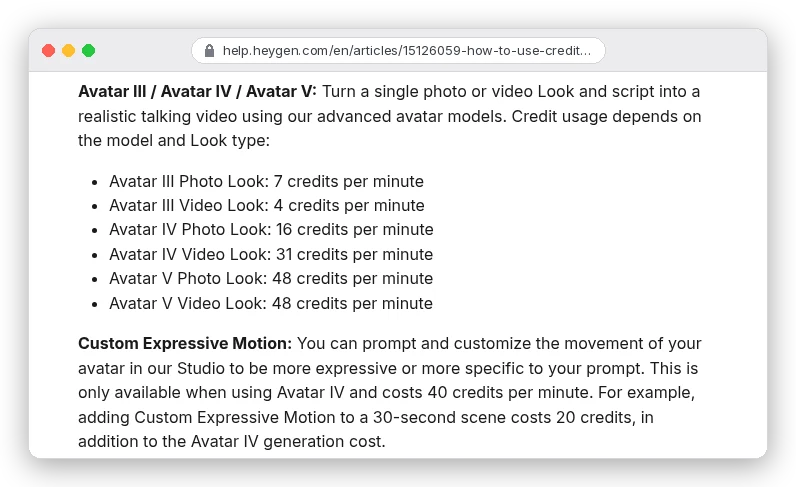
Creator is $29 a month for 600 credits, or about 4.8 cents a credit. On Avatar V, the model HeyGen uses by default for real-human avatars and digital twins, the 60 seconds cost 48 credits: $2.32 per finished ad. Creator's 600 credits cover about 12 of them a month.
An Avatar IV photo look is cheaper. It's HeyGen's default for photo avatars, a talking version of one still image, and the same ad costs 16 credits, or 77 cents.
Hedra works differently. Its Studio plans are monthly credit bundles:
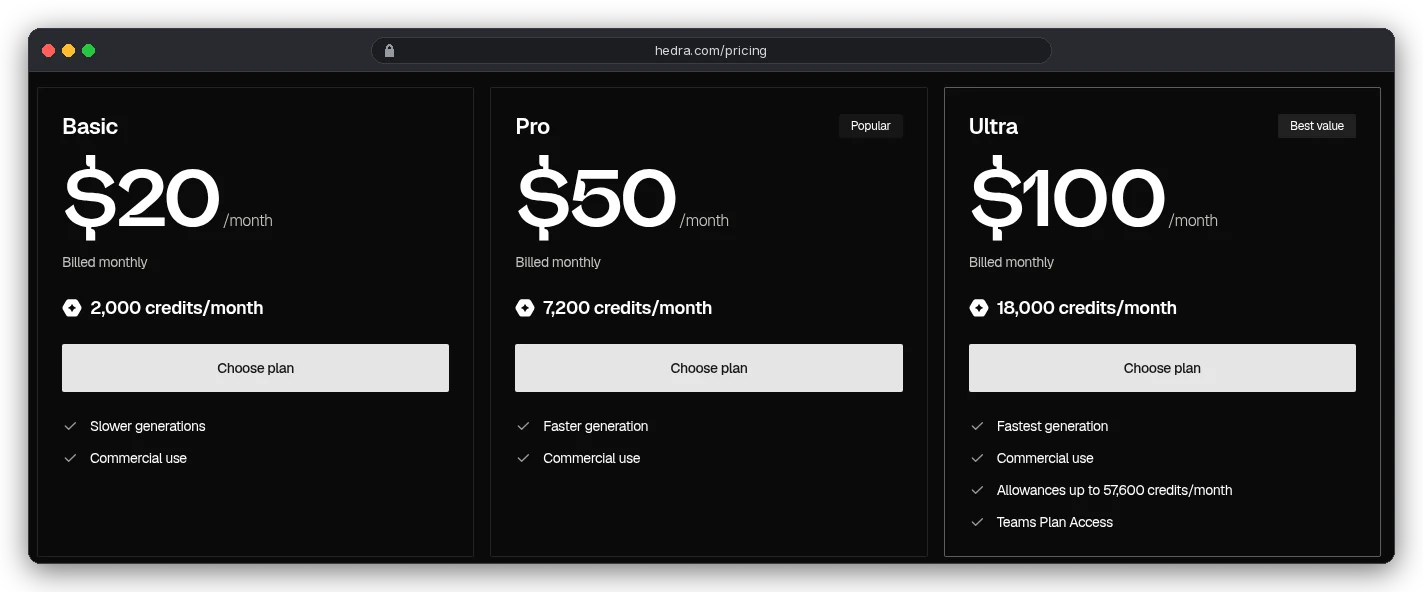
Hedra's pricing page says credits are "deducted based on the generated video length", so a 10-second clip costs 10 seconds, not a minute. But nowhere public does it say how many Studio credits a second of Character-3 uses. You only see that in the app.
What Hedra does publish is its API rate for Character-3: 5 cents a second at 720p, 6.25 cents at 1080p. Our 60 seconds cost $3.00 or $3.75. The Studio figure may differ, so check the app before you budget a month.
Arcads has a rounding rule worth knowing first. Its help center bills a talking actor at 800 credits a minute, per actor. And "length is always rounded up." A 30-second ad costs the same as a 60-second one.
So two takes use 1,600 credits, and Starter's 8,000 credits make five finished ads a month. Arcads shows dollar prices only inside its app.
MakeUGC publishes prices but not per-video credits. Starter is $29 a month billed yearly, or $59 monthly, for 500 credits and exports up to 720p. Its FAQ only says each generation costs credits "based on its model, duration and resolution."
| Tool and setting | Credits for one ad (2 × 30 s) | Cost per finished ad |
|---|---|---|
| HeyGen Creator, Avatar V | 48 | $2.32 ($1.92 billed yearly) |
| HeyGen Creator, Avatar IV photo look | 16 | $0.77 |
| Hedra Character-3, 1080p | Not published for Studio | $3.75 at API rates |
| Arcads talking actor | 1,600 | Prices shown in the app only |
| MakeUGC | Not published | Not published |
You're probably thinking that's too cheap to matter. Per ad, it is. But nobody runs one ad.
Test three hooks and each is a full render, so the Avatar V batch is $6.96 before B-roll. HeyGen's B-roll models start at 0.2 credits a second and climb with the model you pick.
Step 1: Write a brief you'd hand a real creator
An avatar does exactly what the script says, nothing more. So the brief has to carry everything a human creator would have asked you about on a call.
- The product, in one sentence a customer would say.
- One claim you can prove, with the proof on file. One claim, not five.
- Who it's for, and the problem they'd type into search.
- The ask: what the viewer does next, matching what the landing page actually offers.
- Length and format: 15 to 30 seconds, 9:16, captions on.
HeyGen's own UGC template boils the structure down to "problem first, then the product, then the ask." That's a sound default. It's also where the ad usually goes wrong, because the problem gets told in the first person.
Step 2: Write hooks that don't pretend to be a customer
Back to that serum line. "I tried every serum until this one" is an example hook on HeyGen's own UGC page. From a customer who did try them, it's a testimonial.
From a generated person, it describes someone who doesn't exist and an experience that never happened.
US law covers exactly that. The FTC's rule on reviews and testimonials (16 CFR Part 465) bans creating a testimonial that misrepresents "that the reviewer or testimonialist exists." Or that they "used or otherwise had experience with the product."
The FTC's Endorsement Guides say the same for ads that look like customer stories. Ads presenting "actual consumers" should use real ones. Otherwise they must "clearly and conspicuously disclose that the persons in such advertisements are not actual consumers."
So does an AI label fix it? Not on its own. The label says the video is generated, not that the "I" in the script never used the product.
The fix is in the writing. Keep the creator-style delivery and drop the fake experience:
| Risky hook (first-person experience) | Safer hook (same energy, no fake customer) |
|---|---|
| "I tried every serum until this one." | "Three things to check on a serum label before you buy." |
| "My dog refused every food but this." | "If your dog skips meals, here's what's different about this one." |
| "I lost 10 pounds in a month." | Cut it. A results claim needs evidence no avatar can supply. |
Want a testimonial anyway? Use a real one. HeyGen's "Testimonial Video" format is "a real review, read on camera": a customer's words, with permission, read by a presenter the ad discloses as AI.
TikTok adds two hook bans of its own. Its misleading and false content policy rejects "product effect comparisons, such as before-and-after results", the split-screen format half of UGC skincare relies on. It also lists "Number 1 essence on TikTok" as a claim that isn't allowed.
Write five or six hooks and keep the rest of the script fixed. HeyGen's UGC page puts it plainly: swap "the hook, the presenter and the opening shot. Keep the body and the ask." That way the test tells you which hook won, not which whole ad.
Step 3: Pick an avatar you're allowed to use
You have three choices, and they cost different amounts for a reason.
A stock presenter from the tool's library is the cheapest route and needs no paperwork. HeyGen's Free plan lists 500+ ready-made presenters, and MakeUGC's Starter plan lists 300+ AI actors. The downside is that other advertisers can pick the same face.
Your own digital twin looks like you because it is you. HeyGen requires a consent video you record before it renders your likeness, and on Avatar V it bills 48 credits a minute. Our AI avatar generator comparison works through what a twin minute costs on each tool.
The third route is animating one photo. Hedra's Character-3 takes a start frame plus a required audio file and lip-syncs the face to it, in 9:16 among other ratios.
That photo must be of someone who agreed to it. TikTok's AI content rules ban the likeness of "adult private figures used without their permission", and of anyone under 18.
With Hedra, record or generate the voice first. Its model page says audio quality "heavily dictates the output", so use clean speech with no background noise. Our AI voiceover guide covers pacing and pronunciation fixes.
Hedra also flags a quirk: "overly dramatic or unnatural hand gestures." Its fix is to tell the character to restrain them in the text prompt.
Running a series with one presenter? Generate the face once and reuse that exact file in every ad.
Step 4: Add B-roll that shows the real product
A full 30 seconds of a talking head is a hard watch. UGC ads cut away every few seconds: the product in a hand, the texture close up, the app on a phone screen.
Show your real product whenever it's on screen. HeyGen's AI Product Placement "puts the product in frame instead of a stand-in" when you attach product photos.
Arcads sells presets for the same job: 400 credits for an Unboxing POV, 800 for a Product showcase.
For cutaways you generate from a still, our image-to-video guide covers keeping the label from warping once the camera moves.
The labelling line matters here too. TikTok counts "removing or modifying backgrounds" as an insignificant AI edit that needs no label. A product shown doing something it can't do is a different matter: that's a misleading claim, labelled or not.
Step 5: Lay it out inside the 9:16 safe zone
On a phone, the app sits on top of your ad. The account name and caption cover the bottom, the like and share buttons run down the right, and tall screens crop the edges. Anything you put there gets hidden.
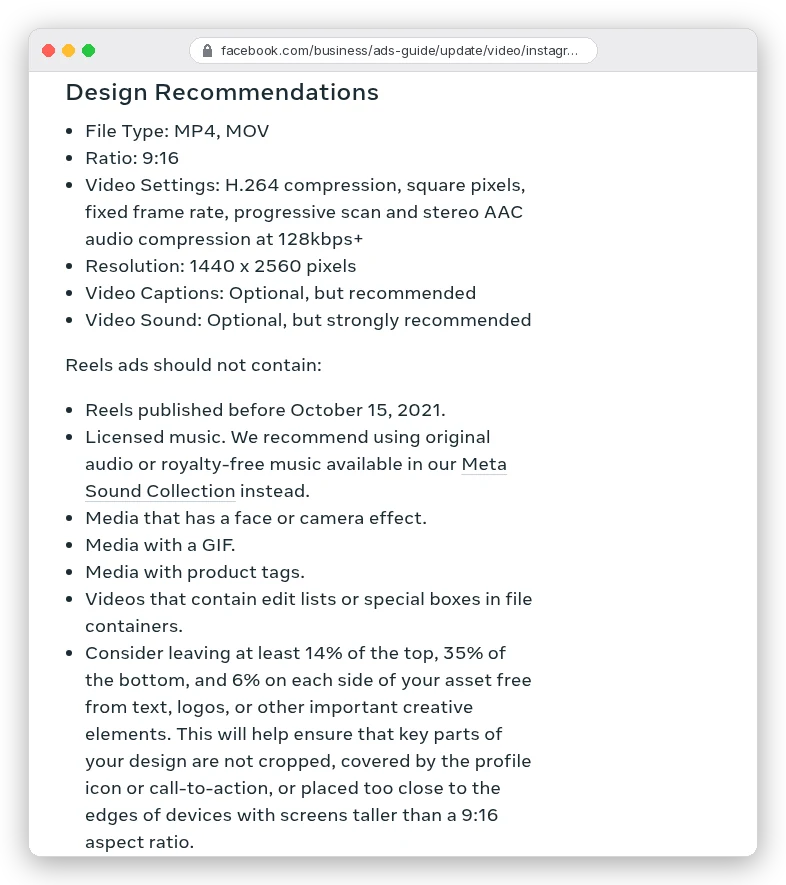
Meta gives its numbers in percentages on its Instagram Reels ad specs:
TikTok doesn't print numbers on its in-feed ads spec page. It links template files instead, so we opened the standard one.
On its 720 × 1,280 frame, TikTok blocks 160 px at the top, 440 at the bottom and 80 per side. A 120 px column on the right, where the buttons sit, is blocked too.
The two don't quite match. TikTok wants wider sides (11% against Meta's 6%) and a cut-out for its buttons; Meta wants slightly more space at the top. So here's one box, built from the stricter number on each edge, for a 1,080 × 1,920 export:
| Edge | TikTok template | Meta Reels | Keep clear (use both) |
|---|---|---|---|
| Top | 240 px | 269 px (14%) | 269 px |
| Bottom | 660 px | 672 px (35%) | 672 px |
| Left and right | 120 px | 65 px (6%) | 120 px |
| Right, lower half | 300 px from the edge below 840 px down | None | 300 px below 840 px down |
In plain terms: keep every caption, logo and product close-up between 269 and 1,248 pixels down, and between 120 and 960 across. Below 840 pixels, stop at 780 across so TikTok's buttons don't cover it.
One more number. Meta's safe-zone help page says that if you add disclaimers to a Reels ad, you should leave the bottom 40% clear. On a 1,920-pixel frame, that moves the floor up to 1,152.
Burn the captions in rather than relying on auto-captions, and put them in the middle third. If you edit in a timeline, our guide to editing Instagram Reels with Claude shows how to script caption placement with FFmpeg.
Step 6: Label it on TikTok and Meta
TikTok is the stricter of the two, and it puts the rule in writing:
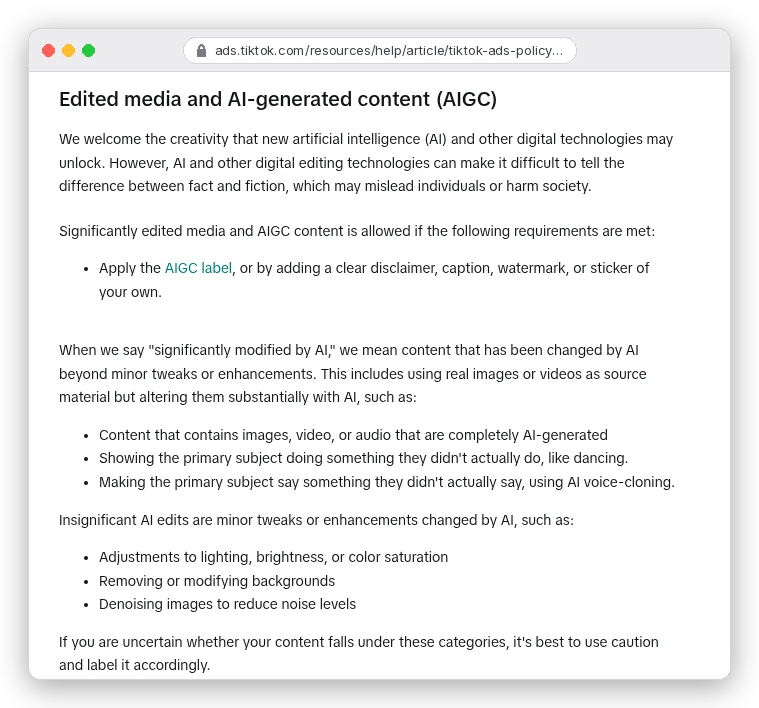
A generated presenter is "completely AI-generated" video, so it needs the label. The same page says undisclosed AI content gets the ad "rejected or restricted."
In TikTok Ads Manager, the label is an ad-level toggle: "This ad contains AI-generated content." TikTok's disclaimer help page adds three details that trip people up:
- After you submit, you can't untick it unless you change the video or image.
- Any new campaign, including a duplicated one, resets the toggle. Re-tick it every time you copy a winning ad.
- Spark Ads, which run from a real TikTok post, don't use the toggle. They follow the creator rules, so the label goes on the post itself: More options, then the AI-generated content setting.
Meta mostly labels for you. Its AI info help page says it adds an "AI info" label when it detects third-party AI tools, using signals such as C2PA metadata.
That label usually sits behind the three-dot menu, under "About this ad". In the European Region, California, New York, India and Taiwan you can also self-disclose, which puts the label next to "Sponsored".
Which brings us back to the FTC. On social media, Part 465 says a proper disclosure "must be unavoidable." It doesn't count "if a consumer must take any action, such as clicking on a hyperlink or hovering over an icon, to see it." A label behind a menu may not meet that bar.
So put it in the ad as well. A line of on-screen text in the safe zone ("AI presenter") and the same words at the start of the caption cover both apps. This isn't legal advice; if you sell in a regulated category such as health, finance or supplements, have a lawyer read the script.
Mistakes that get AI UGC ads rejected or pulled
- A first-person hook about results the "person" never had. Labelling the video doesn't change what the script claims.
- Before-and-after splits on TikTok, which its ad policy rejects outright.
- Forgetting to re-tick TikTok's AI toggle on a duplicated campaign.
- A photo avatar made from someone who never agreed to it. TikTok bans private-figure likeness without permission.
- Captions or a discount code in the bottom third, where both apps cover them.
- An offer in the ad that doesn't match the landing page; TikTok rejects mismatched prices and discounts too.
- Budgeting Arcads per second: a 30-second ad is billed as a full minute.
Which tool should you start with?
If you want the cheapest way to test a stack of hooks with stock presenters, start with HeyGen. Creator's 600 credits cover about 12 finished Avatar V ads a month at $29, and its UGC brief builds the 9:16 captioned format for you. Our HeyGen alternatives post covers where it's weaker.
If your presenter is one specific face, like a brand character or a founder, Hedra's Character-3 is built for it. One image, one audio file. Budget from the API's $3.75 per 1080p ad until the app shows the Studio rate.
If you want an ad-specific tool with product presets and a library of AI actors, Arcads and MakeUGC both fit. Price Arcads by the minute, not the second, and note that MakeUGC's Starter tops out at 720p.
Whichever you pick, the script is the part to get right. A real claim, a hook without a fake customer, and a label in the ad itself.