You paste a script into a text-to-speech box, pick a voice that sounds fine, and press generate. The first take mangles your brand name. It rushes the one line that needed a breath, and says "dollar sign one hundred" in the middle of your pitch.
Making an AI voiceover that sounds right takes about seven steps. Most of them happen before you press generate, and this guide walks through each one in the order you'd hit them.
One step decides whether you can legally use the file at all, and it isn't the voice. We'll get there.
Written from ElevenLabs' documentation, help centre, pricing page and terms, plus Apple's podcast audio specs, all checked on 23 October 2026. We didn't record or test voiceovers for this guide; the worked examples are hypothetical.
What you'll end up with, and what you need
By the end you'll have a voiceover file paced the way you'd read it, with every name said correctly. It'll be in the format your editor expects. And it'll carry a licence that covers how you plan to use it.
You need three things to start:
- A finished script. Not a draft: the AI reads typos exactly as written.
- A text-to-speech tool. The examples use ElevenLabs because its controls are the best documented; the ideas carry over to the tools in our roundup of AI audio generation tools.
- A decision about where the audio will live: a YouTube video, a paid ad, a course, a podcast. That decides your plan and your export settings later.
Start with the script, because it's the cheapest thing to fix.
Step 1: Write the script for the ear, not the page
A sentence that reads well can still trip a voice. Long clauses, brackets and slashes all sound worse out loud than they look.
So read the whole script aloud once before you generate anything. Where you stumble, the model will too.
Then fix the things models misread most:
- Numbers, dates, symbols and acronyms. ElevenLabs' help centre recommends "writing numbers, acronyms, dates and symbols fully, in words", so "$100" becomes "one hundred dollars". "11" could be "eleven", "once" or "elf" depending on the language.
- Spelling. Its docs say the AI "will not try to correct any words that are misspelled". A typo becomes a mispronunciation.
- Stage directions. If you write "she said sadly" to steer the emotion, the model reads that line out too. ElevenLabs says to cut those words in editing afterwards.
Now time it. ElevenLabs' pricing table puts 10,000 credits at about 10 minutes of speech, and text-to-speech costs about one credit per character. So plan on roughly 1,000 characters per minute of audio.
A 90-second YouTube intro is about 1,500 characters. Knowing that before you generate tells you whether the script fits the edit, and what each take will cost.
There's also a ceiling per generation. On the website, Eleven v4 takes up to 10,000 characters at once and every other model 5,000. Anything longer belongs in Studio, ElevenLabs' long-form editor, which is on every plan including Free.
Step 2: Pick the model before you pick the voice
This is the step most AI voiceover guides skip, and it changes everything after it. The controls you'll read about elsewhere (pause tags, a speed slider, phoneme tags) don't work on every model.
Here's how ElevenLabs' current text-to-speech models differ on the controls that matter for a voiceover, per its docs on 23 October 2026:
| Model | Exact pauses | Speed slider | Forcing pronunciation | Max per request |
|---|---|---|---|---|
| Eleven v4 | No break tags; punctuation and audio tags | Not available | IPA between slashes; dictionary phonemes | 10,000 characters |
| Eleven v3 | No break tags; punctuation and audio tags | Yes | IPA; dictionary phonemes | 5,000 characters |
| Multilingual v2 | Break tags up to 3 seconds | Yes | Alias rules only | 10,000 characters |
| Flash v2 / v2.5 | Break tags up to 3 seconds | Yes | Phoneme tags on Flash v2 only | 30,000 / 40,000 characters |
ElevenLabs calls v4 "a net upgrade over Eleven v3, delivering better results in almost every case", and it's the model the site now promotes. Its help page on v4 also says this: "Style and Speed sliders are not available in Eleven v4, and SSML is not supported."
So which one should you use? If the delivery has to feel performed (an ad, a character, a story), start on v4 and steer it with punctuation and tags.
Need an exact 1.5-second pause on a cue, or long, even narration? Then use Multilingual v2. The docs call it "most stable on long-form generations", and it still takes break tags.
Pick one and stay on it for the whole project. Mixing models mid-script is how a narrator's voice drifts between scenes.
Step 3: Choose a voice you'll still have next month
Audition three or four voices with the same two lines from your script, not the sample text. Use the hardest lines: the one with the product name and the one with a number. Listen on a phone speaker, since that's where most people will hear it.
Every audition costs credits, though. ElevenLabs says there's "no way to preview generations without deducting quota."
You do get two free regenerations on the website. The text, voice and model must stay the same, it has to be within two hours, and you can't have refreshed the page.
Two catches with shared voices from the Voice Library are easy to miss:
- Notice periods. A shared voice's notice period is how long you keep access if its owner stops sharing it, up to two years. For a voice without one, ElevenLabs says "you'll lose access to the voice immediately." If you're building a series, filter for voices with a notice period.
- Credit multipliers. Some older shared voices carry a custom rate. ElevenLabs' example: a voice with a 2x multiplier costs "twice as many credits" per generation.
The other route is your own voice. Instant Voice Cloning starts on Starter and Professional Voice Cloning on Creator. Cloning anyone else's voice needs their "explicit and informed consent" under ElevenLabs' prohibited use policy, which we'll come back to in the licensing step.
Once the voice is chosen, the next problem is rhythm.
Step 4: Control pacing and pauses
Pacing is where AI voiceovers give themselves away: every sentence lands at the same speed with the same gap after it. How you fix that depends on the model you picked in Step 2.
On Multilingual v2 and Flash: break tags
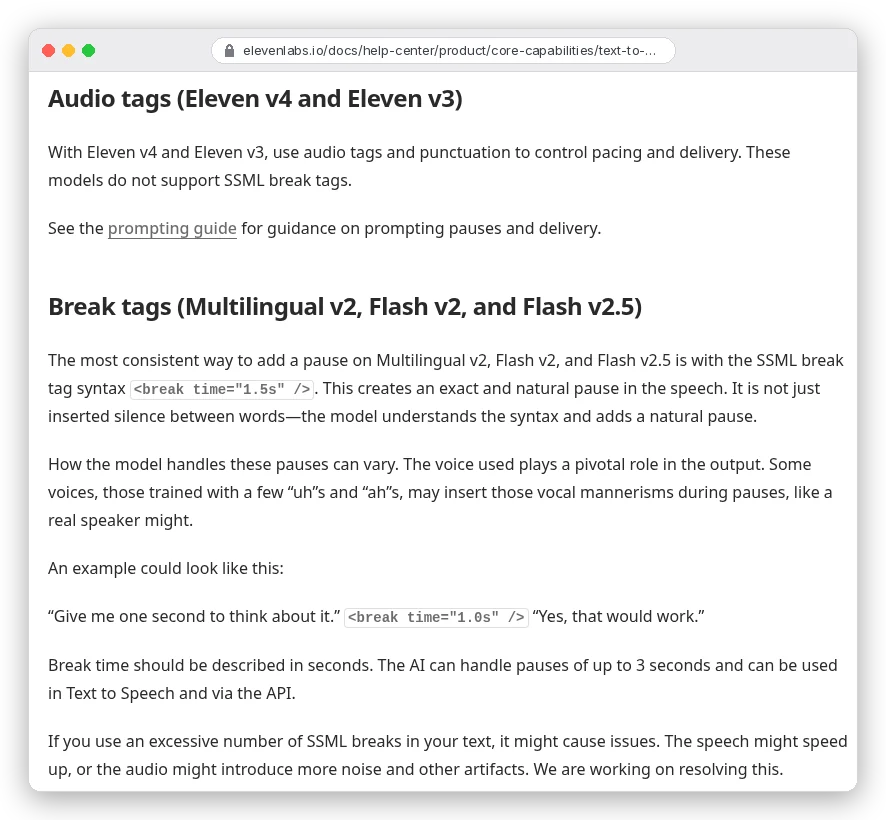
Write <break time="1.5s" /> where you want the pause. ElevenLabs says the model "can handle pauses of up to 3 seconds", and that the pause sounds natural rather than like inserted silence.
Don't sprinkle them everywhere. The docs warn that too many break tags can make "the speech speed up" or add noise and artifacts. Save them for real cues: before a reveal, after a question, between sections.
On Eleven v4 and v3: punctuation and audio tags
These models "do not support SSML break tags." ElevenLabs gives you three other levers instead. Ellipses "add pauses and weight", capital letters add emphasis, and audio tags in square brackets set the delivery, such as [whispers] or [sighs].
Make tags describe a voice quality, not a sound. v4 can mistake a tag for a sound-effect request, the docs note. So [low, gravelly voice] beats anything that could pass for a noise cue.
Ellipses have a side effect: ElevenLabs' pauses article says they "usually also" add "some hesitation or nervousness". Fine for a story, odd in a product demo.
Speed
Where the speed setting exists, it runs from 0.7 to 1.2, with 1.0 as default. ElevenLabs warns that extreme values "may affect the quality". On v4 it isn't there at all, so slow a rushed line by rewriting it: shorter sentences, a full stop where you had a comma.
If you need one exact gap on v4, add the silence in your video or audio editor. It's faster than fighting the model for it.
Step 5: Make it say names and jargon correctly
Brand names, people's names and acronyms are where a good AI voiceover falls apart. You have four tools, from quickest to most reliable.
- Respell the word. Write it how it sounds. ElevenLabs' own example turns "trapezii" into "trapezIi" to push the stress onto the end. Capitals, dashes and apostrophes all nudge the reading.
- Use IPA on Eleven v4. Wrap the International Phonetic Alphabet spelling in slashes inside your text, like
"/ˌsænfrənˈsɪskoʊ/". Include the stress marks. ElevenLabs still says results "can still vary by voice and phrase", so test the line with your chosen voice. - Use phoneme tags on Flash v2. The older XML style, for example
<phoneme alphabet="cmu-arpabet" ph="M AE1 D IH0 S AH0 N">Madison</phoneme>. The docs say CMU Arpabet is more reliable than IPA here, and a tag only covers one word, so a first and last name need one each. - Build a pronunciation dictionary. A reusable file of rules, the right choice for anything you'll say in every video.
The dictionary is worth setting up once. It's a TXT or .pls file of pairs: the word as written, and either a phonetic spelling or an alias. An alias swaps the word for other words, like this example from the docs:
<lexeme>
  <grapheme>UN</grapheme>
  <alias>United Nations</alias>
</lexeme>
Two rules catch people out. Matching is case sensitive, so add "tomato" and "Tomato" as separate entries. And only the first matching rule in the file is used, so a duplicate further down never fires.
Which rules work where? ElevenLabs' API guide says dictionary phoneme rules work on v4, v3 and Flash v2; other models skip them. Its Studio help article still says phoneme tags work only on Flash v2.
When two pages disagree, alias rules are the safe bet. They only swap text, so every model follows them.
With the words right, you can finally generate the full take.
Step 6: Generate in sections and redo only what's broken
Don't generate a ten-minute script as one block and then listen. Generate a scene or a paragraph at a time, listen to each, and redo only the lines that miss.
Studio makes this cheaper: select a few words and regenerate just those. Studio also gives "up to two free regenerations" while the text, voice and settings stay unchanged. For the best match, ElevenLabs suggests redoing a whole phrase or sentence.
If you're working through the API, the joins between chunks are the risk: each request can start with a slightly different tone. The text-to-speech endpoint takes previous_text and next_text (or up to three earlier request IDs) so each chunk knows what surrounds it. ElevenLabs' request stitching guide notes it isn't available on Eleven v3.
Say each lesson intro in a hypothetical course runs 900 characters. Starter's 30,000 credits cover about 33 of them on a first take, or about 16 if every one needs a second go. Credit budgets usually die in the retakes, not the first pass.
Step 7: Export in the format the next step expects
The right export depends on what happens to the file next. ElevenLabs offers MP3, WAV, M4A and FLAC downloads, the last three from your history. The higher-quality settings sit behind higher plans.
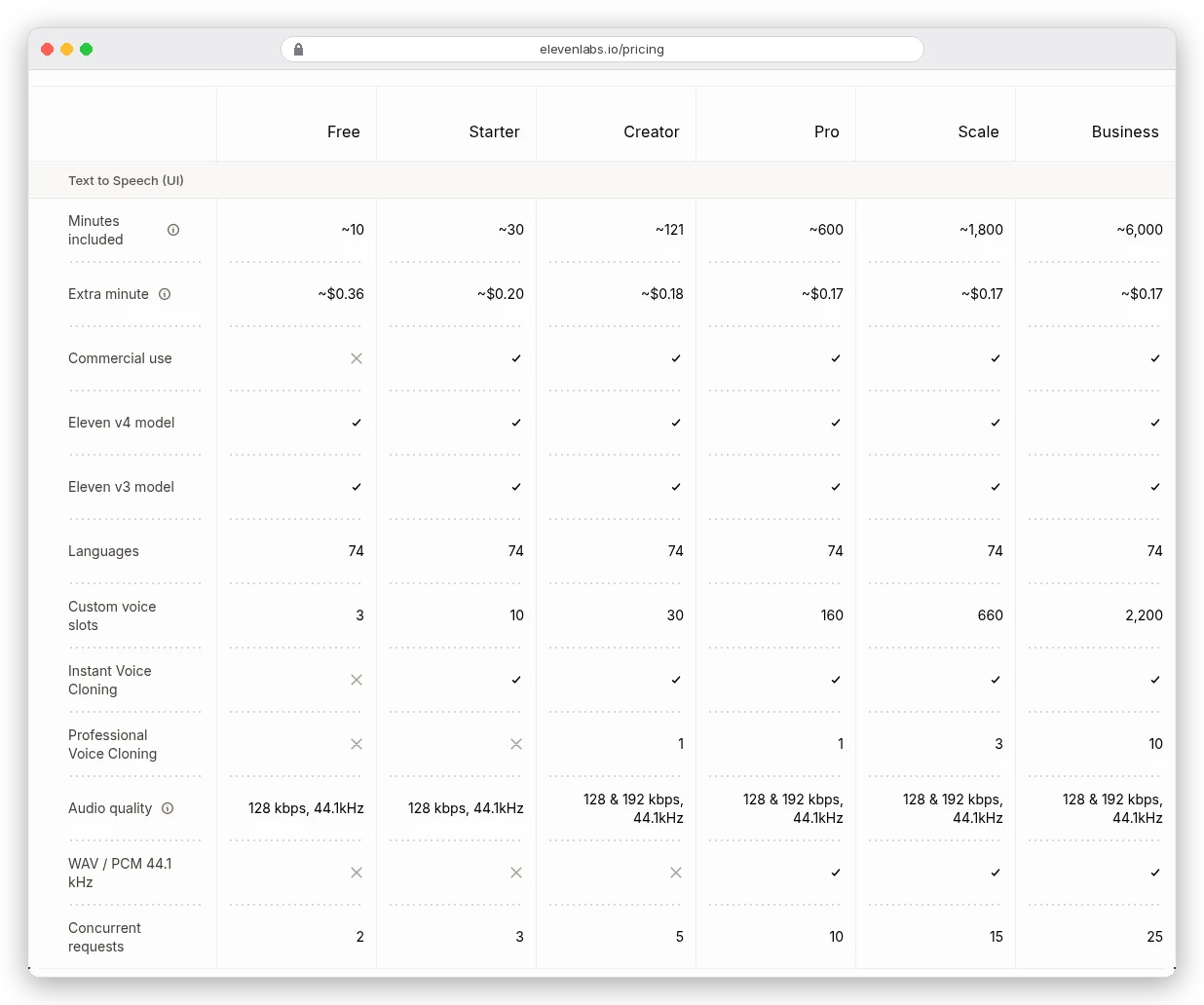
The API docs spell out the same gates. 192 kbps MP3 "requires you to be subscribed to Creator tier or above", and PCM or WAV at 44.1 kHz needs "Pro tier or above". The default is 128 kbps MP3 at 44.1 kHz.
In practice:
- Social clips and YouTube: 128 kbps MP3 is fine. The platform re-encodes it anyway.
- Anything you'll edit, mix or master: take the highest quality your plan allows, because every re-encode of an MP3 loses a little.
- Podcasts: Apple asks for loudness "around -16 dB LKFS, with a +/- 1 dB tolerance" and a true peak no higher than -1 dB FS, applied before encoding. Most editors have a loudness tool that does this in one pass.
If you're adding background music under the voice, our AI music generator comparison covers which tools give you licensed tracks.
And that brings us to the step that decides whether any of this can be used.
Can you use an AI voiceover commercially?
Here's the loop from the start. The voice doesn't decide whether you can monetise the file. The plan you were on when you generated it does.
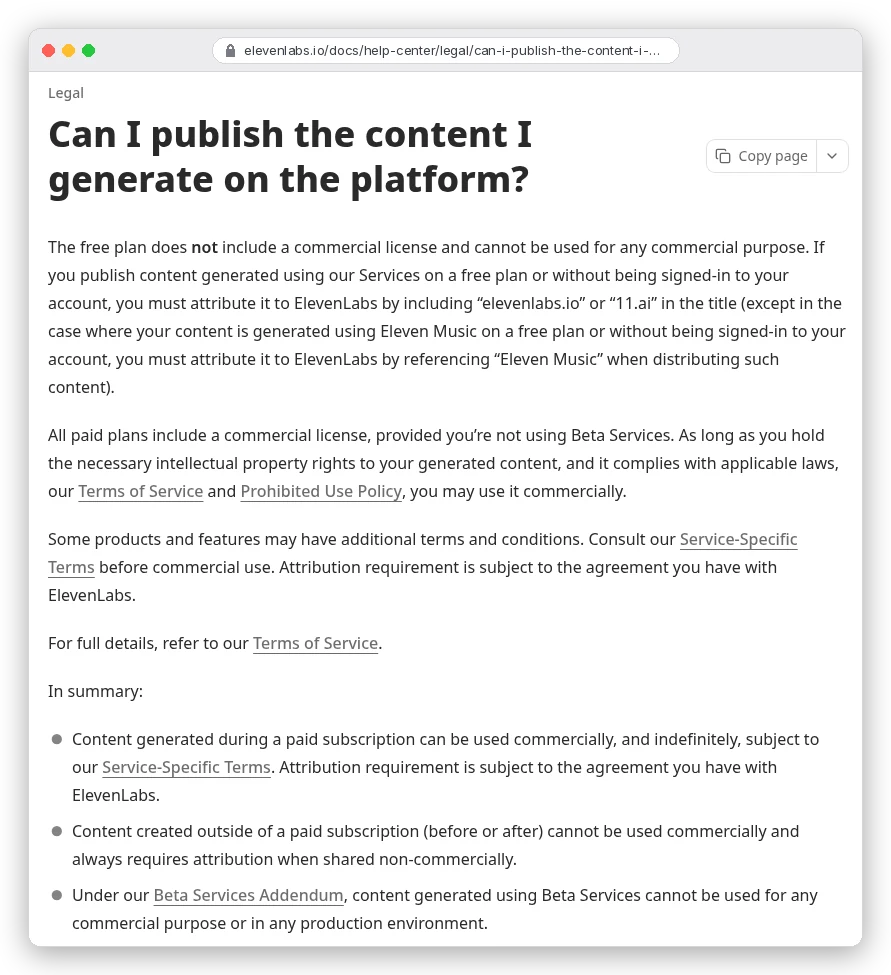
ElevenLabs' rules, quoted from its help centre:
- "The free plan does not include a commercial license and cannot be used for any commercial purpose." If you publish free-plan audio at all, you must put "elevenlabs.io" or "11.ai" in the title.
- "All paid plans include a commercial license, provided you're not using Beta Services." Anything labelled alpha, beta, pilot or preview counts as a beta service under its addendum, and that output "cannot be used for any commercial purpose or in any production environment."
- "Content created outside of a paid subscription (before or after) cannot be used commercially."
That last line is the trap. Upgrading later doesn't clear the free-plan takes you already made. If a voiceover might end up in an ad, a sponsored video or a paid course, generate the final version while you're subscribed.
The other half is voice rights. ElevenLabs' prohibited use policy (updated 9 October 2026) bans cloning "any living individual without their explicit and informed consent or other valid authorization". A separate safeguard blocks clones of prominent public figures.
The policy also asks you to disclose AI where the law requires it, or where hiding it "would materially mislead". And you mustn't strip ElevenLabs' watermarks.
A paid licence covers ElevenLabs' side only. You still need rights to the script you're voicing, and the platform you publish on may have its own AI-disclosure rules.
This is a summary of ElevenLabs' published terms, not legal advice. For a commercial project with real money behind it, read the terms of service and the prohibited use policy yourself, or ask a lawyer.
What does an AI voiceover cost?
On ElevenLabs, a minute of speech costs about the same on every paid plan; what changes is how many minutes you're committing to. From its pricing page on 23 October 2026, billed monthly:
| Plan | Price | Minutes included | Per minute | What it adds for voiceovers |
|---|---|---|---|---|
| Free | $0 | about 10 | n/a | No commercial use |
| Starter | $6 | about 30 | about 20 cents | Commercial licence, Instant Voice Cloning |
| Creator | $22 | about 121 | about 18 cents | 192 kbps MP3, Professional Voice Cloning |
| Pro | $99 | about 600 | about 17 cents | WAV and PCM at 44.1 kHz |
Two pricing details help. Unused credits on paid plans roll over for up to two months, so a quiet month isn't wasted. Annual billing works out to two months free: $5 a month for Starter, $18.33 for Creator.
There's also a first-month discount running now: Starter's first month is $1 (marked "Until Nov 1") and Creator's is $11.
Is ElevenLabs the cheapest way to make AI voiceovers? No.
For hours of narration, read our ElevenLabs vs Fish Audio comparison on when the cheaper tool wins. The ElevenLabs alternatives list costs out five more.
The mistakes that ruin an AI voiceover
- Generating the final take on the free plan, then publishing it in something that earns money.
- Pasting break tags into a v4 script and wondering why the pauses don't happen.
- Leaving "$", "%" and acronyms as symbols instead of writing them out.
- Picking a shared voice with no notice period for a series that runs all year.
- Generating ten minutes in one block, then paying for the whole thing again to fix one line.
- Exporting a 128 kbps MP3, mixing it, and exporting it again for a podcast.
Each one is avoidable before you press generate.
Which setup should you use?
Making short videos or ads that need a performed read? Use Eleven v4 on Starter or Creator. Steer it with punctuation and tags, and add exact pauses in your editor.
Narrating long courses, audiobooks or tutorials? Use Multilingual v2 in Studio, with break tags and a dictionary of alias rules. Creator gets you 192 kbps files.
For podcasts, or anything that gets mixed and mastered, budget for Pro so you can export WAV. Then normalise to around -16 LKFS before you upload.
And if you're still on the free plan, use it to rehearse. Make the version you'll publish after you've subscribed to ElevenLabs or whichever tool you choose. For turning that voiceover into a full video, our guide on how to make AI videos picks up where this one stops.