You need data out of Google Maps. Or LinkedIn, or Amazon. You could spend three weeks building a scraper and fighting the site's defences.
Or you could open Apify, find a scraper someone already built, fill in a form and press run. That moment is why most people choose it.
So why do some of them walk away a month later? It isn't the scrapers. It's the invoice, and by the end of this review you'll know exactly where the surprise comes from and how to avoid it.
Prices checked against Apify's pricing page and documentation on 21 September 2026.
What is Apify, exactly?
Apify isn't a no-code tool you point at a page. It isn't a raw proxy API either. It sits in between: a cloud platform that runs scraping jobs called Actors.
An Actor takes JSON input, runs in a container, and writes structured output to a dataset, key-value store or request queue. You can run someone else's from the Store, or write your own and deploy it.
Around that sits everything that's miserable to build yourself: proxies, scheduling, webhooks, monitoring, retries and storage, all handled by the platform. You write the extraction logic. Apify owns the plumbing.
For custom work there's Crawlee, Apify's open-source crawling library, and it runs anywhere, not just on Apify. That matters more than it sounds. Leave, and your code leaves with you.
The Actor Store is why you'd pay
Here's the part that makes Apify worth talking about.
The Store lists more than 72,000 ready-made Actors. Pick the right one and scraping Google Maps, LinkedIn, Instagram or Amazon stops being a multi-week engineering project and turns into a form and a Run button.
Take the most obvious one. Apify's Google Maps Scraper page shows over 612,000 users, a 4.7 rating, and 98.3% of runs succeeding.
It also tells you something you'd otherwise learn the hard way: a plain search stops at 120 results. Add a location and it keeps going.
You might be thinking you could just ask an AI to write the scraper for you. You could. Then you'd own the proxies, the blocks, the retries and every fix when Google changes its layout.
The Store's real product isn't the code. It's someone else maintaining it.
But that's also the catch.
Many Store Actors are built by independent developers, not by Apify. When a target site changes its markup, those Actors break, and you wait on a stranger's maintenance schedule.
So before you build on one, check when it was last updated, what's in its issue tracker, and who maintains it. A popular, actively maintained Actor is a reasonable dependency. An abandoned one with 4,000 users is a liability.
Reliability, the boring part it gets right
Apify advertises a 99.95% uptime guarantee. In plain terms, that's at most about 22 minutes of downtime a month.
The REST API and webhooks are well documented, and Apify connects to automation tools such as n8n and Make. That matters when scraping is one step in a longer workflow, not the whole job.
What does Apify really cost?
The plans look simple. Free is $0 with $5 of usage. Starter is $19 a month, Scale $199 and Business $999, or 10% less on annual billing ($17, $179 and $899).
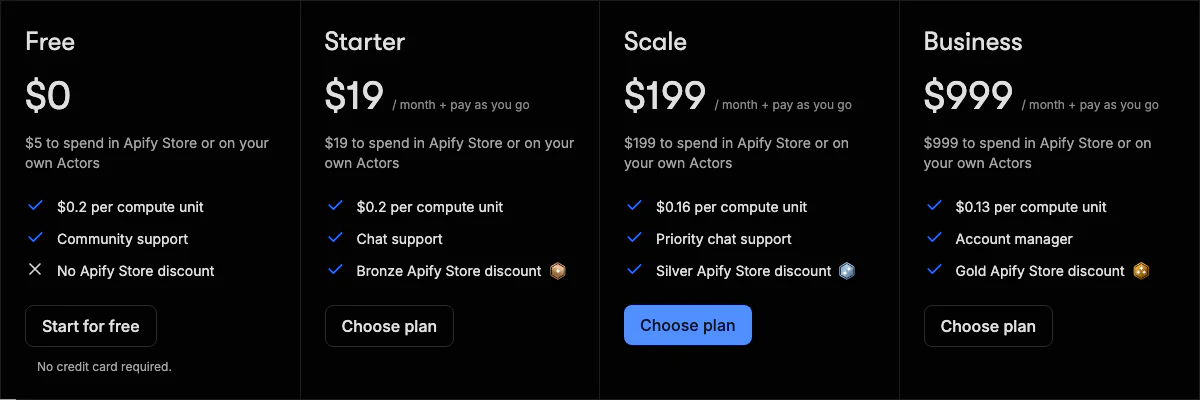
Now read the small line under each price: "$19 to spend in Apify Store or on your own Actors". The plan fee is a prepaid usage budget, not a subscription.
Compute, proxies, storage and Actor fees all draw it down. Run out on a paid plan and you keep going on pay-as-you-go overage, which is where a surprise invoice can start. On the free plan, you just stop.
Compute is billed in compute units. One unit is 1 GB of memory for one hour: $0.20 on Free and Starter, $0.16 on Scale, $0.13 on Business. So a 4 GB job running for an hour costs 80 cents on Starter.
Here's the detail that catches people. You pay for memory you allocate, not memory you use.
You choose it per run, in steps from 128 MB up to 32 GB, and every 4 GB also buys one full CPU core. Set it to 8 GB "to be safe" on a job that needs 1 GB, and you pay eight times over.
To see where your money went, open Runs in the Console and check the Usage column. Click into a run, then the small "?" next to Usage, and you get the breakdown line by line.
Proxies are the other big line. Residential proxy costs $8 per GB on Free and Starter, $7.50 on Scale and $7 on Business. On heavy jobs it often costs more than the compute itself.
A worked example
Say you run a small agency and need 10,000 Google Maps listings a month for a sales list.
The Google Maps Scraper charges per place scraped rather than for compute. It lists a starting price of $1.50 per 1,000 places, and what you actually pay depends on your plan's Store discount and the extras you switch on, like reviews, images or contact details.
At the starting rate, your 10,000 listings come to about $15. That would fit inside Starter's $19. Check the price the Actor shows you before a big run, though, because every extra adds to it.
So for a well-defined job on a per-result Actor, Apify is cheap and predictable. The surprises come from compute-billed Actors and residential proxy, which is why you should run a week of your real job before committing.
You're probably wondering why anyone pays $199 for Scale, then. Scale's compute is 20% cheaper, its proxies are cheaper, and its Store discount is bigger. So once your Starter bill would pass $199 a month anyway, Scale costs the same or less.
Our Apify pricing guide works through more scenarios like this.
Four catches to know before you sign up
The Store is excellent and the platform is dependable, so why do people leave? Four reasons come up again and again.
1. Costs are hard to forecast
This is the most common complaint, and it's fair.
Four meters (compute, proxy, storage and Actor fees) add up to a number you can't easily predict before you run the job. Actors that charge per result, like the Maps scraper, make it much easier. Compute-billed ones don't.
You can build a reliable model. It just takes about a week of running your real workload and reading that usage breakdown.
2. Unused credit disappears
Whatever you don't spend expires at the end of the billing cycle. Apify's own pricing FAQ says so.
With a steady workload, that's fine. With lumpy usage, heavy one month and quiet the next, it stings. It also means "upgrade for the cheaper rate" is bad advice unless you'd actually spend the bigger budget.
3. Custom work needs an engineer
Running a Store Actor is easy. Writing your own means the SDK, container builds and the platform's storage model. With no developer on the team, you're really buying access to the Store, so judge Apify on that.
4. You get fewer concurrent runs than advertised
Starter advertises 32 concurrent runs. The limit you actually hit is its 64 GB of total memory.
Run a 4 GB Actor and 64 GB fits 16 of them, not 32. People tend to find that out in production. Apify sells both as add-ons, at $5 per extra concurrent run and $1 per extra GB of memory, so the fix is cheap once you know.
Apify or something else?
Every alternative beats Apify somewhere.
- Bright Data is the enterprise rival. It charges per record, $1.50 per 1,000 on pay-as-you-go or $499 a month for its Scale plan, with 5,000 free records a month. Easier to budget, and built for very large multi-target jobs.
- Octoparse is the no-code choice, with a free plan and paid plans from $69 a month. Better if you aren't a developer, far less flexible if you are.
- ScrapingBee is the simplest API to drop into your own code, from $19 a month.
- Firecrawl is built for AI and LLM work. If your data ends up in a vector store rather than a spreadsheet, read Apify vs Firecrawl.
So what matters more to you, coverage or predictability?
If well-maintained Actors cover your targets, nothing gets you to data faster. If you're scraping obscure sites and writing everything yourself anyway, the Store advantage disappears, and Apify's harder-to-forecast billing becomes the deciding factor.
Should you use Apify?
If your team has even one developer, yes, probably. It's the best general-purpose scraping platform around. The Store is a moat nobody has copied, the platform is reliable, and Crawlee means you're never trapped.
It suits you if you need data from well-known platforms this week, not next quarter, or you already automate with n8n or Make. At $19, it's also one of the cheapest serious ways to start.
Look elsewhere if finance needs a fixed number every month, or nobody on your team writes code. At very large volume, an enterprise vendor's per-record pricing may also work out simpler.
Remember the invoice from the start? Now you know where it comes from: allocated memory, residential proxy and compute-billed Actors. Keep an eye on those three and Apify is good value.
The free plan gives you $5 of usage with no card required. That's enough to run your real target, open the usage breakdown, and let those numbers pick the plan.