You're building an AI agent, and it needs to read the web. Not HTML soup, but clean text a model can use.
So you start writing a scraper. Then you need a headless browser for the JavaScript, proxies because the site blocks you, and something to strip the menus and cookie banners out of every page.
Firecrawl does all of that in one API call. The real question is what it costs, because a single setting decides whether a page costs you under a tenth of a cent or over a cent and a half. We'll get to it.
Prices checked against Firecrawl's pricing page on 21 September 2026. The credit rates quoted took effect on 4 September 2026.
What is Firecrawl?
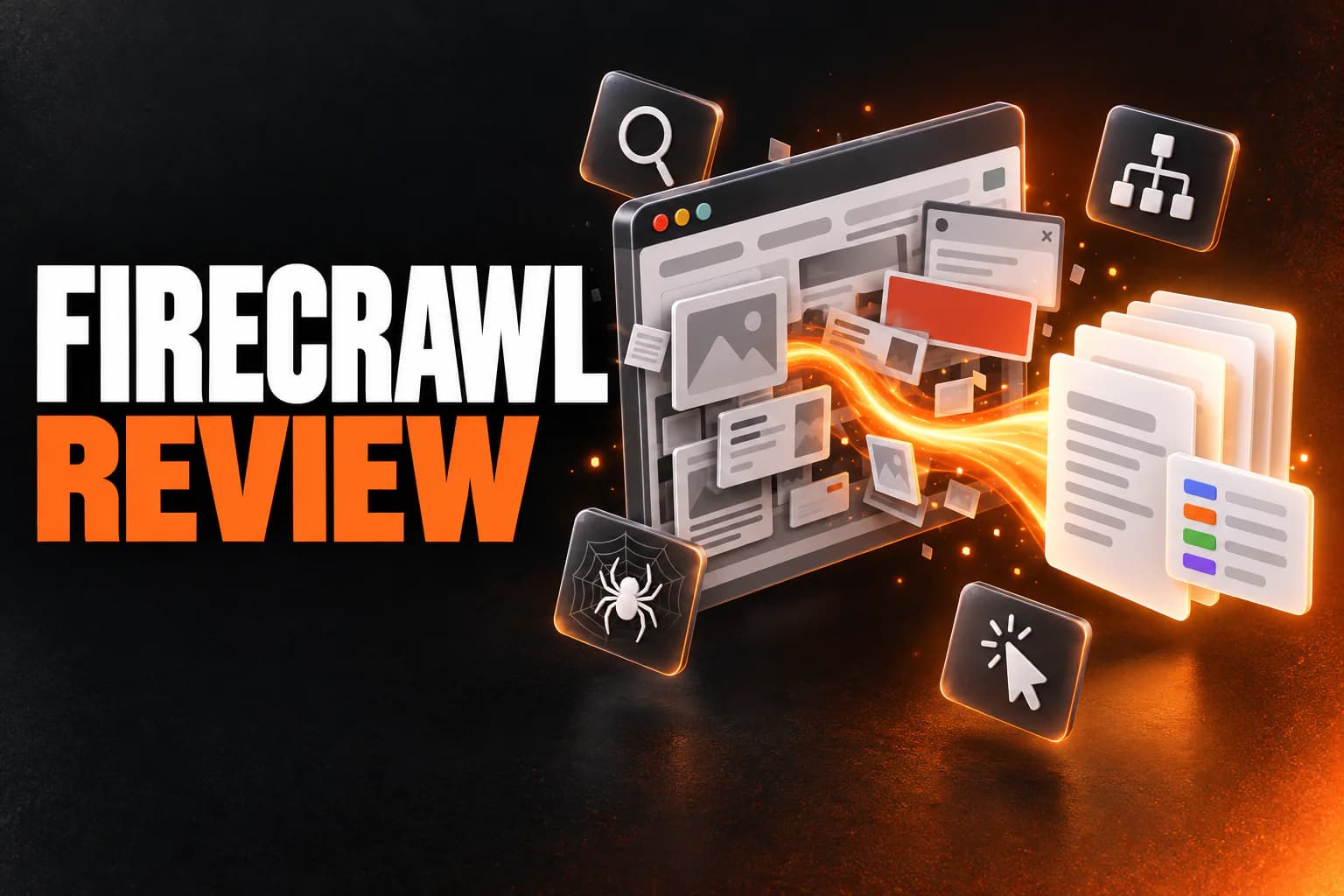
Firecrawl is a web data API built for AI apps. Send it a URL, a whole site or a search query, and it returns clean Markdown or structured JSON. JavaScript rendering, proxies and anti-bot handling happen on its side.
You can reach it through a REST API, Python and Node SDKs, a command-line tool or a hosted MCP server. You can even scrape a page without an API key to try it.
What it does well
Scrape
This is the core endpoint. Give it one URL and get back Markdown, HTML, links, a screenshot or structured JSON, for 1 credit a page.
We've used it ourselves, to capture the pricing screenshots on this blog. Three things we learned the hard way:
- the keyless endpoint answered "403 IP address looks suspicious" from our machine, while the same request with an API key worked;
- a full-page screenshot of Firecrawl's own pricing page came back with garbled prices, and a tall 1440×1500 viewport with a nine-second wait fixed it;
- the screenshot comes back as a signed link that expires, so download it straight away.
Crawl and Map
Crawl follows links across a whole site and returns every page, which is the usual way to load docs or a knowledge base into a vector store. Map just lists every URL on a site, so you can plan a crawl before paying for it. Both cost 1 credit a page.
Search
For agents, this is the one that matters. It searches the web and returns the full content of the results in a single call, instead of a list of links you then scrape one by one. It costs 2 credits per 10 results.
Interact
Interact keeps working with a page after the scrape. It clicks buttons, fills in forms and reads content that only appears after you do something.
You can ask in plain English ("search for this product and tell me the price") or write code. It costs 2 credits per browser minute.
Structured extraction
Ask for JSON with a schema or a prompt, and Firecrawl returns just the fields you named. It's convenient. It's also where the bill jumps.
The JSON, Question and Highlight formats add 4 credits per page. So an extracted page costs five times a Markdown one, and the same plan runs out five times faster.
Agent, Monitor and Parse
- Agent (in preview) gathers data from a goal rather than a URL. You get five free runs a day, then dynamic pricing.
- Monitor re-checks pages over time, at 1 credit per page per check, or a flat 7 with its deterministic extraction engine.
- Parse turns local PDFs, Word files, spreadsheets and HTML into Markdown or JSON.
And if you work through an AI coding assistant, the hosted MCP server connects Claude Code, Cursor or Codex with a browser sign-in. There's almost nothing to set up.
That's what it does. Now for what it costs, which is where most people get it wrong.
What does Firecrawl really cost?
| Plan | Monthly | Billed yearly | Credits / month | Pages per $ (Markdown, yearly) | Concurrent browsers |
|---|---|---|---|---|---|
| Free | $0 | $0 | 1,000 | 2 | |
| Hobby | $19 | $16 | 5,000 | 313 | 5 |
| Standard | $99 | $83 | 100,000 | 1,205 | 25 |
| Growth | $399 | $333 | 500,000 | 1,502 | 50 |
| Scale | $749 | $599 | 1,000,000 | 1,669 | 100 |
| Enterprise | Custom | Custom | Custom | ||
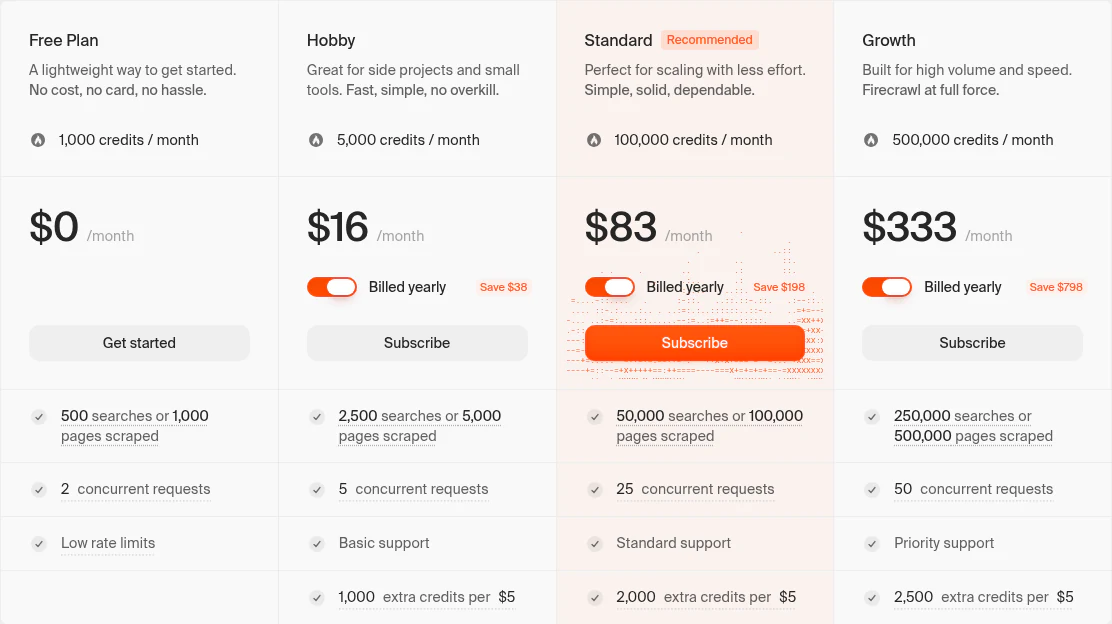
Every plan charges the same rate per action. What you're paying for is how many credits you get, how much you can run at once, and how cheaply you can top up.
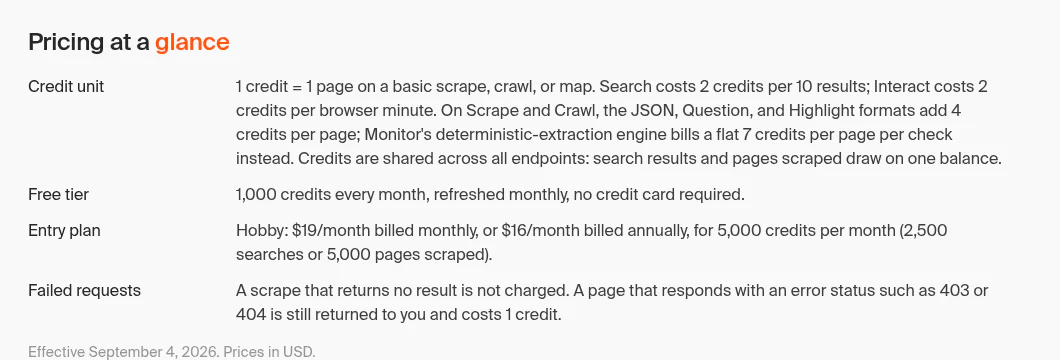
| Action | Credits |
|---|---|
| Scrape, Crawl, Map | 1 per page |
| Search | 2 per 10 results |
| Interact | 2 per browser minute |
| JSON, Question or Highlight format | +4 per page |
| Monitor | 1 per page per check (7 with deterministic extraction) |
| Agent (preview) | 5 free runs a day, then dynamic |
Three pricing details that change the maths
1. Hobby is the expensive way to buy pages
On Hobby, a dollar buys about 300 pages. On Standard, the same dollar buys about 1,200, which is the gap between $3.20 and $0.83 per 1,000 pages.
Top-ups make it worse. $5 buys 1,000 extra credits on Hobby, against 2,000 on Standard, 2,500 on Growth and 5,000 on Scale.
So if you keep blowing past Hobby's 5,000 credits, you're paying the premium rate twice. Somewhere around 18,000 pages a month on yearly billing (about 21,000 on monthly), Standard becomes cheaper than Hobby plus top-ups, even if you leave most of its credits unused.
2. Structured extraction multiplies everything by five
This is the setting from the start. Asking for JSON turns a 1-credit page into a 5-credit one.
Extract fields from 100,000 pages and you use 500,000 credits. That's the difference between Standard at $83 a month and Growth at $333.
Before you default to JSON, ask whether you could take the Markdown and run the extraction with your own model. At volume, that's often cheaper.
3. Most credits expire
Plan credits don't roll over on Hobby, Standard or Growth. Scale carries unused credits for one month.
Failed requests aren't always free, either. A scrape that returns nothing costs nothing, but a page that answers with an error like 403 or 404 still costs a credit. On a crawl full of dead links, that adds up.
You might be worried about a runaway bill. Firecrawl's pay-as-you-go only kicks in on paid plans, adds credits in $5 steps, and stops at a monthly limit you set yourself. Set it before you point a crawler at anything big.
Rate limits: the wall you hit first on the lower plans
| Plan | Scrape, Map, Search per minute | Crawl, Agent per minute |
|---|---|---|
| Free | 10 | 2 |
| Hobby | 100 | 20 |
| Standard | 500 | 100 |
| Growth | 5,000 | 1,000 |
| Scale | 10,000 | 2,000 |
Picture the free plan's 10 scrapes a minute. Scraping your 1,000 free pages one at a time takes at least 100 minutes. Fine for testing, useless for anything users depend on.
If people will rely on what you're building, plan for Hobby at least, and more likely Standard.
Self-hosting covers the core, not the extras
Firecrawl's core engine is open source. You can run the Scrape, Crawl, Map and Search APIs yourself with Docker Compose, and keep full control over where your data goes.
But Agent, Browser, Interact, the dashboard, the enhanced proxies and the enterprise controls stay Cloud-only. LLM-powered extraction needs your own model provider, and security, monitoring and upgrades become your job.
Firecrawl's own advice is to start on Cloud unless owning the infrastructure is worth that work. We agree.
Security: SOC 2 on every plan, SSO on Enterprise only
Every plan, free included, gets SOC 2 Type II, regular penetration testing, multi-factor sign-in, signed webhooks and PII redaction. Standard and above add a countersigned Data Processing Agreement. Zero data retention, SSO, SCIM and static egress IPs are Enterprise-only.
Where Firecrawl falls short
Every tool has a shape it doesn't fit. Here's Firecrawl's.
- It has no ready-made scrapers for specific platforms. For structured records from Google Maps or Instagram, Apify's library of prebuilt Actors gets you there faster.
- Static sites cost more than they need to. You pay the same per page whether or not the site needs a browser, so on simple pages a plain HTTP scraper can be far cheaper.
- Extraction is expensive. At five times the cost of Markdown, built-in JSON is a premium feature at volume.
- The lower plans are tight. Hobby's price per page and its rate limits make it a stepping stone, not a production plan.
- Self-hosting is partial. The open-source version lacks several of the features that make the Cloud product worth paying for.
Firecrawl or Apify?
Want arbitrary pages turned into model-ready text at a predictable price? Firecrawl.
Need structured records from a well-known platform, or cheap crawling of static sites? Apify.
We compare them in detail in Apify vs Firecrawl, and there's a full Apify review too.
Should you use Firecrawl?
If you're building AI agents, RAG pipelines, research tools or other LLM apps that need web content, yes. It fits best on modern, JavaScript-heavy sites, and when you'd rather call one clean API than run a scraping platform.
Look elsewhere if you need structured records from specific platforms, scrape mostly static sites at high volume, or need a full-featured self-hosted setup.
Remember the setting from the start? It's the output format. Take Markdown on Standard and a page costs under a tenth of a cent; ask for JSON on Hobby and it's over a cent and a half.
So size the plan honestly. Move to Standard once you're past a side project, budget five credits a page if you extract, and Firecrawl is the simplest way to give an AI app the web.
The free plan's 1,000 monthly credits are enough to test it on your real targets first.