You export 800 prospects, ask an AI tool to "personalise the first line", and press run. Ten minutes later every row has an opener. The first five look fine.
Row 312 congratulates a company on a funding round it never raised. Row 540 praises a podcast from 2019. About a hundred open with "I love what you're doing at".
AI cold email personalization works when each line points to something real the reader expects you to know. It's cheap: 2 to 5 cents a prospect in Apollo or Instantly, under a cent on your own key.
What decides whether it helps or hurts is what happens to a prospect the AI knows nothing about. We'll get there in step 3.
Written from Apollo's and Instantly's help centres, Firecrawl's and OpenAI's pricing docs, and Google's and Yahoo's sender rules, checked 1 November 2026. We didn't send a campaign or generate lines in either tool, and every example prospect is made up.
What you'll end up with
A list where each prospect carries two extra columns: one short observation with its source, and one opening line written from that observation. Rows with no usable observation get no AI line at all. They get your plain segment email instead.
Then a QA gate that reads a sample before anything sends, and a sequence that pulls the line in as a variable. The rest of the email stays the same for everyone in the segment.
That split matters. The body of a cold email should already fit the whole segment; our guide to writing cold emails that get replies covers it.
AI earns its keep on one sentence: the one that says why you're writing to this person now.
Here's roughly what that one sentence costs per 1,000 prospects, from each vendor's published rates:
| Route | Published rate | Per 1,000 prospects |
|---|---|---|
| Apollo AI research, one column | 1 credit per run | 1,000 credits, about $26 on Basic monthly |
| Instantly opener only | ~0.5 credits a row | About $15.67 on Growth credits |
| Instantly company research + opener | 1 + ~0.5 credits a row | About $47, a whole month of Growth credits |
| Your own scraper + API key | 1 Firecrawl credit a page + tokens | About $3.40 in gpt-6.1-terra tokens plus 2,000 page credits (our assumptions) |
The maths behind each row is further down. First, the part no tool does for you: deciding what the line should be about.
What you need before you start
- A segmented list with verified work emails. If you're still building it, see how to find anyone's business email address or the Apollo prospecting guide.
- One email per segment that works without any personal line. This is your fallback, so write it first.
- A tool that can run a prompt per row: Apollo's AI research, Instantly's Enrich & AI, or a script with an LLM API key.
- Sending that's already set up properly. AI lines don't rescue a domain without SPF, DKIM and DMARC; our deliverability guide covers the records and the warm-up.
Step 1: Pick signals your reader expects you to know
A signal is a public, recent fact about the company or the person's role that connects to your offer. "They're hiring three SDRs" is a signal for a sales-training firm. "Their CEO ran a marathon" isn't a signal for anyone.
The test: would the prospect be comfortable if you said where you got it? A job ad, a press release or their own pricing page, yes.
Their personal social profile, their family, where they live: no. That's where AI lines start to feel like surveillance.
| Signal | What it can support | Where to get it |
|---|---|---|
| Open job listings | A team growing, a new function, a tool named in the ad | Instantly Job Listings (1 credit a row), Apollo filters, their careers page |
| Recent news or funding | A launch, a new market, money to spend | Instantly News or Funding Type (0.5 credits a row), Apollo AI research with web access |
| Tech stack | A tool you replace or plug into | Instantly Technologies (0.5 credits a row), Apollo company data |
| Their own website copy | Who they sell to, what they claim, what's missing | A scrape of the homepage or pricing page |
| Reviews and listings (local firms) | Opening hours, review themes, number of locations | A Google Maps scrape; see how to scrape Google Maps leads |
One more filter before you spend credits: recency. A funding round from three years ago is trivia, not a reason to write. Apollo's own example prompt limits news to "the last 3 months" and passes today's date into the prompt so the model can tell.
Observation or inference?
This distinction prevents most bad AI lines. "You're hiring three account executives in Austin" is an observation: anyone can check it. "Your sales team must be struggling to ramp" is an inference, and the reader knows you can't know that.
So the research step should return observations only. The writing step can frame one as a question ("Is ramping three new reps at once on your plate?"), which asks instead of claiming.
Personal data isn't free to collect
If you research named people in the EU or UK, you're processing personal data. GDPR says it must be "adequate, relevant and limited to what is necessary".
Article 14 adds that when the data didn't come from the person, you owe them certain information, including "from which source the personal data originate". If you'll contact them, the deadline is "at the latest at the time of the first communication".
That's one more reason to keep research at company level and role level. It's less creepy, and it's less personal data to account for. This isn't legal advice; the legal section of our cold email guide covers CAN-SPAM, PECR and GDPR in more depth.
If the signal you want lives on the prospect's own website, a scraper gets it cheaper than a research credit. Firecrawl's billing docs list a scrape at 1 credit a page, and its free plan has 1,000 credits a month. Our guide to web scraping for AI covers turning pages into model-ready text.
Step 2: Extract the signal into its own column first
Don't ask one prompt to research and write in the same breath. Run two: one that pulls a single observation (or says it found none), and one that writes a line from that observation.
Apollo calls this prompt-stacking: one AI research prompt can reference the output of another as a variable. Instantly does the same with custom prompts that read any column you map in.
Two columns cost more, but they buy you something a single prompt can't: a column you can filter. You can sort by "NONE", count the empties, and read the observations in bulk before a single opener is written.
Here's an extraction template. Swap the square-bracket parts for your tool's variables ({{ in Instantly, the { } menu in Apollo):
You are researching a company for a B2B cold email.
Company: [company_name]   Website: [company_domain]
Source text (their own site, scraped today): [website_text]
Today's date: [today]

Task: find ONE fact from the source text that a [your offer, e.g.
"bookkeeping service for agencies"] would have a reason to mention.

Rules:
- Use only the source text. Do not use outside knowledge.
- The fact must be checkable on the page: a product, a customer type,
  a job opening, a launch, a location, a stated number.
- No guesses about their problems, feelings, budget or plans.
- Nothing about any person's private life.
- If nothing qualifies, return exactly: NONE

Output: one line, under 20 words, then " | source: " and the page URL.
Two lines do most of the work. "Use only the source text" stops the model filling gaps from memory, which is where invented funding rounds come from. And the exact NONE follows Apollo's advice to return a fixed value like "N/A" and nothing else.
Apollo adds a guard of its own. If a prompt needs a variable whose field is blank, it skips the research and may show an "unfilled dynamic variable" error. That's useful: it fails closed.
Step 3: Write the line with a prompt that's allowed to say nothing
Here's the rule from the intro: a row with no real signal gets no AI line. The writing prompt must be able to give up, and your sequence must have somewhere for that row to go.
Most bad lines come from prompts that must always produce something. Ask a model for a personal opener about a company it knows nothing about and it'll write flattery. "Love what you're building" is what a model writes when it has no facts.
Write the first line of a cold email to [first_name], [job_title] at
[company_name].

Observation (verified): [signal]

Rules:
- If the observation is NONE, return exactly: NONE
- One sentence, under 25 words, plain text.
- Mention the observation as a fact, then connect it to [problem you
  solve] as a question or a short "usually means" statement.
- No compliments, no "I noticed", "I came across", "I was impressed",
  "love what you're doing", no exclamation marks, no emoji.
- Don't repeat the company name if it's already in the sentence once.
- Never claim anything that isn't in the observation.

Return only the sentence.
Then route the NONE rows away from the personalised version.
In Instantly, the Conditional Formula option runs a prompt only if chosen columns "are empty or not empty". Set the writer to skip blank signals. In Apollo, filter by the AI research field and put those contacts in the plain sequence.
Watch the other way a line goes missing. Apollo's docs say that if your team lacks credits or AI words when emails are created or scheduled, "Apollo doesn't generate the AI opener". Check what your template does when that variable is empty before you find out live.
What good and bad lines look like
Say you sell a bookkeeping service to creative agencies, and the extractor returned "Hiring a part-time finance assistant | source: northfieldstudio.example/careers". These are made-up examples, not outputs from a test:
- Bad: "I love what Northfield Studio is doing and was impressed by your amazing growth!" (no fact, two compliments, an exclamation mark)
- Bad: "Saw you're hiring for finance, which means your books are a mess right now." (an inference stated as fact, and an insult)
- Good: "Saw the part-time finance assistant role on your careers page. Is that mostly to keep up with client invoicing?"
The good one names its source and asks instead of telling. It would still read fine if forwarded to their boss. And for a row that returned NONE, the best line is no line.
A third prompt can run as a reviewer before any human looks. It won't catch everything, but it sorts the pile:
You are checking a cold email opening line before it is sent.
Line: [opener]
Observation it must be based on: [signal]

Answer PASS or FAIL, then one reason. FAIL if any of these are true:
- It states something not contained in the observation.
- It guesses the reader's problems, feelings or intentions as fact.
- It mentions anything about the person's private life.
- It contains praise, hype, urgency, exclamation marks or emoji.
- It is over 25 words, or names the company more than once.
- It would read the same if sent to a different company.
Which model should run these? A small, cheap one is usually enough, because the job is short and tightly bounded. Our guide to choosing an LLM covers how to pick on cost per finished task rather than benchmark rank.
Step 4: Run it in Apollo or Instantly
In Apollo
Open People or Companies, filter your segment, then choose Research with AI and either a template or Run custom AI prompt. Apollo gives you up to three free previews per prompt. Use all three, on three very different prospects.
Then Save & run on the first 10 or 25 rows, read them, and only then run the rest. Pick the field type carefully, because Apollo says you can't change it later.
The result becomes a custom field and a dynamic variable. In the sequence step, Insert AI variable > Existing AI variable pulls it into the email.
Apollo also has a writing assistant that drafts whole emails, openers and PS lines. Its limits are worth reading before you plan a big run:
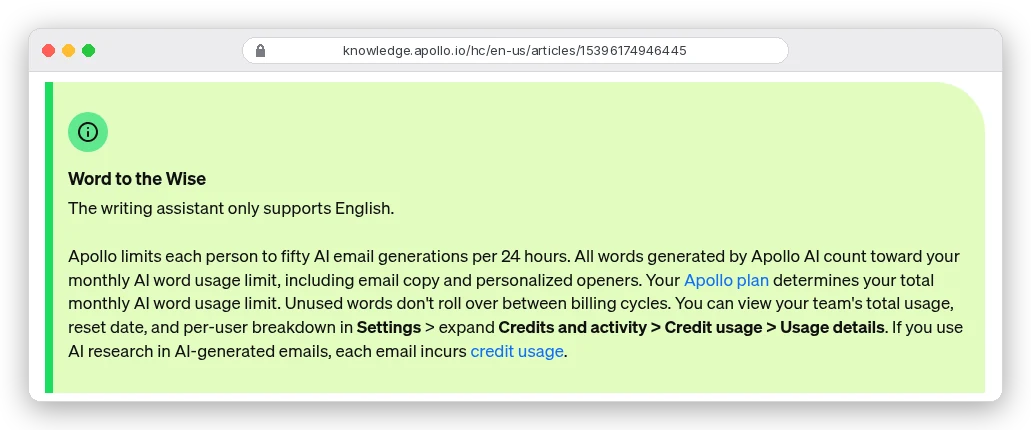
Fifty generations a day is the number to plan around. The note doesn't say whether sequence-wide generation counts, and we couldn't check without running one.
If it does, 1,000 AI-written emails take one person 20 days. Writing the line into an AI research field is billed in credits, and the research docs don't mention a daily cap.
Apollo also recommends adding a manual task to sequences so someone checks generated messages "before they're sent". On a first run, take that advice.
In Instantly
Open the list or campaign, click Enrich & AI, choose AI, then Write a custom prompt. Type {{ to insert columns, pick the result column and the model. Preview on 1 contact before you click Run on X leads.
Prompts run on Instantly's shared AI account and cost credits. Or connect your own OpenAI, Anthropic, Google, DeepSeek, xAI or Perplexity key and pay that provider instead.
Instantly's help centre warns that a basic prompt "will likely produce output that's too long or too generic". It also says a big list can take "several hours". Start early.
What does AI personalisation cost per 1,000 prospects?
Apollo bills AI research in credits from the same pool as email reveals. Its help centre puts it simply: "researching 100 contacts across one column uses 100 credits."
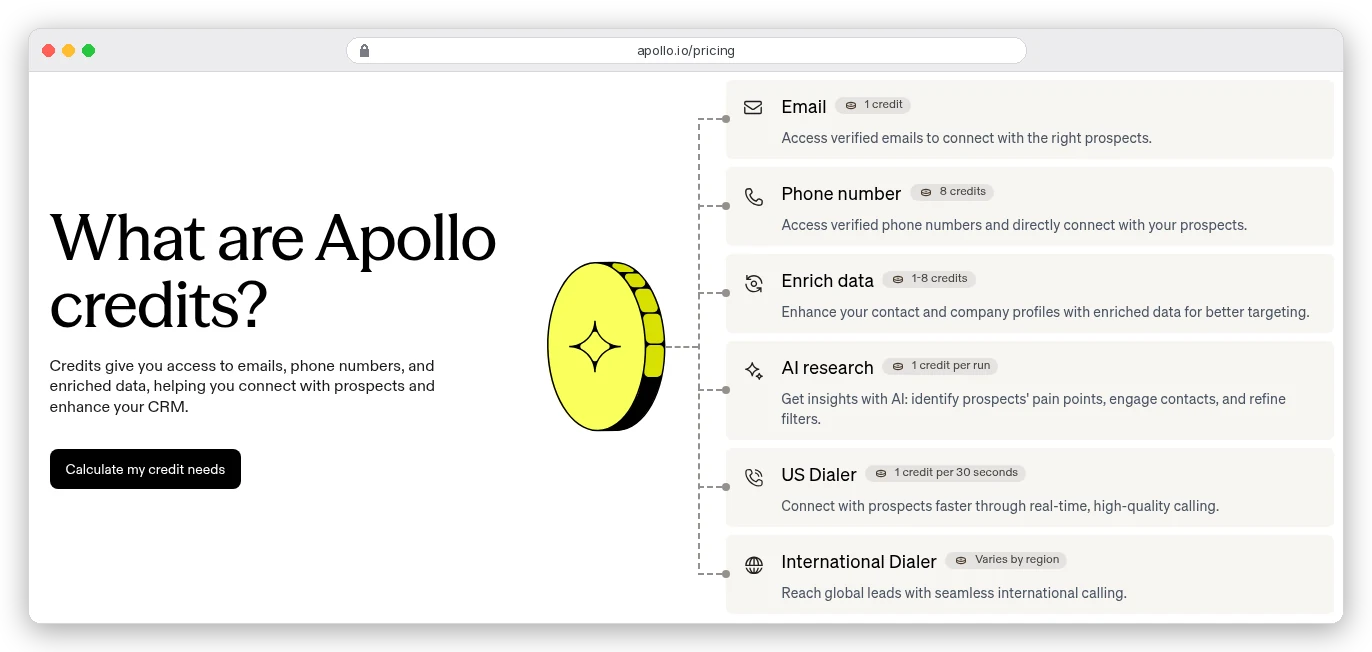
On Basic at $65 a month for 2,500 credits, a credit is 2.6 cents, so one research column on 1,000 prospects costs about $26. Annual Basic ($49 a month, 30,000 credits a year) brings that to about $19.60.
Now stack the two prompts from steps 2 and 3. That's 2,000 credits per 1,000 prospects, plus 1,000 more for the email addresses. Basic's 2,500 monthly credits can't cover all three, but Professional's 4,000 can.
The writing assistant is metered separately, in words: 5,000 a month on Free, 250,000 on Basic, 800,000 on Professional and 1,000,000 on Organization. At 80 words an email, Free covers about 62 AI-written emails a month.
Instantly bills per row:
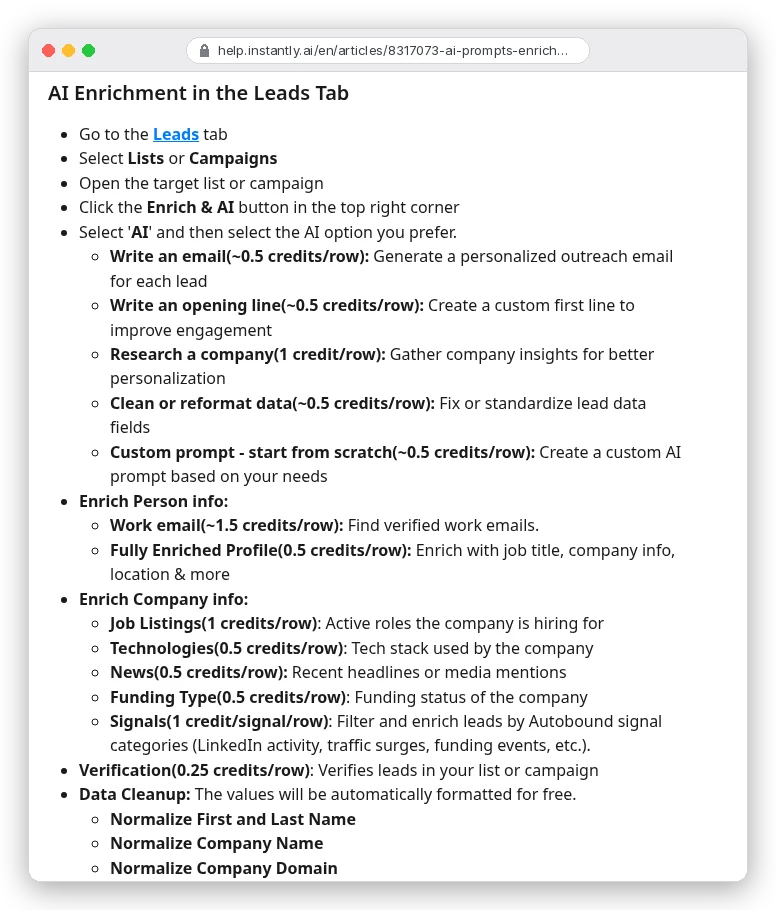
Growth credits cost $47 a month for 1,500, about 3.1 cents a credit. An opener at ~0.5 credits is about 1.6 cents a prospect. Add company research at 1 credit and it's 1.5 credits a row: 1,000 prospects use the whole 1,500-credit month.
The own-key route is cheapest. Say you scrape two pages per company.
The extraction prompt is 2,500 tokens in and 60 out; the writer is 400 in and 40 out. Those are our assumptions, using OpenAI's rule of thumb of about 4 characters a token.
At gpt-6.1-terra's list price of $1 per million input tokens and $5 per million output, that's about $3.40 per 1,000 prospects. On gpt-6-luna ($0.10 and $0.50) it's about 34 cents. The scrape adds 2,000 Firecrawl credits, double the free plan's month.
You're probably thinking the own-key route wins outright. On cash, it does.
But you build and babysit that pipeline yourself. The in-tool routes keep the email data, the sequence and the variable in one place. For a few hundred prospects a month, that's worth the roughly $20 difference.
The QA checklist that catches spammy and creepy lines
Every AI line is read by someone who didn't ask for your email, so "sounds fine" isn't the bar. And one annoyed reader costs more than you'd guess.
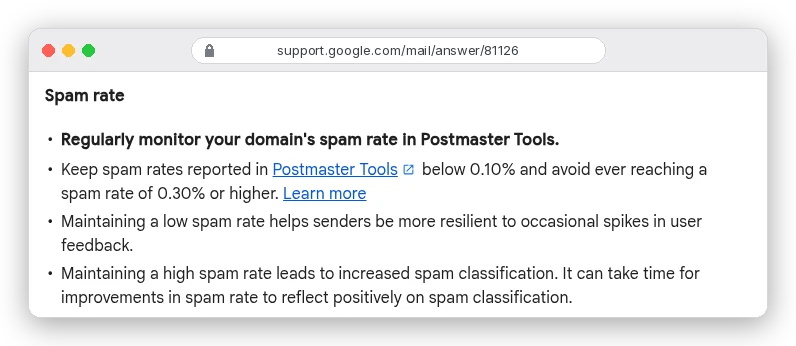
Google's FAQ adds that "spam rate is calculated daily". So on a day you deliver 300 emails to Gmail inboxes, a single spam report is 0.33%, over the line Google says never to reach. Yahoo uses the same 0.3% ceiling, calculated on mail delivered to the inbox.
Run these checks on every batch. Some are scripts, some are eyes:
- Count the
NONErows. If more than half the list has no signal, the segment or the source is wrong, not the prompt. - Search the openers for banned phrases: "I noticed", "I came across", "impressed", "love what", "amazing", "congrats", exclamation marks. Any hit goes back to the writer.
- Flag lines over 25 words, and lines that name the company twice.
- Sort the openers alphabetically. If dozens start the same way, the model has fallen into a template of its own. Fix the prompt, not the rows.
- Read the first 25 rows in full against their sources. Open the source URL; a link that exists isn't proof the model read it correctly.
- After that, read a random 10% of the rest. Any invented fact means fixing the extractor and re-running, not editing one row.
- Check for anything personal: family, health, home town, personal social posts. Delete it, even if it's accurate.
- Preview the rendered email for a long company name, a blank variable and a name with accents. Apollo notes that drafts can briefly show the raw AI variable instead of the final text while generation is still running.
- Confirm the footer: CAN-SPAM wants "your valid physical postal address" and an opt-out you honour "within 10 business days".
The thresholds in that list (25 words, 25 rows, 10%) are our editorial rules, not vendor numbers. Tighten them for a list you can't afford to burn.
Mistakes that turn AI personalisation into spam
Sending the generic version to everyone the AI couldn't research is fine. Sending them a fake personal line is the mistake, because it gives people a reason to hit the spam button.
The other common ones:
- Letting the model research and write in one step, so nothing separates a fact from a guess.
- Running the full list before reading 25 rows. Apollo's free previews and Instantly's one-contact preview exist for this.
- Researching the person instead of the company. Role-level facts work; private ones creep people out and add personal data to account for.
- Personalising the whole email. One line carries the relevance; an AI-written body drifts off your offer.
- Treating AI as a deliverability fix. A personal opener on an unwarmed domain still lands in spam; check how Instantly and Apollo handle sending and warm-up before you pick a tool for both jobs.
Where to start this week
If you already use Apollo, write one extraction prompt as an AI research field and run it on 25 rows. Read every result before you write an opener. You'll know in an hour whether your signal is real.
If you send from Instantly, build the two prompts with the Conditional Formula on, preview on one contact, and budget 1.5 credits a row.
If you're technical and sending thousands a month, scrape the sites and run a small model on your own key. Spend what you save on a person reading samples.
Whichever route you pick, write the no-signal email first. It may be the one most of your list gets.