Your scraper worked on Monday. By Thursday every request comes back 403, or a CAPTCHA where the product data used to be. Someone on a forum says "just add proxies." The first pricing page you open quotes dollars per gigabyte, which tells you nothing about your job.
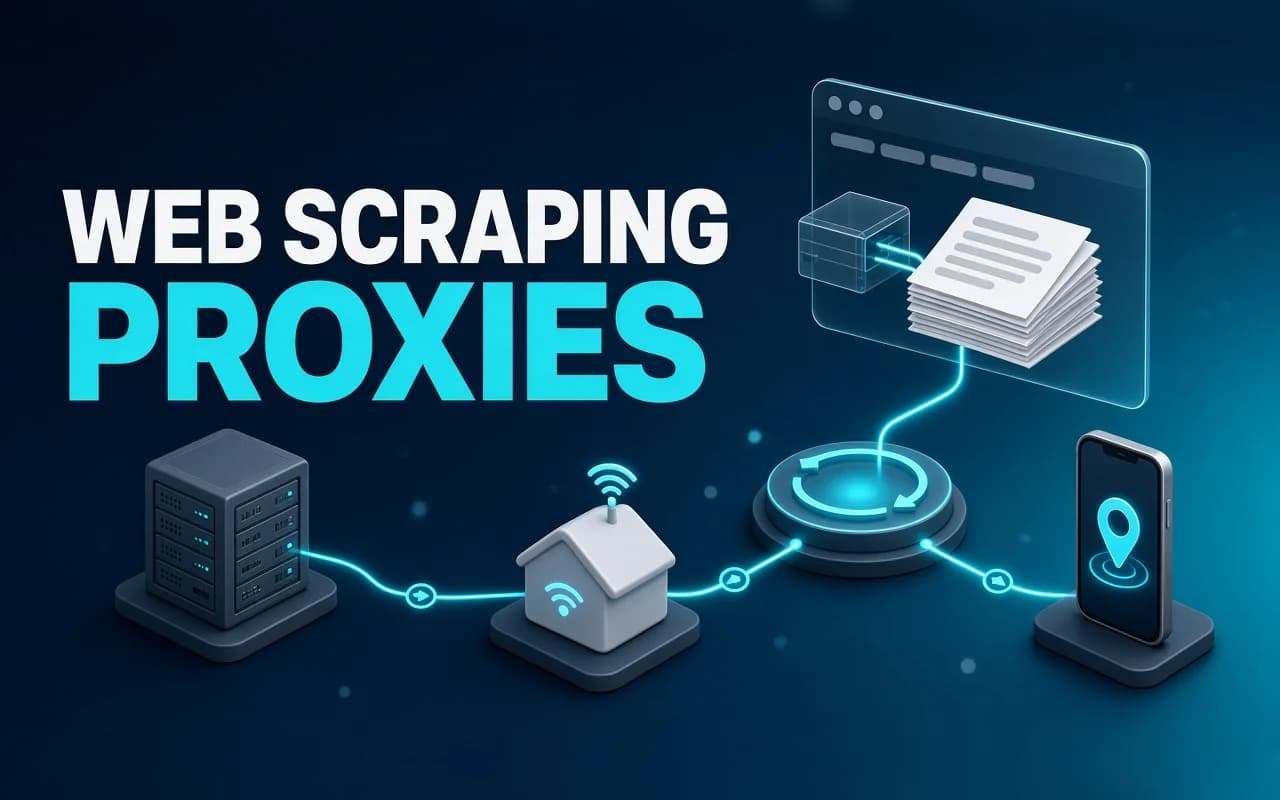
Web scraping proxies come in three main types. On the plans we checked, datacenter IPs cost under a dollar per GB, residential $1.40 to $8, and mobile up to $8 at list price.
But the per-GB rate is the smaller half of the bill. The other half is one setting in your own scraper, and it can change the cost of the same job about 80 times.
Prices checked on the Bright Data, Decodo, Webshare, Apify and Firecrawl pricing pages and docs on 2 November 2026. We read the vendors' pages and docs; we didn't run a proxy benchmark.
Do you need proxies for web scraping at all?
A proxy is a server that sends your request on to the website, so the site sees the proxy's IP address instead of yours. A proxy pool gives you thousands of those addresses, and the site sees thousands of visitors instead of one very busy one.
That matters for two reasons only. The site limits how much one IP can request, or it shows different content depending on where the IP is. If neither is true for you, a proxy adds cost and nothing else.
So check the symptoms before you buy:
- You get 403 Forbidden or 429 Too Many Requests after a few hundred requests, and slowing down doesn't fix it.
- You get a CAPTCHA or a "verify you're human" page in place of the HTML you expected.
- You need prices, search results or listings as a shopper in another country would see them.
- Your own IP is now blocked from the site in your normal browser too.
If you're scraping a few hundred pages a day from a site that answers 200 every time, you don't need any of this. Add a delay of a second between requests and keep your money. Our n8n web scraping walkthrough runs at one request a second for that reason, with no proxy at all.
One more thing before you shop. A proxy changes which IP the site sees, not what you're allowed to collect, and it doesn't make scraping against a site's terms legal. Read the terms and robots.txt first; this article isn't legal advice.
Datacenter, residential or mobile: what changes is who owns the IP
All three do the same job. The difference is where the IP address comes from, and how suspicious a website is of that kind of address.
| Type | Where the IP lives | Price on the pages we checked | Gets blocked | Use it for |
|---|---|---|---|---|
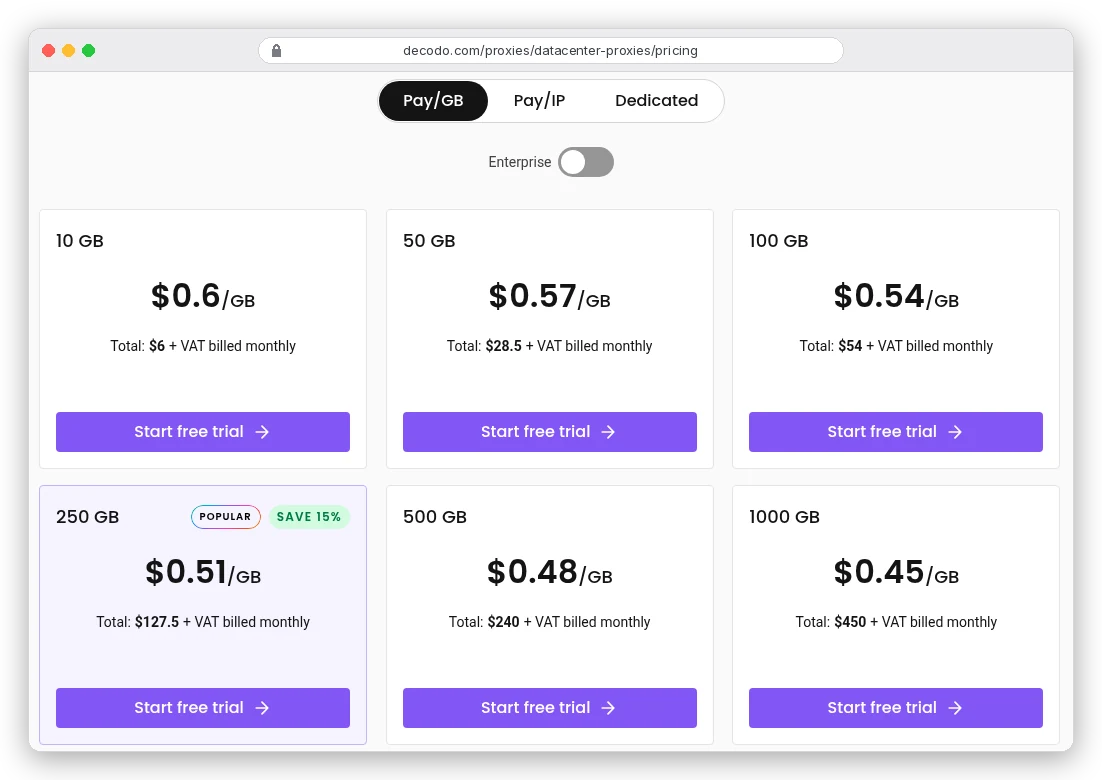
| Datacenter | Servers in cloud and hosting companies | $0.45-0.60/GB at Decodo; 3 cents an IP at Webshare | Most often | Sites without serious bot protection |
| Residential | Home and office internet connections | $1.40-8/GB | Least likely, per Apify's docs | Protected sites, local results |
| Mobile | Phones on 3G/4G/5G carrier networks | $3.75/GB on promo, $7.50 list (Decodo, 2 GB plan) | Rarely | Mobile-only content, the hardest targets |
| ISP (static residential) | Residential IPs hosted on fast servers | $0.30 an IP at Webshare; from $1.30 at Bright Data | Rarely | Logins that need the same IP for weeks |
Datacenter IPs are cheap because they're easy to make, and that's also why sites block them. Bright Data's FAQ says they're used "for mass crawling of non-sophisticated target websites."
Apify's docs add the part that hurts: "Other users' activity can get these IPs blocked." On a shared pool, someone else's aggressive scraper can burn an address before you ever use it.
Residential IPs belong to real home connections, so to the website your request looks like a person on their sofa. That's what you're paying five or six times more for. On Decodo, residential runs from $3.75/GB on the 3 GB plan to $2.75 on 100 GB, with Pay As You Go at $4.
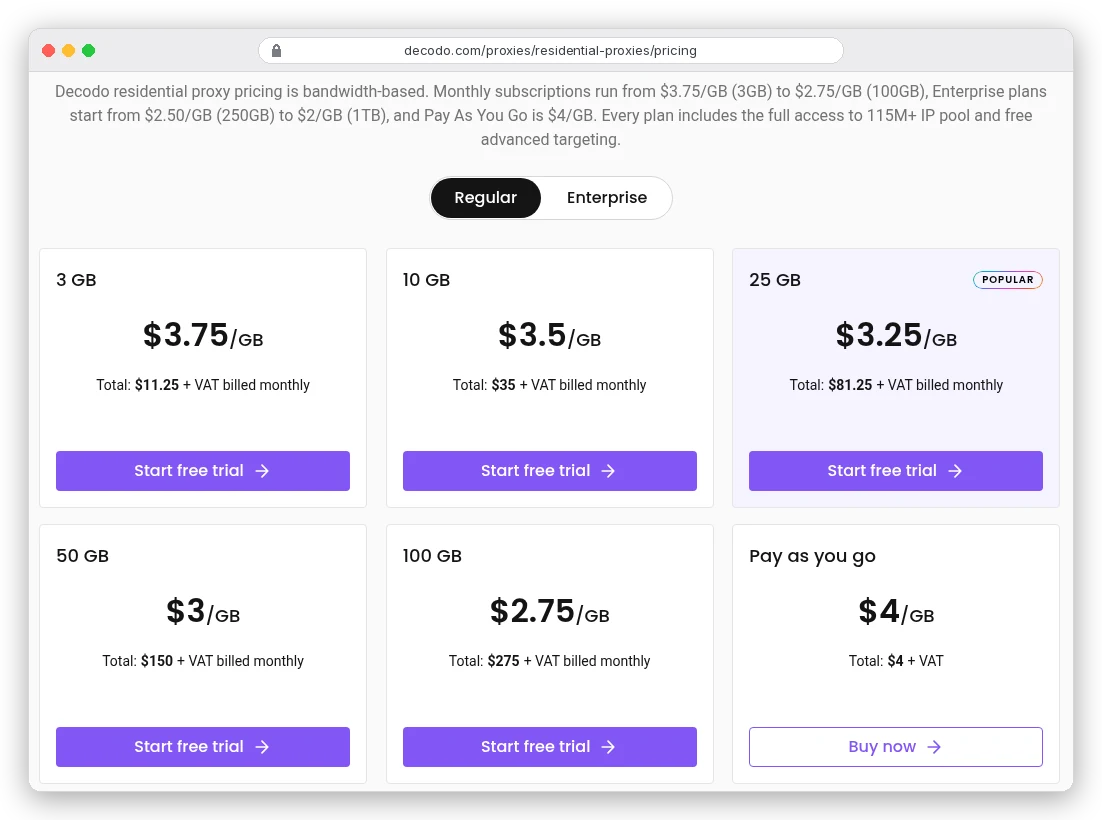
The spread between vendors is wide. Webshare sells rotating residential at $3.50/GB for 1 GB, $2.25 for 100 GB and $1.40 for 3,000 GB. All three are shown as discounts off a $7.00 list price.
Bright Data lists residential Pay As You Go at $8/GB. With the coupon RESIGB50 it shows $4.00, and its banner says that's 50% off for three months only.
Mobile proxies route through phones on 3G, 4G and 5G networks. Bright Data pitches them for "highly sophisticated websites" and "mobile-specific web data", and that's the honest scope. Most scraping jobs never need them.
They're also not always pricier than residential. Decodo's mobile plans are on a 50% promotion as we write: $3.75/GB on 2 GB, against a list price of $7.50.
One Bright Data detail to plan for. Its residential and mobile networks need a know-your-customer check first, which "may include a quick intro video call." On a deadline, budget for that.
Rotating or sticky sessions?
Every provider we checked offers the same two modes. Rotating means a new IP on every request. Sticky (a "session") means the same IP for a while, so the site sees one visitor moving through its pages.
Rotation is the default, and the right choice when every page stands alone: product pages, search results, a list of URLs. On Apify, unless you set a session, "each proxied request is assigned a randomly picked least used IP address." A browser gets one IP per browser instead.
Use a sticky session when the site remembers you between requests:
- You log in, and the session cookie is tied to the IP that logged in.
- You page through results (page 1, 2, 3) and the site checks they come from the same visitor.
- You add items to a cart to see the shipping price.
Sessions don't last forever, and the limits differ by type. Decodo lets you "keep one for up to 30 min." Apify holds a residential session "for around 30 minutes" but a datacenter one for 26 hours. If your login flow takes 40 minutes, that gap decides which type works.
Residential sessions can also die early, because the IP is someone's home router. Apify warns that sessions "can be destroyed at any time if the host devices are turned off." Speed varies too, "from a few milliseconds to a few seconds" between sessions.
Apify's advice is to test a session with one small request and keep it only if it's fast. Need weeks on one IP? That's what ISP proxies are for.
Why the price per GB matters less than your page weight
Here's the setting we promised. Proxies bill for bytes, and your scraper decides how many bytes each page costs.
A plain HTTP request downloads only the HTML. A headless browser downloads the HTML plus every image, font, script and video the page loads. Bright Data counts both directions too, "request headers+request data (POST)+response headers+response data."
How big is the gap? HTTP Archive's 2025 Web Almanac puts the median page's HTML at 22 KB. The median mobile inner page, with everything loaded, weighs 1.8 MB.
That's about 80 times more bytes for the same data.
In felt terms, one GB of residential bandwidth buys about 45,000 HTML-only fetches, or about 555 full page loads. Here's what 1,000 pages costs at each rate, using those medians:
| Proxy and plan | Rate | 1,000 pages, HTML only (22 MB) | 1,000 pages, full browser (1.8 GB) |
|---|---|---|---|
| Decodo datacenter, 10 GB | $0.60/GB | about 1 cent | $1.08 |
| Webshare rotating residential, 100 GB | $2.25/GB | 5 cents | $4.05 |
| Decodo residential, 25 GB | $3.25/GB | 7 cents | $5.85 |
| Apify residential, Starter | $8/GB | 18 cents | $14.40 |
| Bright Data residential, Pay As You Go (list) | $8/GB | 18 cents | $14.40 |
Look down the right-hand column, then the left. The cheapest residential plan with a browser costs more per page than the most expensive one with plain requests.
So the first saving isn't a cheaper vendor. Fetch the HTML directly when the data is in it. When you do need a browser, block images, fonts and media, so you pay only for the scripts that build the page. Our Firecrawl vs Playwright comparison covers when a site needs a real browser at all.
These are medians, not your target. A store with big product photos sits above them, a text-heavy directory below. Run 100 pages through a pay-per-GB plan and read the usage dashboard before you commit to a monthly tier.
What 50,000 pages a month costs on each route
Say you track prices on 50,000 product pages a month from a site that blocks datacenter IPs. This is a hypothetical, built on the medians above.
With a full browser, that's 90 GB. It fits Decodo's 100 GB residential plan at $275 a month, or Webshare's at $225.
On Apify's Starter plan at $8/GB, the proxy alone is $720. Bright Data's Pay As You Go comes to the same $720 at list price, or $360 while the coupon lasts.
With HTML-only requests, the same job is 1.1 GB. Decodo's smallest residential plan, 3 GB for $11.25, covers it with room for retries.
On Firecrawl, the same 50,000 basic scrapes are 50,000 credits, half of the Standard plan's 100,000 a month, proxies included. Its pricing page showed us rupees, so we haven't quoted a dollar price.
You're probably thinking the site needs JavaScript, so HTML-only is out. Sometimes it is. But check the page source first. Many "dynamic" sites ship the data as JSON inside the HTML, or call an API you can request directly, and both cost HTML-sized bytes.
When a scraping API already includes the proxies
Everything above assumes you run your own scraper and buy bandwidth for it. Scraping APIs flip that: you pay per page or per run, and the proxy pool comes with the service.
Firecrawl is the clearest case. Its docs say that "by default, Firecrawl routes all requests through proxies," even if you don't ask. The default mode, auto, starts on basic proxies and retries once on enhanced proxies when the site answers 401, 403 or 429.
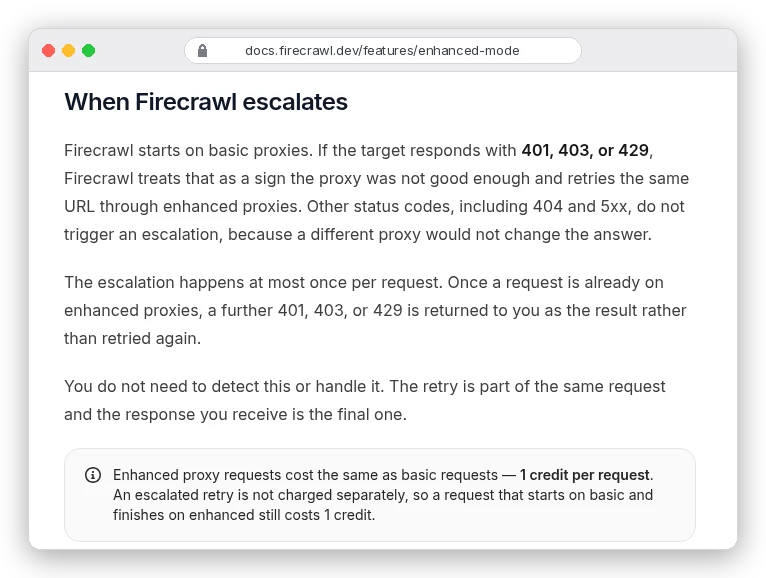
The escalation costs nothing extra: "Enhanced proxy requests cost the same as basic requests — 1 credit per request." Bytes don't count either. On a basic scrape, a 22 KB page and a 3 MB page are both one credit, so the page-weight problem from the last section disappears.
The catch is coverage. Firecrawl's proxy table lists 26 countries for basic proxies, but enhanced proxies only in the US and the Netherlands. If you need German search results from a protected site, check that table before you build on it.
Apify works differently. Its proxies are part of the platform, used by its ready-made scrapers (Actors) and by your own code. Every plan includes datacenter IPs, from 5 on Free to 200 on Scale, and residential is billed per GB.
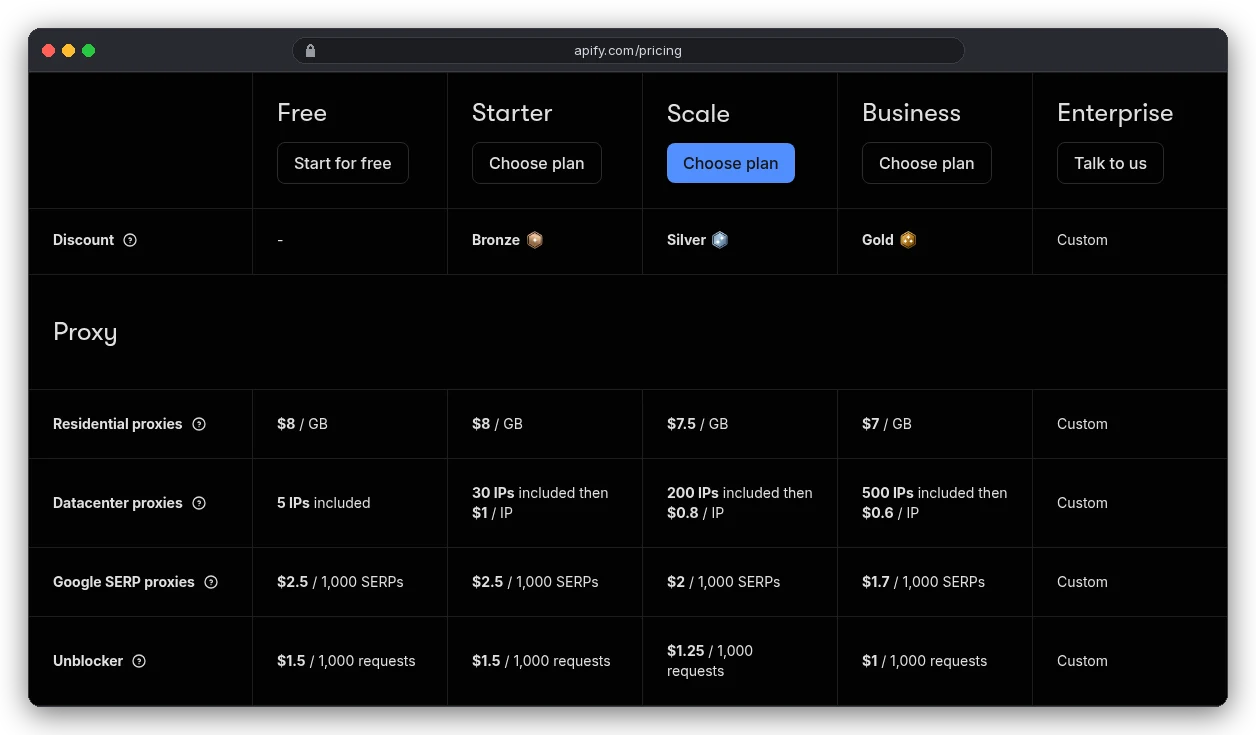
At $8/GB on Starter, Apify's residential bandwidth costs about 2.5 times Decodo's 25 GB rate and 3.5 times Webshare's 100 GB rate. You're paying for convenience: no second account, one bill, sessions handled by the SDK.
For small jobs that's a fair trade. For 90 GB a month of browser traffic, it's $720 against $225-275.
Two more rules from Apify's docs. Using Apify Proxy from outside the platform needs a paid plan. And Actors can use your own proxies instead, so you can run them on cheaper residential bandwidth.
Our Apify review covers the rest of the platform. The Google Maps lead scraping guide shows an Actor that bills per result, so you never size bandwidth at all.
When buying proxies is the wrong fix
Proxies solve IP blocks. Plenty of scraping failures aren't IP blocks.
- A login wall. A new IP doesn't get you past a login, and switching IPs mid-session can log you out, which is what sticky sessions are for.
- A page that builds its content with JavaScript. A proxy gives you the same empty HTML from a new address.
- Bot checks that look at your browser, not your IP. For scraping, Bright Data's own FAQ recommends its Web Unlocker over raw proxies because it "fully handles all of the unblocking." It's billed per request, from $1 per 1,000.
- Your own request rate. If a 2-second delay makes the 429s stop, that's the cheapest proxy you'll ever buy.
Then read the billing rules. Decodo's Pay As You Go sells "only one GB at a time" and can't run alongside a monthly plan. Bright Data's unused commitment "will not roll over to the next month."
Webshare's datacenter bandwidth is "Subject to our Fair Usage Policy." And most of the prices above are promotions, so screenshot what you signed up for.
Which proxy should you buy?
Collecting AI or RAG data from many different sites? Skip proxies and use a scraping API like Firecrawl, where proxies and retries fit inside one credit per page. Our guide to web scraping for AI walks through that setup.
If your scraper only hits 429s on an unprotected site, start with datacenter. Test on Webshare's 10 free proxies, then pay $2.99 a month for 100, or $6 for Decodo's 10 GB.
If the site blocks datacenter IPs, buy residential by the GB and fetch HTML instead of full pages wherever you can. Start small to learn your real page weight: Decodo's 3 GB for $11.25 or Webshare's 1 GB for $3.50 will tell you in a day.
Already on Apify? Use its proxy for small runs and bring your own residential pool once you pass a few GB a month. Mobile proxies are for the narrow case where the content only exists on mobile, or nothing else gets through.