You open AI Studio, pick Nano Banana Pro, leave the resolution on the default 1K to keep costs down, and generate forty images.
Every one of them cost exactly what a 2K image would have. Google's pricing page bills Nano Banana Pro at $0.134 for any image up to 2K, and 1K is the default. So the "cheap" setting gets you a quarter of the pixels for the same money.
That's one of three things the Nano Banana Pro docs say quietly. The others: how its 14 reference slots are really split, and that Google now points most new projects at a cheaper model.
So who should still pay for Pro? We'll get there.
Specs and prices checked against Google's docs, pricing pages and help centre, plus partner pages, on 2 November 2026. We read the documentation; we didn't run generations for this post.
What is Nano Banana Pro, and is it still Google's best image model?
Nano Banana Pro is Google's nickname for Gemini 3 Pro Image, model ID gemini-3-pro-image. It's an image model built on Gemini 3 that reasons through a prompt before it draws. Google's docs call it "the premium choice for the most complex visual tasks."
It isn't the newest member of the family, though. Google released Nano Banana 2.1 on 6 October 2026. The docs now recommend it "for all new projects" in place of Nano Banana 2.
Google's own model page describes 2.1 as "the more efficient counterpart" to Pro, not its replacement.
Here's the family as the Gemini API lists it today:
| Nickname | Model ID | Google's pitch | Price per 1K image (API) |
|---|---|---|---|
| Nano Banana Pro | gemini-3-pro-image | Premium: world knowledge, localisation, brand consistency | $0.134 |
| Nano Banana 2.1 | gemini-nano-banana-2.1 | The workhorse for generation and editing | $0.0336 |
| Nano Banana 2 | gemini-3.1-flash-image | Previous-generation workhorse | $0.067 |
| Nano Banana 2 Lite | gemini-3.1-flash-lite-image | Fastest and cheapest, 1K only | $0.0336 |
So Pro costs four times as much as 2.1 at 1K. That gap shrinks at higher resolutions, and it's the number this whole guide keeps coming back to.
Where can you use Nano Banana Pro?
In more places than most guides list, but with a different catch in each.
- Gemini app: only as a redo. You generate with Nano Banana 2, then choose More, then Redo with Pro. It needs a Google AI plan and the Gemini model set to Pro.
- Google AI Studio: the pricing page links straight to it with "Try it in Google AI Studio".
- Gemini API: there's no free tier for Pro. The pricing table says "Not available" under Free Tier, so you need a billed key.
- Gemini Enterprise Agent Platform (the new name for Vertex AI): generally available since 28 May 2026, global region, with a listed retirement date of "May 28, 2027 or later".
- Partner apps: ImagineArt has a dedicated Nano Banana Pro app, and OpenArt lists Pro among the models its saved characters work with.
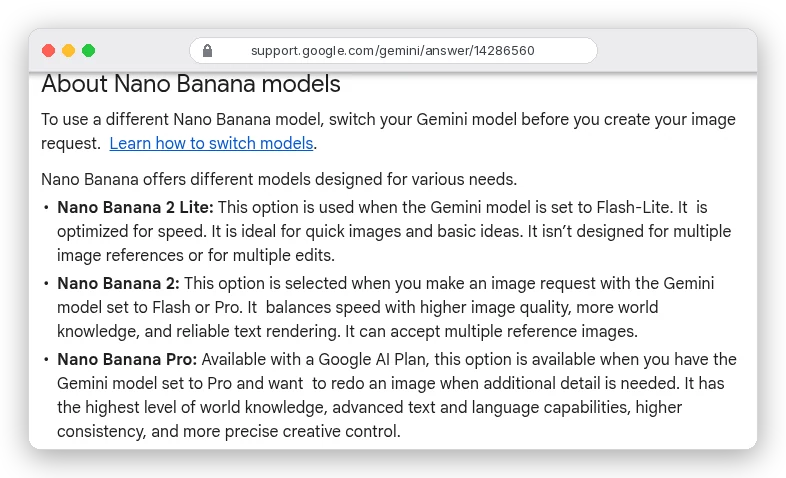
Heavy app users should note one more line: "If you reach your daily quota of Nano Banana 2 images, you can't redo any additional images with Nano Banana Pro." Pro rides on your Nano Banana 2 allowance.
Google's own pages don't fully agree here, either. The Gemini overview page now sells Nano Banana 2.1 as "our most advanced image model" for paid plans and doesn't mention Pro at all. If the Redo with Pro option isn't in your menu, AI Studio is the dependable way in.
The two settings that matter: aspect ratio and resolution
Nano Banana Pro has fewer knobs than a diffusion model. Google's image-generation docs don't mention a seed, a negative prompt field or a guidance scale. You set the canvas shape and the size; the prompt does everything else.
Both live in response_format. Here's Google's documented call with the model ID swapped to Pro:
interaction = client.interactions.create(
    model="gemini-3-pro-image",
    input=prompt,
    response_format={
        "type": "image",
        "aspect_ratio": "16:9",
        "image_size": "2K",
    },
)
Three details from the docs save you a failed call. The K must be uppercase, because "Lowercase parameters (e.g., 1k) will be rejected." Leave the size out and you get 1K. Leave the ratio out and the model copies your input image's shape, or makes a square.
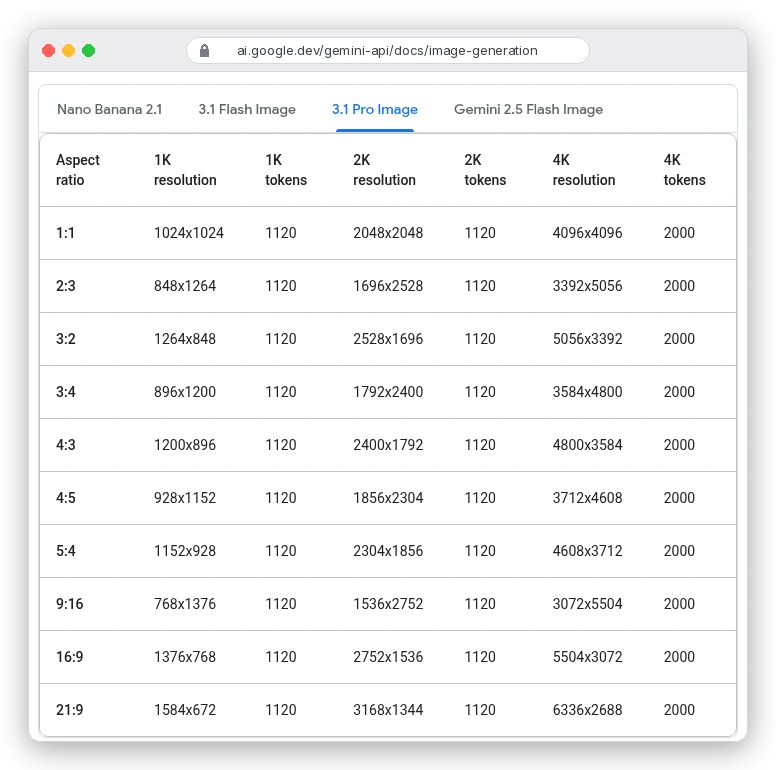
Look at the token columns. A 1K image and a 2K image both use 1,120 output tokens, which is why they cost the same.
So pick 2K as your default. At 16:9 that's 2752×1536 instead of 1376×768, for the same 13.4 cents. Drop to 1K only when you need a small file, never to save money.
4K is a real decision. It uses 2,000 tokens, so it costs 1.79 times as much as 2K for four times the pixels. That's worth it for print and large hero images, and wasted on a 1080-pixel Instagram post.
The aspect ratio list has a wrinkle. The Gemini API table shows ten ratios for Pro, from 1:1 to 21:9. Google's Agent Platform spec lists fourteen, adding 1:4, 4:1, 1:8 and 8:1.
Need a skinny banner? Test the ratio on your platform before you build around it.
For prompt structure that works across models, our AI image prompt guide covers aspect ratio wording, semantic negatives and templates. The rest of this guide sticks to what's specific to Pro, starting with the bill.
What does Nano Banana Pro cost per image?
On the Gemini API, image output costs $120 per million tokens. Google converts that to per-image prices for you:
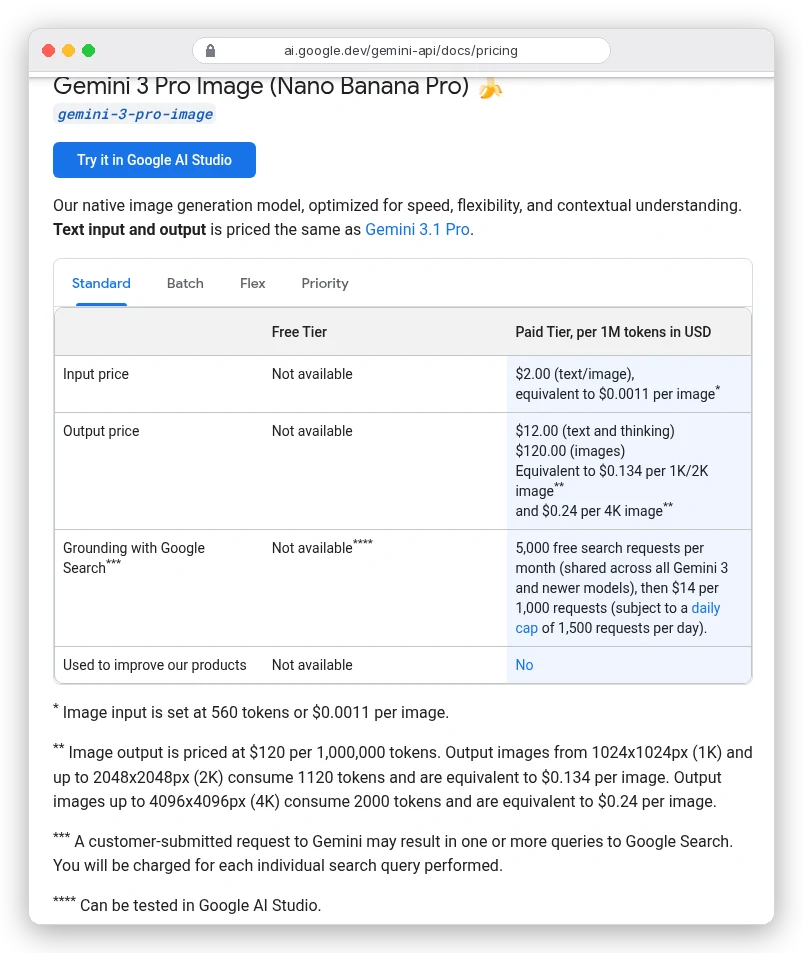
In plain numbers, $10 buys about 74 images at 1K or 2K, or 41 at 4K. Reference images are cheap by comparison: 560 tokens each, so even all 14 add about 1.6 cents to a request.
Two costs sit outside those per-image figures. First, thinking: the docs say it "cannot be disabled in the API", and that text bills at $12 per million tokens.
Google doesn't publish how many thinking tokens a typical image uses. The interim "thought images" aren't charged.
The second is search. Grounding with Google Search gives you 5,000 free requests a month, shared across Gemini 3 models, then $14 per 1,000.
If you don't need the image right now, there's a much cheaper route. The Batch tab halves everything:
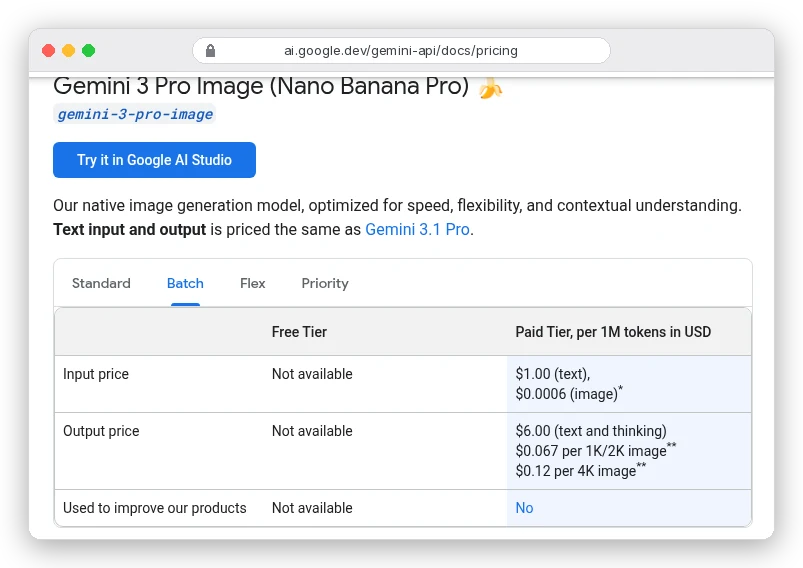
Batch jobs can take up to 24 hours, so this is for catalogues and planned content, not for iterating on one image.
Say you need 50 product images and expect three tries each at 2K. That's 150 images: $20.10 standard, $10.05 on batch, or $7.56 on Nano Banana 2.1. (Our hypothetical, not a test.)
Agent Platform charges the same list prices: $0.134 for 1K and 2K, $0.24 for 4K.
What about apps? ImagineArt's credit docs list Nano Banana Pro at 80 credits per 1K or 2K image and 160 at 4K, against 27 for Nano Banana 2.1. Same quirk: 1K saves nothing.
Its Basic plan's 3,000 monthly credits cover about 37 Pro images at 2K. ImagineArt showed us rupee prices, so we haven't converted that to dollars. Our ImagineArt review covers its plans and catches.
How Nano Banana Pro's 14 reference images are really split
"Up to 14 reference images" is the headline spec, and it's true. But the docs table splits those 14 by job, and Pro's split differs from 2.1's:
| Reference type | Nano Banana Pro | Nano Banana 2.1 |
|---|---|---|
| Objects, high fidelity | Up to 6 | Up to 10 |
| Characters, for consistency | Up to 5 | Up to 4 |
| Style references | Up to 3 | Not offered |
That last row is the one nobody mentions. In Google's table, Pro is the only Nano Banana model with dedicated style slots. You can hand it a brand's past campaign images as style and keep your product photos in the object slots.
Google's pages contradict each other on the object count, though. The same docs page later says Pro "supports 5 images with high fidelity." DeepMind's page claims "fidelity of up to fourteen objects." Plan around six. If a seventh object matters, check it in the output.
There's a file limit too. Agent Platform takes 14 images per request but only 10 as web URLs. The rest go in as inline data (up to 7 MB each) or Cloud Storage files.
Label every reference in the prompt by role ("the bottle from image 1, styled like images 6 to 8"). Our guide to consistent AI characters covers character sheets and the labelling habits that keep faces stable. For packshots, see how to create AI product photos.
Text, translation and live facts: where Pro earns its price
If your image has no words and no facts in it, Nano Banana 2.1 probably does the job for a quarter of the price. Pro pays off when the picture has to say something correctly.
Text is the obvious case. In their section on text, Google's docs point to Gemini 3 Pro Image "for professional asset production."
They also give a tip that saves rerolls: Gemini "works best if you first generate the text and then ask for an image with the text." Write and proofread the copy in a chat, then paste it into the image prompt in quotes.
Translation is the less obvious one. DeepMind's Pro page shows a two-turn flow. First a poster for London, then: "Take this concept and localize it to a setting in Germany, including translation." One design becomes several market versions without rebuilding the layout.
Then there's search grounding, for infographics and anything that needs current facts, like a weather map or a product launch timeline. Pro supports web search grounding. It doesn't get Google Image Search grounding, which the docs reserve for Nano Banana 2.1 and Nano Banana 2.
Pro can also return interleaved output: text and illustrations in one response. Google's example is "the lifecycle of a monarch butterfly, interleave illustrations". That's useful for step-by-step guides and storyboards.
Three prompts written for what Pro does differently
These are templates built from Google's documented features, not outputs we generated. Swap in your own details.
A localised launch poster, in two turns
Turn one:
Design a 4:5 poster for a cold-brew coffee brand called "North Pour".
Headline: "COLD, NOT BITTER". Tagline: "Brewed for 18 hours".
Bold condensed sans-serif headline in cream on a deep navy background,
a sweating glass bottle centred, soft studio light.
Turn two: "Keep the layout, bottle and colours. Localise it for a cafe in Tokyo, including translation of the headline and tagline into Japanese."
A grounded infographic
Turn on Google Search grounding, then:
Use search to find this week's 5-day weather forecast for Pune.
Make a clean 16:9 infographic: one card per day with the day name,
a simple weather icon and the high and low in Celsius.
Flat design, white cards on a soft blue gradient, large legible numbers.
Check every number against the source. DeepMind's own limitations note says Pro "may misinterpret information or produce factually incorrect results" in infographics.
A style-locked product shot
Attach your product as image 1 and three past campaign images as images 2 to 4:
Place the bottle from image 1 on a stone ledge by a window at golden hour.
Match the colour grade, lighting and composition style of images 2, 3 and 4.
Keep the label text and bottle shape exactly as in image 1. 3:2, 2K.
Editing comes next: swapping a background, extending the canvas. Our AI image editing guide explains how Gemini's word-based "semantic masking" behaves, and where it slips.
Where Nano Banana Pro still falls short
Google is unusually frank about this on DeepMind's Pro page. The model "can still struggle with small faces, accurate spelling, and fine details."
Translated text "may struggle with grammar, spelling, cultural nuances, or idiomatic phrases." And "masked editing, major lighting changes (like day to night), or blending multiple images may sometimes produce unnatural results."
So a native speaker should read any translated poster before it ships. Plan for a reroll on group shots with small faces.
The docs also list what Pro can't do that its cheaper sibling can:
- No thinking-level control. Nano Banana 2.1 lets you choose minimal, medium or high; Pro always thinks, and you pay for it.
- No video input, so it can't make a thumbnail from a clip. Nano Banana 2.1 can.
- No Google Image Search grounding, only web search.
- Fewer high-fidelity object slots: six against ten.
Every image also carries an invisible SynthID watermark, on every Nano Banana model. That's good for disclosure and something to know if a client asks.
Weighing all of that against the price brings us back to the question from the start.
Should you use Nano Banana Pro or Nano Banana 2.1?
Use Nano Banana Pro when the image must be right first time and carries words, data or a brand style. Think posters, packaging mockups, infographics, localised ads and anything built from style references. At $0.134 for a 2K image, it's cheap next to a designer's hour.
Use Nano Banana 2.1 for drafts, volume and anything without text. It's a quarter of Pro's price at 1K and about 38% of it at 2K, and it adds video input and image search. Our roundup of AI image generation tools covers when a non-Google model fits better.
And if you use Pro through the API, set image_size to 2K, and send anything that can wait through batch at $0.067 an image.