Open ImagineArt's pricing page and the first thing you see is a countdown: "Biggest Sale Ever! 50% OFF & Unlimited Free Generations on 20 models". Under it sit three plans and a credits slider. The cheapest plan promises roughly 600 images a month.
Behind that page is one of the widest model menus in AI creation. The catch is working out what any of it costs you. This review covers what ImagineArt does well, where it falls short, and who should pay for it.
How we reviewed it: every fact comes from ImagineArt's pricing page, help docs and terms, and its Trustpilot, App Store and Google Play pages, checked on 15 October 2026. We didn't sign up or generate anything, so this is not a hands-on quality test.
The score rates price, credits, rights, features and billing terms, not output quality. This page contains affiliate links; we may earn a commission if you subscribe.
What ImagineArt is
ImagineArt is a web and mobile suite that puts other companies' AI models behind one login and one credit balance. You pick a model, write a prompt, and pay in credits. Its own models (ImagineArt 2.0 and 1.5) sit beside Google's Veo and Nano Banana, Kling, Seedance, Flux, Midjourney V7, Ideogram, Recraft and more.
The home screen splits into three products. AI Toolkit is the generator: image, video, lipsync, extend, upscale, speech and music. Workflow is a node canvas for chaining models.
Agent is Imagine Computer, an assistant that plans and runs multi-step tasks. ImagineArt's docs say more than 6 million people use it.
Where ImagineArt is strong
The model menu is huge
According to ImagineArt's docs, the image tool offers 36 generation models plus edit-only models, and the video picker lists 37 models as of October 2026. That covers most of the names people search for: Veo 3.1, Kling 3.0, Seedance 2.5, Hailuo, Runway 4.5, Pika, Wan and xAI's Grok video.
For a creator, that's the real draw. You can try a prompt on a cheap model, then rerun it on an expensive one without opening a second account or a second bill.
It goes well beyond prompts
The extras are where ImagineArt pulls ahead of a plain generator:
- Editing and upscaling. An Edit tab with inpaint and outpaint, plus three upscalers: ImagineArt's own (from 8 credits), Topaz and Magnific Precision, which goes up to 16x.
- Workflows (Imagine Flow), a no-code canvas that chains "50+ models", for example generate, upscale to 4K, then resize for every ad format in one run. It can read from and save to Google Drive.
- Imagine Apps, 150+ templates for one-click jobs like product ads. Creators can publish their own apps and earn 10 to 30 credits each time someone runs one.
- Film, Ad and Fashion studios for longer, more structured projects.
- Plugins for Premiere Pro, Photoshop, After Effects, Figma, Framer and Shopify.
- An MCP server at mcp.imagine.art, so Claude, ChatGPT, Cursor and other agents can generate with your ImagineArt credits. You sign in instead of pasting an API key.
Few rivals cover all of that under one subscription. If you work across images, video, audio and design tools, this is the strongest argument for ImagineArt.
Credits are spent in a sensible order
ImagineArt keeps up to three balances and spends the one that expires soonest first: free daily credits, then your monthly plan credits, then top-ups. Top-up credits never expire. Failed generations are refunded instantly, according to the pricing page's FAQ, and a Usage Analytics page shows which models ate your credits.
What ImagineArt really costs
ImagineArt's own sources don't agree on its prices. Here is what each one said on 15 October 2026.
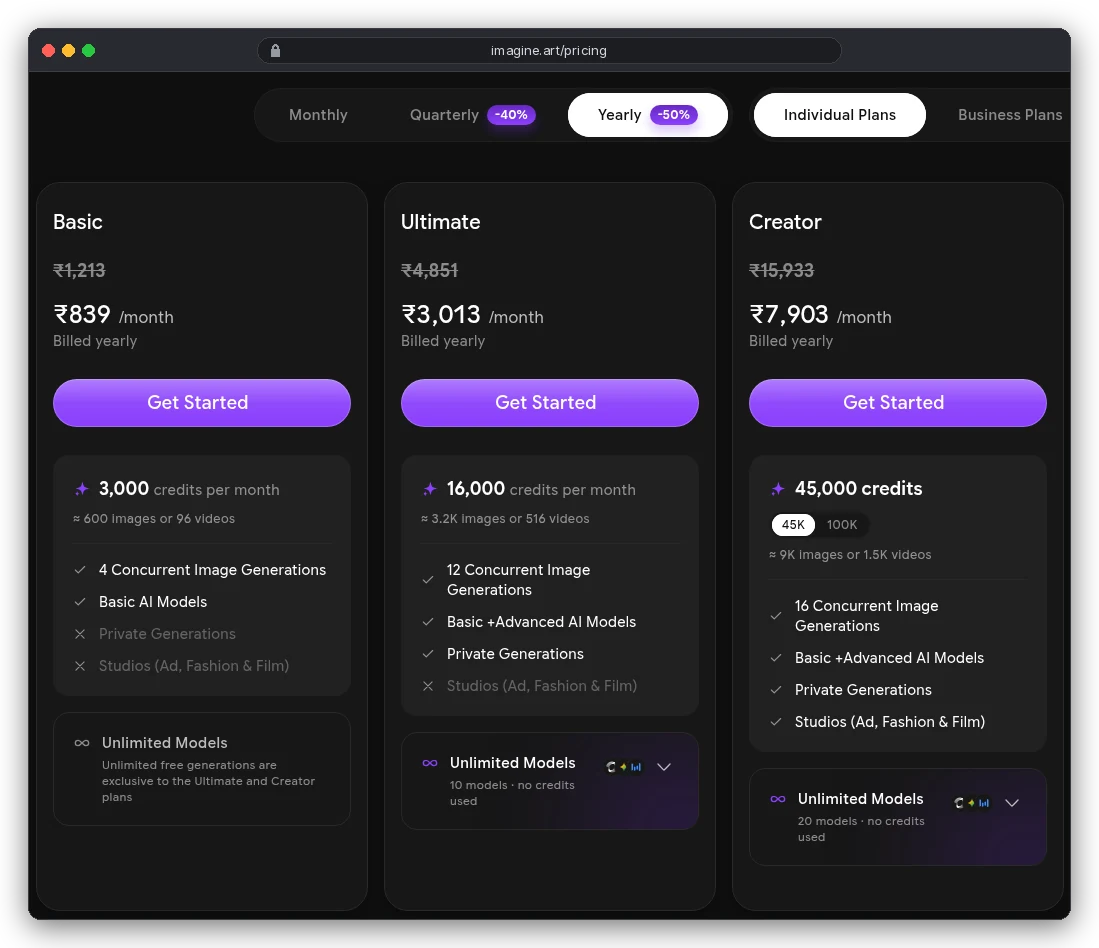
The live pricing page now shows three individual plans: Basic, Ultimate and Creator, with Creator offered at 45,000 or 100,000 credits. Our capture shows rupees because we checked from India; this is the yearly view.
The table below shows US prices from ImagineArt's help docs and its machine-readable pricing file. Monthly is the price if you pay month to month; yearly is the monthly cost when billed for a year.
| Plan | Monthly | Yearly (per month) | Credits a month | Unlimited models |
|---|---|---|---|---|
| Free | $0 | $0 | 100 a day | No |
| Basic | $13 | $9 | 3,000 | No |
| Ultimate | $50 | $34 | 16,000 | 10 |
| Creator (45K) | $120 | $83 | 45,000 | 20 |
| Creator (100K) | $250 | $175 | 100,000 | 20 |
Two warnings go with that table. First, ImagineArt's pricing file lists Basic at $5 a month for 1,500 credits, while its help docs and live page say 3,000 credits. The live rupee price (₹839) matches the $9 figure, so we've used that.
Second, the help docs still list a $30 Standard plan with 8,000 credits that no longer appears on the pricing page. For tiers, seats and top-ups in depth, see our ImagineArt pricing guide.
Credits refresh monthly on every billing term, and unused plan credits expire at the end of the month. A yearly plan is twelve monthly allowances, not one big pot. Top-up packs start at $10 for 1,000 credits and run to $200 for 66,000.
What a credit buys
The pricing card promises Basic users "≈ 600 images or 96 videos". Those figures only hold on the cheapest models. ImagineArt's help docs say the plan estimates are "a baseline for standard model settings", and its own credit tables show why:
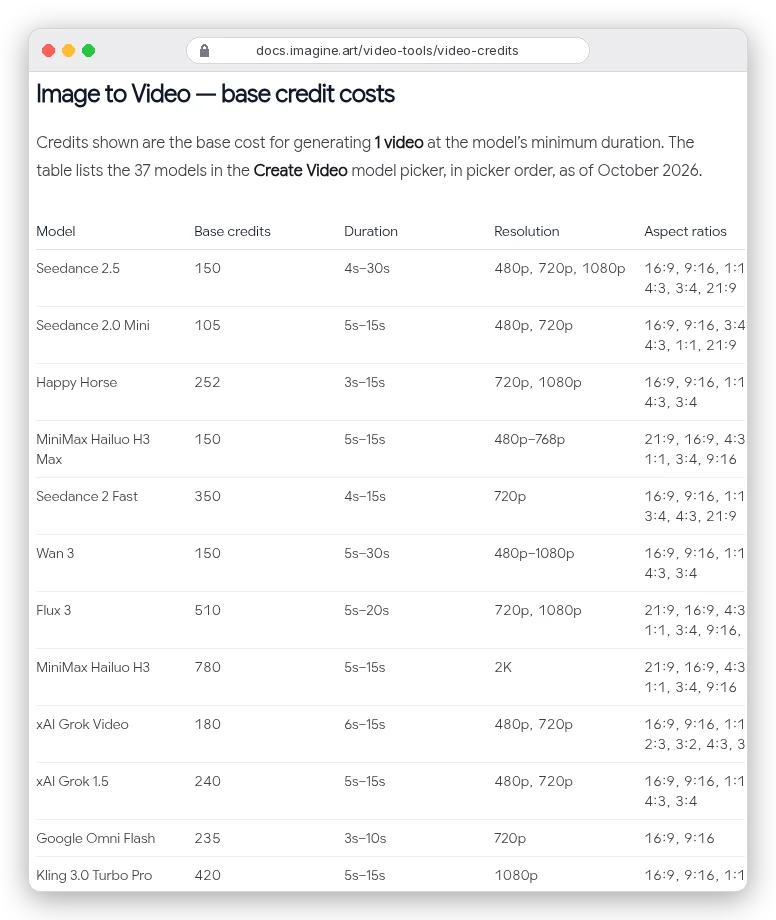
Here's what Basic's 3,000 credits buy at the docs' base prices, one output at the shortest length and default settings:
| Model | Credits each | How many on Basic |
|---|---|---|
| Z Image Turbo (image) | 5 | 600 |
| ImagineArt 2.0 (image) | 25 | 120 |
| Nano Banana Pro, 2K (image) | 80 | 37 |
| Wan 2.2, 5 s 720p (video) | 30 | 100 |
| Kling 3.0 Pro (video) | 300 | 10 |
| Google Veo 3.1 (video) | 900 | 3 |
The pricing page's own comparison table agrees: on Basic it lists "Upto 1" Veo 3.1 video and "Upto 8" Kling 2.6 videos. The same page also promises "Upto 420" videos on Basic, against "96" on the card above it. If premium video is why you're here, plan on the bottom rows of that table, not the headline.
"Unlimited" has a timer
Ultimate and Creator include unlimited generations on a set of models (10 and 20 respectively, per the live page). That sounds like the answer to the credit problem. ImagineArt's own policy page explains why it isn't quite:
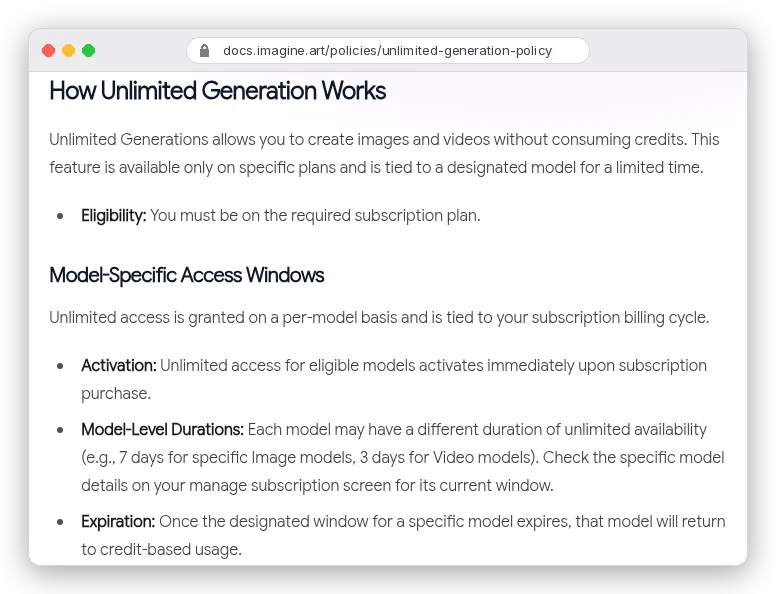
Unlimited access is granted per model for a window. ImagineArt's examples are "7 days for specific Image models, 3 days for Video models", after which the model costs credits again. The policy also allows one unlimited generation at a time, adds a daily fast-generation limit, and excludes Workflows.
Recent one-star Trustpilot reviews complain about exactly this, with titles like "Unlimited Generation Disappeared After Just One Day".
Four catches to know before you pay
1. Basic generations are public
On Basic, private generations are crossed out on the live pricing card; they start at Ultimate. The terms say content shared in a public area lets other users "view and use" it. For client work or unreleased products, Basic is effectively off the table, which makes the real entry price $34 a month billed yearly.
2. You get a licence, not ownership
Paid plans can use outputs commercially. But the terms say ImagineArt owns "all content generated through the platform, except for the Outputs for which we grant you a license". On the plus side, ImagineArt says it won't train on your content without your consent.
Free use is murkier. The terms say free outputs "may be limited to non-commercial, personal purposes". The pricing FAQ says free users can use images commercially if they credit Imagine.Art. If commercial use matters, pay for a plan.
3. The refund window is short
You can ask for a refund within 3 days of a monthly or quarterly purchase, or 5 days of a yearly one. You must have used 300 credits or fewer. Accidental purchases and a change of mind are both listed as non-refundable, and renewal charges refunded within 3 days lose 50%. Cancelling stops renewal but doesn't refund unused time.
That matters because the most common complaint in recent one-star reviews is billing. Several reviewers say they thought they were paying monthly and were charged for a year. Check the toggle above the plans says Monthly before you pay.
4. Web and mobile are billed separately
Your credits and gallery sync between the website and the iOS and Android apps. Subscriptions don't: ImagineArt's FAQ says a plan bought on the web can't move to the app, and the reverse.
The Android listing also says the app contains ads, and Workflows and some editing tools are web-first.
What users say
Public ratings split along the same line as our findings. People who use ImagineArt rate the product well. People who fight its billing do not.
- Trustpilot: 3.8 from 1,245 reviews. 60% are five stars and 19% are one star. Trustpilot shows that ImagineArt replied to 85% of negative reviews but typically takes over a month.
- App Store (US): 4.4 from about 5,200 ratings.
- Google Play: 4.2 from 441,000 reviews, with more than 10 million downloads.
The five-star reviews praise the model selection and ease of use. The one-star reviews are mostly about refunds, yearly charges and short "unlimited" windows, not image quality.
Who should use ImagineArt, and who should skip it
Choose ImagineArt if you:
- want Veo, Kling, Seedance, Nano Banana and Midjourney V7 under one bill;
- work across images, video and audio, or want to chain them in Workflows or call them from an AI agent;
- have a small team: Ultimate and Creator include team seats that share one credit pool.
Skip it if you:
- mostly make premium video on a tight budget, since Veo 3.1 at 900 credits a clip burns through Basic in three generations;
- need private client work for under $34 a month;
- want simple, predictable billing and an easy refund.
ImagineArt alternatives
The closest rival is OpenArt, which charges per seat but gives more images per credit. Our ImagineArt vs OpenArt comparison runs the numbers for solo creators and teams.
Only need still images? Our guide to the best AI image generation tools covers Nano Banana Pro, Seedream, Midjourney and more. For talking-head video, see the best AI avatar generators.
Our verdict
ImagineArt is one of the broadest AI creation suites you can buy. The model list, Workflows, plugins and MCP server put more tools behind one login than most rivals. It loses points on pricing that disagrees with itself and an "unlimited" offer with time limits. Public generations on Basic and a strict refund policy cost it more.
Our 7.0 out of 10 is the plain average of the seven criteria on this page. It reflects what you get for your money on paper. It doesn't judge image or video quality, because we didn't run any generations.
The sensible way in is the free plan. Spend your 100 daily credits for a week and check the tooltip cost of the models you'd really use. Then pick a plan, on monthly billing first.