You need data from a few thousand web pages, probably to feed a model. One option is free: Playwright, Microsoft's browser automation library. The other charges by the page: Firecrawl, an API that hands back clean Markdown.
Free sounds like the end of the conversation. On a friendly site it often is. But one question decides which of the two costs you less, and it isn't how many pages you need.
We'll get to it once the numbers are on the table.
Prices and docs checked on each vendor's own pages on 29 September 2026. We read the docs and did the arithmetic; we didn't run benchmarks.
Firecrawl or Playwright: which way does it lean?
For most people scraping content for an AI app, Firecrawl. One API call returns Markdown a model can read, proxies are on by default, and crawling a whole site is a single endpoint. On the Standard plan that works out to $0.83 per 1,000 pages.
Playwright wins in two situations. The first is when the clicking is the job: signing in, filling forms, stepping through an app. The second is high volume on sites that don't fight back, because there the only real bill is a server.
Whether your sites fight back is the question from the top. First, though, the difference underneath everything else.
The real difference: who runs the browser?
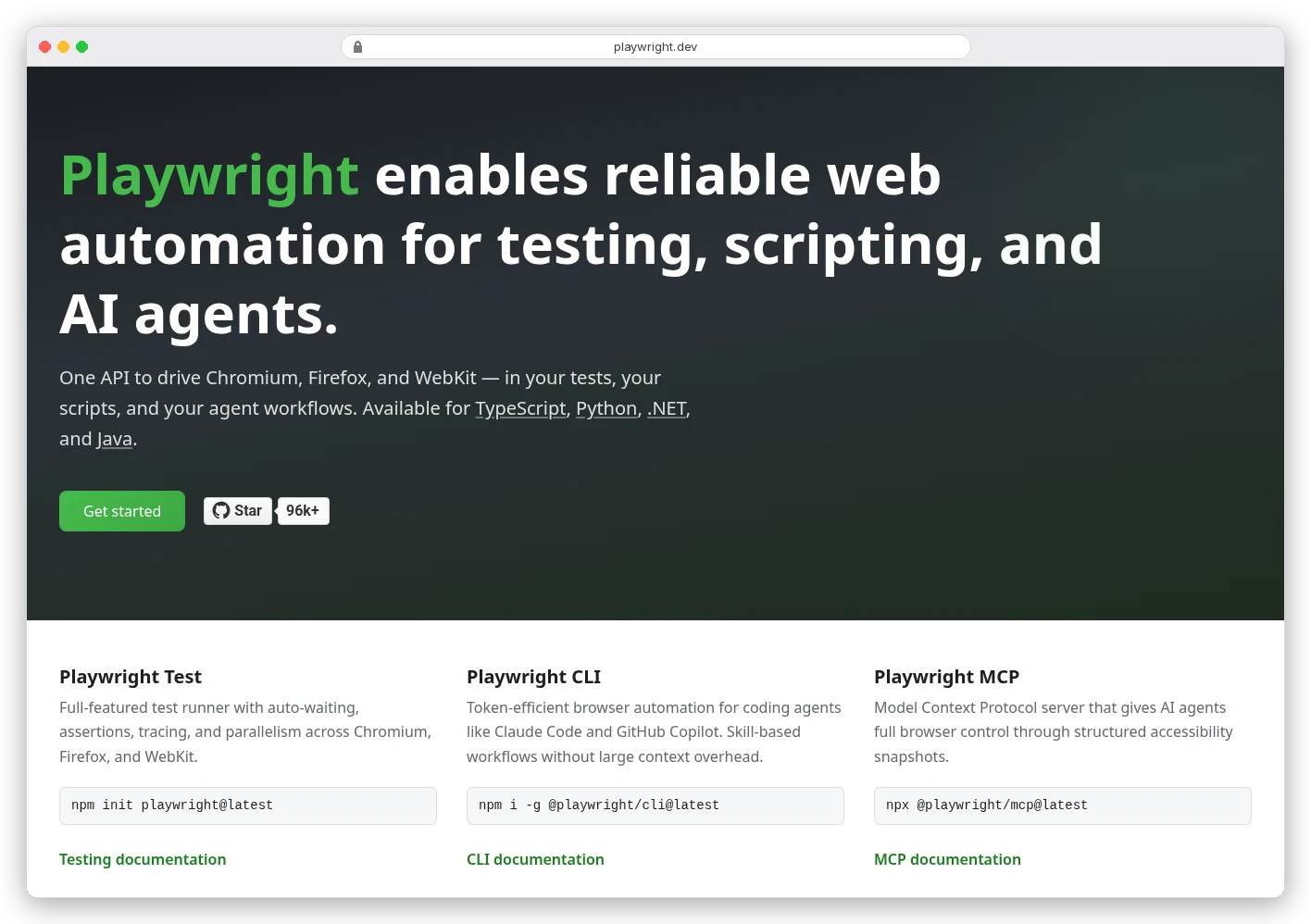
Playwright is a library. You write code that opens Chromium, Firefox or WebKit, loads a page, waits for it and pulls out what you want. It runs wherever you run it: your laptop, a CI job, a server you pay for.
Its homepage is honest about what it was built for. Testing comes first in the headline, and the first feature block is titled "Built for testing".
Here's about the smallest useful Playwright scrape in Python, adapted from the library docs:
from playwright.sync_api import sync_playwright

with sync_playwright() as p:
    browser = p.chromium.launch()
    page = browser.new_page()
    page.goto("https://example.com/pricing")
    print(page.locator("main").inner_text())
    browser.close()
That prints the text inside the page's main element. Everything after that is yours to build. Turning HTML into clean text, retrying timeouts, queueing ten thousand URLs, switching IPs when a site says no.
Firecrawl flips the arrangement. You send a URL to its API, and a browser on its side does the rendering. Here's the same job, taken from Firecrawl's scrape docs:
curl -s -X POST "https://api.firecrawl.dev/v2/scrape" \
  -H "Authorization: Bearer $FIRECRAWL_API_KEY" \
  -H "Content-Type: application/json" \
  -d '{"url": "https://example.com/pricing", "formats": ["markdown"]}'
Back comes JSON with the page as Markdown, plus metadata that includes the status code the target site returned. You never installed a browser. You also can't reach inside that browser the way Playwright lets you, and that trade runs through every section below.
Scrape is only one of Firecrawl's endpoints; our Firecrawl review goes through the rest one by one.
What do 1,000 pages cost on Firecrawl?
Firecrawl bills in credits. A basic scrape costs 1 credit per page, and so does each page of a crawl. The plans differ mainly in how many credits you get a month and how many browsers run at once.
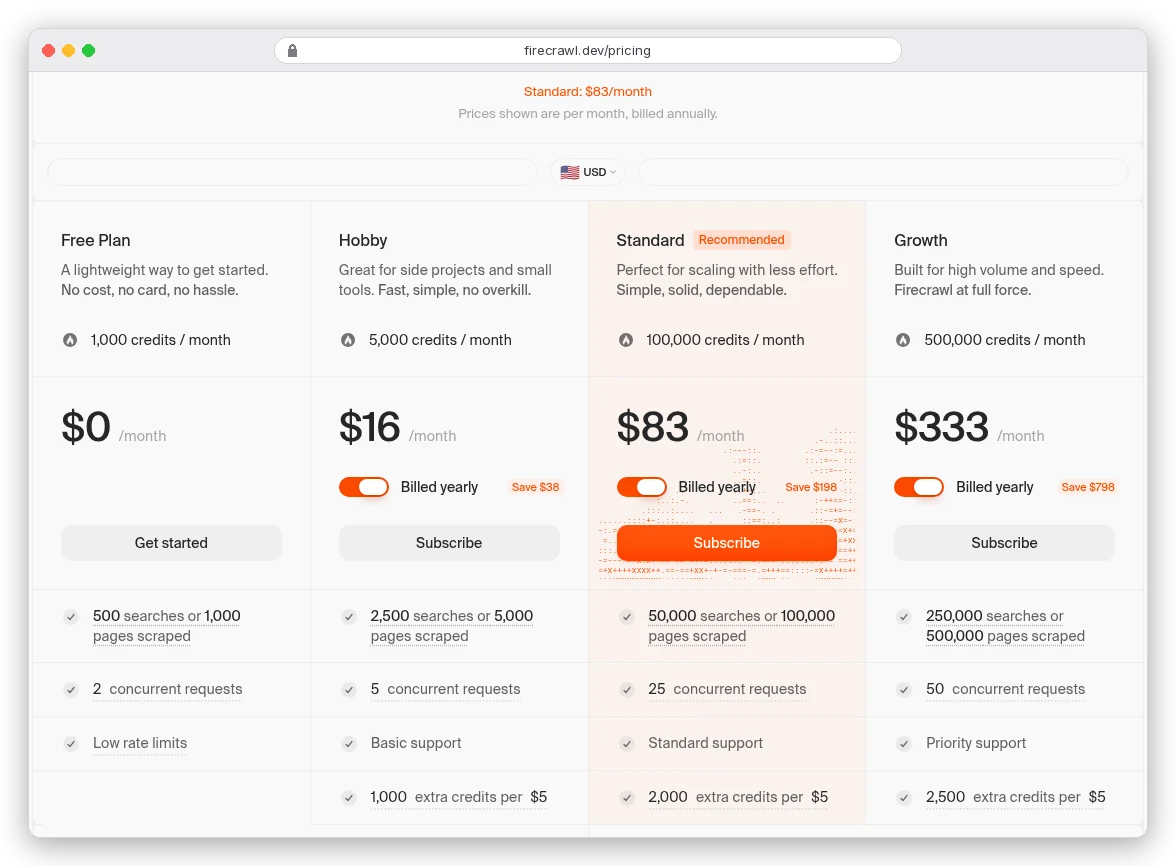
Divide each price by its pages and you get the number that matters:
| Plan | Price a month, billed yearly | Credits a month | Per 1,000 pages | Concurrent browsers |
|---|---|---|---|---|
| Free | $0 | 1,000 | $0 | 2 |
| Hobby | $16 | 5,000 | $3.20 | 5 |
| Standard | $83 | 100,000 | $0.83 | 25 |
| Growth | $333 | 500,000 | $0.67 | 50 |
| Scale | $599 | 1,000,000 | $0.60 | 100 |
On Standard, a dollar buys about 1,200 pages. Hobby is $19 if you pay monthly, which puts its pages at $3.80 per 1,000.
Two things move those numbers, and both are easy to trip over.
Asking for JSON makes every page cost five credits
Want structured fields instead of Markdown? The JSON format adds 4 credits per page, according to Firecrawl's billing docs. A Standard plan then covers 20,000 pages instead of 100,000, and the cost per 1,000 jumps from $0.83 to $4.15.
Going over your plan costs three times as much
When your credits run out, pay-as-you-go tops you up in $5 blocks. On Standard a block is 2,000 credits, so overage pages cost $2.50 per 1,000, three times the plan rate. On Hobby it's $5 per 1,000.
So size the plan for your busy month, not the quiet one. Just don't overshoot: below Scale, unused credits don't roll over.
Playwright is free. Running it at scale isn't.
The library costs nothing. It's released under the Apache 2.0 licence, so commercial use is fine. What you pay for is everything around it.
Start with the server. DigitalOcean lists a Basic droplet with 2 vCPUs and 4 GiB of memory at $24 a month; double both and it's $48.
How many pages one of those gets through depends on the sites, and we haven't measured it. So treat the server as a fixed cost you spread across your volume.
Now line it up against Firecrawl Standard: take the $24 server away from $83 and $59 a month is left. On a site that doesn't block you, that $59 only has to pay for your time. That means the HTML-to-Markdown step, the retry logic, and the afternoon you lose when a redesign breaks your selectors.
That's why Playwright can be the cheapest way to scrape at volume. But only while nobody is trying to stop you.
Do your target sites block bots? That's what flips it
Here's the question from the top. Protected sites often answer a headless browser on a datacenter IP with a CAPTCHA or a 403. The usual fix is residential proxies, and those are sold by the gigabyte.
Bright Data, a large proxy provider, lists residential proxies from $5 per GB, with a 50% promotion running when we checked. Put simply: for every megabyte a page pulls through the proxy, 1,000 pages cost $5.
Say you scrape 100,000 pages a month and each one averages 1 MB through the proxy. That's 100 GB, or $500 a month in bandwidth at list price, before the server.
The same 100,000 pages cost $83 on Firecrawl Standard. It routes every request through proxies by default and charges nothing extra when it escalates to its enhanced ones.
Per page, proxy bandwidth alone can cost six times what Firecrawl charges for everything.
You're probably thinking you'd block images and fonts to shrink each page, or use cheaper datacenter IPs (Bright Data lists those from $0.90 per IP). Both help, and on lightly protected sites that may be enough. On the hard ones, that tuning is the exact work Firecrawl charges you to skip.
Playwright won't do it for you either. Its network docs show how to set a proxy for the whole browser or for each context. Rotating through a pool, spotting a block and retrying from a new IP is code you write, or a library you add.
Where Firecrawl falls short
The pricing page leads with the good parts. These are the ones you find later.
- Error pages cost money. A page that comes back 403 or 404 is still returned to you and billed at 1 credit, so a scraper that keeps retrying a blocked URL keeps paying. Check
metadata.statusCodein each response and stop retrying. - Results can be up to two days old. By default Firecrawl serves a cached copy if it's newer than its
maxAgeof 2 days. SettingmaxAgeto 0 forces a fresh fetch, which the docs warn is slower and more likely to fail. Cached pages still cost the full credit, so if you track prices that change hourly, setmaxAgeyourself. - You get a document, not a browser. Beyond what the endpoints and their options expose, you can't reach into the page the way Playwright lets you. Interact, below, narrows that gap.
- Your pages pass through someone else's servers. The pricing page lists zero data retention as an Enterprise feature, which matters if you scrape anything sensitive behind a login.
None of these is a reason to skip it. They're reasons to read the billing page before you point a crawl at 50,000 URLs.
Logged-in, click-heavy jobs belong to Playwright
Some scraping isn't really scraping. You sign in, pick a date range, click Export and wait for a table to load. That's what Playwright was designed for, because it's what end-to-end tests do all day.
It finds elements the way a user sees them, by role, label or placeholder, and waits until they're ready before acting. You can save a logged-in state once and reuse it. You can also listen to every network request, which sometimes means skipping the HTML and reading the JSON the page loaded for itself.
One trap from the Python docs: don't put time.sleep() between steps. The docs say it leads to outdated page state and point you to page.wait_for_timeout() instead, or better, no fixed wait at all. The API also isn't thread-safe, so each thread needs its own Playwright instance.
Firecrawl can run your Playwright code now
Most comparisons miss this. Firecrawl's Interact endpoint keeps a browser open after a scrape and runs your Playwright code in it, in Node.js or Python. You can save a profile with cookies and local storage, so later scrapes start already logged in.
It's billed by the browser minute: 2 credits with code, 7 if you drive it with a plain-English prompt, one minute minimum. On Standard, 100,000 credits buy 50,000 browser minutes of code, roughly 833 hours, or about 10 cents an hour. Sessions close after 10 minutes by default, or after 5 minutes idle.
The $24 droplet works out at about 3.6 cents an hour, however many browsers you can fit on it. So for a few logged-in jobs a day, Interact saves you running a server. For browsers that stay open all day, your own box wins.
Can't you just self-host Firecrawl for free?
You can. Firecrawl is open source under the AGPL-3.0 licence, and its docs walk you through running it with Docker Compose.
Look at what that stack runs, though: a plain fetcher and a Playwright service to load pages. Self-hosting Firecrawl is partly running Playwright with a friendlier API on top.
And it isn't the cloud product. Firecrawl's own feature table says so plainly:
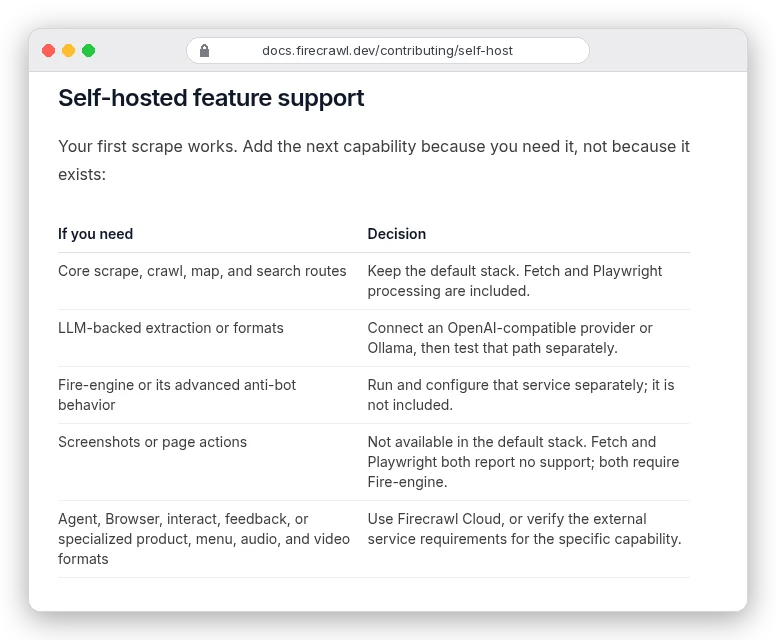
No Fire-engine means none of the advanced anti-bot handling, which is the part that matters most on blocked sites. The self-hosting guide adds that Firecrawl "does not publish a verified minimum host size" for the stack. Its quickstart also switches off API authentication, so it belongs on a trusted network only.
If you try it anyway, don't trust the readiness check at /v0/health/readiness. The docs call it "a heartbeat, not an end-to-end test": it can answer ok while Playwright or the workers are down. Run a real scrape before you believe it.
Want Playwright with the scraping plumbing already built? Look at Crawlee, a free open-source library from Apify whose PlaywrightCrawler adds a request queue and proxy rotation. Our Apify review covers the hosted side, and Apify pricing covers what running it there costs.
Which one should you pick?
- Feeding an LLM or RAG pipeline from lots of different sites? Pick Firecrawl. Start on the free 1,000 credits, and move from Hobby to Standard once you pass roughly 18,000 pages a month, where Hobby plus top-ups costs more than $83.
- Scraping a few known sites that don't block you, at high volume? Run Playwright on your own server. The server's price doesn't rise with each page, so the more you scrape, the cheaper each page gets.
- Hitting CAPTCHAs and 403s? Pick Firecrawl, unless you already pay for a proxy pool and have the retry logic written.
- Logging in and clicking through an app? Playwright. If it's a few runs a day and you don't want a server, try the same code on Firecrawl Interact first.
- Already running Playwright for your tests? Reuse it for the easy sites and send the protected ones to Firecrawl.
If you're weighing Firecrawl against a marketplace of ready-made scrapers instead, our Apify vs Firecrawl comparison picks up from here.