
You point a scraper at a product page, ask for JSON, and back comes a tidy record: title, price, stock status. It passes your schema. It goes into the database.
The page was a 404. We know because it happened in our own test run, and Firecrawl billed it at the full five credits.
Getting structured JSON out of a website with Firecrawl and Python takes about ten lines. Getting JSON you can trust takes one more check, and it isn't the one the docs lead with. It comes right after a listing-page trick that cuts the bill by 95%.
We ran each scrape example on 11 October 2026 with firecrawl-py 4.50.0, on Firecrawl's keyless free tier, against books.toscrape.com (a practice site built for scrapers). Outputs are pasted as printed; prices and limits come from Firecrawl's pricing page and docs, checked the same day. The batch example needs an API key, so it wasn't run.
What you'll have at the end, and what each page costs
A function that takes a URL and hands back a validated Python object, or a clear reason it skipped the page. Ours returns a Book with a title, a price and a stock count. Swap the model and it returns whatever your pages hold.
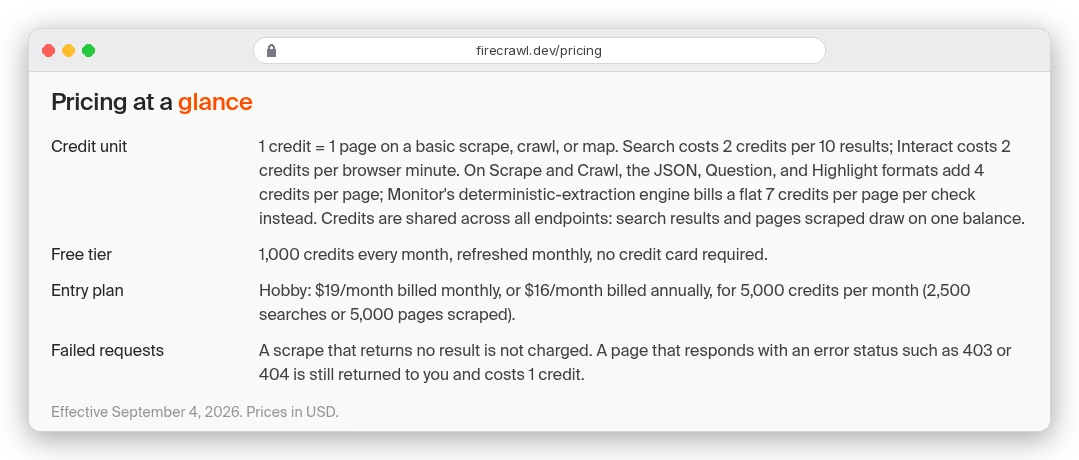
Every page costs 5 credits: one for the scrape, four more for JSON format, per Firecrawl's billing docs. On Hobby, Firecrawl's $19-a-month plan with 5,000 credits, that's 1,000 extracted pages, or about 2 cents each. The same plan would scrape 5,000 pages as plain Markdown.
That multiplier is why the rest of this guide cares about wasted calls. Our Firecrawl review covers the other endpoints and plans; here we stay on the Python side.
You might be thinking this test site is ten lines of free BeautifulSoup. It is, and for one static site you know well, write the parser. Firecrawl earns its 5 credits when you have fifty sites with fifty layouts and one schema to fill.
Install firecrawl-py and get a key (the keyless shortcut fails in Python)
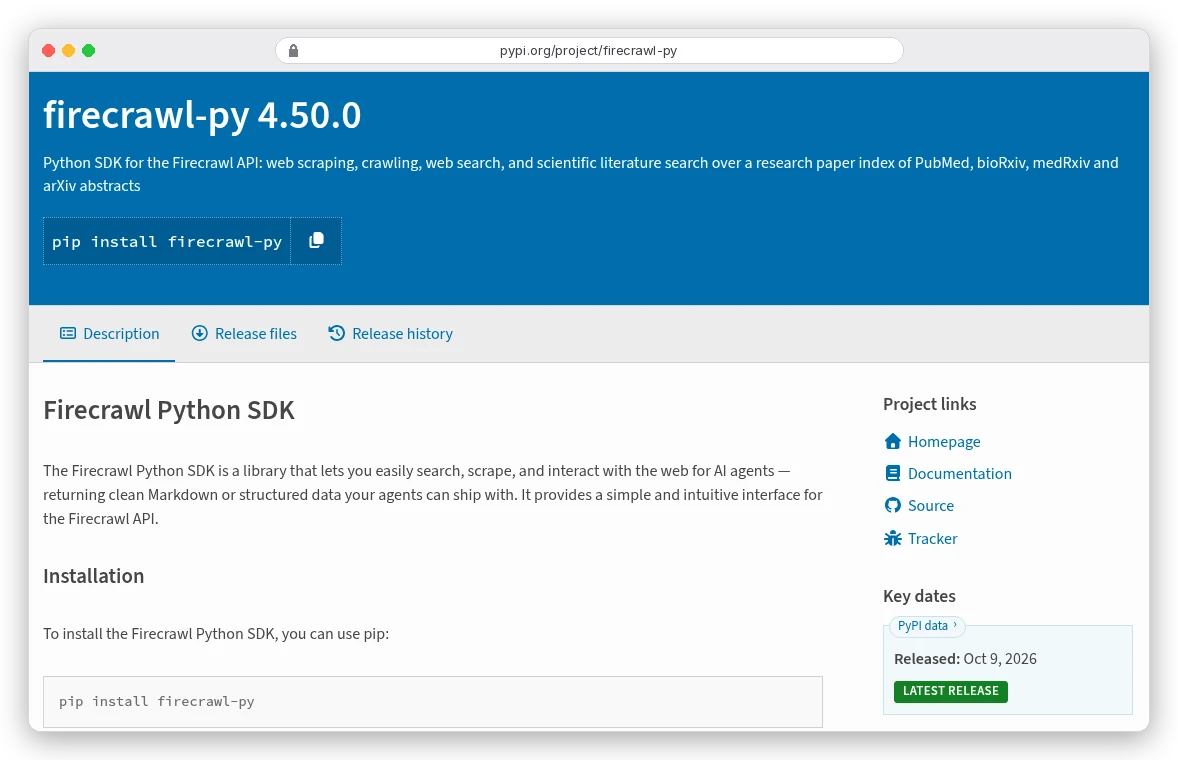
The SDK is firecrawl-py on PyPI. Version 4.50.0 was the latest when we checked, it needs Python 3.8 or newer, and it pulls in Pydantic 2. It moves fast: six releases landed between 6 and 8 October, so pin the version you tested.
Firecrawl's docs say you can skip the key and scrape on a free keyless tier, capped per IP address. The API does allow that. The Python client doesn't.
In 4.50.0, Firecrawl() with no key stops with ValueError: No API key provided, because an older v1 client bundled inside it still demands one.
So get the free key. It comes with 1,000 credits a month and no card, which is 200 JSON pages. Then:
pip install "firecrawl-py==4.50.0" pydantic
export FIRECRAWL_API_KEY="fc-your-key"
import os
from typing import List, Optional
from firecrawl import Firecrawl
from pydantic import BaseModel, Field
app = Firecrawl(api_key=os.environ["FIRECRAWL_API_KEY"])Describe the fields once, as a Pydantic model
The schema is the whole trick. Firecrawl sends the page to a language model along with your field names, types and descriptions, and the model fills them in.
class Book(BaseModel):
    title: str
    price: str = Field(description="Price exactly as shown, with currency symbol")
    in_stock: bool
    stock_count: Optional[int] = Field(None, description="Copies available. Return null if not shown.")
    rating: Optional[int] = Field(None, description="Star rating, 1 to 5. Return null if not shown.")
You can pass the class straight into a JSON format. The SDK calls model_json_schema() for you, inlines nested models, and checks the result before sending it. The docs' Book.model_json_schema() style works too.
Treat each description as a short instruction. "Return null if not shown" comes from Firecrawl's own tips, and it's meant to stop the model guessing. Remember it when we get to the rating.
One page, one call, five credits
JSON mode is a format on the ordinary scrape call. The schema goes inside the format object; the old jsonOptions parameter from v1 no longer exists, which is why older tutorials break.
URL = "https://books.toscrape.com/catalogue/a-light-in-the-attic_1000/index.html"

doc = app.scrape(URL, formats=[{"type": "json", "schema": Book}])

print(doc.json)
print(doc.metadata.status_code, doc.metadata.credits_used)
It printed:
{'title': 'A Light in the Attic', 'price': '£51.77', 'in_stock': True, 'stock_count': 22, 'rating': None}
200 5
Title, price and stock count match the page. The call took about a second, and credits_used confirms the 5-credit price. Notice that doc.json is a plain dict, not a Book: the SDK converts your model going out but not coming back.
Now look at the rating. The page shows three stars. We got None.
Why did the rating come back empty?
Because the stars aren't text. In the page's HTML, the rating lives only in a CSS class: <p class="star-rating Three">.
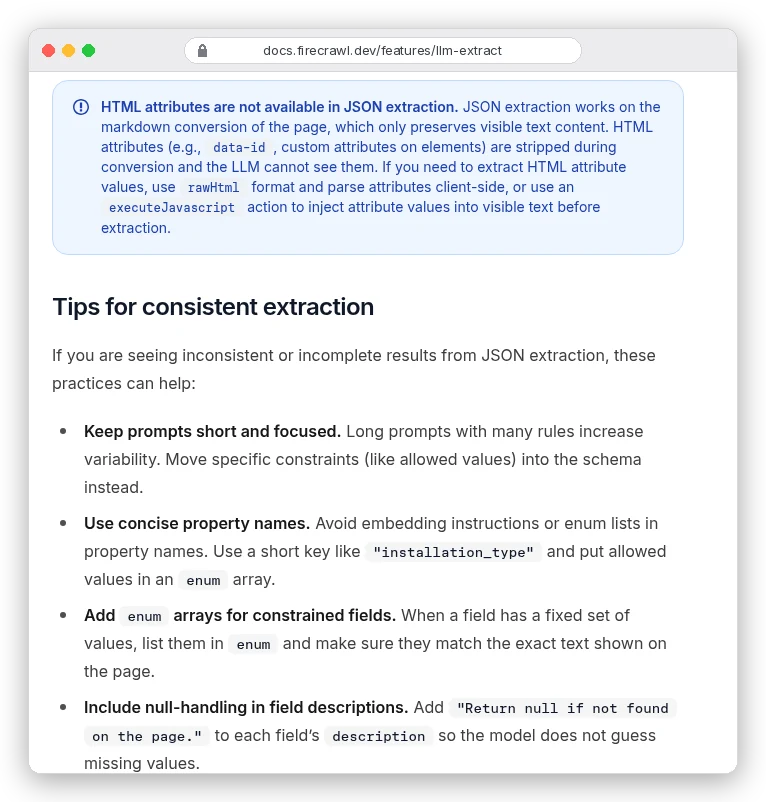
JSON mode never sees that HTML. It works from the Markdown version of the page, and Firecrawl's JSON mode docs say so plainly.
Null is the honest answer, but not the only one you'll get. Twelve minutes earlier, with an almost identical description, the same field came back as 0.
Zero is worse. It's a valid integer, so it slides straight through validation.
There are two fixes.
Give numeric fields a range, such as Field(None, ge=1, le=5), so a made-up zero fails Pydantic instead of reaching your database. For values stored in attributes, the docs suggest two routes. Ask for the rawHtml format and parse it yourself, or add an executeJavascript action that copies the value into visible text.
Prompt-only extraction: quicker to write, harder to build on
You can skip the schema and describe what you want in a sentence. Firecrawl calls this extraction without a schema, and "the llm chooses the structure of the data."
doc = app.scrape(URL, formats=[{
    "type": "json",
    "prompt": "Extract the book's title, price and how many copies are in stock.",
}])
print(doc.json)
It printed:
{'title': 'A Light in the Attic', 'price': 51.77, 'stock': 22}The answers are right. The shape isn't yours: the price lost its pound sign and became a number, and the stock count arrived under a key called stock.
No code of ours expected that key. Ask again next week and it might be copies.
You're probably thinking a stricter prompt would fix that. Firecrawl's docs say the opposite: long prompts with many rules "increase variability", so move constraints into the schema.
Use prompt-only to explore a page you've never seen. It costs the same 5 credits as a schema, so don't build a pipeline on it.
A list page needs an array, and it's the cheap way in
Most sites show the fields you want twice: once on each product page and once on the listing. A schema with a list in it pulls the whole listing in one call.
class BookCard(BaseModel):
    title: str
    price: str

class Listing(BaseModel):
    books: List[BookCard]

doc = app.scrape("https://books.toscrape.com/", formats=[{"type": "json", "schema": Listing}])
listing = Listing.model_validate(doc.json)
print(len(listing.books), listing.books[0])
It printed:
20 title='A Light in the Attic' price='£51.77'We checked all 20 records against the page's HTML: every title and price matched exactly. Wrap items in a list like this, because Firecrawl's docs warn that an object where a list belongs returns a single item. Skip minItems too, which the docs say can make the model invent entries to hit the count.
Now the arithmetic. Twenty books for 5 credits is a quarter of a credit per record, while the 20 detail pages would cost 100 credits.
If the listing already has the fields you need, extract the listing.
The check that catches a 404 dressed up as data
Here's the record from the opening. We asked for a book that doesn't exist, using the same schema.
MISSING = "https://books.toscrape.com/catalogue/this-book-does-not-exist_9999/index.html"

doc = app.scrape(MISSING, formats=[{"type": "json", "schema": Book}])

print(doc.metadata.status_code, doc.metadata.credits_used)
print(doc.json)
It printed:
404 5
{'title': '404 Not Found', 'price': 'N/A', 'in_stock': False, 'stock_count': None, 'rating': None}
The site said 404, Firecrawl charged 5 credits, and the model still filled in a book called "404 Not Found". Every field has the right type, so Pydantic accepts it. Our earlier run of the same URL priced it at "/", which is just as valid as a string.
Firecrawl is open about this. A page that answers with an error status still comes back as a document, and it still costs credits.
The pricing page says 1 credit, which is the plain-scrape figure. The billing docs add that format costs stack on top, which is how our 404 cost 5.
The fix is one line: check doc.metadata.status_code before you trust anything in doc.json. Here it is inside the function we promised at the start, with validation and rate limits handled.
import time
from firecrawl import FirecrawlError, RateLimitError
from pydantic import ValidationError

def get_book(url: str, attempts: int = 4) -> Optional[Book]:
    for attempt in range(attempts):
        try:
            doc = app.scrape(url, formats=[{"type": "json", "schema": Book}])
            break
        except RateLimitError as e:  # 429: the SDK doesn't retry these
            wait = e.response.headers.get("Retry-After") if e.response is not None else None
            time.sleep(float(wait) if wait else 2 ** attempt)
        except FirecrawlError as e:  # 401, 402, 403, 422...
            print(f"skip {url}: {e}")
            return None
    else:
        print(f"skip {url}: still rate-limited")
        return None

    if doc.metadata.status_code != 200:
        print(f"skip {url}: page returned {doc.metadata.status_code}")
        return None
    try:
        return Book.model_validate(doc.json)
    except ValidationError as e:
        print(f"skip {url}: {e.error_count()} field(s) failed validation")
        return None

print(get_book("https://books.toscrape.com/catalogue/tipping-the-velvet_999/index.html"))
print(get_book(MISSING))
It printed:
title='Tipping the Velvet' price='£53.74' in_stock=True stock_count=20 rating=None
skip https://books.toscrape.com/catalogue/this-book-does-not-exist_9999/index.html: page returned 404
None
Why handle 429s yourself? The client's max_retries=3 sounds like it covers them. It doesn't.
In the SDK source, the client retries only 502 errors and dropped connections. A rate-limited request raises RateLimitError at once, and Firecrawl's errors page says to wait for the Retry-After header. A 402 means you're out of credits, so the function skips it rather than retrying.
Scaling up with batch scrape (watch the timeout)
For more than a handful of URLs, batch_scrape takes a list and the same JSON format. It needs a real API key, so this is the one example we couldn't run.
urls = [
    "https://books.toscrape.com/catalogue/a-light-in-the-attic_1000/index.html",
    "https://books.toscrape.com/catalogue/tipping-the-velvet_999/index.html",
    "https://books.toscrape.com/catalogue/soumission_998/index.html",
]

job = app.batch_scrape(
    urls,
    formats=[{"type": "json", "schema": Book}],
    poll_interval=2,
    wait_timeout=300,  # seconds to wait for the whole job
)

books = [Book.model_validate(d.json) for d in job.data if d.metadata.status_code == 200]
print(job.status, job.completed, job.total, job.credits_used, len(books))
Two parameters look alike and aren't. wait_timeout is how many seconds the SDK waits for the whole job. timeout is the per-page scrape limit in milliseconds, so timeout=300 would give each page three-tenths of a second.
Your plan sets the pace, per the rate-limits page. Batch jobs share the crawl limit: 2 batch requests a minute on Free, 20 on Hobby. Pages then render on your concurrent browsers, 2 on Free, 5 on Hobby and 25 on Standard.
Credits are charged as each page finishes, and results stay on the API for 24 hours.
One more default to know about. The Python SDK asks for cached pages up to four hours old unless you pass max_age, and cached pages still cost credits. For prices that change hourly, pass max_age=0 and accept slower, slightly flakier scrapes.
Scrape JSON mode, /extract or Agent: which one?
Firecrawl has three ways to get structured data, and its own docs line them up.
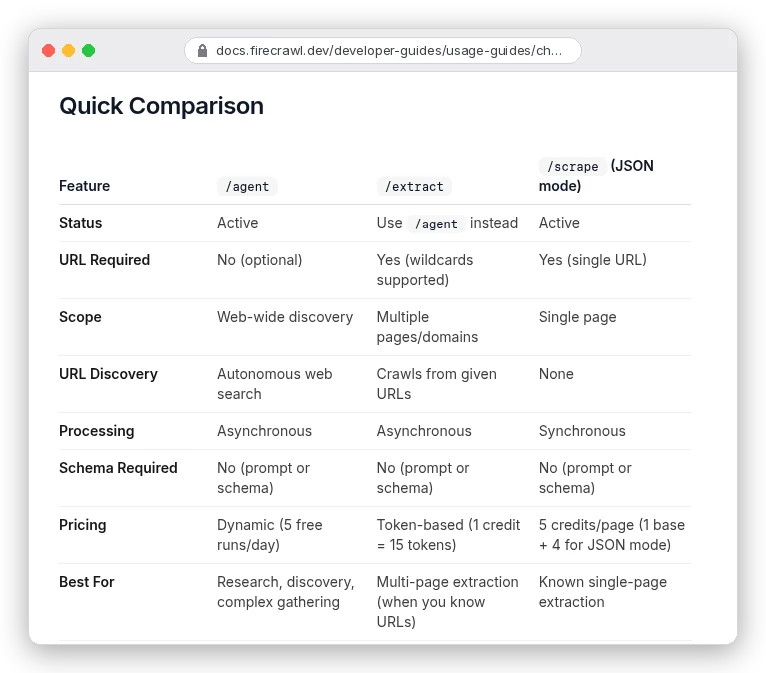
If you know the URLs, use scrape with JSON format, singly or in a batch. You can predict the bill to the credit.
/extract takes many URLs and wildcards, but Firecrawl now marks it "Use /agent instead". It's priced in tokens (1 credit per 15), so you can't know a page's cost in advance. Agent finds pages for you, with five free runs a day and dynamic pricing after that; cap it with max_credits.
There's a fourth option for shops. The product format reads a product from the page's structured data with no language model, for 1 credit.
It refuses rather than guesses. Our test site has no such markup, so we got no product, a warning and a 1-credit charge. On real stores with product markup, try it before paying for JSON.
What 1,000 JSON pages cost on each plan
At 5 credits a page, each plan covers a fifth as many pages as its headline credit count suggests. Here's what that does to the price per 1,000 extracted pages, using the pricing page figures:
| Plan | Price (monthly / annual) | JSON pages a month | Per 1,000 JSON pages |
|---|---|---|---|
| Free | $0 | 200 | $0 |
| Hobby | $19 / $16 | 1,000 | $19.00 / $16.00 |
| Standard | $99 / $83 | 20,000 | $4.95 / $4.15 |
| Growth | $399 / $333 | 100,000 | $3.99 / $3.33 |
| Scale | $749 / $599 | 200,000 | $3.75 / $3.00 |
Run past your plan and pay-as-you-go tops you up in $5 steps (paid plans only). On Hobby, $5 buys 1,000 credits, so overage JSON pages cost $25 per 1,000; on Standard, $12.50.
Unused credits don't roll over, except for one month on annual Scale.
Say you track 100 product pages a day, about 3,000 a month. As JSON that's 15,000 credits: Hobby plus $50 of top-ups ($69), or Standard at $99 ($83 billed yearly).
Pull the same data from listing pages, or with the product format where it works, and it fits inside Hobby's 5,000 credits for $19. The format you pick can decide your plan.
Our Firecrawl vs Playwright comparison prices the do-it-yourself route, if these numbers make you want to run your own browser. Our Apify vs Firecrawl breakdown covers ready-made scrapers for big sites.
So which setup should you build?
If you have a few known pages and the fields are visible text, copy get_book: a Pydantic schema, a status check, then validation. Start there.
If you have thousands of pages, check the listing first. On a 20-item listing, one JSON call does the work of 20. Then batch the rest with wait_timeout set.
If you're scraping shops, try product before JSON. If the data hides in attributes, take rawHtml and parse it yourself, because no prompt will make the model see it. And if you don't have URLs at all, that's an Agent job with a credit cap, not this one.