You recorded a 60-minute podcast and want five good clips for Shorts and Reels by Friday. You upload it to an AI clipper and get 30 back, sorted by a "virality" number. Now you have to watch all 30 to find the five.
Turning long videos into shorts with AI comes down to four jobs. Pick the moments, reframe 16:9 to 9:16, add captions, fix the first two seconds. Every tool does some of that; none does all of it well alone.
And the tools don't even bill the same thing. One charges for every minute you upload, another for every clip it makes. Which one is cheaper flips on a single habit of yours, and we'll get to it.
Plans, help docs and platform specs checked on 4 November 2026. We read Opus Clip's, Klap's and Descript's pages and docs rather than running their apps. The ffmpeg commands near the end we did run, on a synthetic 1080p test clip on our own machine.
What you'll end up with
A finished short is a vertical MP4, 1080 pixels wide and 1920 tall, under three minutes long. It has burned-in captions and an opening line that makes sense to someone who never saw the full episode.
Three minutes is the ceiling on the two platforms whose specs we could read. YouTube now treats square or vertical uploads up to three minutes as Shorts, and Instagram lets you make Reels up to 3 minutes. TikTok's help pages refused our checks with an error, so we're not quoting its limits here.
| Platform | Length | Shape and size | Source |
|---|---|---|---|
| YouTube Shorts | Up to 3 minutes | Square or vertical | YouTube Help |
| Instagram Reels | Up to 3 minutes | 1.91:1 to 9:16, at least 30 FPS and 720 px | Instagram Help |
| TikTok | Not verified | Not verified | Support pages returned HTTP 503 |
One line on YouTube's page changes how long your clips should be. Any Short over one minute with an active copyright claim "will be blocked globally on YouTube". Under a minute, nothing changed.
So if a clip carries music you didn't make, keep it under 60 seconds or swap the track for something you own. Our guide to AI music for YouTube without copyright claims covers the second option.
Three ways to do it, and what each one bills
You can hand the whole job to an auto-clipper or use an editor with clipping built in. Or run it yourself with Claude and ffmpeg. They differ less in features than in what you pay for.
| Route | What it bills | Entry price (monthly) | Best when |
|---|---|---|---|
| Opus Clip | 1 credit per minute of source video | $15 for 150 credits | You keep many clips per episode |
| Klap | Each clip it generates | $29 for 100 clips | Long recordings, few clips kept |
| Descript | Media hours uploaded, plus AI credits | $24 for 10 media hours | You also edit the full episode |
| Claude + ffmpeg | Your Claude plan; ffmpeg is free | Whatever Claude plan you have | You want full control and don't mind a terminal |
CapCut also has a long-video-to-shorts tool with subject tracking "from 16:9 to 9:16". Its prices vary by region, so we left it out of the arithmetic.
Minutes in or clips out: what a weekly podcast really costs
Opus Clip bills the input. Its help centre says processing "will cost 1 credit per minute of the original video imported". So a 60-minute episode costs 60 credits, whether you keep one clip or thirty.
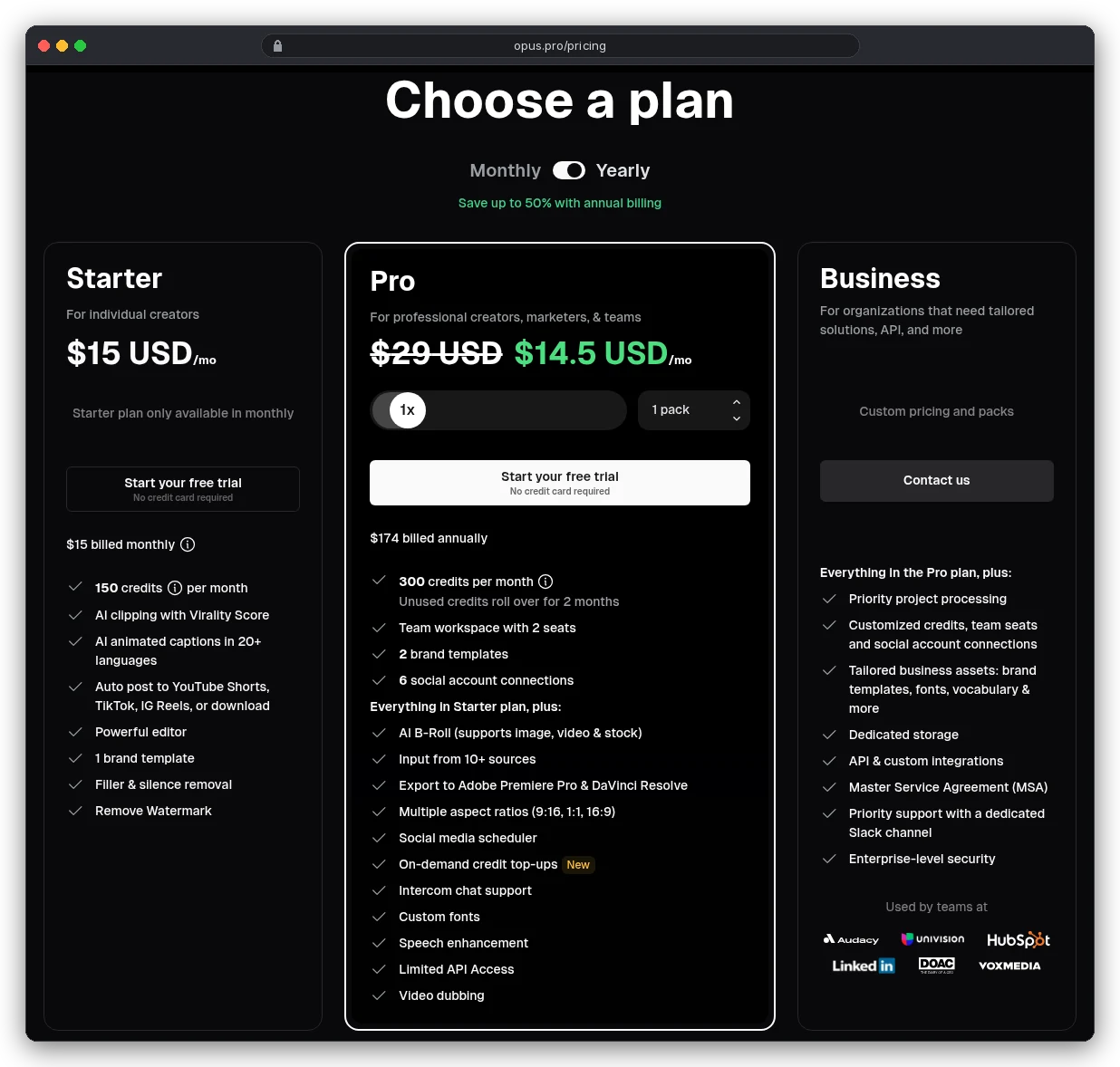
On Starter that's $15 for 150 minutes, about 10 cents per source minute. Pro is $29 for 300 credits billed monthly, or $174 a year, which halves it to under 5 cents.
Now take a weekly one-hour show. Four episodes is 240 credits, and a five-week month is 300. Starter's 150 won't cover it, so you're on Pro.
Unless you don't feed it the whole hour. Opus has a "Processing timeframe" slider, and you only pay for the part you select. If you know the best 20 minutes of each episode, that's 80 credits a month, and Starter covers it with room to spare.
Klap bills the output. Its pricing page says it plainly: "Only pay for clips you generate."
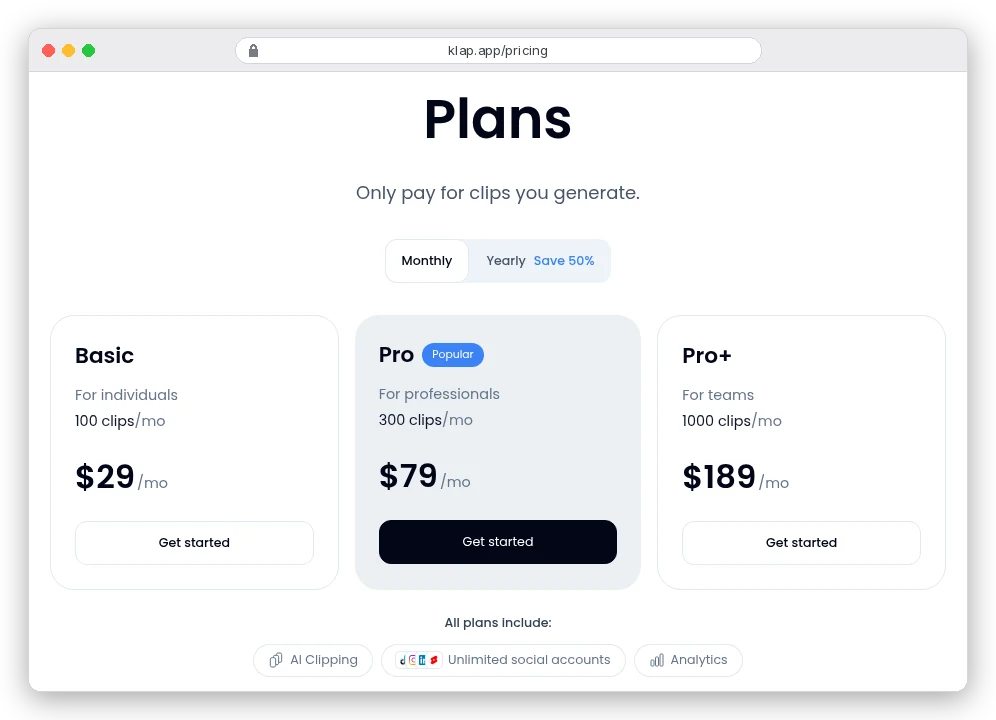
Basic is $29 for 100 clips billed monthly, 29 cents a clip, or 14 cents on the yearly plan. That looks expensive next to Opus until you count clips, not minutes.
Opus's own table says a 30-to-60-minute video gives 23 to 32 clips. On Starter, a 45-minute episode costs $4.50, so 14 to 20 cents per clip, but only if you use them all. Post five and you've paid 90 cents a clip.
Klap's per-clip meter has its own trap. If one episode produces 25 clips, four episodes use up a Basic month's 100, and you'll post maybe 20 of them.
How many clips does Klap make from an hour? Its pages don't agree.
The homepage's rule of thumb: "a one-minute long video produces about 5 video clips". Its FAQ turns "a 3-minute YouTube video into 5".
Klap's API takes a max_clip_count setting, but public pages don't say whether the web app lets you cap the count before it bills. Check that on the free trial (one video, no card) before you pay.
So here's the habit that flips the answer. If you record a lot and keep a few clips, a per-clip meter like Klap's wins. If you record less and post most of what comes back, Opus's per-minute meter wins.
Descript sits in between, because it's a full editor first. Uploading an hour uses 60 of Hobbyist's 600 media minutes.
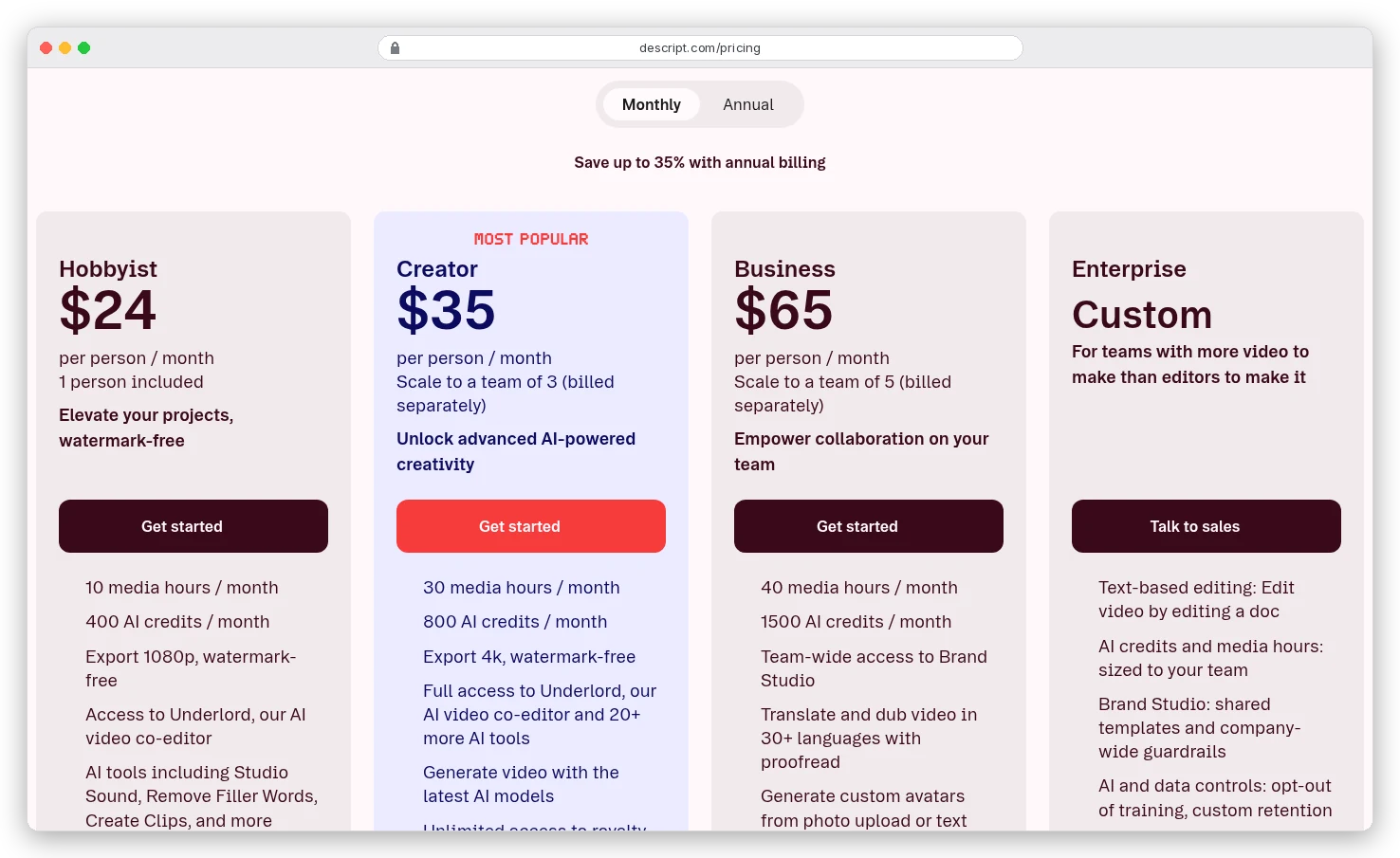
Its Create clips tool then draws on AI credits, and Descript doesn't give that a fixed price. Its help page says Underlord, the AI co-editor, is "non-deterministic" and that even chatting with it "uses a few AI credits". Unused minutes and credits also don't roll over, while Opus's monthly credits last 60 days.
That's the money. The clips themselves only work if the right moments go in, so start there.
Step 1: Choose the moments before the tool does
A good short answers one question completely. It starts on the claim, not on "So, yeah, like I was saying". It doesn't lean on "this" or "that" from three minutes earlier.
Auto-clippers rank their picks for you. Opus gives each clip a Virality Score from 0 to 99, built from hook, flow, value and trend. Treat it as a sorting order, because it can't know your audience.
You'll get better picks if you tell the tool what you want before it runs:
- In Descript's Create clips, set 1 to 20 clips, a length from 10 seconds to 5 minutes, and type a topic or goal (Descript Help).
- In Opus, the clip length defaults to Auto (0 to 3 minutes). Set it to 0-1m for Shorts with music, and use the timeframe slider so it only reads the part you trust.
- With Claude, paste the timestamped transcript and ask for self-contained moments with start and end times. Prompt 30 in our Claude video editing prompts does exactly that.
Then read each pick's first sentence on its own. If it needs the sentence before it, move the start back or drop the clip.
Step 2: Reframe 16:9 to 9:16 without losing the speaker
Here's the arithmetic most guides skip. A 9:16 slice of a 1920×1080 frame is 608 pixels wide, so you keep under a third of the picture. Scaling that to 1080×1920 stretches it 1.78 times, and it looks it.
From a 4K source the same crop is 1,215 pixels wide, and you scale it down instead of up. If you know you'll cut verticals from a recording, shoot it in 4K.
A centre crop also assumes the speaker stays in the middle. On a two-person podcast they usually sit at the edges, and a centre crop shows the wall between them.
Opus auto-reframes on every plan, and pressing X in its editor opens a manual crop window. Klap's AI Reframe 2 offers split screen, screencast and gaming layouts. Descript has portrait presets and a Center Active Speaker tool.
When no crop works, for example on a slide or a wide demo, fit the whole frame and fill the rest with a blurred copy. Here's what both look like on our test clip.
The crop fills the screen but loses most of the frame; the blurred fit keeps everything but shows it small. Use the crop for one face, the fit for anything with text on it.
Step 3: Captions that land on time and out of the way
Short-form captions are usually a few words at a time, timed to the word. Whisper's command line can do that with --word_timestamps True, --max_words_per_line 4 and --output_format srt. The options are listed in Whisper's source; we didn't run Whisper for this post.
Position matters as much as timing, because Instagram lays its own caption, audio label and buttons over the lower part of a Reel. In our run, MarginV=60 put the caption about 420 pixels above the bottom of the frame.
Our guide to editing Reels with Claude shows exactly where Instagram's buttons sit.
Timing is where long-to-short breaks. Your transcript's timestamps belong to the full episode, and the clip starts at zero.
We cut seconds 12 to 42 from our test video and asked ffmpeg to trim the subtitle file the same way. It quietly reset the timestamps to the first caption it found, at 10 seconds, not 12.
Every caption came out two seconds late. Shifting the file with -itsoffset did the same thing.
Two fixes work. Transcribe the cut clip again, so its timestamps start at zero. Or shift the transcript yourself with the short script in the next section, which subtracts the clip's start time and drops captions outside it.
Step 4: Rewrite the first two seconds
A clip from minute 38 opens mid-conversation. Someone scrolling has no idea who's talking or why it matters.
The cheapest fix is the cut itself. Start on the sentence that states the claim, even if the speaker built up to it for a minute. The second fix is a line of on-screen text that says what the clip answers, for viewers who watch on mute.
Opus can automate this. Its "viral hook" lays animated text, zooms and sound effects over the opening, and "each hook uses credits".
It works best on "talking-head videos with a single speaker and a clear opening line". It's off by default when you clip, and it's on Trial, Pro, Max and Business, not Starter.
A third option is a short generated shot that sets up the topic before the speaker comes in. Our beginner's guide to making AI videos covers how to make one that matches your footage.
The Claude and ffmpeg route, end to end
Claude can't watch video. Its vision docs list JPEG, PNG, GIF and WebP, and for animations "only the first frame is used". So the route is transcript in, decisions out, ffmpeg does the cutting.
- Transcribe the full episode with timestamps:
whisper episode.mp4 --model turbo --output_format srt. - Give Claude the transcript and ask for five self-contained moments under 60 seconds, each with a start time, end time and the opening sentence.
- Cut each one, re-encoding so the cut lands on the exact frame.
- Shift the transcript to the clip, then reframe and burn in the captions.
These are the commands we ran for steps 3 and 4, with clip times of 12 to 42 seconds:
# 3. Cut (re-encode for a frame-accurate start)
ffmpeg -ss 00:00:12 -to 00:00:42 -i episode.mp4 -c:v libx264 -crf 18 -c:a aac clip.mp4

# 4a. Shift the transcript to the clip (script below)
python3 shift_srt.py episode.srt 12 42 > clip.srt

# 4b. Centre crop to 9:16 and scale to 1080x1920
ffmpeg -i clip.mp4 -vf "crop=ih*9/16:ih,scale=1080:1920" -c:v libx264 -crf 18 -c:a copy vertical.mp4

# 4c. Or: fit the whole frame over a blurred copy
ffmpeg -i clip.mp4 -filter_complex "[0:v]split[a][b];[a]scale=1080:1920:force_original_aspect_ratio=increase,crop=1080:1920,boxblur=20[bg];[b]scale=1080:-2[fg];[bg][fg]overlay=(W-w)/2:(H-h)/2" -c:v libx264 -crf 18 -c:a copy vertical.mp4

# 4d. Burn in the captions, lifted clear of the app's buttons
ffmpeg -i vertical.mp4 -vf "subtitles=clip.srt:force_style='Fontsize=14,Alignment=2,MarginV=60'" -c:v libx264 -crf 18 -c:a copy -movflags +faststart final.mp4
ffmpeg's crop filter centres by default: its filter docs set the left edge to (in_w-out_w)/2. To follow a speaker on the left, replace the crop with something like crop=608:1080:200:0, where 200 is the left edge in pixels.
The script for step 4a is a dozen lines of Python:
import sys
# usage: python3 shift_srt.py full.srt START END > clip.srt   (seconds)
src, start, end = sys.argv[1], float(sys.argv[2]), float(sys.argv[3])
def sec(t): h, m, s = t.replace(',', '.').split(':'); return int(h)*3600 + int(m)*60 + float(s)
def fmt(x): ms = round(x*1000); return f"{ms//3600000:02}:{ms//60000%60:02}:{ms//1000%60:02},{ms%1000:03}"
n = 0
for block in open(src).read().strip().split('\n\n'):
    lines = block.splitlines()
    a, b = [sec(x.strip()) for x in lines[1].split('-->')]
    if b <= start or a >= end: continue
    n += 1
    print(n); print(f"{fmt(max(a, start)-start)} --> {fmt(min(b, end)-start)}"); print('\n'.join(lines[2:])); print()
On our 30-second test clip the result was a 1080×1920 H.264 file at 30 FPS, 14.4 MB, with captions on time. You can also have Claude Code write and run these for you; the Reels guide above has prompts for that.
You're probably thinking this is a lot of typing for five clips. For one episode, it is. But once the commands are saved, the next episode only needs new clip times, and no meter is running.
Mistakes that waste a batch of shorts
- Posting every clip the tool returns. A virality score is a sort order, and 30 clips from one episode often overlap.
- Clips over a minute with someone else's music on YouTube. A claim blocks them everywhere.
- Centre-cropping a two-person podcast. Use a split-screen layout or a manual crop per scene.
- Reusing full-episode timestamps for a clip's captions. Shift them, or transcribe the clip.
- Exporting from Opus's free plan and forgetting. Free clips carry a watermark and stop being exportable after 3 days.
- Paying for Klap before testing a long episode on the free trial, since that's the easiest way to see how many clips one hour turns into.
Which route should you pick?
If you record a weekly hour-long show and want three to five clips from it, start with Klap's free trial. Its per-clip meter suits long recordings, provided the clip count it gives you is one you'd actually use.
If your videos run 10 to 20 minutes, or you post most of what comes back, Opus's per-minute credits cost less. The timeframe slider keeps Starter affordable.
If you already edit the full episode in Descript, use its Create clips and skip a second subscription.
And if you'd rather pay nothing per clip and you're comfortable in a terminal, use Claude and ffmpeg. Start with the commands above. When you want the rest of the edit done the same way, our list of Claude video editing prompts has 46 of them.