You generate a track, drop it under a 90-second vertical video and hit upload. Two hours later the Short is blocked in every country, and the claimant is a name you've never heard of.
Nobody stole anything. The song was yours, made on a tool you pay for. So what went wrong?
Using AI music on YouTube safely takes four checks, and the licence is only the first. The other three are where creators get caught: a disclosure setting many guides say you can skip, a registration system that can claim your own track, and a Shorts rule that turns a claim into a block. We'll cover each in the order you'd hit them.
Written from YouTube's Help Center, Meta's help pages, and the terms, help articles and pricing pages of Suno, ElevenLabs and SOUNDRAW, checked on 29 October 2026. We didn't upload test videos or file a dispute for this guide; the scenarios are hypothetical. This is general information, not legal advice.
What you'll have at the end
A track you're allowed to monetise, a folder of proof that you made it, a video with the right AI label, and a plan for the day a claim shows up anyway.
That last part matters more than it sounds. Content ID is automatic, so a claim is a match, not an accusation. What you do in the next 30 days decides whether it costs you anything.
Here are the four checks:
- Your plan's licence covers the way you're using the track.
- You got the file through the tool's own download, on a paid plan.
- Nobody, including you, has registered that track in Content ID.
- You've ticked YouTube's AI disclosure when the music is the point of the video.
Step 1: Pick a plan whose licence covers your video
"Commercial use" sounds like one permission. On AI music tools it's usually three: putting music under a monetised video, releasing the song itself on Spotify or YouTube Music, and keeping the file at all. Free plans tend to fail the third one before you get to the first.
Here's how three common tools split those rights, per their terms and pricing pages on 29 October 2026:
| Plan | Under monetised videos | Release the song to streaming | The limit that bites |
|---|---|---|---|
| Suno Free | No | No | No commercial rights; 7 lifetime trial downloads for personal use |
| Suno Pro ($8/mo billed yearly) | Yes | Yes | 20 song downloads a month, and rights attach to the download |
| ElevenLabs Free | No | No | Downloads "Not permitted"; attribution required |
| ElevenLabs Starter ($6/mo) | Yes | No | 30 minutes of downloads a month; streaming distribution prohibited |
| ElevenLabs Creator ($22/mo) | Yes | Yes | 250 minutes of downloads a month |
| SOUNDRAW Creator | Yes, as background music | No | Built for music that "supports the story, rather than being the main focus" |
Two lines in that table trip people up. Suno's terms say you "may not commercially exploit Output that has not been downloaded by you through an approved channel", and they name screen-recording and stream ripping as prohibited. So a song you captured from the Suno player isn't licensed, even on Pro.
ElevenLabs is the other one. Its music terms allow online commercial use on every self-serve plan, but block "film, TV, radio, and Studio Games" until you reach an Enterprise Music deal. A YouTube video is fine. A client who later wants to air that same video on TV isn't covered.
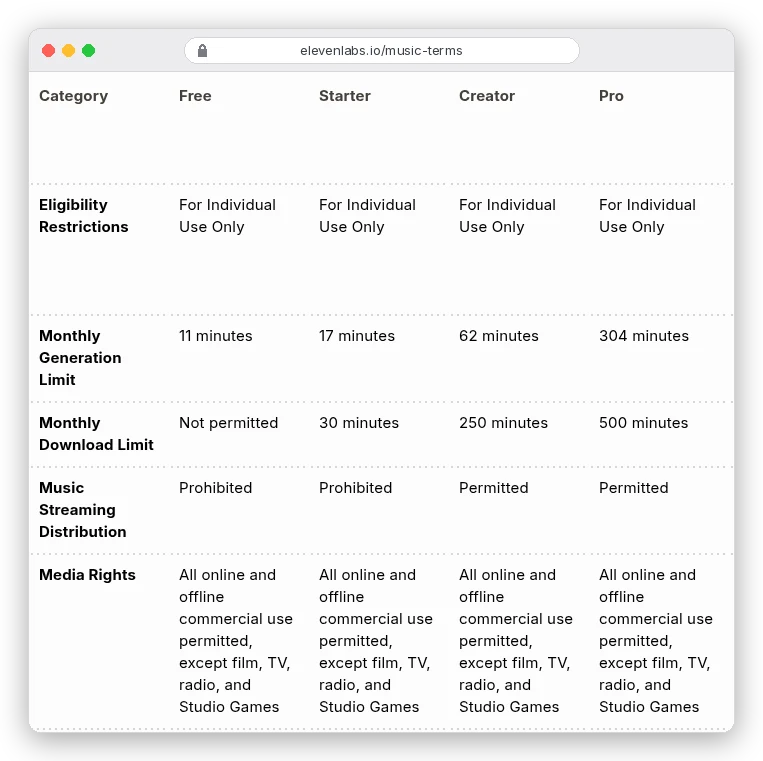
One more ElevenLabs detail if sound quality matters to you: the same table lists "High-Quality Downloads (lossless WAV or 192 kbps mp3)" as Pro and up only. Starter and Creator get the standard file.
Narrating with AI too? ElevenLabs Starter covers YouTube music use at $6 a month from the same account. Eleven Music costs 900 credits a minute, so Starter's 30,000 credits buy about 33 minutes of generation. The terms cap downloads at 30.
We compare the tools themselves, including Udio's download problem, in our roundup of AI music generators. Voice and sound-effect tools are in our AI audio tools guide.
Step 2: Make a track that doesn't sound like someone else's
Content ID compares your audio with reference files that rights holders upload. Your freshly generated track isn't in there. A track that closely copies a famous record might match one that is.
So prompt for sound, not for artists. "Warm lo-fi hip-hop, dusty drums, Rhodes chords, 80 BPM, no vocals" gives the model something to build. A prompt naming a band and a song points it at a catalogue that already has an owner.
It's also a rule on some tools. ElevenLabs' music terms ban prompts that mimic "the voice, likeness, or identifiable characteristics of any recording artist" in a misleading way, and ban output you "should reasonably know infringes" someone's rights.
Then keep a receipt for every track you publish. Save the prompt, the generation date, the plan you were on and the invoice for that month. If a claim arrives in six months, that folder is your dispute.
Step 3: Fit the music under your voice
A full song with vocals fights a talking head. You want either an instrumental or the song split into stems, so you can drop the vocal and keep the bed.
Suno includes stem separation from Pro (two types) and Premier (three), and its download FAQ says "Stems from a song count as part of that song's download". Splitting a track doesn't eat into your 20 downloads.
What about loudness? YouTube's Help Center doesn't publish a loudness target for uploads, and we couldn't find one, so ignore any guide that quotes YouTube's number as fact. Spotify does publish one: it plays tracks back at "-14 dB LUFS" and asks louder masters to keep true peak below -2 dB, per Spotify for Artists.
That only matters if you release the song. For a video bed, mix by ear: keep the music low enough that every word of your narration survives on phone speakers, and duck it further when you talk. Our AI voiceover guide covers the narration side of the same mix.
Step 4: Tick the AI disclosure when the music is the point
This is the step most guides get wrong. Several of the top results for this query say the AI label is only for realistic people and events, never for music.
YouTube's own page says otherwise. Its list of AI content creators must disclose ends with "Creates music that's the main focus of the video", and its examples of what needs disclosing include, simply, "AI generated music".
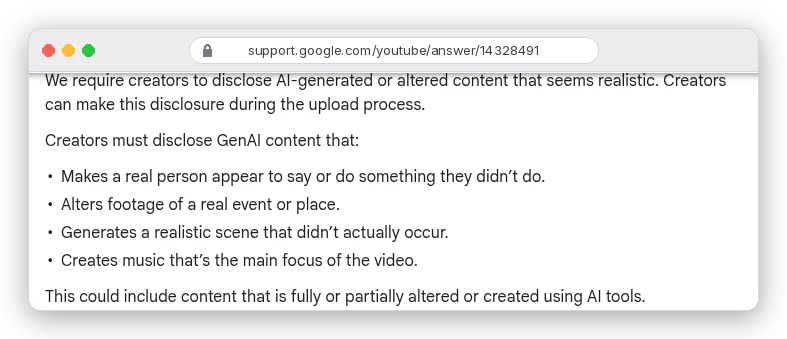
So where's the line? A lyric video, a visualiser, a "song of the day" Short or a music channel: the music is the main focus, so disclose. A quiet bed under a cooking tutorial isn't on that list, and YouTube doesn't say a background track needs the label.
You set it in YouTube Studio during upload: under Attributes, "AI use", choose Yes. YouTube says disclosure alone "won't limit a video's audience or impact its eligibility to earn money", while creators who consistently skip it risk removed videos or suspension from the YouTube Partner Program. It may also label your video on its own if the file carries C2PA metadata, the provenance tag some AI tools embed.
Reels have a similar rule. Meta's AI label help page requires a label on "realistic-sounding audio" and lists "A song created using AI-generated vocals" as an example. An instrumental bed isn't on its list; a vocal track is.
Why your own AI track can still get claimed
You did everything right, and a claim still appears. It happens, and the usual cause isn't a label. It's another uploader, or you.
Content ID only accepts references from owners with exclusive rights. YouTube's eligibility rules exclude "Content licensed non-exclusively from a third party" and say "royalty free" production music must go to manual review before claiming. Rules aren't the same as enforcement, though, and wrong claims get filed.
The more common trap is self-inflicted. Suno's terms assign Pro and Premier users Suno's rights in their output, which means you can release a Suno song through a distributor that offers YouTube Content ID. Do that with the bed from your vlog, and your own videos start matching your own release.
The fix is an allowlist, which exempts a channel from a rights holder's claims. YouTube's allowlist feature sits in the rights holder's Content Manager, so for a distributed track you'd ask your distributor to add your channel. It only stops future claims; existing ones "won't be automatically released".
So allowlist first, release second. Better still, keep background beds out of distribution entirely.
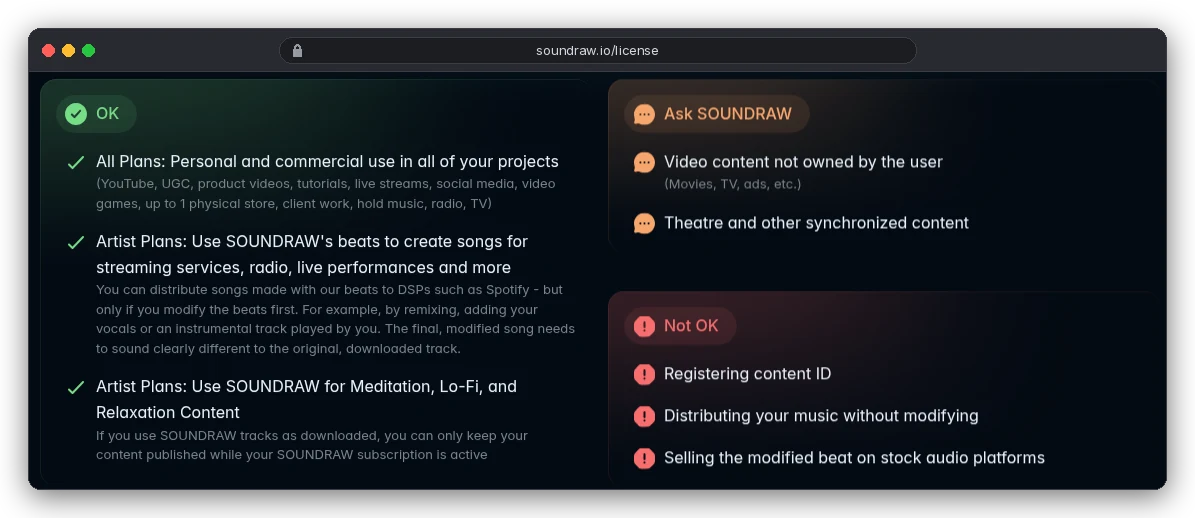
Some licences settle this for you. SOUNDRAW's licence page lists "Registering content ID" under Not OK on every plan.
Shorts over one minute: a claim means a block
On a long video, a music claim usually leaves the video up. YouTube says "Monetize" is the most common policy on music claims, which means ads run and the claimant collects.
Shorts work differently. Since 15 October 2024, vertical videos of one to three minutes count as Shorts, and a Short over one minute with any active claim is blocked, "regardless of the policy".
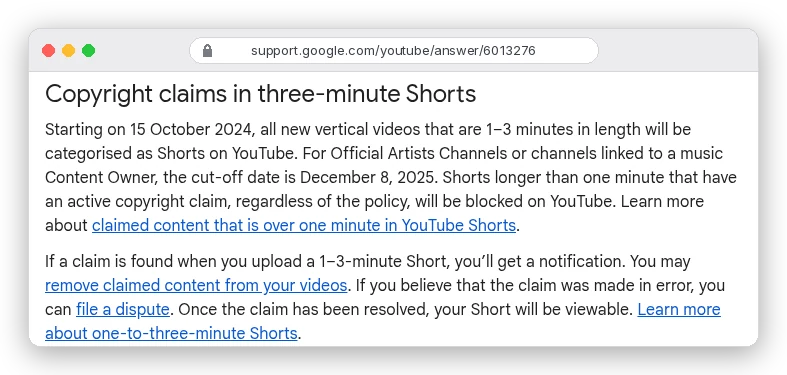
That changes the maths for Shorts creators. A claim that would cost a long video some ad revenue takes a 70-second Short down completely until it's resolved. If Shorts are your main format, the "keep beds out of distribution" rule stops being a tidy habit and becomes the whole strategy.
What to do when a claim lands anyway
First, find out who claimed it and which segment. In YouTube Studio, open Content, filter by Claims, hover over Claims in the Restrictions column and choose See details.
Then pick one of two paths.
If the claim is plausible (you used a free-plan download, or a track you didn't make), fix the video instead. YouTube lets you erase the song, trim the segment or replace the audio with a track from its Audio Library, and any of those removes the claim.
If you made the track on a paid plan and downloaded it properly, dispute. YouTube lists "Having all the necessary rights to the content in your video" as a valid reason. It also lists reasons that aren't valid: giving credit, owning a copy, and choosing not to monetise. Attach the facts from your receipt folder: tool, plan, date, and the licence clause.
The claimant gets 30 days, per YouTube's dispute guide. They can release the claim, reinstate it, let it expire, or file a copyright removal request. That last one is how a claim becomes a strike, and it's why YouTube says to dispute only when you're confident, since repeated bad-faith disputes can bring penalties.
Do you own the copyright in an AI track?
Probably not in the raw output, at least in the US. The U.S. Copyright Office's Part 2 report (29 January 2025) says AI outputs are protected "only where a human author has determined sufficient expressive elements", and "not the mere provision of prompts".
That's not the same as being unable to use it. Your licence comes from the tool's terms, and Suno says so plainly: commercial rights don't "guarantee copyright protection".
In practice, a raw AI track lets you use it but may give you little to enforce against a copier. Add your own playing, vocals or arrangement, and the human-made parts can be protected. Rules differ by country, so talk to a lawyer before you build a business on it.
Which setup fits your channel?
If you make talking-head videos, tutorials or vlogs, you need beds, not songs. SOUNDRAW Creator or ElevenLabs Starter covers YouTube use. Don't distribute the beds, and you can skip the AI label unless the music becomes the focus.
If you run a music channel or post AI songs as Shorts, you need release rights and the label every time. That's Suno Pro or ElevenLabs Creator and up. Allowlist your channel with your distributor before any release, and watch YouTube's "inauthentic content" rule: since 15 July 2025 it bars monetising "mass-produced or repetitive" uploads, which is how a channel of near-identical AI tracks over a still image gets rejected.
If you mainly post Reels, the rules are lighter on claims but stricter on labels for vocals. Use instrumentals where you can, and label any track with AI vocals.
For the video side of the same workflow, start with our guide to making AI videos. And if you narrate in your own cloned voice, our voice cloning guide covers the consent rules that apply there.