You write a prompt that gives you a lovely clip in Kling. You paste it into Veo and the barista's line shows up as a caption floating over the counter. In Seedance, the same text gives you three cuts you never asked for.
The prompt wasn't bad. It was written in one model's dialect.
Kling, Veo and Seedance agree on most of what a good AI video prompt contains. Their official guides disagree on exactly three things: how to write dialogue, how to say "don't", and how to mark time. Get those three right and the same idea travels between all of them.
Written from Kling, Google Cloud and BytePlus documentation checked on 29 October 2026. We didn't generate test clips for this guide.
What you'll end up with
By the end you'll have one five-part prompt structure that every model reads. You'll also have a short translation sheet for each model: where the dialogue goes, which negatives are worth writing, and how to split a clip into shots or seconds.
Then there's a worked example: one coffee-shop brief written three ways, so you can see the differences side by side.
The five parts every AI video prompt needs
Strip the three guides down and they ask for the same ingredients.
BytePlus spells out a formula for Seedance 2.0: "precise subject + action details + scene/environment + lighting & color tone + camera movement + visual style + image quality + constraints". Google's Veo guide lists subject, action, scene, camera, lens, style and audio. Kling 4.0's template has asset roles, overall settings, a sequence of events and an audio line.
Merged, that's five parts, in this order:
- Subject: who or what, with two or three features that don't change ("a barista in a green apron with rolled sleeves").
- Action: what happens, broken into body parts and speed ("slides the cup across the counter, then smiles").
- Scene: where, when and the light ("a small café at 8 a.m., low sun through the window").
- Camera: shot size plus one movement ("medium shot, slow push-in").
- Style and sound: the look, then the audio in its own sentence.
Kling's 4.0 guide adds the rule that matters most: replace abstract words with things a camera can see. "Premium look" becomes "side backlighting outlines the object's edges, the background is blurred, and fine matte grain is visible on the surface." That swap works on all three models, because none of them can film a feeling.
So where do the models part ways? It starts with the camera, though less than you'd think.
Which camera words do the models actually understand?
All three accept plain film vocabulary.
BytePlus says Seedance understands shot sizes, push in, pull out, pan, track, follow, orbit, tilt up and handheld shake directly. Google's Veo guide adds the stricter terms a camera operator would use. Kling's 4.0 guide singles out push-ins, pull-outs, pans, tracking and orbit shots as the moves that come out "more natural and stable".
| Write this | What the camera does | Named in |
|---|---|---|
| Push in / dolly in | Moves toward the subject | All three |
| Pan left or right | Turns on the spot, horizontally | All three |
| Tracking / truck | Moves sideways alongside the subject | All three (Veo calls it truck) |
| Orbit / arc | Circles the subject | All three (Veo calls it arc) |
| Pedestal up | Rises straight up, staying level | Veo |
| Static shot | Doesn't move at all | Veo, Seedance ("fixed camera position") |
The bigger rule is about quantity. Seedance's guide says to "specify only 1 type of camera movement in a single shot", because push, pull and pan together "will increase image instability". Kling and Google don't put it that bluntly, but every example in their guides uses one move per shot. Treat it as a rule for all three.
For rare techniques, BytePlus suggests writing the term and then what it looks like: "Rack focus: the focus shifts smoothly; the trees that were originally clear in the foreground become blurred". That costs ten extra words and removes the guesswork.
How long should an AI video prompt be?
Longer than an image prompt, shorter than you'd fear. The limits are generous, and the real constraint is the clip length, not the character count.
| Model | Prompt limit | Clip length |
|---|---|---|
| Kling 3.0 (API) | 3,072 characters, 2,500 recommended; 512 per shot in multi-shot | 3 to 15 s, default 5 |
| Kling 4.0 | 8,000 tokens | 3 to 30 s, default 10 |
| Veo 3.1 | Not published; English prompts only | 4, 6 or 8 s |
| Seedance 2.5 | Not published | Up to 30 s |
2,500 characters is roughly 400 words. That's far more than a five-second clip can show. Google's advice for short clips applies everywhere: one focused moment per prompt. Its own bad example is a detective who finds a clue, drives across the city and confronts a suspect, all in one prompt. Google's fix is three separate clips.
If you're animating a still image, the budget shrinks further. Google's best-practice page says to prompt "for motion only", because the picture already supplies the subject and style. Our image-to-video guide covers that workflow, start and end frames included.
Writing prompts for Kling
Kling reads natural sentences well and expands short prompts by itself. The 4.0 guide says a single sentence describing "the element, scene, action, and emotion" is a fine start. What trips people up is a default, not the wording.
In Kling 3.0's API, the multi_shot setting defaults to true. Leave it on and a prompt that describes one continuous moment can still come back cut into several shots. If you want one take, turn it off, or say "one continuous long take without any cuts", which is how Kling's own example phrases it.
When you do want several shots, Kling has a strict format: shot n, m, words;. Here n is the shot number (up to 6), m is its length in seconds and the lengths must add up to the clip's total. Each shot's text is capped at 512 characters.
For speech, Kling's examples put the name, then the delivery in brackets, then the line: Mom (softly, in a surprised tone): Wow, I didn't expect this plot at all. Kling 3.0 handles dialogue in Chinese, English, Japanese, Korean and Spanish, and accents can be named in the prompt.
Then the negatives. Kling 3.0's API has no separate negative field; the prompt "can include positive and negative descriptions". The 4.0 guide goes further and says most of them hurt:
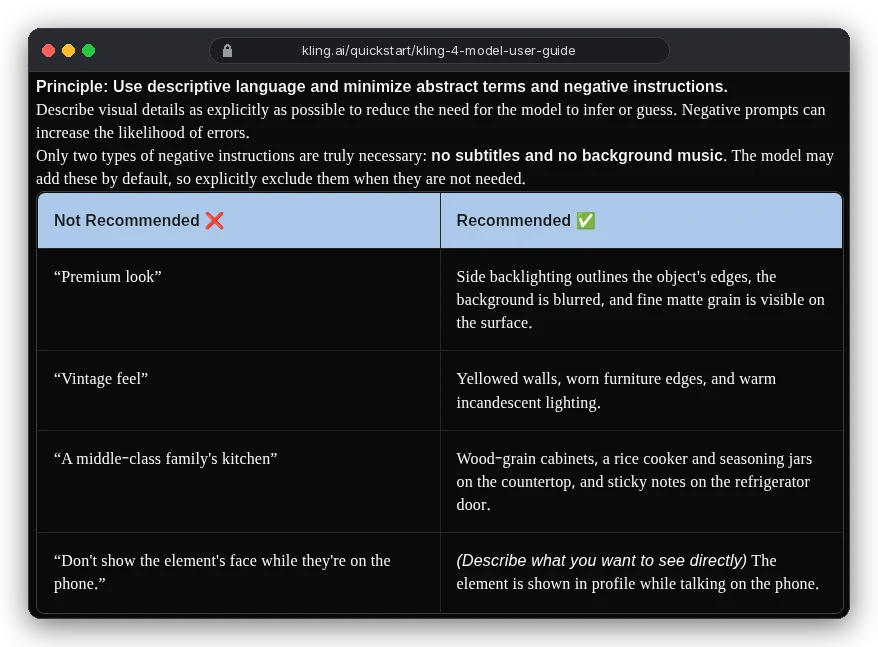
Note the last row.
Instead of "don't show her face", Kling wants "she is shown in profile". You describe the shot you want, not the one you're avoiding. Working on Kling directly? Add "no subtitles" and "no background music" when you need a clean track, because the model "may add these by default".
Writing prompts for Veo 3.1
Veo is the strictest of the three about punctuation. Google's best-practice page has a rule that catches nearly everyone who comes from Kling:
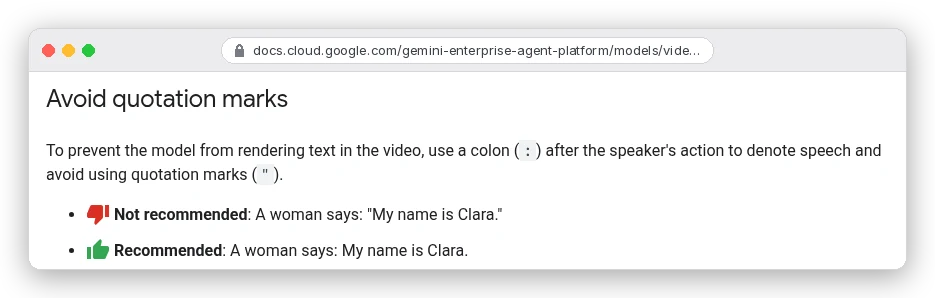
So in Veo it's The barista says: Your usual. with no quotes. Google also says to ask for audio clearly, in separate sentences. Sound effects, ambient noise and dialogue each get their own line.
Veo is also the only one of the three with a proper negative prompt field, negativePrompt.
The trap is how you fill it. Google says not to write "no walls" or "don't show walls". List the unwanted things as plain nouns instead: wall, frame, or urban background, man-made structures.
For a series, Google's advice is low-tech. Write one detailed character description and paste it, unchanged, into every scene prompt. Then reuse the same seed number. Only the action and setting change between prompts.
One more thing changed this month. If you reached Veo through the Gemini API, that route has closed:
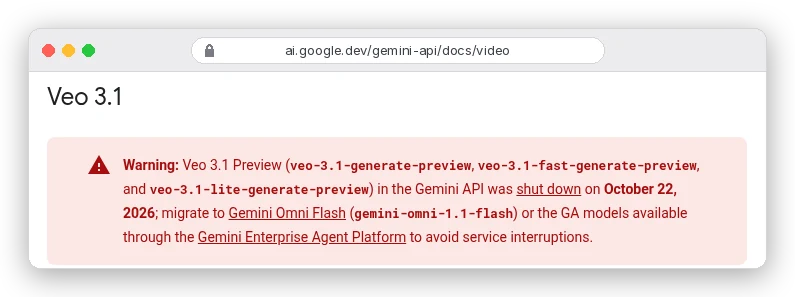
Veo 3.1 itself is still around. The GA model veo-3.1-generate-001 runs on Google's Gemini Enterprise Agent Platform, with clips of 4, 6 or 8 seconds and English-only prompts. Creative suites like OpenArt list it too.
Google's replacement in the Gemini API, Gemini Omni Flash, plays by different rules again. It has no negative prompt field at all (Google says to write "Do not do X" in the prompt), and by default it makes "a few different shots".
Writing prompts for Seedance
Seedance is where version numbers matter most, because 2.0 and 2.5 read time differently. BytePlus says Seedance 2.0's support for precise timing like "0–3 seconds" is "unstable", and it only responds to shot numbers. Seedance 2.5 does support whole-second timestamps.
So for 2.0, write a storyboard: Shot 1: ... Shot 2: ... Shot 3: ..., each with the camera move first, then the action, the position and the sound.
For 2.5 you can write 0-3s: ... 3-8s: ..., as long as the ranges don't leave gaps (BytePlus calls out "0-3s... 5-6s" as a mistake) and you don't try to time fast repeated actions.
Seedance 2.0 also uses symbols to tell sound types apart, which is unusual:
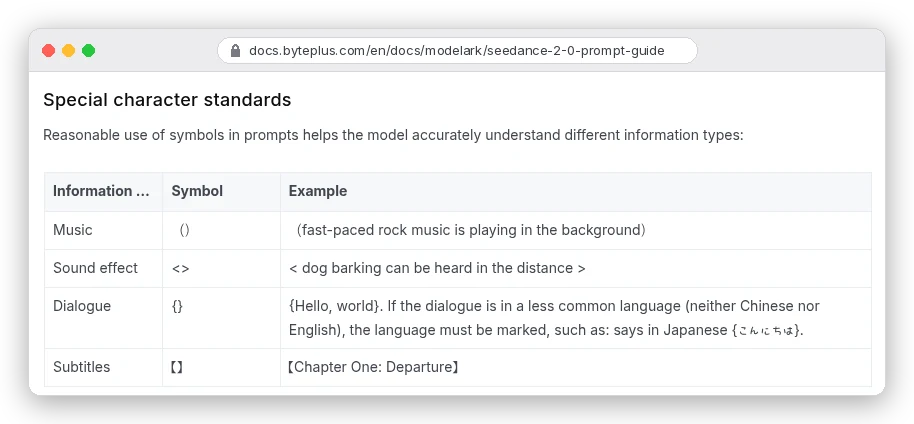
That means dialogue goes in curly braces, {Your usual.}, and a sound effect in angle brackets, <milk steamer hissing>. The guide also prefers "slow, gentle, continuous small movements" over sprints and big jumps. It asks you to show emotion through the body ("shoulders trembling slightly") rather than naming it.
Negatives work on Seedance, but only for a short list.
The 2.5 guide says to "use positive descriptions whenever possible" and supports negatives for subtitles and audio. The 2.0 guide adds "do not generate a logo" and "do not generate a watermark". Even then, BytePlus admits it can't stop subtitles 100% of the time. Its fixes: remove text from your reference images and, where you can, generate in a wide 16:9 frame, which makes subtitles "significantly" less likely.
One brief, three prompts
Here's the same eight-second idea translated for each model. These are prompts we wrote from the guides above, not tested outputs. The brief: a barista hands a regular their coffee and says "Your usual", with café sound and no music.
Kling
A small neighbourhood café at 8 a.m., low sun through the front window, steam rising from the espresso machine. A barista in a green apron with rolled sleeves slides a white cup across the wooden counter toward a regular in a grey coat, then smiles. Medium shot, slow push-in, one continuous take without any cuts. Barista (warm, relaxed tone): Your usual. Soft café ambience, cups clinking. No background music. No subtitles.Veo 3.1
Medium shot with a slow dolly in. In a small neighbourhood café at 8 a.m., low sun through the front window, a barista in a green apron with rolled sleeves slides a white cup across the wooden counter toward a regular in a grey coat, then smiles. Warm, natural colour, shallow depth of field.
The barista says in a warm, relaxed voice: Your usual.
Audio: soft café ambience, cups clinking, the hiss of a milk steamer.

negativePrompt: background music, captions, on-screen text
Seedance 2.0
Shot 1: Medium shot, slow push-in. A small neighbourhood café at 8 a.m., low sun through the front window. A barista in a green apron with rolled sleeves slowly slides a white cup across the wooden counter toward a regular in a grey coat. <cups clinking>
Shot 2: Close-up of the barista, fixed camera position. She looks up and smiles, shoulders relaxed, and says {Your usual.} <milk steamer hissing>
Warm natural colour, soft lighting, HD, rich detail. Keep it subtitle-free. No BGM. Do not generate a logo.
Notice what changed and what didn't. The subject, scene and camera are word-for-word the same. Only the dialogue marks, the negatives and the shot structure moved, which is the whole point of writing in five parts.
Why does "no text" put text in your video?
Because a negative is still a word the model reads. Kling's guide says negative prompts "can increase the likelihood of errors", and Google warns against "no" and "don't" inside its negative field. Write "no walls" and you've put walls in the prompt.
| Model | Where negatives go | Worth writing |
|---|---|---|
| Kling | In the main prompt | "No subtitles", "no background music" |
| Veo 3.1 | negativePrompt field, as nouns | Things to exclude, listed without "no" |
| Seedance | In the main prompt | Subtitles, background music, logos, watermarks |
| Gemini Omni Flash | In the main prompt ("Do not do X") | No separate field |
The fix is the same everywhere: describe the shot you want. "An empty, plain plaster wall" beats "no posters". Music still sneaking in on Seedance? BytePlus suggests listing every word for it (music, BGM, score, instrumental, melody) and repeating the constraint at the start and end of the prompt.
Mistakes that waste a generation
- Quoting dialogue in Veo. Use a colon, or the line may appear as text on screen.
- Leaving Kling's multi-shot switch on for a single moment, then wondering where the cuts came from.
- Writing second-by-second timings for Seedance 2.0, which only follows shot numbers.
- Stacking camera moves ("push in while panning and orbiting"). One move per shot.
- Abstract style words like "cinematic feel" or "premium look" with nothing visible behind them.
- Re-describing a source image in an image-to-video prompt instead of describing the motion.
- Squeezing three events into an eight-second clip. Split them into separate generations and cut them together; our Claude video editing prompts help with that stage.
Which model should you write for first?
Write for the strictest one, then relax. A prompt built for Veo has no quoted dialogue, audio in its own sentences and one scene. It moves to Kling with one change: put the line after a name and tone. Moving it to Seedance means wrapping the dialogue in braces and, for 2.0, splitting it into shots.
If you mostly make short silent B-roll, start with Kling and our 40+ Kling prompts for B-roll, then adapt from there.
If your clips have people talking, draft in Veo's format, because its rules on dialogue are the easiest to break. New to the whole pipeline? Our beginner's guide to AI video covers shot lists, costs and editing, and the AI image prompt guide covers the still frame you may want to start from.
On cost, OpenArt's Starter plan lists 4,000 credits a month for $14. It estimates that at up to about 50 videos, roughly 28 cents a clip before re-rolls. Commercial use rights start on Plus at $34 a month, according to its pricing page on 29 October 2026.