We screenshotted Hedra's pricing page on 21 September. Six days later we took another one, and the plan we'd recommended had disappeared.
The $30 Creator plan is gone. So is Basic at $15. What's there now costs more, and one of the five plans quietly gives you better value than the two Hedra badges as "best value".
The bigger problem is the same as it was: Hedra still won't tell you how many minutes of video your credits buy. So here's what the page says now, what changed, and the two-minute test that settles the minutes question for your own account.
Plans re-checked against Hedra's pricing page on 27 September 2026.
Hedra pricing plans
| Plan | Price / month | Credits / month | Generation speed | Also includes |
|---|---|---|---|---|
| Basic | $20 | 2,000 | Slower | Commercial use |
| Pro | $50 | 7,200 | Faster | Commercial use |
| Ultra | $100 | 18,000 | Fastest | Commercial use, allowances up to 57,600 credits, Teams access |
| Teams | $75 | 14,400 | Fastest | Commercial use, Teams access |
| Enterprise | Custom | Custom | Fastest inference | SSO, private deployments, Slack support, account manager |
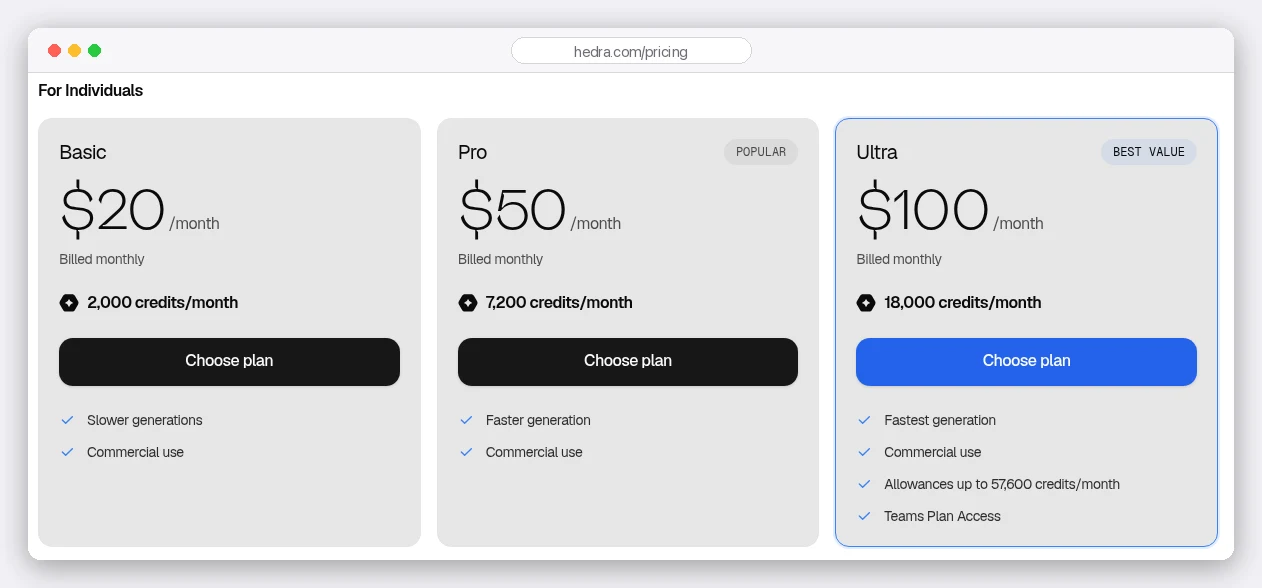
Hedra says "start free", but there's no free plan on the page. Without a subscription, its own FAQ says you get "limited watermarked generations".
That's enough to see whether your photo animates well. It isn't enough for client work.
What changed, and what it costs you
Here's the same section of the same page, six days earlier.
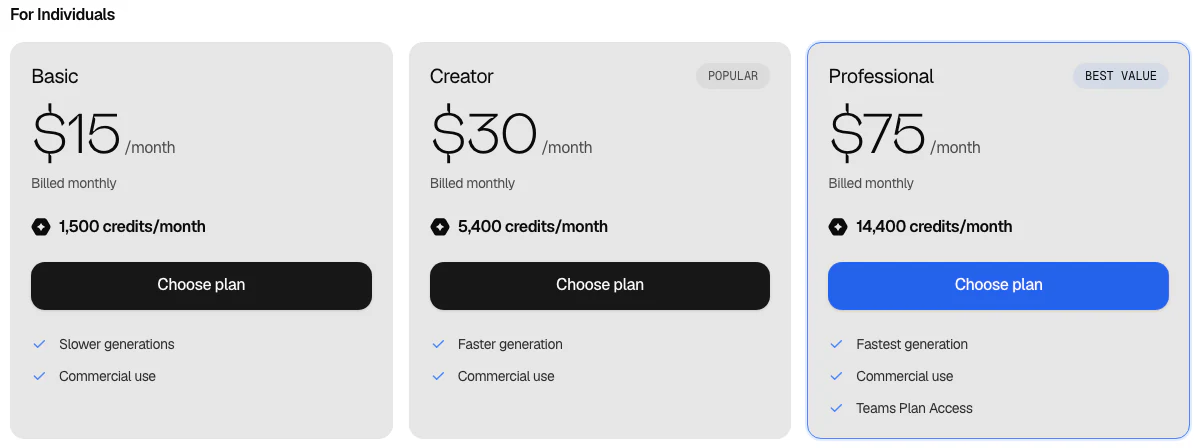
Three plans became four, and the names all moved.
Basic went from $15 to $20, and from 1,500 credits to 2,000. That one is a wash: you still get exactly 100 credits per dollar.
Creator is the loss. It was $30 for 5,400 credits, which worked out at 180 credits per dollar, and it was the plan most solo creators wanted.
To buy credits at that same 180-per-dollar rate today, you need Ultra at $100 a month.
The new middle plan, Pro, is $50 for 7,200 credits. That's 144 credits per dollar, so the middle of Hedra's range got about 20% more expensive per credit. The cheapest plan most creators can work on went from $30 to $50.
If you subscribed before the change, check your billing page before you assume anything here applies to you. Old plans are often grandfathered, and Hedra's page has no way of telling you that.
The best value plan isn't the one labelled "best value"
Forget the monthly price for a moment. Look at what one dollar buys.
| Plan | Price | Credits per $ | Change from the plan below |
|---|---|---|---|
| Basic | $20 | 100 | |
| Pro | $50 | 144 | +44% |
| Ultra | $100 | 180 | +25% |
| Teams | $75 | 192 | +6.7% |
Read the last two rows again.
Teams costs $75 a month and buys 192 credits per dollar. Ultra costs $100 and buys 180.
So the cheapest credits on the page sit on a plan filed under "For Business", $25 below the one Hedra badges as best value. And Ultra's main draw over Pro is Teams access anyway.
Is there a catch? Teams is built for more than one person, so you're buying seat management you may not need. Ultra also carries that "allowances up to 57,600 credits" line that Teams doesn't.
For a solo creator buying credits, though, Teams is simply the better deal.
How many minutes does a plan buy?
This is the part no pricing page answers.
Hedra charges by the second of generated video. Its FAQ gives the example: a 10-second Character-3 clip costs 10 seconds' worth, not a full minute.
But how many credits a second costs depends on the model and the resolution, and Hedra deliberately doesn't publish those rates. Its docs just say to check the live model selector before you generate.
That matters more than it used to. Hedra now runs a whole shelf of models, from its own Character-3 and Hedra Avatar to Kling, Omnihuman and Sora 2 Pro, and each has its own price.
For Character-3, third-party guides widely report 3 credits a second at 540p and 6 at 720p. If those rates hold, here's what each plan buys:
| Plan | Credits | Minutes at 540p | Minutes at 720p | $ per minute at 720p |
|---|---|---|---|---|
| Basic | 2,000 | 11 | 5.6 | $3.60 |
| Pro | 7,200 | 40 | 20 | $2.50 |
| Ultra | 18,000 | 100 | 50 | $2.00 |
| Teams | 14,400 | 80 | 40 | $1.88 |
Those are ceilings, not promises. You'll re-roll takes when an expression lands wrong or the lip sync slips, and every retry costs the same as the first try.
Plan on keeping a good deal less than the headline figure.
Every minutes figure you'll read is for a plan that no longer exists
Search for Hedra minutes and you'll find confident numbers. "About 11 minutes on Creator." "Roughly 4 minutes on Basic."
Creator was discontinued this month, and Basic now holds a third more credits than it did when those guides were written. So the arithmetic behind them is measuring something Hedra no longer sells.
Our own table above has the same weakness, one step removed: it rests on a credits-per-second rate Hedra has never published.
Which is why the only number worth trusting is the one your own account gives you:
- Note your credit balance.
- Generate one 30-second clip at 720p.
- Check the balance again.
If it dropped by 180, the rate is 6 credits a second and Pro holds 20 minutes. If it dropped by more, scale the table down by the same proportion. Either way you'll know in two minutes, before you plan a month of content on someone else's guess.
One more thing to check while you're there. Failed generations can be refunded automatically. Open Billing and look for a debit with a matching refund next to it; together they net to zero.
Credits expire. Here's how to stop losing them
Monthly credits don't roll over. At the start of each cycle your balance resets to your plan's amount, and anything left is gone.
That hurts if your work comes in bursts: a heavy launch month, then a quiet one.
There are two ways around it.
The first is annual billing. Hedra's docs say an annual plan gives you the whole year's credits the day you pay, so a plan with 4,000 credits a month hands you all 48,000 at once.
The pricing page currently shows monthly prices only, so check the annual price on your Billing page before you commit.
The second is credit packs. Pack credits never expire, and Hedra spends them only after your monthly credits run out, so a pack bought early just sits there as a reserve.
So why not skip the subscription and live on packs? You can't. Hedra won't let you spend credits without an active subscription, so pack credits survive a cancellation but sit unused until you resubscribe.
Hedra API pricing: a separate wallet
This is where a lot of Hedra guides, including an earlier version of this one, are wrong.
The API doesn't draw from your plan's credits. Hedra's API docs say the API wallet "is funded separately from Studio and pays only for API requests". It's funded in dollars, from the developer billing page.
Two details make it easier to live with. You can ask for a price before you run anything, through the API's estimate endpoint. And you can set up automatic top-ups: under Profile, then API, find "Auto recharge is disabled" and click Modify.
You set three numbers: a trigger balance of at least $10, a refill level of at least $35 (or $25 above the trigger), and a monthly cap.
Turn it on if anything you build runs unattended. Otherwise your pipeline simply stops at zero.
How Hedra compares on price
Avatar tools price in different units, which makes comparison slippery. Here's what can be compared honestly, all checked on 27 September 2026:
- Hedra: about $2.50 a minute of 720p on Pro and $1.88 on Teams, or half those at 540p, if the reported Character-3 rates hold.
- Synthesia: Starter is $14 a month billed yearly for 120 minutes a year, about $1.40 a minute. Creator is $59 for 360 minutes a year, about $1.97.
- HeyGen: Creator is $29 a month for 600 credits, and its credit rate runs from 4 a minute on Avatar III's video look to 48 on Avatar V. That's 19 cents a finished minute at one end and $2.32 at the other.
So is Hedra the cheap option? Not on published numbers. HeyGen's older avatar models and Synthesia's annual Starter plan both come in under it.
But these tools aren't interchangeable. Synthesia is built around stock presenters and templates, HeyGen leans on digital twins and translation, and Hedra's strength is expressive performance from a single image and an audio track.
Pick on the output you need first. Then compare price within that shortlist.
Six ways to stretch your credits
- Draft at the lower resolution, finish at the higher one. Get the framing and timing right cheaply, and pay full price only for the take you keep.
- Fix the audio before you generate. Lip sync follows the audio, so a bad recording means a bad take, and a redo costs full price.
- Generate short clips and cut them together. You pay by the second, so several short clips cost the same as one long one and give you more to work with.
- Don't upscale everything. Upscaling is its own generation. Social crops rarely need it.
- Keep a credit pack in reserve. It never expires and only kicks in after your monthly credits run out.
- Price annual before you upgrade. A year's credits up front on your current plan can suit bursty work better than moving up a tier.
Which Hedra plan should you choose?
- No plan is for trying Hedra out. Limited, watermarked generations tell you whether it handles your source image well, which is the first thing to test.
- Basic ($20) works only for small volumes where you need commercial rights. Per credit, it's the weakest value on the page.
- Pro ($50) is the default for a solo creator, and the plan that replaced the old $30 Creator tier.
- Teams ($75) is the value pick. More credits per dollar than anything else Hedra sells, and $25 cheaper than Ultra.
- Ultra ($100) earns its price through the fastest queue and allowances up to 57,600 credits a month, not through cheaper credits.
- Enterprise is for when SSO, private deployment and dedicated support are requirements rather than preferences.
Remember the plan that vanished in six days? That's the real lesson here. Prices move, guides go stale, and the only figure you can rely on is the one your own balance gives you after a 30-second test.
Run the test. Then pick the plan from your own numbers.
Building a full video rather than a single talking head? Our guide to Kling AI prompts for B-roll covers the footage that goes around an avatar performance.