You finish a 28-minute interview, open a timeline editor, and spend the next evening hunting for the one "um" that ruined the cold open. Or you skip the mic, paste a script into text-to-speech, and get a flat host that can't trade lines with a guest.
Making a podcast with AI is a sequence, not a single button. Script for the ear, generate host and guest voices, edit the transcript like a document, then pull show notes from that same text. The trap that kills a finished episode sits in the licence, not the waveform.
Written from ElevenLabs' pricing page, billing docs and Studio marketing, Descript's pricing page and help centre (edit-like-a-doc, custom voice clones, Regenerate), and Fish Audio's plans page, all checked on 6 November 2026. We read the docs; we didn't buy a plan, generate speech, clone a voice or publish an episode for this guide. This is general information, not legal advice.
What you'll end up with
A finished episode file, a transcript you can turn into show notes and chapters, and a clear answer on which voices you can monetise.
You need four things to start:
- An episode outline and a script written for speaking, not for reading on a screen.
- A text-to-speech tool that can hold more than one speaker. The voice examples below use ElevenLabs; the edit examples use Descript.
- A place to edit by deleting words, not by dragging clips: Descript's text-based editor, or ElevenLabs Studio if you stay inside one vendor.
- A decision on hosting later (any host that accepts an MP3 and an RSS feed). We won't invent host prices here.
If you only need a single narrator track for YouTube or an ad, our AI voiceover guide is the shorter path. This post is for an episode with structure, cleanup and publishing.
Step 1: Script the episode before you open a voice tool
AI podcast tools will happily read a bad outline. They won't fix it.
Start with a one-page structure: cold open (one concrete scene or question), three segments, a short close with one next step for the listener. Time the segments before you write dialogue.
At ElevenLabs' own estimate of about 1,000 characters per minute of speech, a 20-minute solo episode is roughly 20,000 characters of spoken text. On the Free plan's 10,000 credits a month that is already more than one full take, and Free has no commercial licence.
Write for the ear:
- Short sentences. One idea each.
- Numbers and acronyms in words ("twenty twenty-six", "A I"), the same habit as a voiceover.
- Speaker labels in the script itself:
Host:andGuest:on every turn, so you can assign voices later without guessing who said what. - No stage directions left in the spoken lines. "laughs" in parentheses will get read out unless you strip it.
A drafting model (ChatGPT, Claude, or whatever you already use) is fine for outlines and first drafts. Treat the output as raw material.
Read every line aloud once. Where you stumble, the TTS will too.
You're probably tempted to generate the whole episode in one paste. Don't. Generate section by section so a bad take only costs one segment's credits.
Step 2: Pick two voices that still sound distinct after five minutes
A solo show needs one consistent voice. An interview-style or co-hosted episode needs two that listeners can tell apart without looking at a waveform.
On ElevenLabs, Instant Voice Cloning starts on Starter ($6 a month). On 6 November 2026 the card also showed $1 for the first month with an "Until Nov 16" badge. Professional Voice Cloning starts on Creator ($22 a month).
Stock and library voices work for fictional hosts. Cloning a real person's voice needs their consent. For the safety rules around that, see our AI voice cloning guide.
Audition with the hardest two lines from your cold open, not the vendor's sample text. Listen on a phone speaker. Keep the same model for the whole episode so the host doesn't drift mid-show.
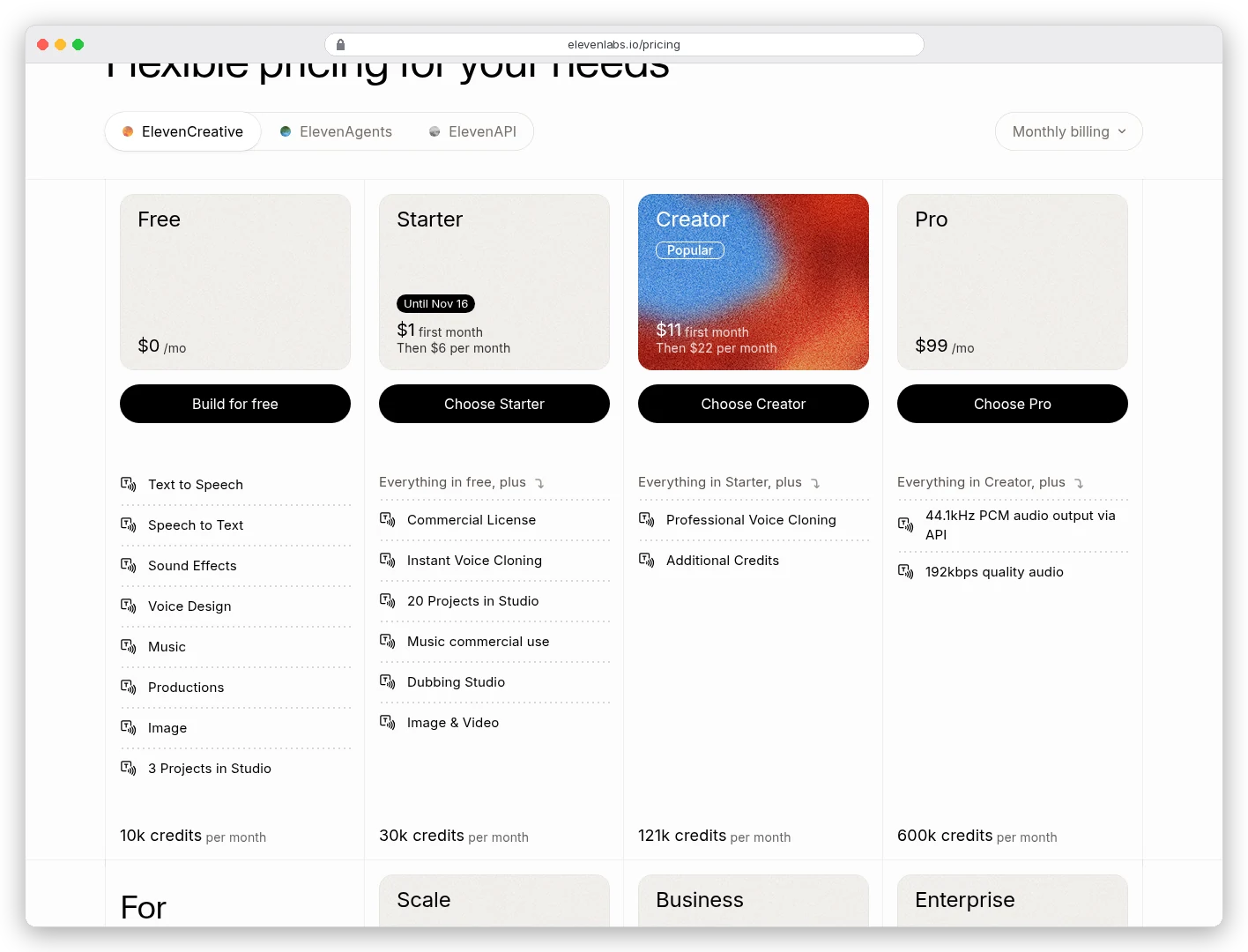
Credit math for a weekly show: ElevenLabs' compare table lists about 30 minutes of app text-to-speech on Starter and about 121 minutes on Creator. A weekly 25-minute episode is already near Starter's ceiling before regenerations. Creator is the plan most weekly AI hosts land on once they stop throwing away Free-plan takes.
If the bill is the problem and English narration is enough, Fish Audio is often cheaper per minute on Plus and Pro. On 6 November 2026 its plans page listed Plus at $11 a month billed annually (about 200 minutes) with commercial use for verified voices you own. Free is personal use per its FAQ.
Pick one stack and stay there for the season so your host voice doesn't change mid-catalogue.
For a wider map of voice tools, see our best AI audio generation tools roundup and the current ElevenLabs pricing breakdown.
Step 3: Generate the episode as labelled takes, not one blob
Paste one segment at a time. Keep the Host / Guest labels. Generate the host track, then the guest track, or use a studio-style editor that lets you assign a voice per speaker block.
ElevenLabs Studio's marketing page on 6 November 2026 calls out podcasters and audiobook authors. It says you can edit recordings by editing the text.
Free includes 3 Studio projects; Starter lists 20. That matters if you keep each episode as its own project.
Export WAV or the highest MP3 your plan allows when you still plan to edit. Creator includes 192 kbps; Pro adds 44.1 kHz PCM via the API. A compressed social export can wait until after cleanup.
Save every take with the date and plan name in the filename. If you later argue with a host or a platform about rights, you want proof of when and under which subscription the file was made.
Step 4: Edit the transcript like a document
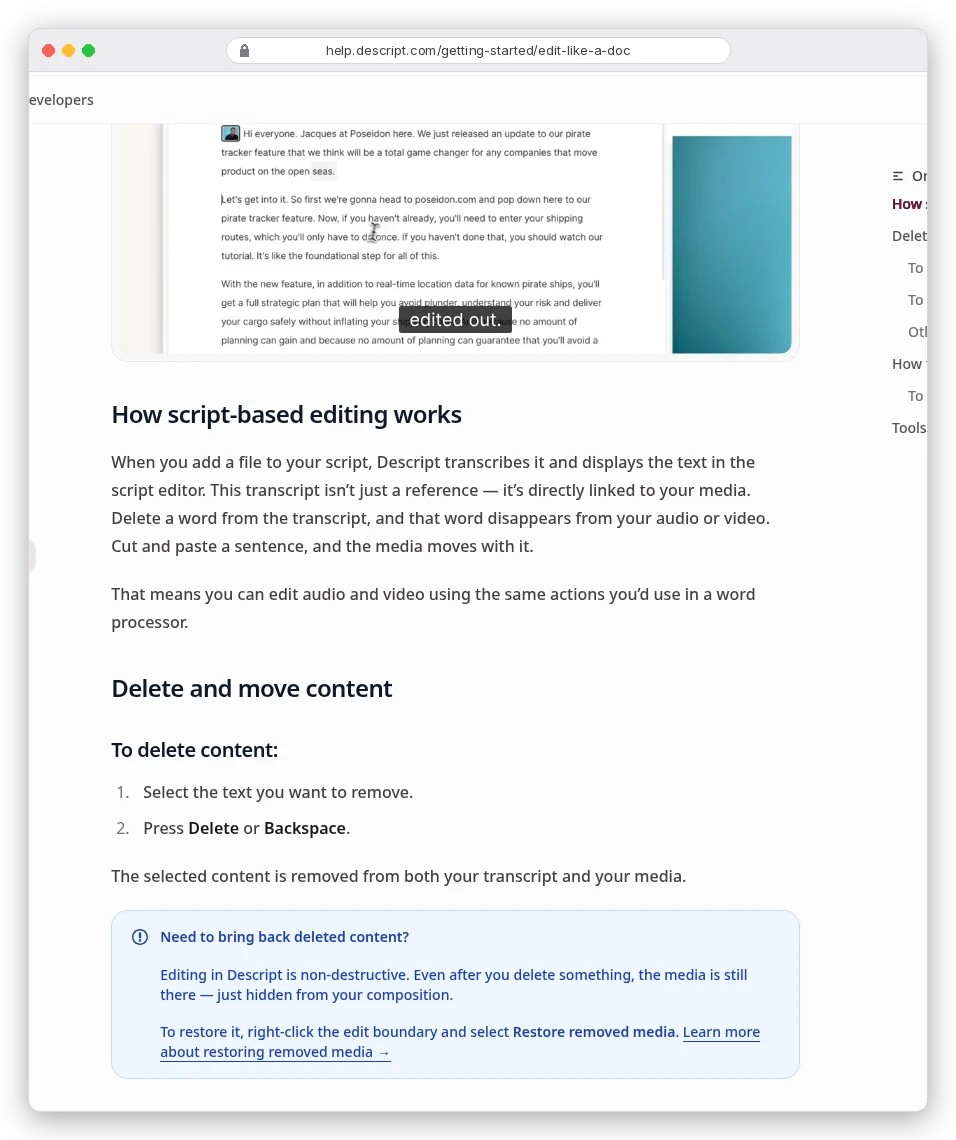
This is the part that saves the evening. In Descript, the transcript is linked to the media. Delete a word and that audio goes with it. Cut and paste a sentence and the media moves.
Its help centre calls this "edit like a doc". Editing is non-destructive, so you can restore removed media from an edit boundary.
Import your generated takes (or a live recording). Let it transcribe. Then do a first pass that only removes:
- False starts and repeated sentences.
- Filler words you don't want on the record (Descript's Remove Filler Words tool is listed from Hobbyist up).
- Long gaps (Shorten Word Gaps), without making the conversation feel rushed.
Descript's pricing page on 6 November 2026 defaulted to Annual. Hobbyist was $16 per person per month (struck monthly $24), Creator $24 ($35), Business $50 ($65).
Hobbyist includes 10 media hours and 400 AI credits a month. Free includes 1 media hour and 100 one-time AI credits, with 720p export in the compare table.
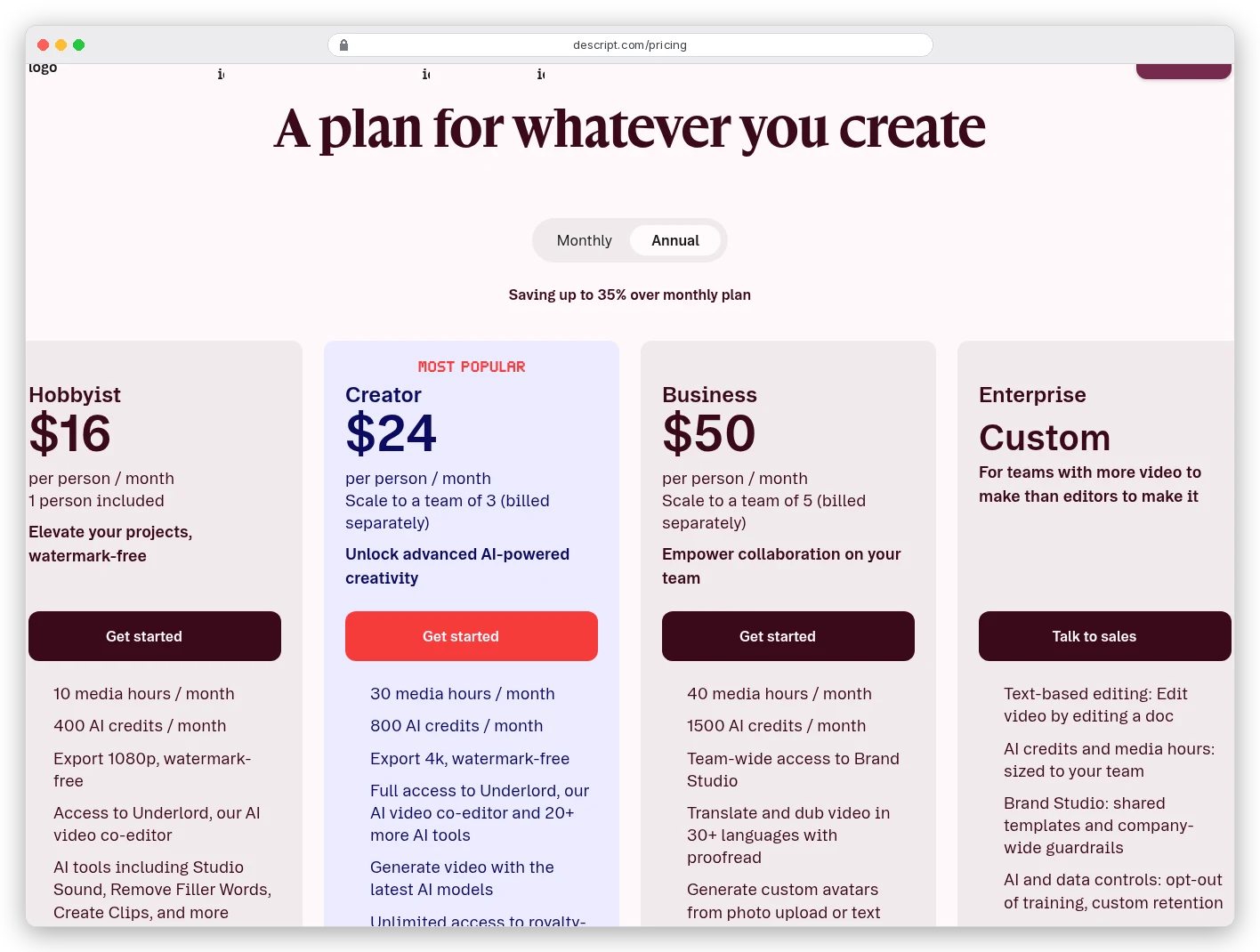
A weekly 45-minute raw session is about 3 hours of media a month. Hobbyist's 10 hours covers that with room for a second show, before you burn AI credits on cleanup tools.
Step 5: Fix lines with Regenerate only when you have consent
Descript used to call this Overdub. The current docs call the rewrite path Regenerate: highlight text, type the correction, generate new audio in the speaker's voice.
Three limits from Descript's help centre matter more than the button:
- English only for Regenerate.
- Up to 250 characters per regenerate action when changing what was said.
- A custom AI speaker that the original person authorised. Stock voices cannot rewrite a real person's line.
Creating that custom speaker requires a recorded English consent statement. Descript says it will not create clones for a deceased person, a non-consenting person, someone who cannot record consent, or audio from an AI source. Trying to bypass that is a Terms of Service breach.
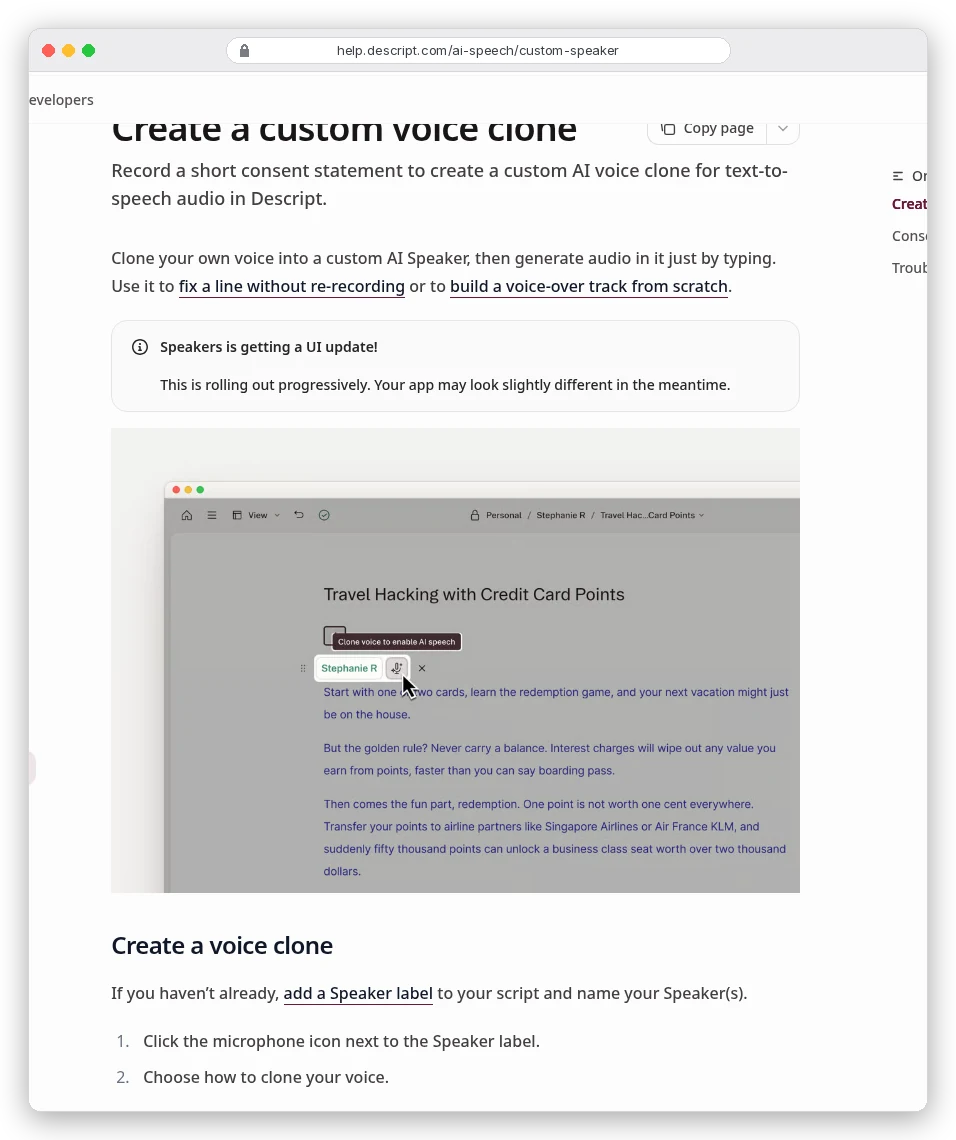
So for a guest interview you recorded live: you can cut and rearrange their words freely in the transcript. You cannot have Descript invent a corrected sentence in their voice unless that guest recorded consent. For a fully synthetic co-host you designed yourself, assign a stock or cloned voice you control and regenerate as needed.
Studio Sound and similar cleanup tools spend AI credits. Descript's pricing FAQ says unused media minutes and AI credits do not roll over; treat the monthly pool as a budget, not a bank.
Step 6: Pull show notes, chapters and SEO from the transcript
You already have the best source for show notes: the cleaned transcript.
From that text, draft:
- A title under about 60 characters with the episode's promise, not a joke only regulars get.
- A 1–2 sentence description for Apple Podcasts and Spotify.
- Timestamps for chapters (Descript's help centre covers markers and chapters; its pricing compare table also lists an "Add chapters" AI tool).
- 3–5 bullet takeaways and any links mentioned on air.
Descript's plan compare lists a Publish AI tool that can "Draft social posts, blog posts, show notes, summarize". Use it as a first draft, then fact-check every claim against the audio. AI-written notes that invent a quote will follow you into search results.
Export the transcript as text or markdown for your blog. A full transcript page is still one of the few podcast SEO moves that compounds.
Step 7: Export, loudness and hosting basics
Export an MP3 (or WAV if your host re-encodes) from Descript or your editor. Keep a master WAV on disk.
Loudness and RSS details vary by host and directory. High level, you need one RSS feed URL, HTTPS audio, artwork that meets the directory's size rules, and matching show metadata.
Descript's help centre lists direct exports to hosts such as Buzzsprout, Castos, Podbean and Transistor. We did not check those hosts' plan prices for this guide.
If you add AI music under the episode, rights are a separate problem from voice rights. Check the music tool's commercial terms before you drop a generated bed under a monetised show.
Licensing: when the voice is allowed to earn money
ElevenLabs' billing docs say paid plans get commercial rights to generated content. The free plan is non-commercial with attribution. Its pricing cards list "Commercial License" from Starter up.
Generate the final publishable takes while a paid plan is active. Upgrading later does not rewrite the licence on a Free-plan file you already made.
Descript custom clones require recorded consent, as above. Cloning a living person without authorisation is both a platform violation and, in many places, a legal risk.
This guide is not legal advice. Read the vendor terms for your use case. Talk to a lawyer if the show is commercial or uses someone's real voice.
Disclosure to listeners is a separate choice. If the co-host is fully synthetic, say so in the show notes. Listeners forgive AI voices; they do not forgive feeling tricked.
Common mistakes that waste a week's credits
- Writing the script like a blog post, then blaming the voice model for sounding stiff.
- Generating the whole episode on Free, liking the take, then discovering you cannot use it commercially.
- Using one voice for host and guest so listeners lose the conversation.
- Trying to Regenerate a guest's flub without their consent clone.
- Burning AI credits on Studio Sound before cutting the episode down.
- Publishing without chapters or a transcript, then wondering why the episode does not show up in search.
Which path fits which creator?
If you are testing the format this weekend: Free tiers on both tools are enough to learn the workflow. Do not publish monetised audio from ElevenLabs Free.
If you ship one synthetic solo episode a week: ElevenLabs Creator for voice quality and Studio room, Descript Hobbyist for text editing and filler removal. Pick annual billing only if you already know you will stick with it.
If you record real guests and only want AI for cleanup and show notes, record in Descript Rooms or your usual call tool. Edit the transcript in Descript. Skip voice cloning unless each guest consents.
If cost per minute is the constraint and English is enough: generate on Fish Audio Plus, still edit in Descript. Compare the trade-offs against cheaper voice stacks before you lock a season.
If you need music beds too, budget those credits separately. Voice and music pull from the same ElevenLabs pool.